
busdog is a filter driver for MS Windows (XP and above) to sniff USB traffic.
https://code.google.com/p/busdog/
busdog is a filter driver for MS Windows (XP and above) to sniff USB traffic.
https://busdog.googlecode.com/files/busdog32_v0.2.1.exe
https://busdog.googlecode.com/files/busdog64_v0.2.1.exe
Important Note
It is a good idea to create a system restore point before mucking about with USB class filter drivers as if you install a filter that windows cannot load (non-signed on x64, unmet dependency etc) then the pnp manager will not be able to load the driver stack for any USB device (all USB mice and keyboards will stop working). A system restore point can come in handy at this stage.
Installation
All you need to do is grab one the execuables and run it, you will then be prompted to install the busdog filter driver. The filter driver sits on top of all USB and HID devices on your system so it is possible to remove it via the setup tab.
Note:
- If you are running a 64 bit system you will need to either run with testsigning enabled (http://msdn.microsoft.com/en-us/library/dd419910.aspx).
- The busdog client depends on the .NET 3.5 framework
Busdog Driver Uninstallation
The busdog GUI has an uninstall function on the setup tab and also you can uninstall the driver via the "Control Panel->Add/Remove Programs"interface.
Screenshots

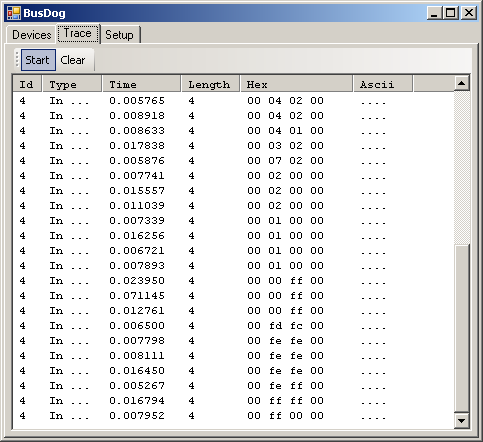
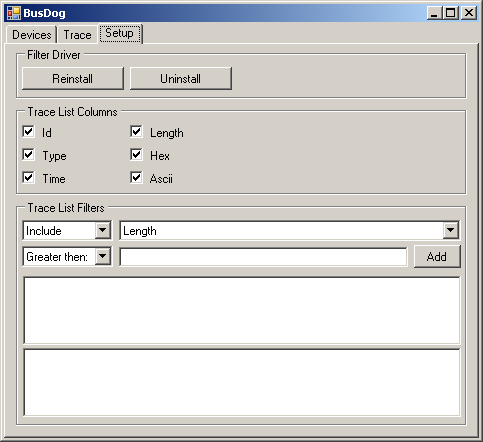
redits
Thanks to FAMFAMFAM for the use of the Silk icon set: http://www.famfamfam.com/lab/icons/silk/
busdog is a filter driver for MS Windows (XP and above) to sniff USB traffic.的更多相关文章
- WinSetupFromUSB – Install Windows XP from USB Flash Drive
http://myeeeguides.wordpress.com/2008/11/15/winsetupfromusb-install-windows-xp-from-usb-flash-drive/ ...
- Windows Filesystem filter driver
参考:http://www.codeproject.com/Articles/43586/File-System-Filter-Driver-Tutorial 关键点: To perform atta ...
- windows XP系统内核文件分析(全)
Windows XP个别 System32 文件 System32 文件夹下个别要移除的文件 我们就要删除另外600 个 system32 文件...我们要一次把它们全都解决掉. 以下是我所删除的 S ...
- 初试 Windows XP Embedded 系统开发1
目前 Windows PE(Preinstallation Environment)和 Windows XP Embedded 是可以脱离主机里的硬盘独立运行的 Windows 操作系统,Window ...
- Linux与Windows xp操作系统启动过程
Linux启动过程: 第一步,加载BIOS,当你打开计算机电源,计算机会首先加载BIOS信息,BIOS信息是如此的重要,以至于计算机必须在最开始就找到它.这是因为BIOS中包含了CPU的相关信息.设备 ...
- 蜻蜓特派员 Windows XP SP3 纯净终结版
蜻蜓特派员Windows XP SP3 纯净安装版 终结版,系统纯净无广告.无插件,网卡等驱动和运行库齐全,安全更新补丁全网最新!微软停止了 Windows XP 的支持之后还是偶尔为 WinXP 提 ...
- MSDN Windows XP Professional x64 Edition with SP2 +VL简体中文语言包+序列号
[资源名称]---Windows XP Professional x64 Edition with SP2 - VL (English)[资源类型]---ISO镜像[资源语言]---英语+简体中文[杀 ...
- 用Visual Studio 2015 编译张帆的第一个NT式驱动,并且成功安装到Windows XP里面!!!
开发工具:Visual Studio 2015 企业版 目 标 机:Windows XP X86 前提:我们已经成功安装了Visual Studio 2015以及WDK,而且更重要一点是一定要SDK版 ...
- fedora 21下Virtual Box安装Windows XP SP3
Installing Virtual Box and Windows XP SP3 during Fedora 21 The first step:Download and Install Virtu ...
随机推荐
- rocketmq 记
Rocketmq选型 Rocket是一个专业的队列服务,性能优于Rabbitmq,优势是性能和并发,源于Kafka的扩展版,增强了数据的可靠性. Rocketmq的队列类型 普通队列,广播队列.顺序队 ...
- C基础 time.h 简单思路扩展
前言 - time 简单需求 时间业务相关代码. 基本属于框架的最底层. 涉及的变动都很小. 以前参与游戏研发时候, 这方面需求不少, 各种被策划花式吊打. 转行开发互联网服务之后很少遇到这方面需求. ...
- caffe Python API 之图片预处理
# 设定图片的shape格式为网络data层格式 transformer = caffe.io.Transformer({'data': net.blobs['data'].data.shape}) ...
- linux下使用privoxy将socks转为http代理
此博客不在更新,我的博客新地址:www.liuquanhao.com ----------------------------------------------------------------- ...
- redis常见数据操作
redis中有5种常见的数据类型,针对这5种数据类型有着相应的数据操作. 1.String(键值对为String - String) set k1 v1 get k1 getset k1 v1 - h ...
- 【数据挖掘基础算法】KNN最近邻分类算法
算法简介: 通过计算待预测样本和已知分类号的训练样本之间的距离来判断该样本属于某个已知分类号的概率.并选取概率最大的分类号来作为待预测样本的分类号 懒惰分类算法,其模型的建立直到待预测实例进行预测时才 ...
- 仿微信小红圈消息提示App消息红圆点提示
代码: <div class="wrap"> <div class="img"></div> <div class=& ...
- sin()函数的实现
计算如下公式,并输出结果: 其中r.s的值由键盘输入.sin x的近似值按如下公式计算,计算精度为10-10: 程序说明: #include <math.h>和#include<cm ...
- git用法大全
转载自实验楼,之前有更新过两篇git的文章,毕竟内容太少,而git还有很多更丰富的技能,在实验楼上有一系列全的教程,这里做一下备案.需要时查阅. Git 实战教程 目录 一.实验说明 二.git的初始 ...
- lr11_Vugen_Genrial Options选项介绍:
lr11_Vugen_Genrial Options选项介绍: