
JQuery Validate验证显示错误提示位置
验证多个Name值相同的元素:
$(".send").click(function () {

                var a = 0;

                var b = 0;

                var c = 0;

                var d = 0;

                //重置name值

                $("input[name^='ContactName']").each(

                  function () {

                      $(this).attr('name', 'ContactName[' + a + ']');

                      a++;

                  })

                $("input[name^='ContactTel']").each(

                  function () {

                      $(this).attr('name', 'ContactTel[' + b + ']');

                      b++;

                  })

                $("input[name^='Position']").each(

                  function () {

                      $(this).attr('name', 'Position[' + c + ']');

                      c++;

                  })

                $("input[name^='Email']").each(

                  function () {

                      $(this).attr('name', 'Email[' + d + ']');

                      d++;

                  })

                $("input[name^='ContactName']").each(

                  function () {

                      $(this).rules("add", { required: true, messages: { required: "请填写联系人" },});

                      $(this).rules("add", { maxlength: 50, messages: { maxlength: "联系人最大长度不能大于50" }, });

                  })

                $("input[name^='ContactTel']").each(

                  function () {

                      $(this).rules("add", { required: true, messages: { required: "请填写联系方式" }, });

                      $(this).rules("add", { maxlength: 50, messages: { maxlength: "联系人最大长度不能大于50" } });

                      $(this).rules("add", { PhoneCheck: true, messages: { PhoneCheck: "请正确填写您的联系方式" } });

                  })

                $("input[name^='Position']").each(

                  function () {

                      $(this).rules("add", { required: true, messages: { required: "请填写职务" }, });

                  })

                $("input[name^='Email']").each(

                  function () {

                      $(this).rules("add", { MailCheck: true, messages: { MailCheck: "请填写正确的邮件格式" }, });

                      //$(this).rules("add", { required: true, messages: { required: "请填写联系邮箱" }, });

                  })

                $("#mainform").submit();

                $(this).attr('disabled', true);

                if (!$("#mainform").valid()) {

                    $(this).attr('disabled', false);

                }

            })

        })
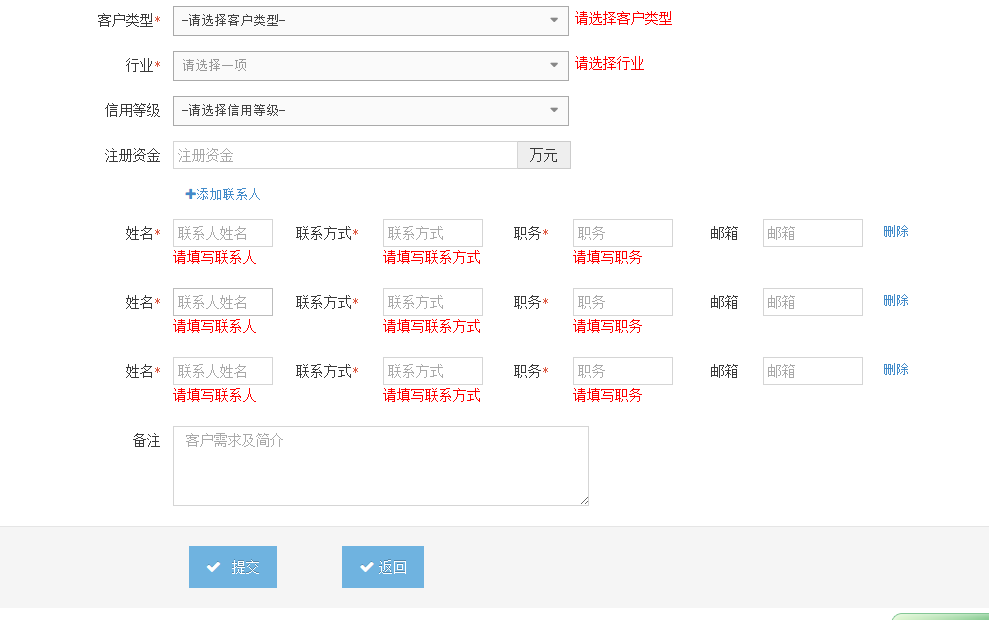
显示元素位置:
 1 $("#mainform").validate({

                 errorPlacement: function (error, element) {

                     if (element.parent().hasClass("input-group")) {

                         element.parent().after(error);

                     }

                     else

                         element.after(error)

                 },

                 errorPlacement: function (error, element) {

                     error.appendTo(element.parent()); //直接把错误信息加在验证元素后··

                 },

                 rules: {

                     CustomerName: {

                         required: true,

                         maxlength: 50,

                         remote: {

                             url: '/crm/Customer/CheckCustomName',

                             type: 'Post',

                             data: {

                                 CustomerName: function () { return $("#CustomerName").val() },

                                 id: function ()

                                 {

                                     if ($("#Id").val() == undefined) {

                                         return 0;

                                     } else {

                                         return $("#Id").val();

                                     }

                                 }

                             }

                         }

                     },

                     OwnerId: {

                         required:true

                     },

                     CustomerType:{

                         required:true

                     },

                     Address:{

                         required: true,

                         maxlength: 100

                     },

                     IndustryId: {

                         required: true

                     },

                     Capital: {

                         number: true,

                         min: 0.001,

                         maxlength: 8

                     }

                 },

                 messages: {

                     CustomerName: {

                         required: '请输入客户名称',

                         maxlength: '客户名称最大长度为50',

                         remote:'客户名称不能重复'

                     },

                     CustomerType: {

                         required: '请选择客户类型'

                     },

                     Address: {

                         required: '请输入地址',

                         maxlength: '客户名称最大长度为50'

                     },

                     OwnerId: {

                         required: '请选择对接人'

                     },

                     IndustryId: {

                         required: '请选择行业'

                     },

                     Capital: {

                         number: '注册资金必须为数字',

                         min: '注册资金最小为0.001万元',

                         maxlength:'注册资金最长单位为8位'

                     }

                 }

             });
JQuery Validate验证显示错误提示位置的更多相关文章
- jQuery Validate验证框架详解
转自:http://www.cnblogs.com/linjiqin/p/3431835.html jQuery校验官网地址:http://bassistance.de/jquery-plugins/ ...
- 【转】jQuery Validate验证框架详解
jQuery校验官网地址:http://bassistance.de/jquery-plugins/jquery-plugin-validation 一.导入js库 <script type=& ...
- jQuery Validate验证框架详解(转)
jQuery校验官网地址:http://bassistance.de/jquery-plugins/jquery-plugin-validation 一.导入js库 <script type=& ...
- JQuery validate验证规则
//定义中文消息 var cnmsg = { required: “必选字段”, remote: “请修正该字段”, email: “请输入正确格式的电子邮件”, url: “请输入合法的网址”, d ...
- jQuery Validate验证框架与 jQuery ajaxSubmit的联合使用
jQuery Validate验证框架自定义验证 第一步导入导入js库 <script src="<%=basePath%>static/js/jquery.js" ...
- jQuery Validate验证框架详解(jquery.validate.min.js)
原博客 jQuery Validate验证框架详解 jQuery校验官网地址:https://jqueryvalidation.org/ 一.导入js库 <script type="t ...
- 弹出框页面中使用jquery.validate验证控件
弹出框页面中使用jquery.validate验证控件有几个问题需要解决: 1,弹出框的提交事件完成后如何关闭弹出框页面? 2,提交不成功如何返回当前页? 3,如果知道验证事件成功? 之前笔者都是JS ...
- jQuery.Validate 验证,以及 remote验证, 多参数传递
jQuery.Validate 验证: http://www.runoob.com/jquery/jquery-plugin-validate.html 教程网址,很简单, 今天主要在这里记录一下re ...
- jquery.validate验证表单配合回调提交和h5.storage本地保存笔记
表单验证插件我使用:jquery.validate.js 支持中文提示,可扩展性强!教程地址 本地保存状态信息使用:h5提供的storage,浏览器支持5m的存储量,存储类型必须是string类型,并 ...
随机推荐
- [置顶] Android AlarmManager实现不间断轮询服务
在消息的获取上是选择轮询还是推送得根据实际的业务需要来技术选型,例如对消息实时性比较高的需求,比如微博新通知或新闻等那就最好是用推送了.但如果只是一般的消息检测比如更新检查,可能是半个小时或一个小时一 ...
- 六、Linux/UNIX操作命令积累【kill、netstat、df、du】
在使用Linux/UNIX下,常常会使用文本界面去设置系统或操作系统,作者本人在工作的过程也在不断接触这方面的命令,所以为此特酝酿.准备.開始了本文的编写. 本文主要记录自己平时遇到的一些Linux/ ...
- Linq 学习
聚合操作符 说 ...
- 试读《基于MVC的JavaScript Web富应用开发》
前两年做jsp开发时,用了不少JavaScript(JS)和Ajax, 最近的项目一直在使用Flex做前台,虽然也有类似的ActionScript实现JS的功能,但没想到的是,短短几年JS发展如此迅速 ...
- jquery.validate使用攻略
主要分几部分 jquery.validate 基本用法 jquery.validate API说明 jquery.validate 自定义 jquery.validate 常见类型的验证代码 下载地址 ...
- BZOJ 1084: [SCOI2005]最大子矩阵 DP
1084: [SCOI2005]最大子矩阵 题目连接: http://www.lydsy.com/JudgeOnline/problem.php?id=1084 Description 这里有一个n* ...
- 支付宝api指南
tyle="margin:20px 0px 0px; line-height:26px; font-family:Arial"> 在这些服务中,服务类型大致可以分为以下几类: ...
- Android ViewPager 应该及技巧
1. android 中的ViewPager 功能类似于iOS中的scrollView,实现最主要的页面的左右滑动功能.该类存在于Google的兼容包里面,所以在引用时记得在BuilldPath中 ...
- Linux磁盘及文件系统管理 4---- Linux文件系统挂载管理
1 挂载操作 1 磁盘或者分区需要创建好文件系统后,需要挂载到一个目录才能够使用 2 windows或者是Mac会自动的挂载文件系统,一旦创建好文件系统后会自动的挂载 3 对于Linux来说我们必须要 ...
- Java核心技术卷二部分笔记
第1章 流与文件 1.2 文本输入与输出 第3章 网络 3.3 可中断套接字 第4章 数据库编程 4.5.2 读写LOB 4.6 可滚动和可更新的结果集 4.8 元数据 第6章 高级Swing 6.1 ...