
android147 360 程序锁
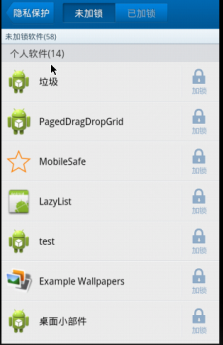
<?xml version="1.0" encoding="utf-8"?>

<LinearLayout xmlns:android="http://schemas.android.com/apk/res/android"

    android:layout_width="match_parent"

    android:layout_height="match_parent"

    android:orientation="vertical" >

    <TextView

        android:layout_width="match_parent"

        android:layout_height="60dip"

        android:background="#8866ff00"

        android:gravity="center"

        android:text="程序锁"

        android:textSize="24sp" />

    <LinearLayout

        android:layout_width="match_parent"

        android:layout_height="wrap_content"

        android:gravity="center_horizontal"

        android:orientation="horizontal" >

        <TextView

            android:id="@+id/tv_unlock"

            android:layout_width="wrap_content"

            android:layout_height="wrap_content"

            android:background="@drawable/tab_left_pressed"

            android:gravity="center"

            android:text="未加锁" />

        <TextView

            android:id="@+id/tv_lock"

            android:layout_width="wrap_content"

            android:layout_height="wrap_content"

            android:background="@drawable/tab_right_default"

            android:gravity="center"

            android:text="已加锁" />

    </LinearLayout>

    <FrameLayout

        android:id="@+id/fl_content"

        android:layout_width="match_parent"

        android:layout_height="match_parent" />

</LinearLayout>
package com.itheima.mobileguard.activities;

import com.itheima.mobileguard.R;

import com.itheima.mobileguard.fragment.LockFragment;

import com.itheima.mobileguard.fragment.UnLockFragment;

import android.os.Bundle;

import android.support.v4.app.FragmentActivity;

import android.support.v4.app.FragmentManager;

import android.support.v4.app.FragmentTransaction;

import android.view.View;

import android.view.View.OnClickListener;

import android.widget.FrameLayout;

import android.widget.TextView;

public class AppLockActivity extends FragmentActivity implements

        OnClickListener {

    private FrameLayout fl_content;

    private TextView tv_unlock;

    private TextView tv_lock;

    private FragmentManager fragmentManager;

    private UnLockFragment unLockFragment;

    private LockFragment lockFragment;

    @Override

    protected void onCreate(Bundle arg0) {

        super.onCreate(arg0);

        initUI();

    }

    private void initUI() {

        setContentView(R.layout.activity_app_lock);

        fl_content = (FrameLayout) findViewById(R.id.fl_content);

        tv_unlock = (TextView) findViewById(R.id.tv_unlock);

        tv_lock = (TextView) findViewById(R.id.tv_lock);

        tv_unlock.setOnClickListener(this);

        tv_lock.setOnClickListener(this);

        //获取到fragment的管理者

        fragmentManager = getSupportFragmentManager();

        //开启事务

        FragmentTransaction mTransaction = fragmentManager.beginTransaction();

        unLockFragment = new UnLockFragment();

        lockFragment = new LockFragment();

        /**

         * 替换界面

         * 1 需要替换的界面的id

         * 2具体指某一个fragment的对象

         */

        mTransaction.replace(R.id.fl_content, unLockFragment).commit();

    }

    @Override

    public void onClick(View v) {

        FragmentTransaction ft = fragmentManager.beginTransaction();

        switch (v.getId()) {

        case R.id.tv_unlock:

            //没有加锁

            tv_unlock.setBackgroundResource(R.drawable.tab_left_pressed);

            tv_lock.setBackgroundResource(R.drawable.tab_right_default);

            ft.replace(R.id.fl_content, lockFragment);

            System.out.println("切换到lockFragment");

            break;

        case R.id.tv_lock:

            //没有加锁

            tv_unlock.setBackgroundResource(R.drawable.tab_left_default);

            tv_lock.setBackgroundResource(R.drawable.tab_right_pressed);

            ft.replace(R.id.fl_content, unLockFragment);

            System.out.println("切换到unlockFragment");

            break;

        }

        ft.commit();

    }

}
android147 360 程序锁的更多相关文章
- android147 360 程序锁fragment
package com.itheima.mobileguard.fragment; import java.util.ArrayList; import java.util.List; import ...
- android149 360 程序锁输入密码
<?xml version="1.0" encoding="utf-8"?> <LinearLayout xmlns:android=&quo ...
- Android学习笔记_63_手机安全卫士知识点归纳(3)分享 程序锁 服务 进程管理 widget
1.分享: Intent shareIntent = new Intent(); shareIntent.setAction(Intent.ACTION_SEND); shareIntent.setT ...
- CAD调试时抛出“正试图在 os 加载程序锁内执行托管代码。不要尝试在 DllMain 或映像初始化函数内运行托管代码”异常的解决方法
这些天重装了电脑Win10系统,安装了CAD2012和VS2012,准备进行软件开发.在调试程序的时候,CAD没有进入界面就抛出 “正试图在 os 加载程序锁内执行托管代码.不要尝试在 DllMain ...
- 正尝试在 OS 加载程序锁内执行托管代码。不要尝试在 DllMain 或映像初始化函数内运行托管代码,这样...
出错提示: 正尝试在 OS 加载程序锁内执行托管代码.不要尝试在 DllMain 或映像初始化函数内运行托管代码,这样做会导致应用程序挂起. 原因分析: .NET2.0中增加了42种非常强大的调试助手 ...
- 检测到 LoaderLock:DLL"XXXX"正试图在OS加载程序锁内执行
解决方法: ctrl+D+E或alt+ctl+e或使用菜单调试——>异常——>异常窗口——>Managed Debugging Assistants——>去掉LoaderLoc ...
- 正试图在 os 加载程序锁内执行托管代码。不要尝试在 DllMain 或映像初始化函数内运行托管代码
来自:http://www.cnblogs.com/lcxu2/archive/2011/01/16/2004016.html 正试图在 os 加载程序锁内执行托管代码.不要尝试在 DllMain 或 ...
- Android安全问题 程序锁
导读:本文介绍如何实现对应用加锁的功能,无须root权限 某些人有时候会有这样一种需求,小A下载了个软件,只是软件中的美女过于诱惑与暴露,所以他不想让别人知道这是个什么软件,起码不想让别人打开浏 览. ...
- 正尝试在 OS 载入程序锁内执行托管代码。不要尝试在 DllMain 或映像初始化函数内执行托管代码,这样做会导致应用程序挂起。
出错提示: 正尝试在 OS 载入程序锁内执行托管代码. 不要尝试在 DllMain 或映像初始化函数内执行托管代码,这样做会导致应用程序挂起. 原因分析: .NET2.0中添加了42种非常强大的调试助 ...
随机推荐
- Think Python Glossary
一.The way of the program problem solving: The process of formulating a problem, finding a solution, a ...
- dell optiplex台式机 安装win7 清楚分区的方法
http://jingyan.baidu.com/article/92255446e1065f851648f42b.html
- hdu 1544 水题
水题 /* * Author : ben */ #include <cstdio> #include <cstdlib> #include <cstring> #i ...
- 【Linux学习】 写一个简单的Makefile编译源码获取当前系统时间
打算学习一下Linux,这两天先看了一下gcc的简单用法以及makefile的写法,今天是周末,天气闷热超市,早晨突然发现住处的冰箱可以用了,于是先出去吃了点东西,然后去超市买了一坨冰棍,老冰棍居多, ...
- javascript跑马灯抽奖
<!DOCTYPE html> <html lang="en"> <head> <meta charset="UTF-8&quo ...
- 几个地图(高德、百度、Apple、Google)URL API(转)
转自:http://blog.csdn.net/cooldragon/article/details/20642131 移动应用中,如何在自己的App中调起第三方的原生地图App,并显示相关的信息,如 ...
- mybatis系列-05-SqlMapConfig.xml详解
mybatis的全局配置文件SqlMapConfig.xml,配置内容如下: properties(属性) settings(全局配置参数) typeAliases(类型别名) typeHandler ...
- RabbitMQ三种Exchange模式(fanout,direct,topic)的特性 -摘自网络
RabbitMQ中,所有生产者提交的消息都由Exchange来接受,然后Exchange按照特定的策略转发到Queue进行存储 RabbitMQ提供了四种Exchange:fanout,direct, ...
- uva 796 Critical Links(无向图求桥)
https://uva.onlinejudge.org/index.php?option=com_onlinejudge&Itemid=8&page=show_problem& ...
- jsp页面显示数据库的数据信息表
在日常jsp开发中:最基本的一个操作之一是把之前添加到数据库中的信息在jsp页面中显示出来,也就是增删改查中的查找的一部分: 下面是以上部分的开发步骤及分析. 1.在jsp页面: <thead& ...