
android149 360 程序锁输入密码
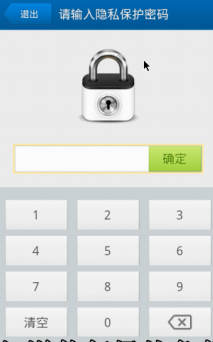
<?xml version="1.0" encoding="utf-8"?>

<LinearLayout xmlns:android="http://schemas.android.com/apk/res/android"

    android:layout_width="match_parent"

    android:layout_height="match_parent"

    android:orientation="vertical" >

    <TextView

        android:layout_width="match_parent"

        android:layout_height="60dip"

        android:background="#8866ff00"

        android:gravity="center"

        android:text="请输入隐私保护密码"

        android:textSize="24sp" />

    <ImageView

        android:layout_width="wrap_content"

        android:layout_height="wrap_content"

        android:layout_gravity="center_horizontal"

        android:layout_marginTop="15dp"

        android:src="@drawable/icon_lock_big" />

    <RelativeLayout

        android:layout_width="match_parent"

        android:layout_height="wrap_content" >

        <EditText

            android:id="@+id/et_pwd"

            android:layout_width="match_parent"

            android:layout_height="wrap_content"

            android:layout_marginLeft="10dp"

            android:layout_marginRight="10dp"

            android:layout_marginTop="15dp" />

        <Button

            android:id="@+id/bt_ok"

            android:layout_width="wrap_content"

            android:layout_height="wrap_content"

            android:layout_alignParentRight="true"

            android:layout_marginRight="10dp"

            android:background="@drawable/desktop_button_1"

            android:text="确定" />

    </RelativeLayout>

    <LinearLayout

        android:layout_width="match_parent"

        android:layout_height="match_parent"

        android:gravity="bottom"

        android:orientation="vertical"

        android:background="#22000000">

        <LinearLayout

            android:layout_width="match_parent"

            android:layout_height="wrap_content"

            android:orientation="horizontal" >

            <Button

                android:id="@+id/bt_1"

                android:layout_width="wrap_content"

                android:layout_height="wrap_content"

                android:layout_weight="1"

                android:text="1" />

            <Button

                android:id="@+id/bt_2"

                android:layout_width="wrap_content"

                android:layout_height="wrap_content"

                android:layout_weight="1"

                android:text="2" />

            <Button

                android:id="@+id/bt_3"

                android:layout_width="wrap_content"

                android:layout_height="wrap_content"

                android:layout_weight="1"

                android:text="3" />

        </LinearLayout>

        <LinearLayout

            android:layout_width="match_parent"

            android:layout_height="wrap_content"

            android:orientation="horizontal" >

            <Button

                android:id="@+id/bt_4"

                android:layout_width="wrap_content"

                android:layout_height="wrap_content"

                android:layout_weight="1"

                android:text="4" />

            <Button

                android:id="@+id/bt_5"

                android:layout_width="wrap_content"

                android:layout_height="wrap_content"

                android:layout_weight="1"

                android:text="5" />

            <Button

                android:id="@+id/bt_6"

                android:layout_width="wrap_content"

                android:layout_height="wrap_content"

                android:layout_weight="1"

                android:text="6" />

        </LinearLayout>

        <LinearLayout

            android:layout_width="match_parent"

            android:layout_height="wrap_content"

            android:orientation="horizontal" >

            <Button

                android:id="@+id/bt_7"

                android:layout_width="wrap_content"

                android:layout_height="wrap_content"

                android:layout_weight="1"

                android:text="7" />

            <Button

                android:id="@+id/bt_8"

                android:layout_width="wrap_content"

                android:layout_height="wrap_content"

                android:layout_weight="1"

                android:text="8" />

            <Button

                android:id="@+id/bt_9"

                android:layout_width="wrap_content"

                android:layout_height="wrap_content"

                android:layout_weight="1"

                android:text="9" />

        </LinearLayout>

        <LinearLayout

            android:layout_width="match_parent"

            android:layout_height="wrap_content"

            android:orientation="horizontal" >

            <Button

                android:id="@+id/bt_clean_all"

                android:layout_width="wrap_content"

                android:layout_height="wrap_content"

                android:layout_weight="1"

                android:text="清空" />

            <Button

                android:id="@+id/bt_0"

                android:layout_width="wrap_content"

                android:layout_height="wrap_content"

                android:layout_weight="1"

                android:text="0" />

            <Button

                android:id="@+id/bt_delete"

                android:layout_width="wrap_content"

                android:layout_height="wrap_content"

                android:layout_weight="1"

                android:text="删除" />

        </LinearLayout>

    </LinearLayout>

</LinearLayout>
package com.itheima.mobileguard.services;

import java.util.List;

import com.itheima.mobileguard.activities.EnterPwdActivity;

import com.itheima.mobileguard.db.dao.AppLockDao;

import android.app.ActivityManager;

import android.app.ActivityManager.RunningTaskInfo;

import android.app.Service;

import android.content.BroadcastReceiver;

import android.content.Context;

import android.content.Intent;

import android.content.IntentFilter;

import android.os.IBinder;

import android.os.SystemClock;

import android.view.ViewDebug.FlagToString;

//作为一个服务,后台启动运行。

public class WatchDogService extends Service {

    private ActivityManager activityManager;

    private AppLockDao dao;

    @Override

    public IBinder onBind(Intent intent) {

        return null;

    }

    //临时停止保护的包名

    private String tempStopProtectPackageName;

    private class WatchDogReceiver extends BroadcastReceiver{

        @Override

        public void onReceive(Context context, Intent intent) {

            if(intent.getAction().equals("com.itheima.mobileguard.stopprotect")){

                //获取到停止保护的对象

                tempStopProtectPackageName = intent.getStringExtra("packageName");

            }else if(intent.getAction().equals(Intent.ACTION_SCREEN_OFF)){

                tempStopProtectPackageName = null;

                // 让狗休息

                falg = false;

            }else if(intent.getAction().equals(Intent.ACTION_SCREEN_ON)){

                //让狗继续干活

                if(falg == false){

                    startWatDog();

                }

            }

        }

    }

    @Override

    public void onCreate() {

        super.onCreate();

        dao = new AppLockDao(this);

        appLockInfos = dao.findAll();

        //注册广播接受者

        receiver = new WatchDogReceiver();

        IntentFilter filter = new IntentFilter();

        //停止保护

        filter.addAction("com.itheima.mobileguard.stopprotect");

        //注册一个锁屏的广播

        /**

         * 当屏幕锁住的时候。狗就休息

         * 屏幕解锁的时候。让狗活过来

         */

        filter.addAction(Intent.ACTION_SCREEN_OFF);

        filter.addAction(Intent.ACTION_SCREEN_ON);

        registerReceiver(receiver, filter);

        //获取到进程管理器

        activityManager = (ActivityManager) getSystemService(ACTIVITY_SERVICE);

        //1 首先需要获取到当前的任务栈

        //2取任务栈最上面的任务

        startWatDog();

    }

    //标记当前的看萌狗是否停下来

    private boolean falg = false;

    private List<String> appLockInfos;

    private WatchDogReceiver receiver;

    private void startWatDog() {

        new Thread(){

            public void run() {

                falg = true;

                while (falg) {

                    //由于这个狗一直在后台运行。为了避免程序阻塞。

                    //获取到当前正在运行的任务栈

                    List<RunningTaskInfo> tasks = activityManager.getRunningTasks(1);

                    //获取到最上面的进程就是正在打开的应用。判断是否已经加锁。

                    RunningTaskInfo taskInfo = tasks.get(0);

                    //获取到最顶端应用程序的包名

                    String packageName = taskInfo.topActivity.getPackageName();

                    System.out.println(packageName);

                    //让狗休息一会

                    SystemClock.sleep(30);

                    //直接从数据库里面查找当前的数据

                    //这个可以优化。改成从内存当中寻找

                    if(appLockInfos.contains(packageName)){

//                    if(dao.find(packageName)){

//                        System.out.println("在程序锁数据库里面");

                        //说明需要临时取消保护

                        //是因为用户输入了正确的密码

                        if(packageName.equals(tempStopProtectPackageName)){

                        }else{

                            Intent intent = new Intent(WatchDogService.this,EnterPwdActivity.class);

                            /**

                             * 需要注意:如果是在服务里面往activity界面跳的话。需要设置flag

                             */

                            intent.setFlags(Intent.FLAG_ACTIVITY_NEW_TASK);

                            //停止保护的对象

                            intent.putExtra("packageName", packageName);

                            startActivity(intent);

                        }

                    }

                }

            };

        }.start();

    }

    //调用stopService()方法就会调用onDestroy(),

    @Override

    public void onDestroy() {

        super.onDestroy();

        falg = false;

        unregisterReceiver(receiver);

        receiver = null;

    }

}
package com.itheima.mobileguard.activities;

import android.app.Activity;

import android.content.Intent;

import android.os.Bundle;

import android.text.InputType;

import android.view.View;

import android.view.View.OnClickListener;

import android.widget.Button;

import android.widget.EditText;

import com.itheima.mobileguard.R;

import com.itheima.mobileguard.utils.UIUtils;

public class EnterPwdActivity extends Activity implements OnClickListener {

    private EditText et_pwd;

    private Button bt_0;

    private Button bt_1;

    private Button bt_2;

    private Button bt_3;

    private Button bt_4;

    private Button bt_5;

    private Button bt_6;

    private Button bt_7;

    private Button bt_8;

    private Button bt_9;

    private Button bt_clean_all;

    private Button bt_delete;

    private Button bt_ok;

    private String packageName;

    @Override

    protected void onCreate(Bundle savedInstanceState) {

        super.onCreate(savedInstanceState);

        setContentView(R.layout.activity_set_pwd);

        initUI();

    }

    private void initUI() {

        Intent intent = getIntent();

        if (intent != null) {

            packageName = intent.getStringExtra("packageName");

        }

        et_pwd = (EditText) findViewById(R.id.et_pwd);

        // 隐藏当前的键盘

        et_pwd.setInputType(InputType.TYPE_NULL);

        bt_0 = (Button) findViewById(R.id.bt_0);

        bt_1 = (Button) findViewById(R.id.bt_1);

        bt_2 = (Button) findViewById(R.id.bt_2);

        bt_3 = (Button) findViewById(R.id.bt_3);

        bt_4 = (Button) findViewById(R.id.bt_4);

        bt_5 = (Button) findViewById(R.id.bt_5);

        bt_6 = (Button) findViewById(R.id.bt_6);

        bt_7 = (Button) findViewById(R.id.bt_7);

        bt_8 = (Button) findViewById(R.id.bt_8);

        bt_9 = (Button) findViewById(R.id.bt_9);

        bt_ok = (Button) findViewById(R.id.bt_ok);

        bt_ok.setOnClickListener(this);

        bt_clean_all = (Button) findViewById(R.id.bt_clean_all);

        bt_delete = (Button) findViewById(R.id.bt_delete);

        // 清空

        bt_clean_all.setOnClickListener(new OnClickListener() {

            @Override

            public void onClick(View v) {

                et_pwd.setText("");

            }

        });

        // 删除

        bt_delete.setOnClickListener(new OnClickListener() {

            private String str;

            @Override

            public void onClick(View v) {

                str = et_pwd.getText().toString();

                if (str.length() == 0) {

                    return;

                }

                et_pwd.setText(str.substring(0, str.length() - 1));

            }

        });

        bt_0.setOnClickListener(new OnClickListener() {

            @Override

            public void onClick(View v) {

                String str = et_pwd.getText().toString();

                et_pwd.setText(str + bt_0.getText().toString());

            }

        });

        bt_1.setOnClickListener(new OnClickListener() {

            @Override

            public void onClick(View v) {

                String str = et_pwd.getText().toString();

                et_pwd.setText(str + bt_1.getText().toString());

            }

        });

        bt_2.setOnClickListener(new OnClickListener() {

            @Override

            public void onClick(View v) {

                String str = et_pwd.getText().toString();

                et_pwd.setText(str + bt_2.getText().toString());

            }

        });

        bt_3.setOnClickListener(new OnClickListener() {

            @Override

            public void onClick(View v) {

                String str = et_pwd.getText().toString();

                et_pwd.setText(str + bt_3.getText().toString());

            }

        });

        bt_4.setOnClickListener(new OnClickListener() {

            @Override

            public void onClick(View v) {

                String str = et_pwd.getText().toString();

                et_pwd.setText(str + bt_4.getText().toString());

            }

        });

        bt_5.setOnClickListener(new OnClickListener() {

            @Override

            public void onClick(View v) {

                String str = et_pwd.getText().toString();

                et_pwd.setText(str + bt_5.getText().toString());

            }

        });

        bt_6.setOnClickListener(new OnClickListener() {

            @Override

            public void onClick(View v) {

                String str = et_pwd.getText().toString();

                et_pwd.setText(str + bt_6.getText().toString());

            }

        });

        bt_7.setOnClickListener(new OnClickListener() {

            @Override

            public void onClick(View v) {

                String str = et_pwd.getText().toString();

                et_pwd.setText(str + bt_7.getText().toString());

            }

        });

        bt_8.setOnClickListener(new OnClickListener() {

            @Override

            public void onClick(View v) {

                String str = et_pwd.getText().toString();

                et_pwd.setText(str + bt_8.getText().toString());

            }

        });

        bt_9.setOnClickListener(new OnClickListener() {

            @Override

            public void onClick(View v) {

                String str = et_pwd.getText().toString();

                et_pwd.setText(str + bt_9.getText().toString());

            }

        });

    }

    @Override

    public void onClick(View v) {

        switch (v.getId()) {

        case R.id.bt_ok:

            String result = et_pwd.getText().toString();

            if ("123".equals(result)) {

                // 如果密码正确。说明是自己人

                /**

                 * 是自己家人。不要拦截他

                 */

                System.out.println("密码输入正确");

                Intent intent = new Intent();

                // 发送广播。停止保护

                intent.setAction("com.itheima.mobileguard.stopprotect");

                // 跟狗说。现在停止保护短信

                intent.putExtra("packageName", packageName);

                sendBroadcast(intent);

                finish();

            } else {

                UIUtils.showToast(EnterPwdActivity.this, "密码错误");

            }

            break;

        }

    }

    // 监听当前页面的后退健

    // <intent-filter>

    // <action android:name="android.intent.action.MAIN" />

    // <category android:name="android.intent.category.HOME" />

    // <category android:name="android.intent.category.DEFAULT" />

    // <category android:name="android.intent.category.MONKEY"/>

    // </intent-filter>

    @Override

    public void onBackPressed() {

        // 当用户输入后退健 的时候。我们进入到桌面

        Intent intent = new Intent();

        intent.setAction("android.intent.action.MAIN");

        intent.addCategory("android.intent.category.HOME");

        intent.addCategory("android.intent.category.DEFAULT");

        intent.addCategory("android.intent.category.MONKEY");

        startActivity(intent);

    }

}
android149 360 程序锁输入密码的更多相关文章
- android147 360 程序锁fragment
package com.itheima.mobileguard.fragment; import java.util.ArrayList; import java.util.List; import ...
- android147 360 程序锁
<?xml version="1.0" encoding="utf-8"?> <LinearLayout xmlns:android=&quo ...
- Android学习笔记_63_手机安全卫士知识点归纳(3)分享 程序锁 服务 进程管理 widget
1.分享: Intent shareIntent = new Intent(); shareIntent.setAction(Intent.ACTION_SEND); shareIntent.setT ...
- Android安全问题 程序锁
导读:本文介绍如何实现对应用加锁的功能,无须root权限 某些人有时候会有这样一种需求,小A下载了个软件,只是软件中的美女过于诱惑与暴露,所以他不想让别人知道这是个什么软件,起码不想让别人打开浏 览. ...
- Android开发——程序锁的实现(可用于开发钓鱼登录界面)
1. 程序锁原理 1.1 实现效果: 在用户打开一个应用时,若此应用是我们业务内的逻辑拦截目标,那就在开启应用之后,弹出一个输入密码的界面,输入密码正确则进入目标应用.若不输入直接按返回键,则直接返回 ...
- Android项目实战_手机安全卫士程序锁
###1.两个页面切换的实现1. 可以使用Fragment,调用FragmentTransaction的hide和show方法2. 可以使用两个布局,设置visibility的VISIABLE和INV ...
- CAD调试时抛出“正试图在 os 加载程序锁内执行托管代码。不要尝试在 DllMain 或映像初始化函数内运行托管代码”异常的解决方法
这些天重装了电脑Win10系统,安装了CAD2012和VS2012,准备进行软件开发.在调试程序的时候,CAD没有进入界面就抛出 “正试图在 os 加载程序锁内执行托管代码.不要尝试在 DllMain ...
- 正尝试在 OS 加载程序锁内执行托管代码。不要尝试在 DllMain 或映像初始化函数内运行托管代码,这样...
出错提示: 正尝试在 OS 加载程序锁内执行托管代码.不要尝试在 DllMain 或映像初始化函数内运行托管代码,这样做会导致应用程序挂起. 原因分析: .NET2.0中增加了42种非常强大的调试助手 ...
- 检测到 LoaderLock:DLL"XXXX"正试图在OS加载程序锁内执行
解决方法: ctrl+D+E或alt+ctl+e或使用菜单调试——>异常——>异常窗口——>Managed Debugging Assistants——>去掉LoaderLoc ...
随机推荐
- linux下查看硬件配置的相关命令
from:http://www.jakee.cn/index.php/archives/501.html 常用命令整理如下:查看主板的序列号: dmidecode | grep -i ’serial ...
- FOJ 1962 新击鼓传花游戏 线段树
维护一个sum数组,有点划分树的思想,写过划分树的应该能看出来 #include<cstdio> #include<algorithm> #include<iostrea ...
- 【剑指offer 面试题22】栈的压入、弹出序列
思路: 不停地压栈,直到栈头元素与弹出序列的首元素相等则出栈,同时弹出序列后移:若不相等则一直保持压栈,直到压入所有元素后弹出序列仍不为空,则说明无法匹配. C++: #include <ios ...
- Redrain仿酷狗音乐播放器开发完毕,发布测试程序
转载请说明原出处,谢谢~~ 从暑假到现在中秋刚过,我用duilib开发仿酷狗播放器大概经历了50天.做仿酷狗的意图只是看原酷狗的界面比较漂亮,想做个完整一些的工程来练习一下duilib.今天把写好的程 ...
- 大道至简—SQLite3 使用教学
OS X自从10.4后把SQLite这套相当出名的数据库软件,放进了作业系统工具集里.OS X包装的是第三版的SQLite,又称SQLite3.这套软件有几个特色: 软件属于公共财(pu ...
- Gym 100818I Olympic Parade(位运算)
Olympic Parade http://acm.hust.edu.cn/vjudge/contest/view.action?cid=101594#problem/I [题意]: 给出N个数,找出 ...
- 通过源码学Java基础:BufferedReader和BufferedWriter
准备写一系列Java基础文章,先拿Java.io下手,今天聊一聊BufferedReader和BufferedWriter BufferedReader BufferedReader继承Writer, ...
- IPhone 设备状态、闪光灯状态
//判断闪光灯状态,修改默认的"CameraFlashOff" 按钮图片.转由 TGCameraFlash.m 控制图标切换 AVCaptureDevice *device ...
- POJ 2762 Going from u to v or from v to u? (强连通分量缩点+拓扑排序)
题目链接:http://poj.org/problem?id=2762 题意是 有t组样例,n个点m条有向边,取任意两个点u和v,问u能不能到v 或者v能不能到u,要是可以就输出Yes,否则输出No. ...
- iOS开发60分钟入门
原文:https://github.com/qinjx/30min_guides/blob/master/ios.md 本文面向已有其它语言(如Java,C,PHP,Javascript)编程经验的i ...