
Android实例-解决虚拟键盘遮挡问题(XE8+小米2)
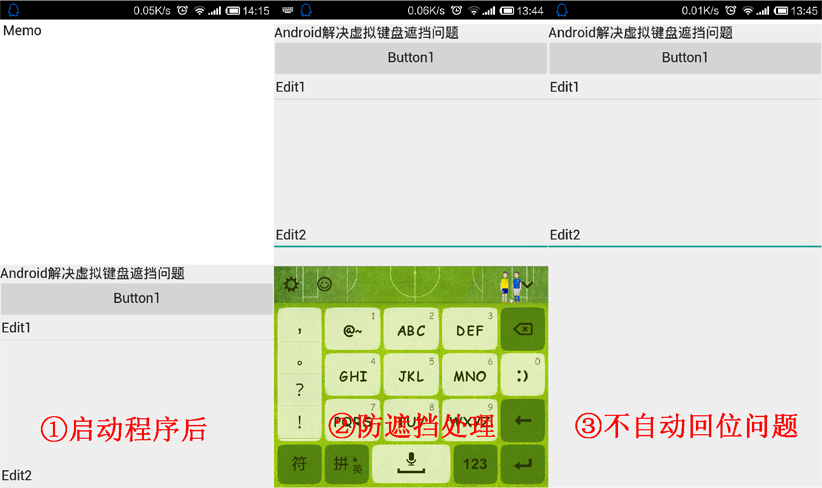
结果:
1.可以自动向上移动,来防遮挡,但同时发现个问题,如果是按硬件返回没有问题,要是点输入法(QQ、百度输入法)上的隐藏就不行了。
2.点击Edit2后出现输入法,点输入法上的隐藏后, 再点Edit2输入法不再显示。
实例代码:
 unit Unit1;

 interface

 uses

   System.SysUtils, System.Types, System.UITypes, System.Classes, System.Variants,

   FMX.Types, FMX.Controls, FMX.Forms, FMX.Graphics, FMX.Dialogs, FMX.ComboEdit,

   FMX.Edit, FMX.EditBox, FMX.NumberBox, FMX.DateTimeCtrls, FMX.ScrollBox,

   FMX.Memo, FMX.Controls.Presentation, FMX.StdCtrls,

   System.Math,//需要引入

   FMX.VirtualKeyboard,//需要引入

   FMX.Layouts;

 type

   TForm1 = class(TForm)

     VertScrollBox1: TVertScrollBox;

     Layout1: TLayout;

     Memo1: TMemo;

     Label1: TLabel;

     Button1: TButton;

     Edit1: TEdit;

     Edit2: TEdit;

     procedure FormCreate(Sender: TObject);

     procedure FormFocusChanged(Sender: TObject);

     procedure FormVirtualKeyboardHidden(Sender: TObject;

       KeyboardVisible: Boolean; const Bounds: TRect);

     procedure FormVirtualKeyboardShown(Sender: TObject;

       KeyboardVisible: Boolean; const Bounds: TRect);

   private

     //定义移位标记

     FKBBounds:TRectF;

     FNeedOffset: Boolean;

     procedure CalcContentBoundsProc(Sender: TObject; var ContentBounds: TRectF);

     procedure RestorePosition;

     procedure UpdateKBBounds;

     { Private declarations }

   public

     { Public declarations }

   end;

 var

   Form1: TForm1;

 implementation

 {$R *.fmx}

 {$R *.NmXhdpiPh.fmx ANDROID}

 //赋值事件

 procedure TForm1.FormCreate(Sender: TObject);

 begin

   VertScrollBox1.OnCalcContentBounds := CalcContentBoundsProc;

 end;

 //每次焦点改变都要更新位置

 procedure TForm1.FormFocusChanged(Sender: TObject);

 begin

   UpdateKBBounds;

 end;

 //输入法隐藏时的处理

 procedure TForm1.FormVirtualKeyboardHidden(Sender: TObject;

   KeyboardVisible: Boolean; const Bounds: TRect);

 begin

   FKBBounds.Create(, , , );

   FNeedOffset := False;

   RestorePosition;

 end;

 //输入法显示时的处理

 procedure TForm1.FormVirtualKeyboardShown(Sender: TObject;

   KeyboardVisible: Boolean; const Bounds: TRect);

 begin

   FKBBounds := TRectF.Create(Bounds);

   FKBBounds.TopLeft := ScreenToClient(FKBBounds.TopLeft);

   FKBBounds.BottomRight := ScreenToClient(FKBBounds.BottomRight);

   UpdateKBBounds;

 end;

 //计算内容边界

 procedure TForm1.CalcContentBoundsProc(Sender: TObject;

   var ContentBounds: TRectF);

 begin

   if FNeedOffset and (FKBBounds.Top > ) then

   begin

     ContentBounds.Bottom := Max(ContentBounds.Bottom,  * ClientHeight - FKBBounds.Top);

   end;

 end;

 //还原位置

 procedure TForm1.RestorePosition;

 begin

   VertScrollBox1.ViewportPosition := PointF(VertScrollBox1.ViewportPosition.X, );

   Layout1.Align := TAlignLayout.Client;

   VertScrollBox1.RealignContent;

 end;

 //更新边界

 procedure TForm1.UpdateKBBounds;

 var

   LFocused : TControl;

   LFocusRect: TRectF;

 begin

   FNeedOffset := False;

   if Assigned(Focused) then

   begin

     LFocused := TControl(Focused.GetObject);

     LFocusRect := LFocused.AbsoluteRect;

     LFocusRect.Offset(VertScrollBox1.ViewportPosition);

     if (LFocusRect.IntersectsWith(TRectF.Create(FKBBounds))) and

        (LFocusRect.Bottom > FKBBounds.Top) then

     begin

       FNeedOffset := True;

       Layout1.Align := TAlignLayout.Horizontal;

       VertScrollBox1.RealignContent;

       Application.ProcessMessages;

       VertScrollBox1.ViewportPosition := PointF(VertScrollBox1.ViewportPosition.X, LFocusRect.Bottom - FKBBounds.Top);

     end;

   end;

   if not FNeedOffset then

     RestorePosition;

 end;

 end.
PS:
1.本实例来自官方demo(D:\DelphiXE8\Users\Public\Documents\Embarcadero\Studio\15.0\Samples\Object Pascal\Mobile Samples\User Interface\ScrollableForm)。
2.控件布局是VertScrollBox1、Layout1,之后的控件都是在Layout1上的。
Android实例-解决虚拟键盘遮挡问题(XE8+小米2)的更多相关文章
- Android实例-解决启动黑屏问题(XE8+小米2)
结果: 1.在启动时马上出现图片界面,但在出现程序界面前会有黑屏,大约有0.2秒左右. 实现: 1.建立2个文件:loading.png和styles.xml: ①其中loading.png是启动时替 ...
- Android实例-获取安卓手机WIFI信息(XE8+小米2)
结果: 1.必须打开Access wifi state权限,不打开权限会出图二的错误. 相关资料: http://blog.csdn.net/lyf_lyf/article/category/1735 ...
- Android实例-MediaPlayer播放音乐和视频(XE8+小米2)
结果: 1.播放视频需要手动放入MediaPlayerControl1控件,设置MediaPlayerControl1.MediaPlayer := MediaPlayer1; 2.播放声音文件正常, ...
- Android实例-录音与回放(播放MP3)(XE8+小米2)
结果: 1.增加ActionList中的Action时,需要跳到Master界面,不能在Android4Phonel界面下. 2.如果不打开权限的话,会提示“该设备不支持停止录音操作”(Record ...
- Android实例-程序界面内截取屏幕(XE8+小米2)
结果: 1.只能截取程序界面内的图片. 2.图片有点不清楚,自己设置清楚度. 实例代码: unit Unit1; interface uses System.SysUtils, System.Type ...
- Android实例-监测网络状态及一些事件(XE8+小米2)
结果: 1.网络连接:是指现在可不可以上网(你非要问我什么是网,我会K你呀的). 2.WIFI网络:是指现在可以上网,用的是不是WIFI网络(如果你打开了WIFI那它会显示正在使用WIFI). 3.移 ...
- Android实例-如何使用系统剪切板(XE8+小米2)
结果: 发现个问题,就是粘贴时会清除之前的信息. unit Unit1; interface uses System.SysUtils, System.Types, System.UITypes, S ...
- FIREMONEY手机虚拟键盘遮挡的解决
FIREMONEY手机虚拟键盘遮挡的解决 尝遍了网上人们提供的N种方法之后,发现还是老猫的方法才是彻底解决问题的办法. 老猫“不看后悔XXX”--->RAD10.2.3 Flying Wang ...
- 【转】iOS 上常用的两个功能:点击屏幕和return退出隐藏键盘和解决虚拟键盘挡住UITextField的方法
iOS上面对键盘的处理很不人性化,所以这些功能都需要自己来实现, 首先是点击return和屏幕隐藏键盘 这个首先引用双子座的博客 http://my.oschina.net/plumsoft/blog ...
随机推荐
- poj 1095 Trees Made to Order 卡特兰数
这题用到了卡特兰数,详情见:http://www.cnblogs.com/jackge/archive/2013/05/19/3086519.html 解体思路详见:http://blog.csdn. ...
- gdb调试多线程程序总结
阿里核心系统团队博客 http://csrd.aliapp.com/?tag=pstack Linux下多线程查看工具(pstree.ps.pstack) http://www.cnblogs.com ...
- 安装Ubuntu双系统系列——64位Ubuntu安装H3C的INode客户端
学校使用的是Inode客户端认证上网的.如果是使用Ubuntu 32位版本,可以完美地安装并能够连接到网站.但是如果安装的是Ubuntu desktop 12.10 amd64版本,则发现之前的&qu ...
- CentOS7.1 Xshell 经常掉线 Connection closed by foreign host
XShell如果经常对CentOS掉线,则VNC肯定连接不上 但是ping CentOS的IP又能ping通,主要原因还是因为sshd的设置问题 #进入ssh目录 cd /etc/ssh #修改ssh ...
- Area of a Circle
Area of a Circle Description: Complete the function circleArea so that it will return the area of a ...
- Number of Rectangles in a Grid
Project Euler 85: Investigating the number of rectangles in a rectangular grid Number of Rectangles ...
- .net 测试工具类
fluentassertions QuickStart (替换Assert ) https://github.com/dennisdoomen/fluentassertions/wiki Moq ...
- Unity3D GUI中的图片跟随鼠标旋转脚本
var Mid : Texture2D; var mouse : Texture2D; //鼠标图片 var mousePs = Vector2.zero; //鼠标的位置 private var a ...
- BZOJ_1027_[JSOI2007]_合金_(计算几何+Floyd求最小环)
描述 http://www.lydsy.com/JudgeOnline/problem.php?id=1027 共三种金属,\(m\)种材料,给出每种材料中三种金属的占比. 给出\(n\)种合金的三种 ...
- HTML5 离线功能介绍
HTML5 是目前正在讨论的新一代 HTML 标准,它代表了现在 Web 领域的最新发展方向.在 HTML5 标准中,加入了新的多样的内容描述标签,直接支持表单验证.视频音频标签.网页元素的拖拽.离线 ...