
解决项目迁移至Kubernetes集群中的代理问题
解决项目迁移至Kubernetes集群中的代理问题
随着Kubernetes技术的日益成熟,越来越多的企业选择用Kubernetes集群来管理项目。新项目还好,可以选择合适的集群规模从零开始构建项目;旧项目迁移进Kubernetes集群就需要考虑很多因素,毕竟项目不能中断时间过久。
问题来源
近日在做项目迁移至Kubernetes集群时,遇到了一件有意思的问题:因为开发用的dubbo版本过低,在zookeeper注册不上,需要开发升级dobbo,然后在打包成镜像,所以要先把nodejs迁移进Kubernets集群。因为是部分业务迁移进Kubernets集群,所以要在traefik 前面还得加一层代理Nginx(Nginx为旧业务的入口,反向代理后面的微服务,阿里云的slb指向nginx,等到业务全部迁移完毕,slb就指向traefik)。此种架构为双层代理,即Slb-->Nginx-->Traefik-->Service 。
图解
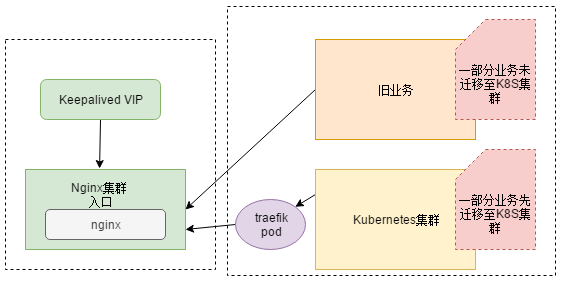
解决方案:
- 迁移至k8s集群的业务走Nodeport,Nginx --> Nodeport。业务应用直接Nodeport,不好管理,1万台机器的时候 不能也Nodeport吧,端口自己要规划,机器多了 每个机器还都暴露端口,想想都不现实
- 迁移至k8s集群的业务走Clusterip,Nginx --> Traefik --> Service。这种方式合理。
解决问题
总不能拿生产环境来写博文吧,用虚机讲明。其实把虚机和生产机也就网络环境存在差别。
思路分析
- 部署k8s集群
- 部署nginx
- 部署traefik
- 部署应用
- 联调联试
部署k8s集群
使用我之前的博文部署方法:https://www.cnblogs.com/zisefeizhu/p/12505117.html
部署nginx
下载必要的组件
# hostname -I

20.0.0.101

# cat /etc/redhat-release

CentOS Linux release 7.6.1810 (Core)

# uname -a

Linux fuxi-node02-101 4.4.186-1.el7.elrepo.x86_64 #1 SMP Sun Jul 21 04:06:52 EDT 2019 x86_64 x86_64 x86_64 GNU/Linux

# wget http://nginx.org/download/nginx-1.10.2.tar.gz

# wget http://www.openssl.org/source/openssl-fips-2.0.10.tar.gz

# wget http://zlib.net/zlib-1.2.11.tar.gz

# wget https://ftp.pcre.org/pub/pcre/pcre-8.40.tar.gz

# yum install gcc-c++
配置-编译-安装软件
# tar zxvf openssl-fips-2.0.10.tar.gz

# cd openssl-fips-2.0.10/

# ./config && make && make install

# cd ..

# ll

tar zxvf pcre-8.40.tar.gz

# cd pcre-8.40/

# ./configure && make && make install

# tar zxvf zlib-1.2.11.tar.gz

# cd zlib-1.2.11/

# ./configure && make && make install

# tar zxvf nginx-1.10.2.tar.gz

# cd nginx-1.10.2/

#./configure --with-http_stub_status_module --prefix=/opt/nginx

# make && make install
启动Nginx
# pwd

/opt/nginx

# ll

总用量 4

drwx------ 2 nobody root    6 4月  22 11:30 client_body_temp

drwxr-xr-x 2 root   root 4096 4月  22 12:53 conf

drwx------ 2 nobody root    6 4月  22 11:30 fastcgi_temp

drwxr-xr-x 2 root   root   40 4月  22 11:29 html

drwxr-xr-x 2 root   root   41 4月  22 14:24 logs

drwx------ 2 nobody root    6 4月  22 11:30 proxy_temp

drwxr-xr-x 2 root   root   19 4月  22 11:29 sbin

drwx------ 2 nobody root    6 4月  22 11:30 scgi_temp

drwx------ 2 nobody root    6 4月  22 11:30 uwsgi_temp

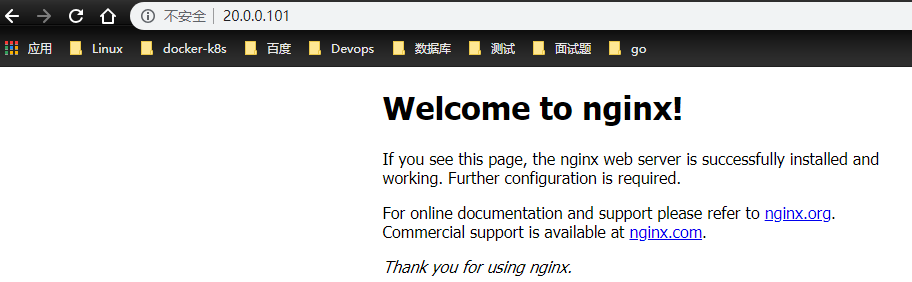
# sbin/nginx
traefik 部署
https://www.cnblogs.com/zisefeizhu/p/12692979.html
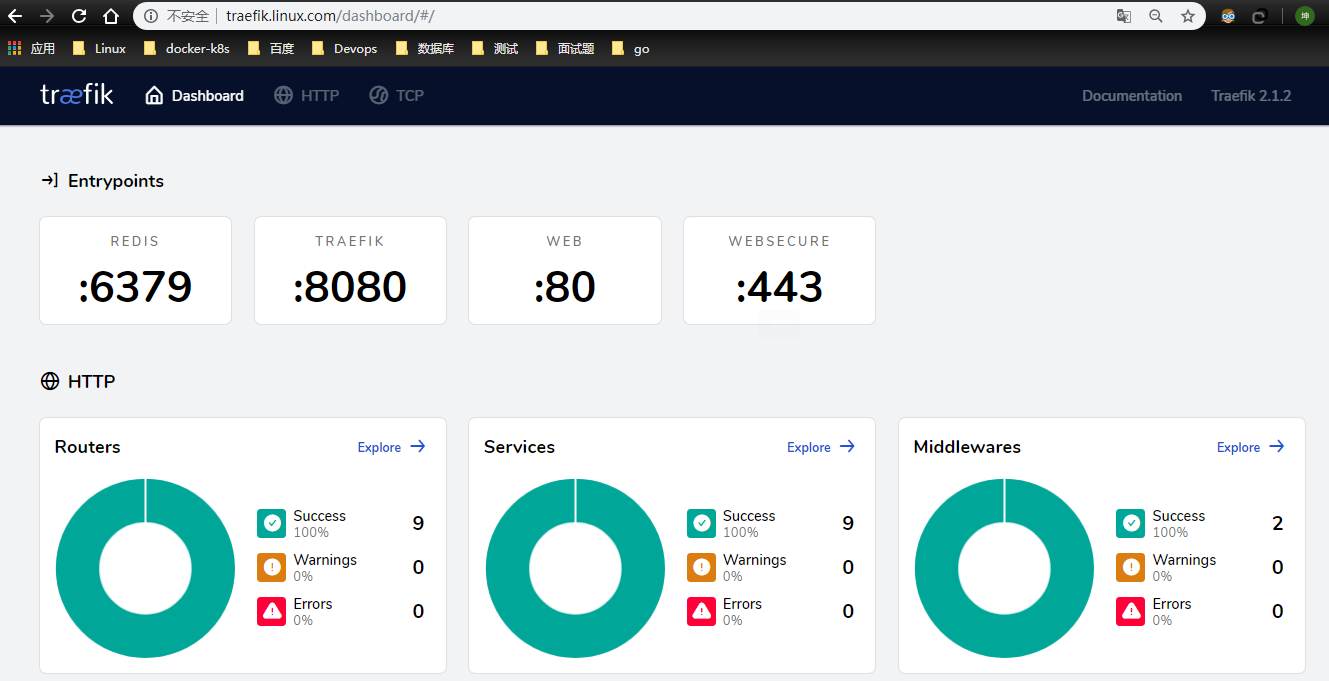
环境检查
# kubectl get pods,svc -A | grep traefik

kube-system   pod/traefik-ingress-controller-z5qd7             1/1     Running       0          136m

kube-system   service/traefik                     ClusterIP   10.68.251.132   <none>        80/TCP,443/TCP,8080/TCP        4h14m
浏览器访问
部署应用
这里的测试应用选择containous/whoami镜像
测试应用部署
# cat whoami.yaml

##########################################################################

#Author:                     zisefeizhu

#QQ:                         2********0

#Date:                       2020-04-22

#FileName:                   whoami.yaml

#URL:                        https://www.cnblogs.com/zisefeizhu/

#Description:                The test script

#Copyright (C):              2020 All rights reserved

###########################################################################

apiVersion: v1

kind: Service

metadata:

  name: whoami

spec:

  ports:

    - protocol: TCP

      name: web

      port: 80

  selector:

    app: whoami

---

kind: Deployment

apiVersion: apps/v1

metadata:

  name: whoami

  labels:

    app: whoami

spec:

  replicas: 2

  selector:

    matchLabels:

      app: whoami

  template:

    metadata:

      labels:

        app: whoami

    spec:

      containers:

        - name: whoami

          image: containous/whoami

          ports:

            - name: web

              containerPort: 80

# kubectl get svc,pod

NAME                 TYPE        CLUSTER-IP      EXTERNAL-IP   PORT(S)             AGE

service/whoami       ClusterIP   10.68.109.151   <none>        80/TCP              3h30m

NAME                                 READY   STATUS    RESTARTS   AGE

pod/whoami-bd6b677dc-jvqc2           1/1     Running   0          3h30m

pod/whoami-bd6b677dc-lvcxp           1/1     Running   0          3h30m
联调联试
因为选择的解决问题的方案是:nginx --> traefik --> service
- traefik -->service
- nginx --> traefik
- nginx --> service
traefik --> service
使用traefik 代理测试应用的资源清单:
# cat traefik-whoami.yaml

##########################################################################

#Author:                     zisefeizhu

#QQ:                         2********0

#Date:                       2020-04-22

#FileName:                   traefik-whoami.yaml

#URL:                        https://www.cnblogs.com/zisefeizhu/

#Description:                The test script

#Copyright (C):              2020 All rights reserved

###########################################################################

apiVersion: traefik.containo.us/v1alpha1

kind: IngressRoute

metadata:

  name: simpleingressroute

spec:

  entryPoints:

    - web

  routes:

  - match: Host(`who.linux.com`) && PathPrefix(`/notls`)

    kind: Rule

    services:

    - name: whoami

      port: 80
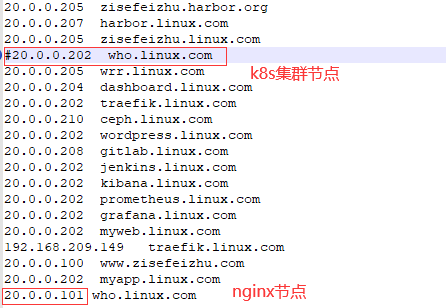
本地hosts解析

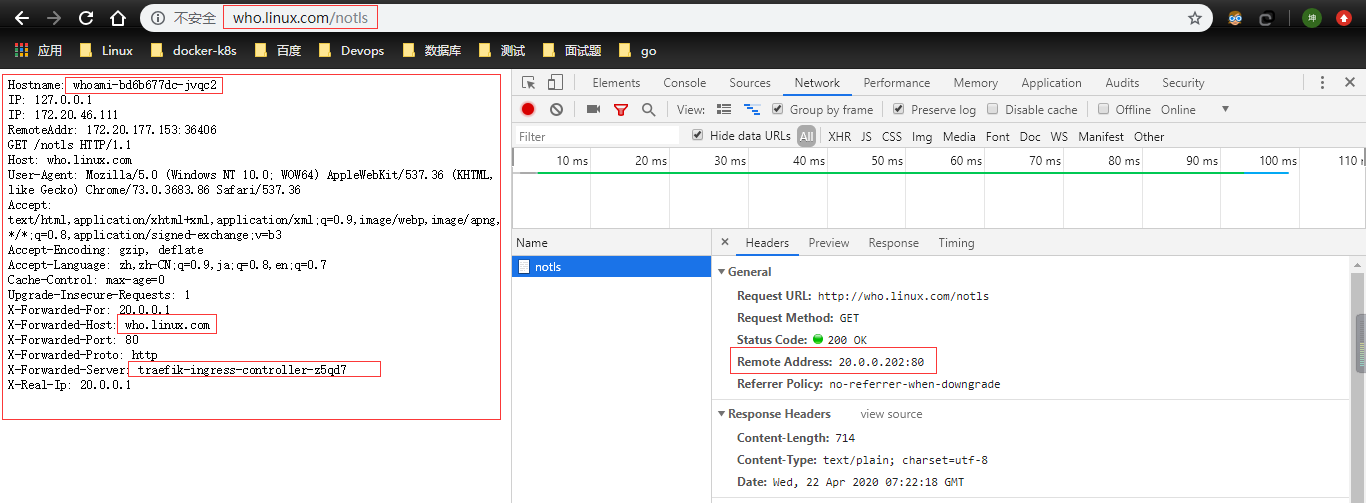
traefik界面观察是代理成功:

访问who.linux.com/notls
nginx --> traefik
# cat conf/nginx.conf

user nobody;

worker_processes 4;

events {

	use epoll;

	worker_connections 2048;

}

http {

	upstream app {

		server  20.0.0.202;

	}

	server {

		listen 80;

#		server_name who2.linux.com;

  	access_log logs/access.log;

  	error_log logs/error.log;

  	location / {

   		proxy_set_header X-Forwarded-For $remote_addr;

    	proxy_set_header X-Real-IP $remote_addr;

    	proxy_set_header X-Forwarded-For $proxy_add_x_forwarded_for;

    	proxy_set_header Host $host;

			proxy_headers_hash_max_size 51200;

			proxy_headers_hash_bucket_size 6400;

    	proxy_redirect off;

    	proxy_read_timeout 600;

    	proxy_connect_timeout 600;

    	proxy_pass http://app;

  	}

	}

}

# cat /etc/hosts

127.0.0.1   localhost localhost.localdomain localhost4 localhost4.localdomain4

::1         localhost localhost.localdomain localhost6 localhost6.localdomain6

20.0.0.202  who.linux.com   //k8s集群traefik所落节点,其实K8s任意节点都随便拉

# curl -iL who.linux.com/notls

HTTP/1.1 200 OK

Content-Length: 388

Content-Type: text/plain; charset=utf-8

Date: Wed, 22 Apr 2020 07:33:52 GMT

Hostname: whoami-bd6b677dc-lvcxp

IP: 127.0.0.1

IP: 172.20.46.67

RemoteAddr: 172.20.177.153:58168

GET /notls HTTP/1.1

Host: who.linux.com

User-Agent: curl/7.29.0

Accept: */*

Accept-Encoding: gzip

X-Forwarded-For: 20.0.0.101

X-Forwarded-Host: who.linux.com

X-Forwarded-Port: 80

X-Forwarded-Proto: http

X-Forwarded-Server: traefik-ingress-controller-z5qd7

X-Real-Ip: 20.0.0.101
nginx要是不熟悉就看这大佬的博文吧:https://www.cnblogs.com/kevingrace/p/6095027.html
nginx --> service
# cat /etc/hosts

127.0.0.1   localhost localhost.localdomain localhost4 localhost4.localdomain4

::1         localhost localhost.localdomain localhost6 localhost6.localdomain6

20.0.0.101  who.linux.com

# curl -iL who.linux.com/notls

HTTP/1.1 200 OK       //响应信息

Server: nginx/1.10.2    //响应服务

Date: Wed, 22 Apr 2020 07:27:46 GMT

Content-Type: text/plain; charset=utf-8

Content-Length: 389

Connection: keep-alive

Hostname: whoami-bd6b677dc-jvqc2

IP: 127.0.0.1

IP: 172.20.46.111

RemoteAddr: 172.20.177.153:38298

GET /notls HTTP/1.1

Host: who.linux.com

User-Agent: curl/7.29.0

Accept: */*

Accept-Encoding: gzip

X-Forwarded-For: 20.0.0.101

X-Forwarded-Host: who.linux.com

X-Forwarded-Port: 80

X-Forwarded-Proto: http

X-Forwarded-Server: traefik-ingress-controller-z5qd7

X-Real-Ip: 20.0.0.101

nginx日志

# tail -f access.log

20.0.0.101 - - [22/Apr/2020:15:28:28 +0800] "GET /notls HTTP/1.1" 200 389 "-" "curl/7.29.0"
浏览器测试
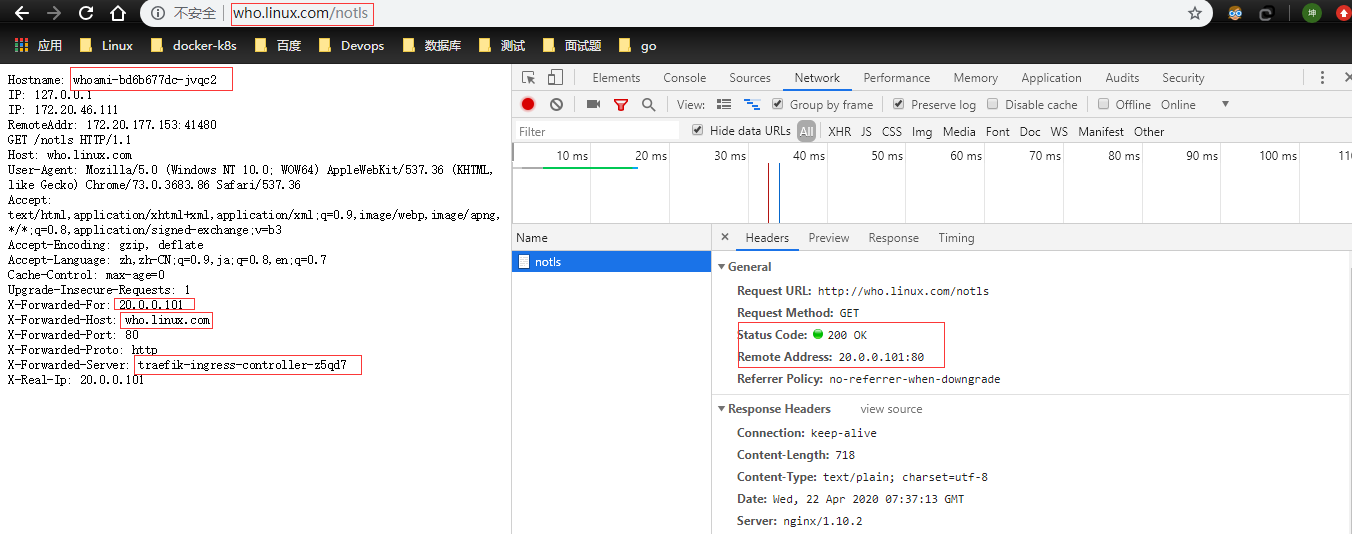
继续测试
把traefik应用给关了,然后再测试
# kubectl delete -f .

configmap "traefik-config" deleted

customresourcedefinition.apiextensions.k8s.io "ingressroutes.traefik.containo.us" deleted

customresourcedefinition.apiextensions.k8s.io "ingressroutetcps.traefik.containo.us" deleted

customresourcedefinition.apiextensions.k8s.io "middlewares.traefik.containo.us" deleted

customresourcedefinition.apiextensions.k8s.io "tlsoptions.traefik.containo.us" deleted

customresourcedefinition.apiextensions.k8s.io "traefikservices.traefik.containo.us" deleted

ingressroute.traefik.containo.us "traefik-dashboard-route" deleted

service "traefik" deleted

daemonset.apps "traefik-ingress-controller" deleted

serviceaccount "traefik-ingress-controller" deleted

clusterrole.rbac.authorization.k8s.io "traefik-ingress-controller" deleted

clusterrolebinding.rbac.authorization.k8s.io "traefik-ingress-controller" deleted
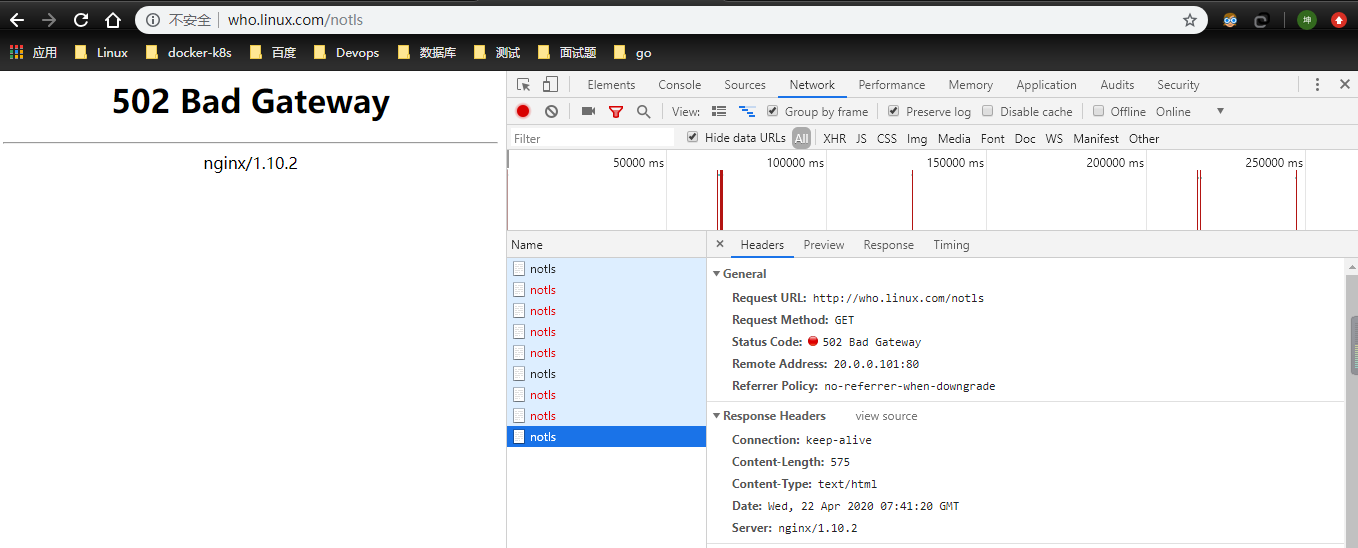
# kubectl delete -f traefik-whoami.yaml   //关闭whoami traefik代理

ingressroute.traefik.containo.us "simpleingressroute" deleted
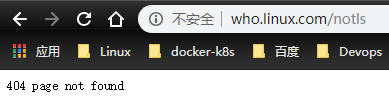
没得说了 测试结果很明确了:访问who.linux.com 流量走向:nginx-->traefik --> service 。
解决项目迁移至Kubernetes集群中的代理问题的更多相关文章
- 【转载】浅析从外部访问 Kubernetes 集群中应用的几种方式
一般情况下,Kubernetes 的 Cluster Network 是属于私有网络,只能在 Cluster Network 内部才能访问部署的应用.那么如何才能将 Kubernetes 集群中的应用 ...
- ingress-nginx 的使用 =》 部署在 Kubernetes 集群中的应用暴露给外部的用户使用
文章转载自:https://mp.weixin.qq.com/s?__biz=MzU4MjQ0MTU4Ng==&mid=2247488189&idx=1&sn=8175f067 ...
- 初试 Kubernetes 集群中使用 Traefik 反向代理
初试 Kubernetes 集群中使用 Traefik 反向代理 2017年11月17日 09:47:20 哎_小羊_168 阅读数:12308 版权声明:本文为博主原创文章,未经博主允许不得转 ...
- 在kubernetes集群中创建redis主从多实例
分类 > 正文 在kubernetes集群中创建redis主从多实例 redis-slave镜像制作 redis-master镜像制作 创建kube的配置文件yaml 继续使用上次实验环境 ht ...
- 如何在 Kubernetes 集群中玩转 Fluid + JuiceFS
作者简介: 吕冬冬,云知声超算平台架构师, 负责大规模分布式机器学习平台架构设计与功能研发,负责深度学习算法应用的优化与 AI 模型加速.研究领域包括高性能计算.分布式文件存储.分布式缓存等. 朱唯唯 ...
- 在Kubernetes集群中使用calico做网络驱动的配置方法
参考calico官网:http://docs.projectcalico.org/v2.0/getting-started/kubernetes/installation/hosted/kubeadm ...
- Kubernetes集群中Service的滚动更新
Kubernetes集群中Service的滚动更新 二月 9, 2017 0 条评论 在移动互联网时代,消费者的消费行为已经“全天候化”,为此,商家的业务系统也要保持7×24小时不间断地提供服务以满足 ...
- Kubernetes集群中Jmeter对公司演示的压力测试
6分钟阅读 背景 压力测试是评估Web应用程序性能的有效方法.此外,越来越多的Web应用程序被分解为几个微服务,每个微服务的性能可能会有所不同,因为有些是计算密集型的,而有些是IO密集型的. 基于微服 ...
- (转)在Kubernetes集群中使用JMeter对Company示例进行压力测试
背景 压力测试是评估应用性能的一种有效手段.此外,越来越多的应用被拆分为多个微服务而每个微服务的性能不一,有的微服务是计算密集型,有的是IO密集型. 因此,压力测试在基于微服务架构的网络应用中扮演着越 ...
随机推荐
- 贪心-谷歌-857. 雇佣 K 名工人的最低成本
2020-03-15 22:00:39 问题描述: 有 N 名工人. 第 i 名工人的工作质量为 quality[i] ,其最低期望工资为 wage[i] . 现在我们想雇佣 K 名工人组成一个工资组 ...
- PMP备考日记(一)
本人在今年1月份就开始有考PMP证的一个想法,结果头脑一热就报名了.本来计划今年3月份就要进行PMP考试,一直都在备考中,结果谁知道来了新冠状病毒,彻底打乱了自己的脚步.PMI也将PMP考试延迟到了今 ...
- 【转载】卸载Anaconda教程
文章来源:https://docs.continuum.io/anaconda/install/uninstall/ 卸载Anaconda 要卸载Anaconda,您可以简单地删除该程序.这将留下一些 ...
- python之路 2020/2/18
这是第一篇随笔,记录今天的内容,我不知道什么是成功,因为我没有成功过,但是,我想成功一次! python 多练吧! 一.编程语言的分类 机器语言:01001010,高低电平,计算机懂的语言. 汇编语言 ...
- [codevs1049]棋盘染色<迭代深搜>
题目链接:http://codevs.cn/problem/1049/ 昨天的测试题里没有打出那可爱的迭代深搜,所以今天就来练一练. 这道题其实我看着有点懵,拿着题我就这状态↓ 然后我偷偷瞄了一眼hz ...
- ARM.SchDoc图解
1.基准电压.CR1220电池 2.LCD 3.SPI 4.外部SAM 5.实时时钟 6.EEPROM 7.JTAG 8.复位
- 监听窗口大小变化,改变画面大小-[Three.js]-[onResize]
如果没有监听窗口变化,将会出现一下情况: ![](https://img2018.cnblogs.com/blog/1735896/202001/1735896-20200102081845027-2 ...
- 如何将 .NetFramework WebApi 按业务拆分成多个模块
在 .NetFramework 中使用 WebApi ,在不讨论 微服务 的模式下,大部分都是以层来拆分库的 : 基础设施 数据存储层 服务层 WeApi 层 一些其它的功能库 项目结构可能会像下面这 ...
- ELK 是什么?
ELK 是什么? 2018年07月04月 09:37:46 ...
- Golang笔记集
学习Golang了, 下面分享我的, 还有我收集的Golang的学习资料 我的基础笔记地址: https://github.com/zhuchangwu/go-study-notes 其他参考: Go ...