
第04项目:淘淘商城(SpringMvc+Spring+Mybatis) 的学习实践总结【第三天】
淘淘商城(SpringMVC+Spring+Mybatis) 是传智播客在2015年9月份录制的,几年过去了。由于视频里课上老师敲的代码和项目笔记有些细节上存在出入,只有根据日志报错信息作出适当的调整变更才能跑通项目。为了方便广大自学Java同仁的共同进步,我将持续更新这个网络实战项目练习的内容,着重指出符合当下开发环境下的内容勘误修订。
https://pan.baidu.com/s/1bptYGAb#list/path=%2F&parentPath=%2Fsharelink389619878-229862621083040
03.第三天(实现商品添加)

//商品分类管理

@Service

public class ItemCatServiceImpl implements ItemCatService {

    @Autowired

    private TbItemCatMapper itemCatMapper;

    @Override

    public List<EUTreeNode> getItemCatList(long parentId) {

        //使用mybatis的逆向工程生成的mapper接口和XML文件

        //因为单表查询并且非主键字段,所以用example查询

        //1.创建查询条件

        TbItemCatExample example = new TbItemCatExample();

        Criteria criteria = example.createCriteria();

        criteria.andParentIdEqualTo(parentId);

        //2.根据条件查询

        List<TbItemCat> list = itemCatMapper.selectByExample(example);

        List<EUTreeNode> resultList = new ArrayList<>();

        //把列表转换成treeNodeist

        for (TbItemCat tbItemCat : list) {

            EUTreeNode node = new EUTreeNode();

            node.setId(tbItemCat.getId());

            node.setText(tbItemCat.getName());

            node.setState(tbItemCat.getIsParent()?"closed":"open");

            resultList.add(node);

        }

        //返回最终结果

        return resultList;

    }

}
/**

  * 商品分类管理controller

 *

 */

@Controller

@RequestMapping("/item/cat")

public class ItemCatController {

    @Autowired

    private ItemCatService itemCatService;

    @RequestMapping("/list")

    @ResponseBody

    //此行底下的private和public都可以,不影响功能实现

    public List<EUTreeNode> getItemCatList(@RequestParam(value="id",defaultValue = "0")Long parentId){

        List<EUTreeNode> list = itemCatService.getItemCatList(parentId);

        return list;

    }

}
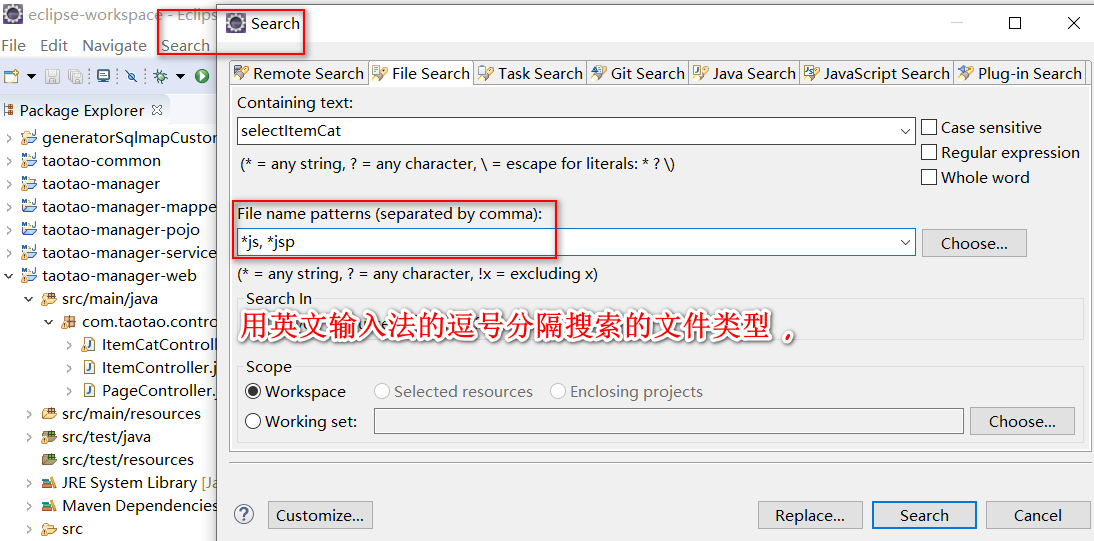
一、使用Eclipse的Search功能检索
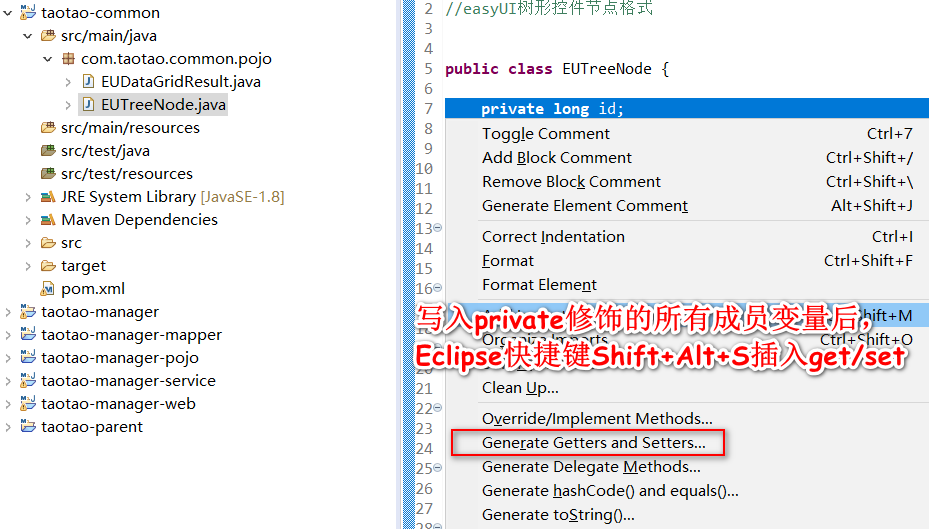
二、使用Eclipse的快捷键插入get/set方法
三、教学视频和淘淘商城-day03教案中代码的方法名称不一致性

四、图片上传服务器的搭建


Windows10操作系统下安装并使用VMware-workstation-full-15.5.0加载安装CentOS7后检查是否已安装GCC、PCRE、Zlib等实现nginx的运行环境
yum install gcc-c++安装gcc编译器
大部分Linux发行版的默认账户是普通用户,而更改系统文件或者执行某些命令,需要root身份才能进行,这就需要从当前用户切换到root用户,Linux中切换用户的命令是su -
nginx的http模块使用pcre来解析正则表达式
yum install -y pcre pcre-devel
zlib库提供了很多种压缩和解压缩的方式,nginx使用zlib对http包的内容进行gzip
yum install -y zlib zlib-devel
nginx不仅支持http协议,还支持https(即在ssl协议上传输http),所以需要在linux安装openssl库。
yum install -y openssl openssl-devel
五、Linux系统下的基本操作与Nginx的安装配置
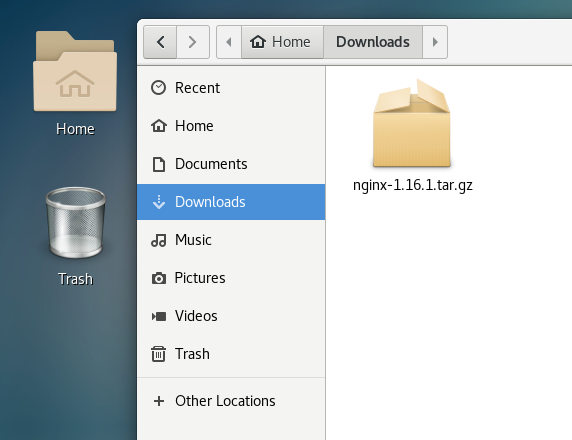
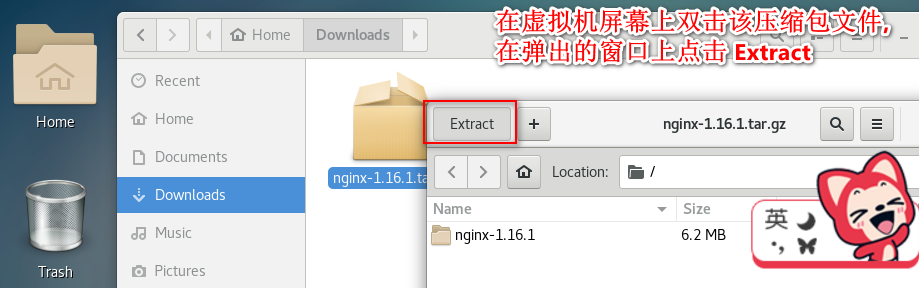
文件夹的新建可以用GUI实现,nginx-1.16.1.tar的解压可以命令行也可以用图形化界面操作完成。
tar -zxvf nginx-1.16..tar.gz

cd nginx-1.16.
把nginx-1.16.1.tar.gz复制到Downloads目录下,解压该压缩文件到默认的当前目录,点击Extract执行。
注意:下边将临时文件目录指定为/var/temp/nginx,需要在/var下创建temp及nginx目录
cd /var

mkdir temp

cd /var/temp

mkdir nginx

参考技术博客: Linux系统下文件夹的新建与删除操作
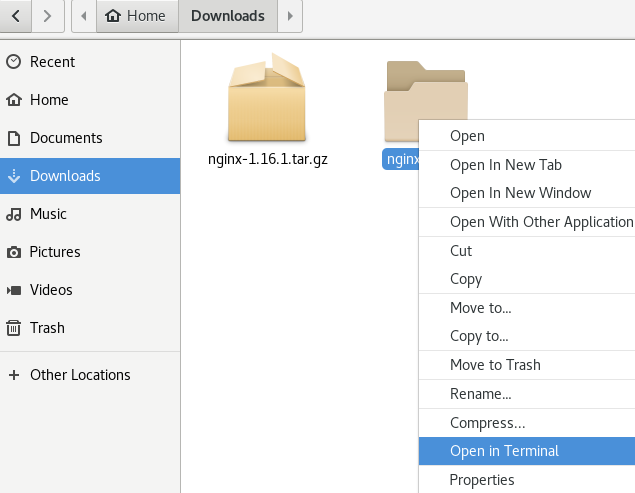
选中nginx-1.16.1文件夹,右键单击在弹出菜单上选择open in Terminal
su -
cd /home/kangmianfeng/Downloads/nginx-1.16.1
在命令行里复制下面的nginx安装默认配置信息如下:
./configure \

--prefix=/usr/local/nginx \

--pid-path=/var/run/nginx/nginx.pid \

--lock-path=/var/lock/nginx.lock \

--error-log-path=/var/log/nginx/error.log \

--http-log-path=/var/log/nginx/access.log \

--with-http_gzip_static_module \

--http-client-body-temp-path=/var/temp/nginx/client \

--http-proxy-temp-path=/var/temp/nginx/proxy \

--http-fastcgi-temp-path=/var/temp/nginx/fastcgi \

--http-uwsgi-temp-path=/var/temp/nginx/uwsgi \

--http-scgi-temp-path=/var/temp/nginx/scgi
编译安装
make

make  install
安装成功查看安装目录 :
cd /usr/local/nginx
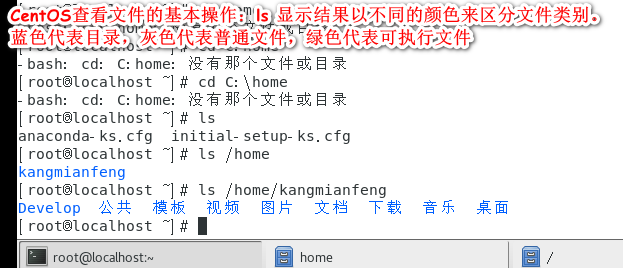
ls


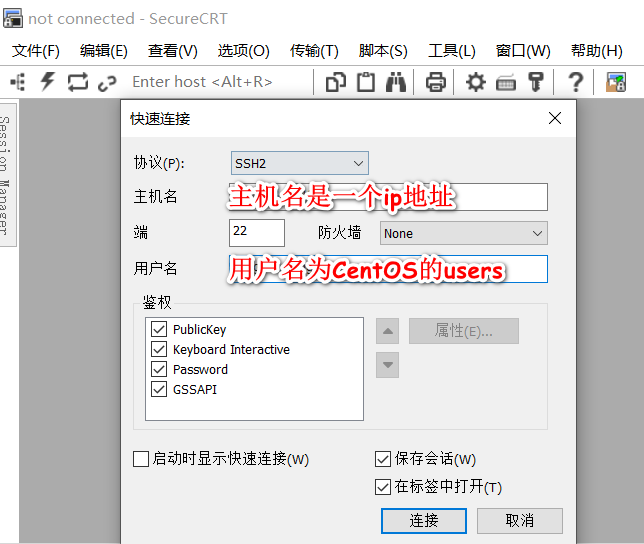
SecureCRT用来在Windows环境下远程登录Linux服务器的SSH连接配置
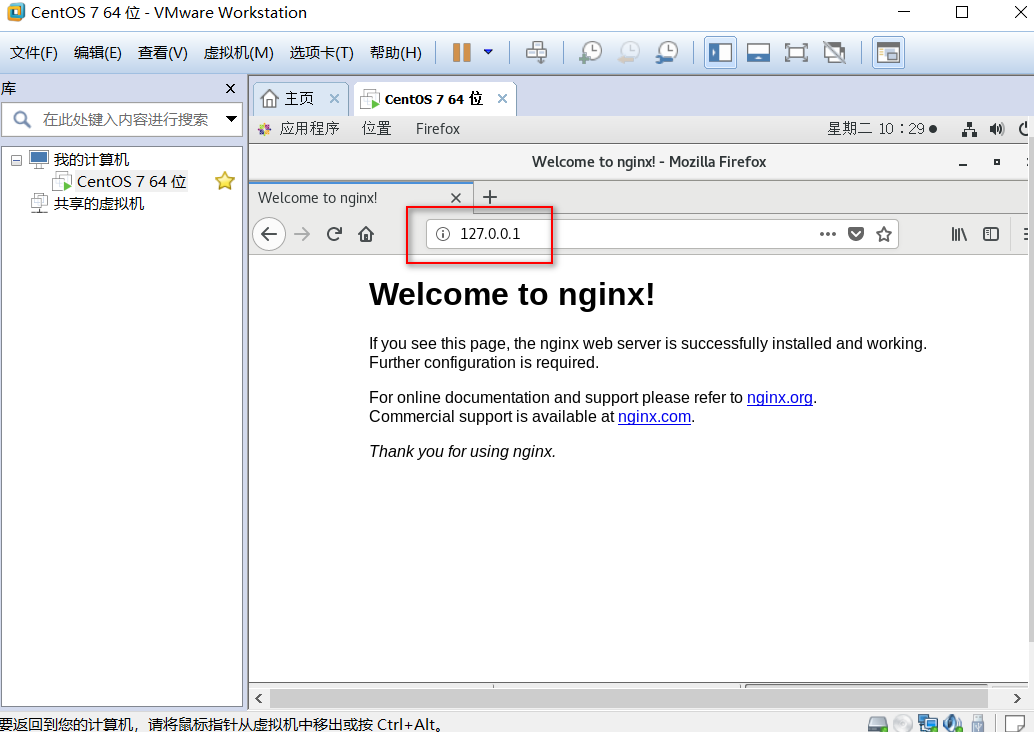
nginx安装成功,启动nginx,即可访问虚拟机上的nginx:
本教程中的nginx安装位置

cd /usr/local/nginx/sbin/
./nginx
VMware运行CentOS重启虚拟机后,启动Nginx报错"/var/run/nginx/nginx.pid" failed (2: No such file or directory)解决方法
注意:执行./nginx启动nginx,这里可以-c指定加载的nginx配置文件,如下:
./nginx -c /usr/local/nginx/conf/nginx.conf
#复制一份默认的配置文件重新命名为:taotao-nginx.conf
cp /usr/local/nginx/conf/nginx.conf /usr/local/nginx/conf/taotao-nginx.conf#在taotao-nginx.conf定义图片HTTP服务器的反向代理路由规则,修改文件需要root权限
#chmod 777使得所有用户可以读写和执行该文件
chmod777 /usr/local/nginx/conf/taotao-nginx.conf
      location / {

            root   /home/ftpuser/www;

            index  index.html index.htm;

}用命令进入你的站点根目录
cd /home/ftpuser/www
然后输入指令
chmod a+w .四种解决Nginx出现403 forbidden 报错的方法
在访问的根目录下要有index.html否则会报403错误
六、 vsftpd服务在CentOS 7中的安装、配置、使用
在VMware14虚拟机的CentOS 7系统中,安装与配置vsftpd【Linux安装ftp组件】
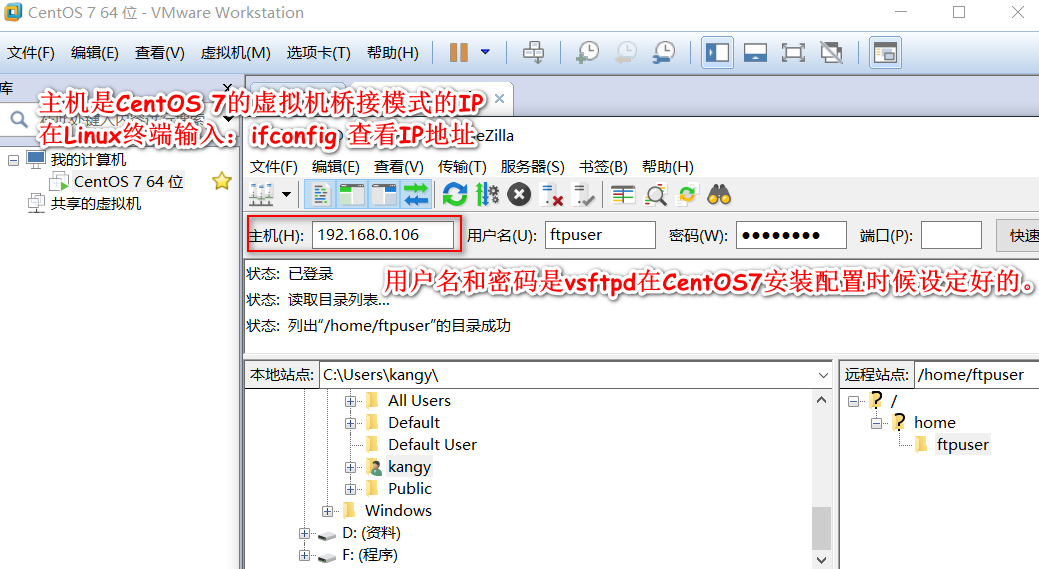
FileZilla Client 成功的连接到Linux主机的vsftpd服务如图所示:
七 、SELinux 全称是Security Enhanced Linux,关掉SELinux,并重启系统让其生效。
修改/etc/selinux/config配置文件,设置SELINUX=disabled
vim /etc/selinux/config
查看SELINUX状态的命令:
sestatus
八、 关闭CentOS 7的默认防火墙或者切换到iptables防火墙
先进行Linux防火墙设置
CentOS7默认使用的是firewall作为防火墙,这里改为iptables防火墙
1、关闭firewall:
systemctl stop firewalld.service #停止firewall

systemctl disable firewalld.service #禁止firewall开机启动
2、安装iptables防火墙
yum install iptables-services #安装
3、修改文件配置允许80端口
vi /etc/sysconfig/iptables #编辑防火墙配置文件
按i进入文本编辑 在原文档中找到
-A INPUT -m state –state NEW -m tcp -p tcp –dport 22 -j ACCEPT
在该行下面添加
-A INPUT -m state –state NEW -m tcp -p tcp –dport 80 -j ACCEPT
:wq! #保存退出
systemctl restart iptables.service #最后重启防火墙使配置生效
systemctl enable iptables.service #设置防火墙开机启动
systemctl restart network
systemctl stop NetworkManager
systemctl disable NetworkManager
systemctl start network.service
九 、FTPclient上传组件的使用
        <dependency>

            <groupId>commons-net</groupId>

            <artifactId>commons-net</artifactId>

        </dependency>
    @Test

    public void testFtpClient() throws Exception {

        //创建一个FtpClient对象

        FTPClient ftpClient = new FTPClient();

        //1.创建FTP连接。

        ftpClient.connect("192.168.179.128", 21);

        //2.登录FTP服务器,使用用户名和密码

        ftpClient.login("ftpuser", "taotaoftp");

        //读取本地文件

        File file = new File("F:\\aky.png");

        FileInputStream inputStream = new FileInputStream(file);

        //3.设置上传的路径

        ftpClient.changeWorkingDirectory("/home/ftpuser/www/images");

        //4.修改上传文件的格式、方法的形参是枚举enum

        ftpClient.setFileType(FTP.BINARY_FILE_TYPE);

        //5.执行上传文件

        //第一个参数:服务器端文件名

        //第二个参数:上传文件的inputStream

        ftpClient.storeFile("hello.png", inputStream);

        //关闭连接

        ftpClient.logout();

    }
    //测试FtpUtil工具类的使用

    @Test

    public void testFtpUtil() throws Exception {

        // 读取本地文件

        FileInputStream inputStream = new FileInputStream(new File("F:\\aky.png"));

        // 实用工具类

        FtpUtil.uploadFile("192.168.179.128", 21, "ftpuser", "taotaoftp", "/home/ftpuser/www/images", "/2019",

                "hello2.png", inputStream);

    }
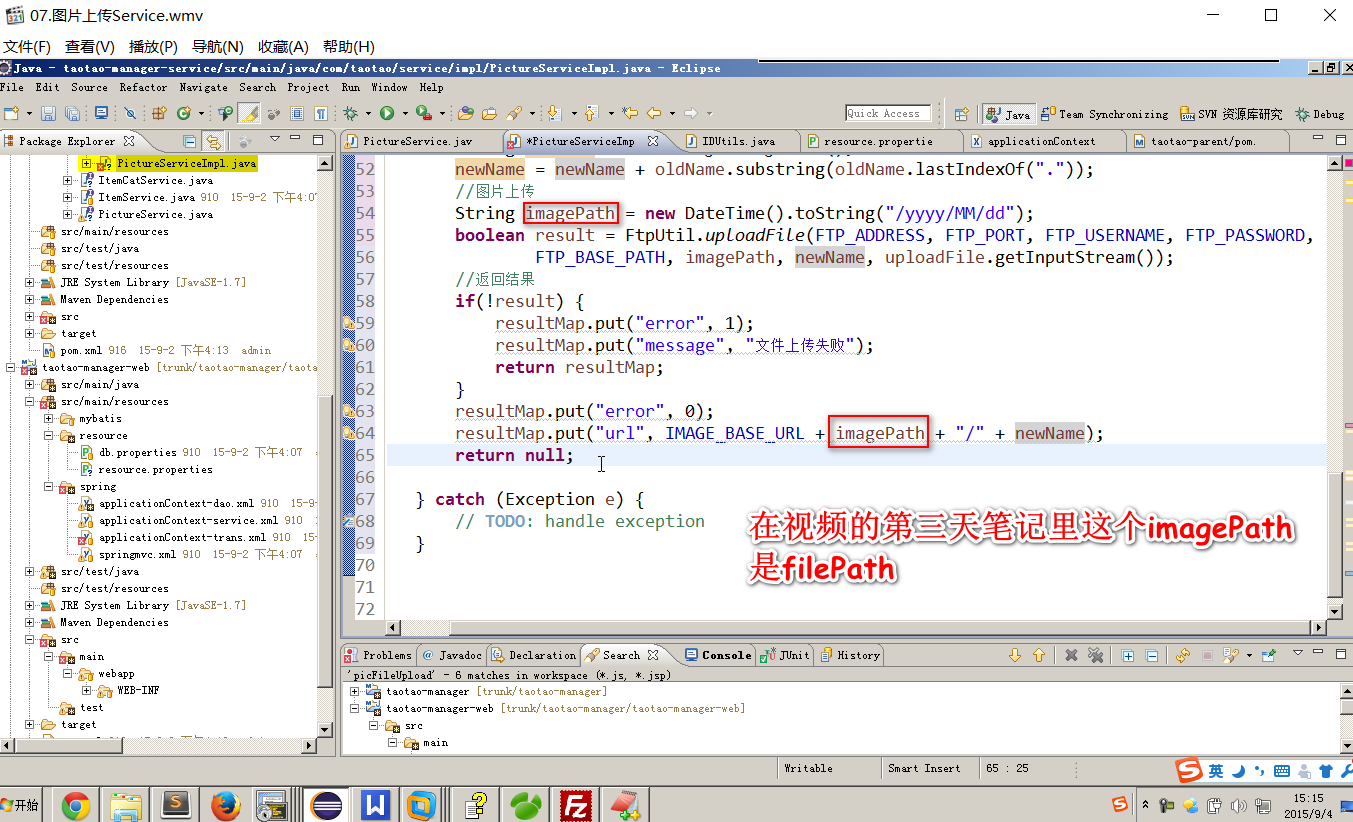
十、PictureServiceImpl 的视频和笔记代码变量名不一致的小细节
package com.taotao.common.pojo;

/**

 * 上传图片的返回结果

 */

public class PictureResult {

    private int error;

    private String url;

    private String message;

    private PictureResult(int error, String url, String message) {

        this.error = error;

        this.url = url;

        this.message = message;

    }

    //成功时调用的方法

    public static PictureResult ok(String url) {

        return new PictureResult(0, url, null);

    }

    //失败时调用的方法

    public static PictureResult error(String message) {

        return new PictureResult(1, null, message);

    }

    public int getError() {

        return error;

    }

    public void setError(int error) {

        this.error = error;

    }

    public String getUrl() {

        return url;

    }

    public void setUrl(String url) {

        this.url = url;

    }

    public String getMessage() {

        return message;

    }

    public void setMessage(String message) {

        this.message = message;

    }

}
public static PictureResult
import com.taotao.common.pojo.PictureResult;

import com.taotao.common.utils.FtpUtil;

import com.taotao.common.utils.IDUtils;

import com.taotao.service.PictureService;

@Service

public class PictureServiceImpl implements PictureService {

    //用@Value注解取出.properties配置文件中的值

    @Value("${FTP_ADDRESS}")

    private String FTP_ADDRESS;

    @Value("${FTP_PORT}")

    private Integer FTP_PORT;

    @Value("${FTP_USER_NAME}")

    private String FTP_USER_NAME;

    @Value("${FTP_PASSWORD}")

    private String FTP_PASSWORD;

    @Value("${FTP_BASE_PATH}")

    private String FTP_BASE_PATH;

    @Value("${IMAGE_BASE_URL}")

    private String IMAGE_BASE_URL;

    @Override

    public PictureResult uploadPicture(MultipartFile uploadFile) {

        //判断上传图片是否为空

        if (null == uploadFile || uploadFile.isEmpty()) {

            return PictureResult.error("上传图片为空");

        }

        //取文件扩展名

        String originalFilename = uploadFile.getOriginalFilename();

        String ext = originalFilename.substring(originalFilename.lastIndexOf("."));

            //生成新文件名可以是时间+随机数生成

            // 取原始文件名

            String oldName  = uploadFile.getOriginalFilename();

            // 生成新文件名

            String newName = IDUtils.genImageName();

            newName = newName + oldName.substring(oldName.lastIndexOf("."));

            // 图片上传到FTP服务器

            //文件在服务器的存放路径,应该使用日期分隔的目录结构

            DateTime dateTime = new DateTime();

            String imagePath = dateTime.toString("/yyyy/MM/dd");

            try {

            FtpUtil.uploadFile(FTP_ADDRESS, FTP_PORT, FTP_USER_NAME, FTP_PASSWORD, FTP_BASE_PATH, imagePath,newName, uploadFile.getInputStream());

            } catch (Exception e) {

                e.printStackTrace();

                return PictureResult.error("上传图片失败");

            }

            //返回结果,生成一个可以访问到图片的url返回

            return PictureResult.ok (IMAGE_BASE_URL+ imagePath +"/"+ newName);

    }

}
<!-- 文件上传组件 -->
<dependency>
<groupId>commons-fileupload</groupId>
<artifactId>commons-fileupload</artifactId>
</dependency>还需要在springmvc.xml配置多部件解析器:
<?xml version="1.0" encoding="UTF-8"?>

<beans xmlns="http://www.springframework.org/schema/beans"

    xmlns:xsi="http://www.w3.org/2001/XMLSchema-instance"

    xmlns:p="http://www.springframework.org/schema/p"

    xmlns:context="http://www.springframework.org/schema/context"

    xmlns:mvc="http://www.springframework.org/schema/mvc"

    xsi:schemaLocation="http://www.springframework.org/schema/beans http://www.springframework.org/schema/beans/spring-beans.xsd

        http://www.springframework.org/schema/mvc http://www.springframework.org/schema/mvc/spring-mvc-4.0.xsd

        http://www.springframework.org/schema/context http://www.springframework.org/schema/context/spring-context.xsd">

    <!-- 扫描controller的注解,别的不扫描 -->

    <context:component-scan

        base-package="com.taotao.controller" />

    <!--开启对SpringMVC注解的支持:处理器映射器,处理器适配器 -->

    <mvc:annotation-driven />

    <!-- 配置视图解析器 -->

    <bean id="viewResolver"

        class="org.springframework.web.servlet.view.InternalResourceViewResolver">

        <property name="prefix" value="/WEB-INF/jsp/" />

        <property name="suffix" value=".jsp" />

    </bean>

    <!-- 不拦截释放静态资源的映射 -->

    <mvc:resources location="/WEB-INF/js/"  mapping="/js/**" />

    <mvc:resources location="/WEB-INF/css/" mapping="/css/**" />

    <mvc:resources location="/WEB-INF/img/" mapping="/img/**" />

    <mvc:resources location="/WEB-INF/plugins/" mapping="/plugins/**" />

    <!-- 定义文件上传解析器 -->

    <bean id="multipartResolver"

        class="org.springframework.web.multipart.commons.CommonsMultipartResolver">

        <!-- 设定默认编码 -->

        <property name="defaultEncoding" value="UTF-8"></property>

        <!-- 设定文件上传的最大值5MB,5*1024*1024 -->

        <property name="maxUploadSize" value="5242880"></property>

    </bean>

</beans>
sprinmvc.xml
end

================================================
参考资料:
CentOS7 Failed to start LSB: Bring up/down解决方法
end
第04项目:淘淘商城(SpringMvc+Spring+Mybatis) 的学习实践总结【第三天】的更多相关文章
- 第04项目:淘淘商城(SpringMVC+Spring+Mybatis) 的学习实践总结【第二天】
淘淘商城(SpringMVC+Spring+Mybatis) 是传智播客在2015年9月份录制的,几年过去了.由于视频里课上老师敲的代码和项目笔记有些细节上存在出入,只有根据日志报错信息作出适当的调 ...
- 第04项目:淘淘商城(SpringMVC+Spring+Mybatis) 的学习实践总结【第一天】
本人做过一年的MATLAB编程和简单维护过VB和C++的项目.是跟着网上获得的黑马的Java双元视频课来自学入门Java知识和常用框架的使用. 淘淘商城(SpringMVC+Spring+Mybati ...
- 第04项目:淘淘商城(SpringMVC+Spring+Mybatis) 的学习实践总结【第六天】
https://pan.baidu.com/s/1bptYGAb#list/path=%2F&parentPath=%2Fsharelink389619878-229862621083040 ...
- 第04项目:淘淘商城(SpringMVC+Spring+Mybatis) 的学习实践总结【第五天】
https://pan.baidu.com/s/1bptYGAb#list/path=%2F&parentPath=%2Fsharelink389619878-229862621083040 ...
- 第04项目:淘淘商城(SpringMVC+Spring+Mybatis) 的学习实践总结【第四天】
https://pan.baidu.com/s/1bptYGAb#list/path=%2F&parentPath=%2Fsharelink389619878-229862621083040 ...
- 第04项目:淘淘商城(SpringMVC+Spring+Mybatis)【第十天】(单点登录系统实现)
https://pan.baidu.com/s/1bptYGAb#list/path=%2F&parentPath=%2Fsharelink389619878-229862621083040 ...
- 第04项目:淘淘商城(SpringMVC+Spring+Mybatis)【第九天】(商品详情页面实现)
https://pan.baidu.com/s/1bptYGAb#list/path=%2F&parentPath=%2Fsharelink389619878-229862621083040 ...
- 第04项目:淘淘商城(SpringMVC+Spring+Mybatis)【第八天】(solr服务器搭建、搜索功能实现)
https://pan.baidu.com/s/1bptYGAb#list/path=%2F&parentPath=%2Fsharelink389619878-229862621083040 ...
- 第04项目:淘淘商城(SpringMVC+Spring+Mybatis)【第七天】(redis缓存)
https://pan.baidu.com/s/1bptYGAb#list/path=%2F&parentPath=%2Fsharelink389619878-229862621083040 ...
随机推荐
- 人人嫌丑的iPhoneX刘海屏为何会被手机厂商竞相模仿
不得不提到的是,苹果的iPhone自发布以来就始终引领着智能手机发展的方向.比如iPhone一代出现之后,就慢慢将键盘手机赶下历史舞台,让触屏手机成为主流.此外,iPhone的指纹识别.金属机身.玻璃 ...
- cd oldpwd
常用方式 环境变量OLDPWD表示前一次的当前目录.刚登录系统之后,这个变量是没有设置的. 环境变量PWD表示当前目录. 环境变量CDPATH用来指定cd命令的搜索路径,类似于PATH,它也是用:分隔 ...
- 花了一周整理的,这是价值10W的32个Python项目!
今天为大家整理了32个Python爬虫项目.整理的原因是,爬虫入门简单快速,也非常适合新入门的小伙伴培养信心.所有链接指向GitHub,祝大家玩得愉快~QQSpider ! QQ空间爬虫,包括日志.说 ...
- PAT Advanced 1151 LCA in a Binary Tree (30) [树的遍历,LCA算法]
题目 The lowest common ancestor (LCA) of two nodes U and V in a tree is the deepest node that has both ...
- JavaBean和json数据之间的转换(一)简单的JavaBean转换
1.为什么要使用json? JSON(JavaScript Object Notation) 是一种轻量级的数据交换格式,因为其高性能.可读性强的原因,成为了现阶段web开发中前后端交互数据的主要数据 ...
- openstack trove mongodb配置项
systemLog.verbosity 组件的默认日志消息详细程度级别. 详细程度级别决定MongoDB输出的信息和调试消息量. 详细级别可以在0到5之间: 0是MongoDB的默认日志详细程度级别, ...
- Java 语言特性【一】——JUC(Java 并发工具包)
引言 JUC即java.util.concurrent,是java提供的用于多线程处理的工具类库.重点关注 ConcurrentXXX.AtomicXXX.Executor.Caller&&a ...
- aliyun服务器lamp配置
1.安装Apache:yum install httpd 2.安装php: yum install php 3.安装mysql客户端:yum install mysql 4.安装mysql服务端:yu ...
- javascript函数柯里化初探
// 柯里化之前 function add(x,y,z){ return x+y+z; } add(1,2,3) // 6 // 柯里化之后 function curryAdd(x){ return ...
- Tutorial: Create a Blinky ARM test project(创建一个闪灯的arm测试项目)
Background ref : Tutorial: Create a Blinky ARM test project If you are new to ARM development, it is ...