
个人安装GO1.13.6版本指南手册之搭建环境
因好奇而走进go语言,让你不在只闻其声,不见其形。
https://golang.org/doc/install;这里是go语言的官网文档。吃不透英文,终究会被限制在有限的区域,一词词的吃透。
安装包下载地址为:https://golang.org/dl/。
如果打不开可以使用这个地址:https://golang.google.cn/dl/。https://golang.google.cn/doc/install。
想了想,具体步骤就不提了,英文内容够全了。
说一下关于SettingGOPATH的中外差别:
就像原文所说,“ If no GOPATH is set, it is assumed to be $HOME/go on Unix systems and %USERPROFILE%\go on Windows.”
那么这个GOPATH居然是在环境变量的用户变量中;
那么,原文中:
Your workspace can be located wherever you like, but we'll use C:\go-work in this example.
NOTE: GOPATH must not be the same path as your Go installation.
- Create folder at
C:\go-work. - Right click on "Start" and click on "Control Panel". Select "System and Security", then click on "System".
- From the menu on the left, select the "Advanced systems settings".
- Click the "Environment Variables" button at the bottom.
- Click "New" from the "User variables" section.
- Type
GOPATHinto the "Variable name" field. - Type
C:\go-workinto the "Variable value" field. - Click OK.
这段就是说将GOPATH这个环境变量的值由原来的%USERPROFILE%\go替换为你的go工作空间的目录。保存环境变量更改后,记得重启电脑是其生效(win10)。
原文中是这样使test.go生效的并测试的:
Check that Go is installed correctly by setting up a workspace and building a simple program, as follows.
Create your workspace directory, %USERPROFILE%\go. (If you'd like to use a different directory, you will need to set the GOPATH environment variable.)
Next, make the directory src\hello inside your workspace, and in that directory create a file named hello.go that looks like:
package main

import "fmt"

func main() {

	fmt.Printf("hello, world\n")

}
Then build it with the go tool:
C:\> cd %USERPROFILE%\go\src\hello

C:\Users\Gopher\go\src\hello> go build
The command above will build an executable named hello.exe in the directory alongside your source code. Execute it to see the greeting:
C:\Users\Gopher\go\src\hello> hello

hello, world
If you see the "hello, world" message then your Go installation is working.
You can run go install to install the binary into your workspace's bin directory or go clean -i to remove it.
Before rushing off to write Go code please read the How to Write Go Code document, which describes some essential concepts about using the Go tools.
但是,按旧有方式,还可在终端执行:go run hello.go
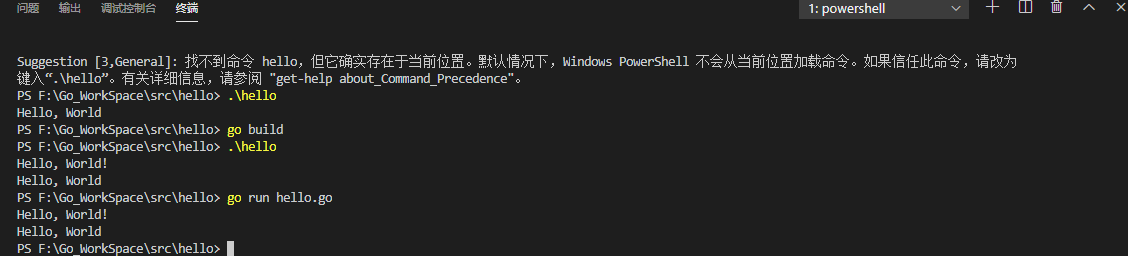
使用原文中的生成hello.exe文件得使用当前目录相对路径执行hello.exe这种方式。
更新:
1. 因为go version >= 1.13,所以go env -w GO111MODULE=on修改相应依赖模式,go env查看
个人安装GO1.13.6版本指南手册之搭建环境的更多相关文章
- 【linux】【Go】Centos7安装go1.13环境
前言 Go(又称Golang)是Google开发的一种静态强类型.编译型.并发型,并具有垃圾回收功能的编程语言. 罗伯特·格瑞史莫(Robert Griesemer),罗勃·派克(Rob Pi ...
- centos7.5上安装go1.13.4
一.安装 1.下载go1.13.4.linux-amd64.tar.gz 先进入官网https://golang.google.cn/ 再 https://golang.google.cn/doc/i ...
- 升级安装go1.13.5
运行文件时报错 verifying github.com/mattn/go-isatty@v0.0.10-0.20190818123653-bf9a1dea1961/go.mod: github.co ...
- 黑苹果之DELL台式机安装Mac OS X 10.13.6版本操作系统
由于本人所在的公司一般都是DELL的品牌台式机,所以以DELL台式机做小白鼠.记得在2012年的时候,在当时的那家公司为了学习自学IOS开发的Objective-C开发语言的时候,由于囊中羞涩买不起m ...
- docker探索-CentOS7中配置Docker的yum源并升级安装docker1.13(十)
此处使用的是CentOS7,内核版本为 [root@localhost ~]# uname -r -.el7.x86_64 该版本下,配置了yum的源为阿里的镜像源,具体的配置方法可以参见阿里镜像源配 ...
- Kubernetes 1.13 的完整部署手册
前言: 非常详细的K8s的完整部署手册,由于Kubernetes版本和操作系统的版本关系非常敏感,部署前请查阅版本关系对应表 地址:https://github.com/kubernetes/kube ...
- atitit.api设计 方法 指南 手册 v2 q929.docx
atitit.api设计 方法 指南 手册 v2 q929.docx atitit.api设计原则与方法 1. 归一化(锤子钉子理论)1 1.1. 链式方法2 1.2. 规则5:建立返回值类型2 1. ...
- VMware上安装ubuntu 13.04
作者:viczzx 出处:http://www.cnblogs.com/zixuan-zhang 欢迎转载,也请保留这段声明.谢谢! 这两天打算在Linux环境下学Python语言,想换个高点的ubu ...
- ROS(indigo) 安装和使用更新版本的Gazebo----3,4,5,6,7 附:中国机器人大赛中型组仿真比赛说明
ROS(indigo) 安装和使用更新版本的Gazebo,本文以7为例. Gazebo7支持更多新的功能,如果使用下面命令安装ROS(indigo): ~$ sudo apt-get install ...
随机推荐
- 杭电oj1860:统计字符(字符串hash / 水题)
统计字符 题目链接 Time Limit: 1000/1000 MS (Java/Others) Memory Limit: 32768/32768 K (Java/Others) Problem D ...
- 011-PHP获取数组中的元素
<?php $monthName = array( /*定义$monthName[1]到$monthName[12]*/ 1=>"January", "Feb ...
- excel表格数据导入导出
/** * 导出数据到excel表格 * Created by shenjianhua on 2018-12-28 */ package com.luer.comm.excel; import jav ...
- hadoop安装文档
一.准备 该准备工作在三台机器上都需要进行,首先使用 vmvare 创建 1 个虚拟机,这台虚拟机是 master,一会需要把 master 克隆出两台 slave 点确定然后开启此虚拟机 然后添加/ ...
- NIO 聊天室代码实现
服务器端 package com.ronnie.nio.groupChat; import java.io.IOException; import java.net.InetSocketAddress ...
- ubuntu18.04下载yarn
下载curl sudo apt-get update && sudo apt-get install curl 配置库 curl -sS https://dl.yarnpkg.com/ ...
- 吴裕雄--天生自然java开发常用类库学习笔记:大数操作
import java.math.* ; class MyMath{ public static double add(double d1,double d2){ // 进行加法计算 BigDecim ...
- JPA#OneToOne
无力吐槽. 一对一,一个人有一个身份证号码.一个人有一条命,类似于这一种的就是一对一的关系. 涉及到的注解两个: OneToOne JoinColumn( name="当前实体对应数据库表中 ...
- <强化学习>无模型下计算给定策略对应的价值函数,Model free Prediction,评估一个给定策略的表现
一.Intro Prediction只是评估给定策略的表现,直白的说它是找 “在环境ENV下,AGENT按照给定的策略pai,AGENT的价值函数”. 这篇blog只介绍三种计算方法,没有涉及到 “求 ...
- 七十五、SAP中数据库的使用SQL
一.在SAP中可以使用两张数据库,一直是NativeSQL和OPEN SQL. Native SQL(本地SQL)特点: 1.每种关系型数据库都有其对应的 SQL,是数据库相关的. 2.不同的 SA ...