
identityserver4源码解析_2_元数据接口
目录
- IdentityServer4源码解析_1_项目结构
- IdentityServer4源码解析_2_元数据接口
- IdentityServer4源码解析_3_认证接口
- IdentityServer4源码解析_4_令牌发放接口
- IdentityServer4源码解析_5_查询用户信息接口
- [IdentityServer4源码解析_6_结束会话接口]
- [IdentityServer4源码解析_7_查询令牌信息接口]
- [IdentityServer4源码解析_8_撤销令牌接口]
协议
这一系列我们都采用这样的方式,先大概看下协议,也就是需求描述,然后看idsv4怎么实现的,这样可以加深理解。
元数据接口的协议地址如下:
摘要
该协议定义了一套标准,用户能够获取到oidc服务的基本信息,包括OAuth2.0相关接口地址。
Webfinger - 网络指纹
先了解一下Webfinger这个概念。
WebFinger可以翻译成网络指纹,它定义了一套标准,描述如何通过标准的HTTP方法去获取网络实体的资料信息。WebFinger使用JSON来描述实体信息。
查询oidc服务元数据 - OpenID Provider Issuer Discovery
可选协议。
定义了如何获取oidc服务元数据。如果客户端明确知道oidc服务的地址,可以跳过此部分。
个人理解是存在多个oidc服务的情况,可以部署一个webfinger服务,根据资源请求,路由到不同的oidc服务。
通常来说,我们只有一个oidc服务,我看了一下idsv4也没有实现这一部分协议,这里了解一下就可以了。
查询oidc服务配置信息 - OpenID Provider Configuration Request
必选协议。
用于描述oidc服务各接口地址及其他配置信息。
  GET /.well-known/openid-configuration HTTP/1.1

  Host: example.com
必须校验issuer与请求地址是否一致
启个idsrv服务调用试一下,返回结果如图
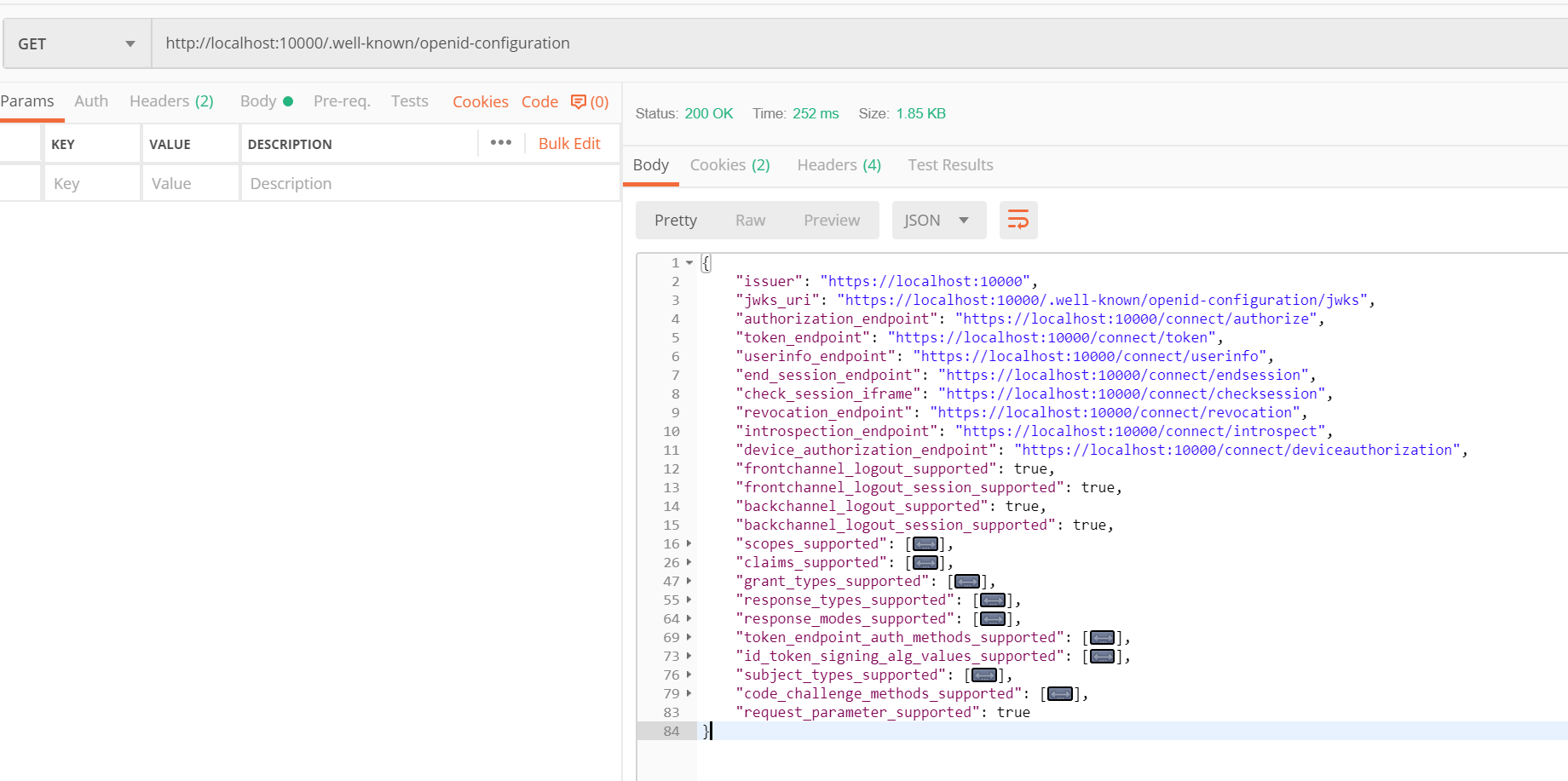
详细信息如下。
{

    "issuer": "https://localhost:10000", //颁发者地址

    "jwks_uri": "https://localhost:10000/.well-known/openid-configuration/jwks", //jwks接口地址,查询密钥

    "authorization_endpoint": "https://localhost:10000/connect/authorize", //认证接口地址

    "token_endpoint": "https://localhost:10000/connect/token", //令牌发放接口

    "userinfo_endpoint": "https://localhost:10000/connect/userinfo", //查询用户信息接口

    "end_session_endpoint": "https://localhost:10000/connect/endsession", //结束会话接口

    "check_session_iframe": "https://localhost:10000/connect/checksession", //检查会话接口

    "revocation_endpoint": "https://localhost:10000/connect/revocation", //撤销令牌接口

    "introspection_endpoint": "https://localhost:10000/connect/introspect", //查询令牌详情接口

    "device_authorization_endpoint": "https://localhost:10000/connect/deviceauthorization", //设备认证接口

    "frontchannel_logout_supported": true, //是否支持前端登出

    "frontchannel_logout_session_supported": true, //是否支持前端结束会话

    "backchannel_logout_supported": true, //是否支持后端登出

    "backchannel_logout_session_supported": true, //是否支持后端结束会话

    "scopes_supported": [ //支持的授权范围,scope

        "openid",

        "profile",

        "userid",

        "username",

        "email",

        "mobile",

        "api",

        "offline_access" //token过期可用refresh_token刷新换取新token

    ],

    "claims_supported": [ //支持的声明

        "sub",

        "updated_at",

        "locale",

        "zoneinfo",

        "birthdate",

        "gender",

        "preferred_username",

        "picture",

        "profile",

        "nickname",

        "middle_name",

        "given_name",

        "family_name",

        "website",

        "name",

        "userid",

        "username",

        "email",

        "mobile"

    ],

    "grant_types_supported": [ //支持的认证类型

        "authorization_code", //授权码模式

        "client_credentials", //客户端密钥模式

        "refresh_token", //刷新token

        "implicit", //隐式流程, 一般用于单页应用javascript客户端

        "password", //用户名密码模式

        "urn:ietf:params:oauth:grant-type:device_code" //设备授权码

    ],

    "response_types_supported": [ //支持的返回类型

        "code", //授权码

        "token", //通行令牌

        "id_token", //身份令牌

        "id_token token", //身份令牌+统通行令牌

        "code id_token", //授权码+身份令牌

        "code token", //授权码+通行令牌

        "code id_token token" //授权码+身份令牌+通行令牌

    ],

    "response_modes_supported": [ //支持的响应方法

        "form_post", //form-post提交

        "query", //get提交

        "fragment" //fragment提交

    ],

    "token_endpoint_auth_methods_supported": [ //发放令牌接口支持的认证方式

        "client_secret_basic", //basic

        "client_secret_post" //post

    ],

    "id_token_signing_alg_values_supported": [ //身份令牌加密算法

        "RS256"

    ],

    "subject_types_supported": [

        "public"

    ],

    "code_challenge_methods_supported": [

        "plain",

        "S256"

    ],

    "request_parameter_supported": true

}
JWK - Json Web Keys
idsv还注入这样一个接口:DiscoveryKeyEndpoint,尝试发现返回了一组密钥。协议内容如下。
GET /.well-known/openid-configuration/jwks,返回结果如下
{

    "keys": [

        {

            "kty": "RSA",

            "use": "sig",

            "kid": "LS-EQOr-3BkalkkUVh8q7Q",

            "e": "AQAB",

            "n": "08BLLaTz4JrTYmE4bZ9c7oKVrZKLy3KfGT5mmnslhl41nk_EV_8OUdL8wMXunC2KERdnsy5XYk4aw3LlvxZDIvjxO9PEblPsoap-WErdi9GVyAv-NJ6eJQy3S7FRSkvzQYBsLnCKm5wu0kjdQBVUCFJ7wfiZ9ayY7pH7K10qN2Utvt-qsCLUy0cJ0StuP_rquefp7_XhUw3A8IIA8P6DjfZIbpwrVjOeVWoI_ZKIwfxShghOAKBDLyQuC2PhozsqZ7HvGEeAPm06YPMWQVbE9_LBn2j_Ul_VBUWc9KfBNOzk_BMQHyF2NUlwMtqMUEcwK_hpjEeo62O_aFT8EDkgcQ",

            "alg": "RS256"

        },

        {

            "kty": "RSA",

            "use": "sig",

            "kid": "LS-EQOr-3BkalkkUVh8q7Q",

            "e": "AQAB",

            "n": "08BLLaTz4JrTYmE4bZ9c7oKVrZKLy3KfGT5mmnslhl41nk_EV_8OUdL8wMXunC2KERdnsy5XYk4aw3LlvxZDIvjxO9PEblPsoap-WErdi9GVyAv-NJ6eJQy3S7FRSkvzQYBsLnCKm5wu0kjdQBVUCFJ7wfiZ9ayY7pH7K10qN2Utvt-qsCLUy0cJ0StuP_rquefp7_XhUw3A8IIA8P6DjfZIbpwrVjOeVWoI_ZKIwfxShghOAKBDLyQuC2PhozsqZ7HvGEeAPm06YPMWQVbE9_LBn2j_Ul_VBUWc9KfBNOzk_BMQHyF2NUlwMtqMUEcwK_hpjEeo62O_aFT8EDkgcQ",

            "alg": "RS256"

        }

    ]

}
源码解析
接口地址都在Constants.cs这个文件,ProtocalRoutePaths这个类里面定义的。现在知道为什么接口地址是.well-known/openid-configuration这样奇怪的一个路由了,这是oidc协议定的(对,都是产品的锅)。
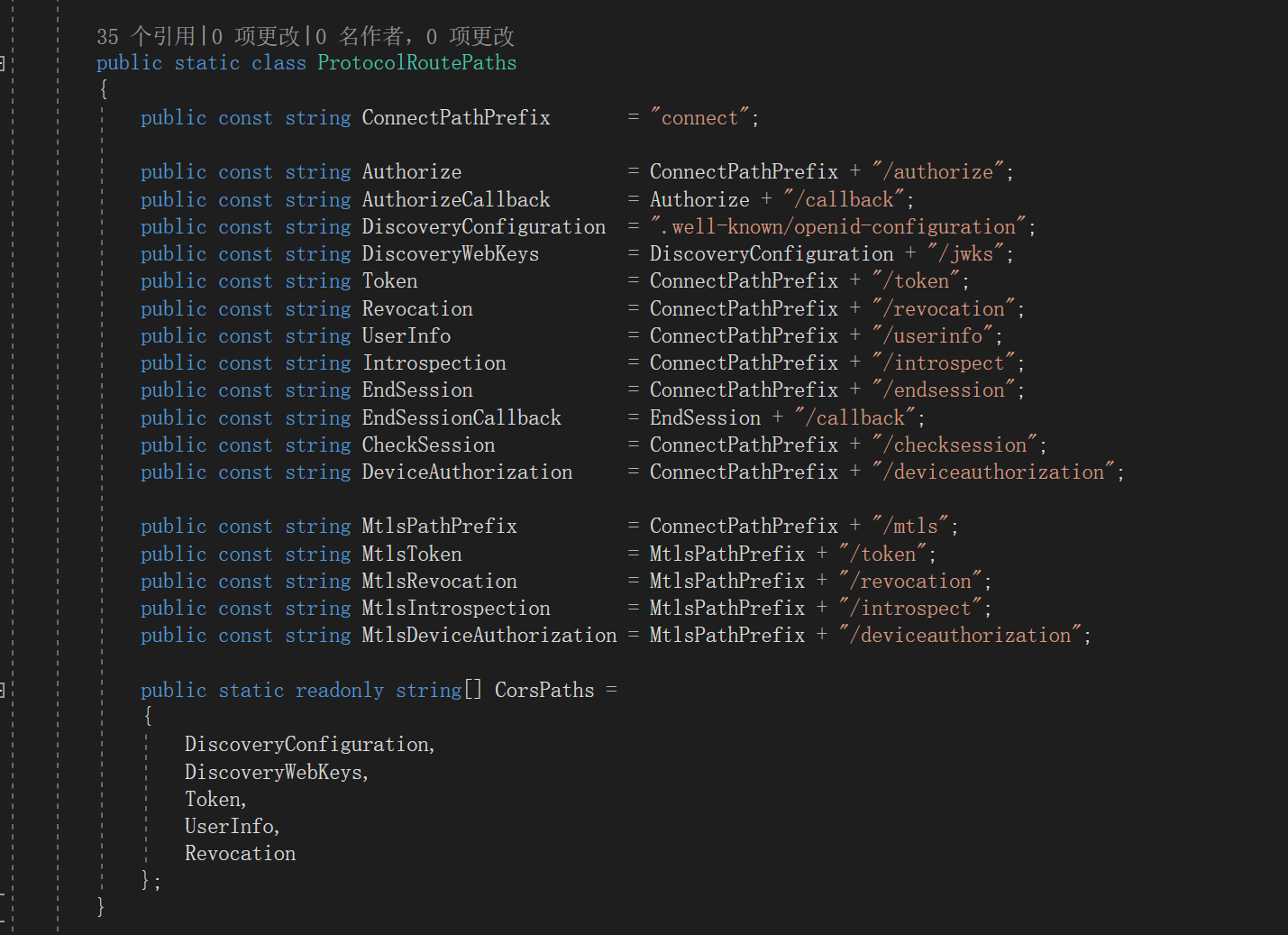
oidc服务配置信息接口 - DiscoveryEndpoint
代码很长,但是逻辑很简单,就是组装协议规定的所有地址和信息。
需要注意的支持的claims、支持的scope等信息是遍历所有IdentityResource、ApiResource动态获取的。
基本上每个接口都可以配置是否显示在元数据文档中。
public async Task<IEndpointResult> ProcessAsync(HttpContext context)

{

    _logger.LogTrace("Processing discovery request.");

    // validate HTTP

    if (!HttpMethods.IsGet(context.Request.Method))

    {

        _logger.LogWarning("Discovery endpoint only supports GET requests");

        return new StatusCodeResult(HttpStatusCode.MethodNotAllowed);

    }

    _logger.LogDebug("Start discovery request");

    if (!_options.Endpoints.EnableDiscoveryEndpoint)

    {

        _logger.LogInformation("Discovery endpoint disabled. 404.");

        return new StatusCodeResult(HttpStatusCode.NotFound);

    }

    var baseUrl = context.GetIdentityServerBaseUrl().EnsureTrailingSlash();

    var issuerUri = context.GetIdentityServerIssuerUri();

    // generate response

    _logger.LogTrace("Calling into discovery response generator: {type}", _responseGenerator.GetType().FullName);

    var response = await _responseGenerator.CreateDiscoveryDocumentAsync(baseUrl, issuerUri);

    return new DiscoveryDocumentResult(response, _options.Discovery.ResponseCacheInterval);

}

/// <summary>

/// Creates the discovery document.

/// </summary>

/// <param name="baseUrl">The base URL.</param>

/// <param name="issuerUri">The issuer URI.</param>

public virtual async Task<Dictionary<string, object>> CreateDiscoveryDocumentAsync(string baseUrl, string issuerUri)

{

    var entries = new Dictionary<string, object>

    {

        { OidcConstants.Discovery.Issuer, issuerUri }

    };

    // jwks

    if (Options.Discovery.ShowKeySet)

    {

        if ((await Keys.GetValidationKeysAsync()).Any())

        {

            entries.Add(OidcConstants.Discovery.JwksUri, baseUrl + Constants.ProtocolRoutePaths.DiscoveryWebKeys);

        }

    }

    // endpoints

    if (Options.Discovery.ShowEndpoints)

    {

        if (Options.Endpoints.EnableAuthorizeEndpoint)

        {

            entries.Add(OidcConstants.Discovery.AuthorizationEndpoint, baseUrl + Constants.ProtocolRoutePaths.Authorize);

        }

        if (Options.Endpoints.EnableTokenEndpoint)

        {

            entries.Add(OidcConstants.Discovery.TokenEndpoint, baseUrl + Constants.ProtocolRoutePaths.Token);

        }

        if (Options.Endpoints.EnableUserInfoEndpoint)

        {

            entries.Add(OidcConstants.Discovery.UserInfoEndpoint, baseUrl + Constants.ProtocolRoutePaths.UserInfo);

        }

        if (Options.Endpoints.EnableEndSessionEndpoint)

        {

            entries.Add(OidcConstants.Discovery.EndSessionEndpoint, baseUrl + Constants.ProtocolRoutePaths.EndSession);

        }

        if (Options.Endpoints.EnableCheckSessionEndpoint)

        {

            entries.Add(OidcConstants.Discovery.CheckSessionIframe, baseUrl + Constants.ProtocolRoutePaths.CheckSession);

        }

        if (Options.Endpoints.EnableTokenRevocationEndpoint)

        {

            entries.Add(OidcConstants.Discovery.RevocationEndpoint, baseUrl + Constants.ProtocolRoutePaths.Revocation);

        }

        if (Options.Endpoints.EnableIntrospectionEndpoint)

        {

            entries.Add(OidcConstants.Discovery.IntrospectionEndpoint, baseUrl + Constants.ProtocolRoutePaths.Introspection);

        }

        if (Options.Endpoints.EnableDeviceAuthorizationEndpoint)

        {

            entries.Add(OidcConstants.Discovery.DeviceAuthorizationEndpoint, baseUrl + Constants.ProtocolRoutePaths.DeviceAuthorization);

        }

        if (Options.MutualTls.Enabled)

        {

            var mtlsEndpoints = new Dictionary<string, string>();

            if (Options.Endpoints.EnableTokenEndpoint)

            {

                mtlsEndpoints.Add(OidcConstants.Discovery.TokenEndpoint, baseUrl + Constants.ProtocolRoutePaths.MtlsToken);

            }

            if (Options.Endpoints.EnableTokenRevocationEndpoint)

            {

                mtlsEndpoints.Add(OidcConstants.Discovery.RevocationEndpoint, baseUrl + Constants.ProtocolRoutePaths.MtlsRevocation);

            }

            if (Options.Endpoints.EnableIntrospectionEndpoint)

            {

                mtlsEndpoints.Add(OidcConstants.Discovery.IntrospectionEndpoint, baseUrl + Constants.ProtocolRoutePaths.MtlsIntrospection);

            }

            if (Options.Endpoints.EnableDeviceAuthorizationEndpoint)

            {

                mtlsEndpoints.Add(OidcConstants.Discovery.DeviceAuthorizationEndpoint, baseUrl + Constants.ProtocolRoutePaths.MtlsDeviceAuthorization);

            }

            if (mtlsEndpoints.Any())

            {

                entries.Add(OidcConstants.Discovery.MtlsEndpointAliases, mtlsEndpoints);

            }

        }

    }

    // logout

    if (Options.Endpoints.EnableEndSessionEndpoint)

    {

        entries.Add(OidcConstants.Discovery.FrontChannelLogoutSupported, true);

        entries.Add(OidcConstants.Discovery.FrontChannelLogoutSessionSupported, true);

        entries.Add(OidcConstants.Discovery.BackChannelLogoutSupported, true);

        entries.Add(OidcConstants.Discovery.BackChannelLogoutSessionSupported, true);

    }

    // scopes and claims

    if (Options.Discovery.ShowIdentityScopes ||

        Options.Discovery.ShowApiScopes ||

        Options.Discovery.ShowClaims)

    {

        var resources = await ResourceStore.GetAllEnabledResourcesAsync();

        var scopes = new List<string>();

        // scopes

        if (Options.Discovery.ShowIdentityScopes)

        {

            scopes.AddRange(resources.IdentityResources.Where(x => x.ShowInDiscoveryDocument).Select(x => x.Name));

        }

        if (Options.Discovery.ShowApiScopes)

        {

            var apiScopes = from api in resources.ApiResources

                            from scope in api.Scopes

                            where scope.ShowInDiscoveryDocument

                            select scope.Name;

            scopes.AddRange(apiScopes);

            scopes.Add(IdentityServerConstants.StandardScopes.OfflineAccess);

        }

        if (scopes.Any())

        {

            entries.Add(OidcConstants.Discovery.ScopesSupported, scopes.ToArray());

        }

        // claims

        if (Options.Discovery.ShowClaims)

        {

            var claims = new List<string>();

            // add non-hidden identity scopes related claims

            claims.AddRange(resources.IdentityResources.Where(x => x.ShowInDiscoveryDocument).SelectMany(x => x.UserClaims));

            // add non-hidden api scopes related claims

            foreach (var resource in resources.ApiResources)

            {

                claims.AddRange(resource.UserClaims);

                foreach (var scope in resource.Scopes)

                {

                    if (scope.ShowInDiscoveryDocument)

                    {

                        claims.AddRange(scope.UserClaims);

                    }

                }

            }

            entries.Add(OidcConstants.Discovery.ClaimsSupported, claims.Distinct().ToArray());

        }

    }

    // grant types

    if (Options.Discovery.ShowGrantTypes)

    {

        var standardGrantTypes = new List<string>

        {

            OidcConstants.GrantTypes.AuthorizationCode,

            OidcConstants.GrantTypes.ClientCredentials,

            OidcConstants.GrantTypes.RefreshToken,

            OidcConstants.GrantTypes.Implicit

        };

        if (!(ResourceOwnerValidator is NotSupportedResourceOwnerPasswordValidator))

        {

            standardGrantTypes.Add(OidcConstants.GrantTypes.Password);

        }

        if (Options.Endpoints.EnableDeviceAuthorizationEndpoint)

        {

            standardGrantTypes.Add(OidcConstants.GrantTypes.DeviceCode);

        }

        var showGrantTypes = new List<string>(standardGrantTypes);

        if (Options.Discovery.ShowExtensionGrantTypes)

        {

            showGrantTypes.AddRange(ExtensionGrants.GetAvailableGrantTypes());

        }

        entries.Add(OidcConstants.Discovery.GrantTypesSupported, showGrantTypes.ToArray());

    }

    // response types

    if (Options.Discovery.ShowResponseTypes)

    {

        entries.Add(OidcConstants.Discovery.ResponseTypesSupported, Constants.SupportedResponseTypes.ToArray());

    }

    // response modes

    if (Options.Discovery.ShowResponseModes)

    {

        entries.Add(OidcConstants.Discovery.ResponseModesSupported, Constants.SupportedResponseModes.ToArray());

    }

    // misc

    if (Options.Discovery.ShowTokenEndpointAuthenticationMethods)

    {

        var types = SecretParsers.GetAvailableAuthenticationMethods().ToList();

        if (Options.MutualTls.Enabled)

        {

            types.Add(OidcConstants.EndpointAuthenticationMethods.TlsClientAuth);

            types.Add(OidcConstants.EndpointAuthenticationMethods.SelfSignedTlsClientAuth);

        }

        entries.Add(OidcConstants.Discovery.TokenEndpointAuthenticationMethodsSupported, types);

    }

    var signingCredentials = await Keys.GetSigningCredentialsAsync();

    if (signingCredentials != null)

    {

        var algorithm = signingCredentials.Algorithm;

        entries.Add(OidcConstants.Discovery.IdTokenSigningAlgorithmsSupported, new[] { algorithm });

    }

    entries.Add(OidcConstants.Discovery.SubjectTypesSupported, new[] { "public" });

    entries.Add(OidcConstants.Discovery.CodeChallengeMethodsSupported, new[] { OidcConstants.CodeChallengeMethods.Plain, OidcConstants.CodeChallengeMethods.Sha256 });

    if (Options.Endpoints.EnableAuthorizeEndpoint)

    {

        entries.Add(OidcConstants.Discovery.RequestParameterSupported, true);

        if (Options.Endpoints.EnableJwtRequestUri)

        {

            entries.Add(OidcConstants.Discovery.RequestUriParameterSupported, true);

        }

    }

    if (Options.MutualTls.Enabled)

    {

        entries.Add(OidcConstants.Discovery.TlsClientCertificateBoundAccessTokens, true);

    }

    // custom entries

    if (!Options.Discovery.CustomEntries.IsNullOrEmpty())

    {

        foreach (var customEntry in Options.Discovery.CustomEntries)

        {

            if (entries.ContainsKey(customEntry.Key))

            {

                Logger.LogError("Discovery custom entry {key} cannot be added, because it already exists.", customEntry.Key);

            }

            else

            {

                if (customEntry.Value is string customValueString)

                {

                    if (customValueString.StartsWith("~/") && Options.Discovery.ExpandRelativePathsInCustomEntries)

                    {

                        entries.Add(customEntry.Key, baseUrl + customValueString.Substring(2));

                        continue;

                    }

                }

                entries.Add(customEntry.Key, customEntry.Value);

            }

        }

    }

    return entries;

}
然后是jwks描述信息的代码。关于加密的信息也是根据配置的SecuritKey去动态返回的。
public virtual async Task<IEnumerable<Models.JsonWebKey>> CreateJwkDocumentAsync()

    {

        var webKeys = new List<Models.JsonWebKey>();

        foreach (var key in await Keys.GetValidationKeysAsync())

        {

            if (key.Key is X509SecurityKey x509Key)

            {

                var cert64 = Convert.ToBase64String(x509Key.Certificate.RawData);

                var thumbprint = Base64Url.Encode(x509Key.Certificate.GetCertHash());

                if (x509Key.PublicKey is RSA rsa)

                {

                    var parameters = rsa.ExportParameters(false);

                    var exponent = Base64Url.Encode(parameters.Exponent);

                    var modulus = Base64Url.Encode(parameters.Modulus);

                    var rsaJsonWebKey = new Models.JsonWebKey

                    {

                        kty = "RSA",

                        use = "sig",

                        kid = x509Key.KeyId,

                        x5t = thumbprint,

                        e = exponent,

                        n = modulus,

                        x5c = new[] { cert64 },

                        alg = key.SigningAlgorithm

                    };

                    webKeys.Add(rsaJsonWebKey);

                }

                else if (x509Key.PublicKey is ECDsa ecdsa)

                {

                    var parameters = ecdsa.ExportParameters(false);

                    var x = Base64Url.Encode(parameters.Q.X);

                    var y = Base64Url.Encode(parameters.Q.Y);

                    var ecdsaJsonWebKey = new Models.JsonWebKey

                    {

                        kty = "EC",

                        use = "sig",

                        kid = x509Key.KeyId,

                        x5t = thumbprint,

                        x = x,

                        y = y,

                        crv = CryptoHelper.GetCrvValueFromCurve(parameters.Curve),

                        x5c = new[] { cert64 },

                        alg = key.SigningAlgorithm

                    };

                    webKeys.Add(ecdsaJsonWebKey);

                }

                else

                {

                    throw new InvalidOperationException($"key type: {x509Key.PublicKey.GetType().Name} not supported.");

                }

            }

            else if (key.Key is RsaSecurityKey rsaKey)

            {

                var parameters = rsaKey.Rsa?.ExportParameters(false) ?? rsaKey.Parameters;

                var exponent = Base64Url.Encode(parameters.Exponent);

                var modulus = Base64Url.Encode(parameters.Modulus);

                var webKey = new Models.JsonWebKey

                {

                    kty = "RSA",

                    use = "sig",

                    kid = rsaKey.KeyId,

                    e = exponent,

                    n = modulus,

                    alg = key.SigningAlgorithm

                };

                webKeys.Add(webKey);

            }

            else if (key.Key is ECDsaSecurityKey ecdsaKey)

            {

                var parameters = ecdsaKey.ECDsa.ExportParameters(false);

                var x = Base64Url.Encode(parameters.Q.X);

                var y = Base64Url.Encode(parameters.Q.Y);

                var ecdsaJsonWebKey = new Models.JsonWebKey

                {

                    kty = "EC",

                    use = "sig",

                    kid = ecdsaKey.KeyId,

                    x = x,

                    y = y,

                    crv = CryptoHelper.GetCrvValueFromCurve(parameters.Curve),

                    alg = key.SigningAlgorithm

                };

                webKeys.Add(ecdsaJsonWebKey);

            }

            else if (key.Key is JsonWebKey jsonWebKey)

            {

                var webKey = new Models.JsonWebKey

                {

                    kty = jsonWebKey.Kty,

                    use = jsonWebKey.Use ?? "sig",

                    kid = jsonWebKey.Kid,

                    x5t = jsonWebKey.X5t,

                    e = jsonWebKey.E,

                    n = jsonWebKey.N,

                    x5c = jsonWebKey.X5c?.Count == 0 ? null : jsonWebKey.X5c.ToArray(),

                    alg = jsonWebKey.Alg,

                    x = jsonWebKey.X,

                    y = jsonWebKey.Y

                };

                webKeys.Add(webKey);

            }

        }

        return webKeys;

    }
结语
这一节还是比较好理解的。总而言之就是oidc协议规定了,需要提供GET接口,返回所有接口的地址,以及相关配置信息。idsv4的实现方式就是接口地址根据协议规定的去拼接,其他配置项信息根据开发的配置去动态获取,然后以协议约定的JSON格式返回。
identityserver4源码解析_2_元数据接口的更多相关文章
- identityserver4源码解析_3_认证接口
目录 identityserver4源码解析_1_项目结构 identityserver4源码解析_2_元数据接口 identityserver4源码解析_3_认证接口 identityserver4 ...
- IdentityServer4源码解析_4_令牌发放接口
目录 identityserver4源码解析_1_项目结构 identityserver4源码解析_2_元数据接口 identityserver4源码解析_3_认证接口 identityserver4 ...
- IdentityServer4源码解析_5_查询用户信息接口
协议简析 UserInfo接口是OAuth2.0中规定的需要认证访问的接口,可以返回认证用户的声明信息.请求UserInfo接口需要使用通行令牌.响应报文通常是json数据格式,包含了一组claim键 ...
- IdentityServer4源码解析_1_项目结构
目录 IdentityServer4源码解析_1_项目结构 IdentityServer4源码解析_2_元数据接口 IdentityServer4源码解析_3_认证接口 IdentityServer4 ...
- Spring源码解析 - AbstractBeanFactory 实现接口与父类分析
我们先来看类图吧: 除了BeanFactory这一支的接口,AbstractBeanFactory主要实现了AliasRegistry和SingletonBeanRegistry接口. 这边主要提供了 ...
- 时序数据库 Apache-IoTDB 源码解析之元数据索引块(六)
上一章聊到 TsFile 索引块的详细介绍,以及一个查询所经过的步骤.详情请见: 时序数据库 Apache-IoTDB 源码解析之文件索引块(五) 打一波广告,欢迎大家访问 IoTDB 仓库,求一波 ...
- Java基础——集合源码解析 List List 接口
今天我们来学习集合的第一大体系 List. List 是一个接口,定义了一组元素是有序的.可重复的集合. List 继承自 Collection,较之 Collection,List 还添加了以下操作 ...
- 简单理解 OAuth 2.0 及资料收集,IdentityServer4 部分源码解析
简单理解 OAuth 2.0 及资料收集,IdentityServer4 部分源码解析 虽然经常用 OAuth 2.0,但是原理却不曾了解,印象里觉得很简单,请求跳来跳去,今天看完相关介绍,就来捋一捋 ...
- Spring-cloud & Netflix 源码解析:Eureka 服务注册发现接口 ****
http://www.idouba.net/spring-cloud-source-eureka-client-api/?utm_source=tuicool&utm_medium=refer ...
随机推荐
- Selenium2自动化——初体验
一.Windows下的环境搭建 1.安装Python 访问Python官网:https://www.python.org/ 2.安装setuptools与pip setuptools是Python e ...
- 想清楚再入!VR硬件创业能“要你命”
每一次跨时代新产品的出现,总会让科技行业疯狂一阵儿,十年前是智能手机,今天自然是VR.自2015年开始,VR火的越来越让人欣喜,让人兴奋,更让人越来越看不清,越来越害怕.数不清的大小品牌义无反顾的杀入 ...
- install jekyll
最直接的方法就是运行快速指南中的命令: gem install jekyll 这个时候会提示: Command 'gem' not found, but can be installed with: ...
- Leetcode 141题 环形链表(Linked List Cycle) Java语言求解
题目描述: 给定一个链表,判断链表中是否有环. 为了表示给定链表中的环,我们使用整数 pos 来表示链表尾连接到链表中的位置(索引从 0 开始). 如果 pos 是 -1,则在该链表中没有环. Map ...
- C++走向远洋——59(项目三、图形面积、抽象类)
*/ * Copyright (c) 2016,烟台大学计算机与控制工程学院 * All rights reserved. * 文件名:text.cpp * 作者:常轩 * 微信公众号:Worldhe ...
- Metaploit-永恒之蓝漏洞利用
目录 Metaploit介绍 实验环境 漏洞利用过程 Metaploit介绍 本次测试主要是利用永恒之蓝漏洞对windows7进行控制利用,掌握Metaploit工具的使用,知道永恒之蓝的漏洞利用原理 ...
- 7-11 jmu-python-分段函数&数学函数 (15 分)
本题要求计算下列分段函数f(x)的值(x为从键盘输入的一个任意实数): 输入格式: 直接输入一个实数x 输出格式: 在一行中按“f(x)=result”的格式输出,其中x与result都保留三位小数. ...
- 前端每日实战:149# 视频演示如何用纯 CSS 创作一个宝路薄荷糖的动画
效果预览 按下右侧的"点击预览"按钮可以在当前页面预览,点击链接可以全屏预览. https://codepen.io/comehope/pen/oagrvz 可交互视频 此视频是可 ...
- clientWidth offsetWidth等视窗尺寸
clientWidth和offsetWidth clientWidth 是一个只读属性,返回元素的内部宽度,该属性包括内边距,但不包括垂直滚动条(如果有).边框和外边距. offsetWidth 是一 ...
- 使用MySQL练习增删改查时因为版本问题出现连接错误
使用MySQL练习增删改查时出现连接错误,错误提示如下: 2020-02-19 19:53:51.088 ERROR 16328 --- [reate-249798694] com.alibaba.d ...