
WPF下的仿QQ图片查看器
本例中的大图模式使用图片控件展示,监听控件的鼠标滚轮事件和移动事件,缩略图和鹰眼模式采用装饰器对象IndicatorObject和Canvas布局。百分比使用一个定时器,根据图片的放大倍数计算具体的数值显示。
首先看看效果图:
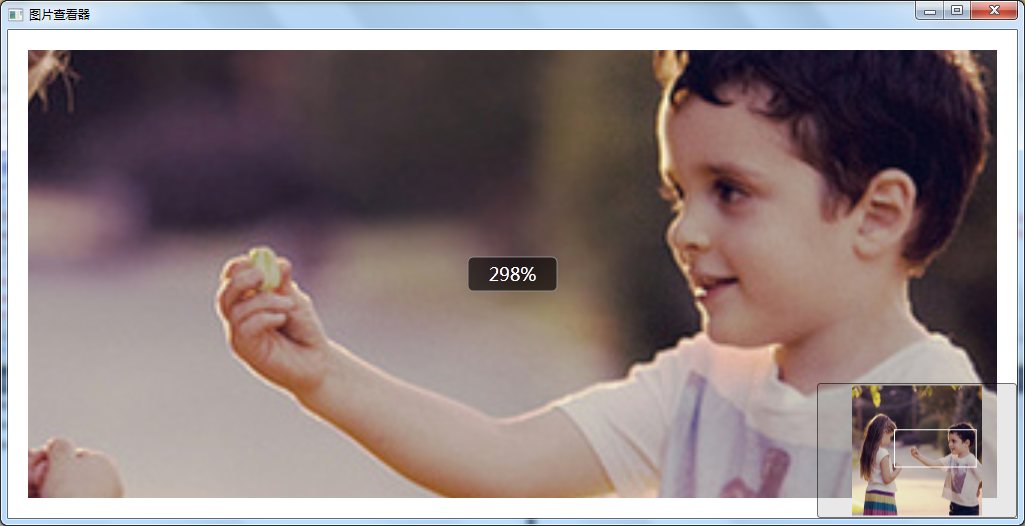
以下开始绘制图片 定义缩略图上白色的矩形,这其实是一个Indicator,它的外围是一个Canvas,然后缩略图是一个Image控件
 internal class IndicatorObject : ContentControl

    {

        private MaskCanvas canvasOwner;

        public IndicatorObject(MaskCanvas canvasOwner)

        {

            this.canvasOwner = canvasOwner;

        }

        static IndicatorObject()

        {

            var ownerType = typeof(IndicatorObject);

            FocusVisualStyleProperty.OverrideMetadata(ownerType, new FrameworkPropertyMetadata(null));

            DefaultStyleKeyProperty.OverrideMetadata(ownerType, new FrameworkPropertyMetadata(ownerType));

            MinWidthProperty.OverrideMetadata(ownerType, new FrameworkPropertyMetadata(5.0));

            MinHeightProperty.OverrideMetadata(ownerType, new FrameworkPropertyMetadata(5.0));

        }

        public void Move(System.Windows.Point offset)

        {

            var x = Canvas.GetLeft(this) + offset.X;

            var y = Canvas.GetTop(this) + offset.Y;

            x = x <  ?  : x;

            y = y <  ?  : y;

            x = Math.Min(x, this.canvasOwner.Width - this.Width);

            y = Math.Min(y, this.canvasOwner.Height - this.Height);

            Canvas.SetLeft(this, x);

            Canvas.SetTop(this, y);

            canvasOwner.UpdateSelectionRegion(new Rect(x, y, Width, Height), true);

        }

    }
Indicator
查看位置所在的矩形定义好了,然后开始定义外围的Canvas,这个作用是可以在Canvas上选中移动到查看的位置
  public class MaskCanvas : Canvas

    {

        public MaskCanvas()

        {

            Loaded += OnLoaded;

        }

        public System.Windows.Media.Brush SelectionBorderBrush = new SolidColorBrush(System.Windows.Media.Color.FromArgb(, , , ));

        public Thickness SelectionBorderThickness = new Thickness();

        public System.Windows.Media.Brush MaskWindowBackground = new SolidColorBrush(System.Windows.Media.Color.FromArgb(, , , ));

        public event EventHandler<LoactionArgs> LoationChanged;

        private void OnLoaded(object sender, RoutedEventArgs e)

        {

           maskRectLeft.Fill = maskRectRight.Fill = maskRectTop.Fill = maskRectBottom.Fill = MaskWindowBackground;

            SetLeft(maskRectLeft, );

            SetTop(maskRectLeft, );

            SetRight(maskRectRight, );

            SetTop(maskRectRight, );

            SetTop(maskRectTop, );

            SetBottom(maskRectBottom, );

            maskRectLeft.Height = ActualHeight;

            Children.Add(maskRectLeft);

            Children.Add(maskRectRight);

            Children.Add(maskRectTop);

            Children.Add(maskRectBottom);

            selectionBorder.Stroke = SelectionBorderBrush;

            selectionBorder.StrokeThickness =  ;

            Children.Add(selectionBorder);

            indicator = new IndicatorObject(this);

            indicator.Visibility = System.Windows.Visibility.Hidden;

            Children.Add(indicator);

            CompositionTarget.Rendering += OnCompositionTargetRendering;

        }

        private void UpdateSelectionBorderLayout()

        {

            if (!selectionRegion.IsEmpty)

            {

                SetLeft(selectionBorder, selectionRegion.Left);

                SetTop(selectionBorder, selectionRegion.Top);

                selectionBorder.Width = selectionRegion.Width;

                selectionBorder.Height = selectionRegion.Height;

            }

        }

        private void UpdateMaskRectanglesLayout()

        {

            var actualHeight = ActualHeight;

            var actualWidth = ActualWidth;

            if (selectionRegion.IsEmpty)

            {

                SetLeft(maskRectLeft, );

                SetTop(maskRectLeft, );

                maskRectLeft.Width = actualWidth;

                maskRectLeft.Height = actualHeight;

                maskRectRight.Width = maskRectRight.Height = maskRectTop.Width = maskRectTop.Height = maskRectBottom.Width = maskRectBottom.Height = ;

            }

            else

            {

                var temp = selectionRegion.Left;

                if (maskRectLeft.Width != temp)

                {

                    maskRectLeft.Width = temp <  ?  : temp; //Math.Max(0, selectionRegion.Left);

                }

                temp = ActualWidth - selectionRegion.Right;

                if (maskRectRight.Width != temp)

                {

                    maskRectRight.Width = temp <  ?  : temp; //Math.Max(0, ActualWidth - selectionRegion.Right);

                }

                if (maskRectRight.Height != actualHeight)

                {

                    maskRectRight.Height = actualHeight;

                }

                SetLeft(maskRectTop, maskRectLeft.Width);

                SetLeft(maskRectBottom, maskRectLeft.Width);

                temp = actualWidth - maskRectLeft.Width - maskRectRight.Width;

                if (maskRectTop.Width != temp)

                {

                    maskRectTop.Width = temp <  ?  : temp; //Math.Max(0, ActualWidth - maskRectLeft.Width - maskRectRight.Width);

                }

                temp = selectionRegion.Top;

                if (maskRectTop.Height != temp)

                {

                    maskRectTop.Height = temp <  ?  : temp; //Math.Max(0, selectionRegion.Top);

                }

                maskRectBottom.Width = maskRectTop.Width;

                temp = actualHeight - selectionRegion.Bottom;

                if (maskRectBottom.Height != temp)

                {

                    maskRectBottom.Height = temp <  ?  : temp; //Math.Max(0, ActualHeight - selectionRegion.Bottom);

                }

            }

        }

        #region Fileds & Props

        private Rect selectionRegion = Rect.Empty;

        private bool isMaskDraging;

        public bool MoveState = false;

        private IndicatorObject indicator;

        private System.Windows.Point? selectionStartPoint;

        private System.Windows.Point? selectionEndPoint;

        private readonly System.Windows.Shapes.Rectangle selectionBorder = new System.Windows.Shapes.Rectangle();

        private readonly System.Windows.Shapes.Rectangle maskRectLeft = new System.Windows.Shapes.Rectangle();

        private readonly System.Windows.Shapes.Rectangle maskRectRight = new System.Windows.Shapes.Rectangle();

        private readonly System.Windows.Shapes.Rectangle maskRectTop = new System.Windows.Shapes.Rectangle();

        private readonly System.Windows.Shapes.Rectangle maskRectBottom = new System.Windows.Shapes.Rectangle();

        public System.Drawing.Size? DefaultSize

        {

            get;

            set;

        }

        #endregion

        #region Mouse Managment

        private bool IsMouseOnThis(RoutedEventArgs e)

        {

            return e.Source.Equals(this) || e.Source.Equals(maskRectLeft) || e.Source.Equals(maskRectRight) || e.Source.Equals(maskRectTop) || e.Source.Equals(maskRectBottom);

        }

        protected override void OnMouseLeftButtonDown(MouseButtonEventArgs e)

        {

            indicator.Visibility = System.Windows.Visibility.Visible;

            if (e.Source.Equals(indicator))

            {

                HandleIndicatorMouseDown(e);

            }

            base.OnMouseLeftButtonDown(e);

        }

        protected override void OnMouseMove(MouseEventArgs e)

        {

            if (IsMouseOnThis(e))

            {

                UpdateSelectionRegion(e, UpdateMaskType.ForMouseMoving);

                e.Handled = true;

            }

            base.OnMouseMove(e);

        }

        protected override void OnMouseLeftButtonUp(MouseButtonEventArgs e)

        {

            if (IsMouseOnThis(e))

            {

                UpdateSelectionRegion(e, UpdateMaskType.ForMouseLeftButtonUp);

                FinishShowMask();

            }

            base.OnMouseLeftButtonUp(e);

        }

        protected override void OnMouseRightButtonUp(MouseButtonEventArgs e)

        {

            indicator.Visibility = Visibility.Collapsed;

            selectionRegion = Rect.Empty;

            selectionBorder.Width = selectionBorder.Height = ;

           // ClearSelectionData();

            UpdateMaskRectanglesLayout();

            base.OnMouseRightButtonUp(e);

        }

        internal void HandleIndicatorMouseDown(MouseButtonEventArgs e)

        {

            MoveState = true;

        }

        internal void HandleIndicatorMouseUp(MouseButtonEventArgs e)

        {

            MoveState = false;

        }

        private void PrepareShowMask(System.Drawing.Point mouseLoc)

        {

            indicator.Visibility = Visibility.Collapsed;

            selectionBorder.Visibility = Visibility.Visible;

        }

        private void UpdateSelectionRegion()

        {

            var startPoint = new System.Drawing.Point(,);

            var endPoint = new System.Drawing.Point(, );

            var sX = startPoint.X;

            var sY = startPoint.Y;

            var eX = endPoint.X;

            var eY = endPoint.Y;

            var deltaX = eX - sX;

            var deltaY = eY - sY;

            if (Math.Abs(deltaX) >= SystemParameters.MinimumHorizontalDragDistance ||

                Math.Abs(deltaX) >= SystemParameters.MinimumVerticalDragDistance)

            {

                double x = sX < eX ? sX : eX;//Math.Min(sX, eX);

                double y = sY < eY ? sY : eY;//Math.Min(sY, eY);

                double w = deltaX <  ? -deltaX : deltaX;//Math.Abs(deltaX);

                double h = deltaY <  ? -deltaY : deltaY;//Math.Abs(deltaY);

                selectionRegion = new Rect(x, y, w, h);

            }

            else

            {

               selectionRegion = new Rect(startPoint.X, startPoint.Y, DefaultSize.Value.Width, DefaultSize.Value.Height);

            }

        }

        private void UpdateSelectionRegion(MouseEventArgs e, UpdateMaskType updateType)

        {

            if (updateType == UpdateMaskType.ForMouseMoving && e.LeftButton != MouseButtonState.Pressed)

            {

                selectionStartPoint = null;

            }

            if (selectionStartPoint.HasValue)

            {

                selectionEndPoint = e.GetPosition(this);

                var startPoint = (System.Windows.Point)selectionEndPoint;

                var endPoint = (System.Windows.Point)selectionStartPoint;

                var sX = startPoint.X;

                var sY = startPoint.Y;

                var eX = endPoint.X;

                var eY = endPoint.Y;

                var deltaX = eX - sX;

                var deltaY = eY - sY;

                if (Math.Abs(deltaX) >= SystemParameters.MinimumHorizontalDragDistance ||

                    Math.Abs(deltaX) >= SystemParameters.MinimumVerticalDragDistance)

                {

                    isMaskDraging = true;

                    double x = sX < eX ? sX : eX;//Math.Min(sX, eX);

                    double y = sY < eY ? sY : eY;//Math.Min(sY, eY);

                    double w = deltaX <  ? -deltaX : deltaX;//Math.Abs(deltaX);

                    double h = deltaY <  ? -deltaY : deltaY;//Math.Abs(deltaY);

                    selectionRegion = new Rect(x, y, w, h);

                }

                else

                {

                    if (DefaultSize.HasValue && updateType == UpdateMaskType.ForMouseLeftButtonUp)

                    {

                        isMaskDraging = true;

                        selectionRegion = new Rect(startPoint.X, startPoint.Y, DefaultSize.Value.Width, DefaultSize.Value.Height);

                    }

                    else

                    {

                        isMaskDraging = false;

                    }

                }

            }

            UpdateIndicator(selectionRegion);

        }

        internal void UpdateSelectionRegion(Rect region, bool flag = false)

        {

            selectionRegion = region;

            UpdateIndicator(selectionRegion);

            if (LoationChanged != null && flag)

            {

                LoationChanged(this, new LoactionArgs(region.Left/this.Width, region.Top/this.Height));

            }

        }

        private void FinishShowMask()

        {

            if (IsMouseCaptured)

            {

                ReleaseMouseCapture();

            }

            if (isMaskDraging)

            {

                UpdateIndicator(selectionRegion);

                ClearSelectionData();

            }

        }

        private void ClearSelectionData()

        {

            isMaskDraging = false;

            selectionBorder.Visibility = Visibility.Collapsed;

            selectionStartPoint = null;

            selectionEndPoint = null;

        }

        private void UpdateIndicator(Rect region)

        {

            if (indicator == null)

                return;

            if (region.Width < indicator.MinWidth || region.Height < indicator.MinHeight)

            {

                return;

            }

 indicator.Visibility = Visibility.Visible;

            indicator.Width = region.Width;

            indicator.Height = region.Height;

            SetLeft(indicator, region.Left);

            SetTop(indicator, region.Top);

        }

        private Rect GetIndicatorRegion()

        {

            return new Rect(GetLeft(indicator), GetTop(indicator), indicator.ActualWidth, indicator.ActualHeight);

        }

        #endregion

        #region Render

        private void OnCompositionTargetRendering(object sender, EventArgs e)

        {

            UpdateSelectionBorderLayout();

            UpdateMaskRectanglesLayout();

        }

        #endregion

        #region inner types

        private enum UpdateMaskType

        {

            ForMouseMoving,

            ForMouseLeftButtonUp

        }

        #endregion

    }
Canvas
缩略图很简单,按照比例缩放图片加载上即可
thumbImage = m_Bitmap.GetThumbnailImage(thumbWidth, thumbHeight, null, IntPtr.Zero) as Bitmap; //thumbWidth指定宽,thumbHeight指定高度
ThumbnailImage
然后我们为大图加上监听事件ScrollChanged和MouseWheel 以及MouseLeftButtonDown、MouseLeftButtonUp、 MouseMove
ScrollChanged用来计算显示的滚动区域范围
 if (e.ExtentHeight > e.ViewportHeight || e.ExtentWidth > e.ViewportWidth)

            {

                offsetX = (e.ExtentWidth - e.ViewportWidth) / ;

                offsetY = (e.ExtentHeight - e.ViewportHeight) / ;

                svImg.ScrollToVerticalOffset(offsetY);

                svImg.ScrollToHorizontalOffset(offsetX);

            }

            double timeH =  svImg.ViewportHeight/ (svImg.ViewportHeight + svImg.ScrollableHeight);

            double timeW = svImg.ViewportWidth / (svImg.ViewportWidth + svImg.ScrollableWidth);

            double w = thumbWidth * timeW;

            double h = thumbHeight * timeH;

            double offsetx = ;

            double offsety = ;

            if (svImg.ScrollableWidth == )

            {

                offsetx = ;

            }

            else

            {

                offsetx = (w - thumbWidth) / svImg.ScrollableWidth * svImg.HorizontalOffset;

            }

            if (svImg.ScrollableHeight == )

            {

                offsety = ;

            }

            else

            {

                offsety = (h - thumbHeight) / svImg.ScrollableHeight * svImg.VerticalOffset;

            }

            Rect rect = new Rect( - offsetx,  - offsety, w, h);

            mask.UpdateSelectionRegion(rect);
ScrollChanged
MouseWheel计算滚动比例
  var mosePos = e.GetPosition(img);

            scale = scale * (e.Delta >  ? 1.2 :  / 1.2);

            scale = Math.Max(scale, 0.15);

            scale = Math.Min(, scale);

            this.txtZoom.Text = ((int)(scale * )).ToString();

            img.Width = scale * imgWidth;

            img.Height = scale * imgHeight;

            offsetX = svImg.ScrollableWidth / ;

            offsetY = svImg.ScrollableHeight / ;
MouseWheel
MouseLeftButtonDown后三个事件在移动图片时使用
以上大部分的工作已经做完了,然后我们加入一个定时器的功能,调节显示百分比的时间。加上一个Timer类即可。
当然在ScrolChanged里面我们加入了鹰眼监控,细心的朋友可以在事件里面看到。
WPF下的仿QQ图片查看器的更多相关文章
- wpf 仿QQ图片查看器
参考博客 WPF下的仿QQ图片查看器 wpf图片查看器,支持鼠标滚动缩放拖拽 实现效果 主要参考的WPF下的仿QQ图片查看器,原博主只给出了部分代码. 没有完成的部分 1.右下角缩略图是原图不是缩略图 ...
- jquery图片查看插件,支持旋转、放大、缩小、拖拽、缩略图(仿qq图片查看)
最近做了一个jquery图片查看的插件,目的是能精确查看图片的详情,插件支持图片旋转.放大.缩小.拖拽.缩略图显示,界面效果是按照window的qq查看图片功能写的,当然不尽相同. 具体功能: 1. ...
- 图片特效-仿 iPhone 图片查看器效果
—————————————————————— <script type="text/javascript"> var arr = ...
- jQuery 图片查看插件 Magnify 开发简介(仿 Windows 照片查看器)
前言 因为一些特殊的业务需求,经过一个多月的蛰伏及思考,我开发了这款 jQuery 图片查看器插件 Magnify,它实现了 Windows 照片查看器的所有功能,比如模态窗的拖拽.调整大小.最大化, ...
- jQuery 插件 Magnify 开发简介(仿 Windows 照片查看器)
前言 因为一些特殊的业务需求,经过一个多月的蛰伏及思考,我开发了这款 jQuery 图片查看器插件 Magnify,它实现了 Windows 照片查看器的所有功能,比如模态窗的拖拽.调整大小.最大化, ...
- wpf图片查看器,支持鼠标滚动缩放拖拽
最近项目需要,要用到一个图片查看器,类似于windows自带的图片查看器那样,鼠标滚动可以缩放,可以拖拽图片,于是就写了这个简单的图片查看器. 前台代码: <Window x:Class=&qu ...
- 发布两款JQ小插件(图片查看器 + 分类选择器),开源
图片查看器,github地址:https://github.com/VaJoy/imgViewer 效果如下: 这款当初大概写了2小时,有点匆忙地赶出来的,使用的接口很简单: $.bindViewer ...
- 用JQ仿造礼德财富网的图片查看器
现在就职于一家P2P平台,自然也会关注同行其它网站的前端技术,今天要仿造的是礼德内页的一个图片查看器效果.不过说白了,无论人人贷也好礼德财富也好,很多地方的前端都做的不尽如人意,比如忽略细节.缺乏交互 ...
- Objective-C ,ios,iphone开发基础:快速实现一个简单的图片查看器
新建一个single view 工程: 关闭ARC , 在.xib视图文件上拖放一个UIImageView 两个UIButton ,一个UISlider ,布局如图. 并为他们连线, UIImage ...
随机推荐
- JQ001-认识jQuery 和 JQ002-jQuery选择器
JQ001-认识jQuery jQuery环境配置:将jQuery.js文件引入到html页面中即可. 代码如下: <!DOCTYPE html> <html> <hea ...
- Python之路【第二十一篇】Django ORM详解
ORM回顾 关系对象映射(Object Relational Mapping,简称ORM). django中遵循 Code Frist 的原则,即:根据代码中定义的类来自动生成数据库表. 对于ORM框 ...
- SQL2005解密已经被加密的存储过程
SQL2005解密已经被加密的存储过程 第一步:打开DAC连接功能 第二步:在MASTER数据库创建一个解密存储过程 USE master GO CREATE PROCEDURE [dbo].[sp_ ...
- VBA笔记(一)
开启VBA编程环境--VBE 方法一:按<Alt+F11>组合建 方法二:查看代码 宏设置 当然启用宏的设置方式不同,宏的启动方式也不一样. 首先打开"office 按钮&quo ...
- 【C语言入门教程】目录/大纲
第一章 C语言编程基础 1.1 基本程序结构 1.2 函数库 和 链接 1.3 C语言“32个”关键字 第二章 数据类型.运算符和表达式 2.1 数据类型(5种基本数据类型),聚合类型与修饰符 2.2 ...
- css动画 animation
今天用css做了一个简单的三角上下移动的一个小动画,说白了就是在改变该物体的height值.除了这个方法,还可以用js. 一.在用css写动画时,一定要记住兼容性问题.如何解决该兼容性?在前面加内核前 ...
- str.format
#使用str.format()函数 #使用'{}'占位符 print('I\'m {},{}'.format('Hongten','Welcome to my space!')) >>&g ...
- Shell脚本
shell script,是一种为shell编写的脚本程序. 业界所说的shell通常是指shell脚本.shell和shell script.
- BZOJ 4725: [POI2017]Reprezentacje ró?nicowe
Description 一个数列. \(a_1=1,a_2=2\) 当 \(n>2\) 时 \[a_n = \{ \begin {matrix} 2a_{n-1},\text{n is an ...
- python的os模块
1.得到当前工作目录,即当前Python脚本工作的目录路径: os.getcwd() 2.返回指定目录下的所有文件和目录名:os.listdir() 3.函数用来删除一个文件:os.remove() ...