
Objective-C ,ios,iphone开发基础:快速实现一个简单的图片查看器
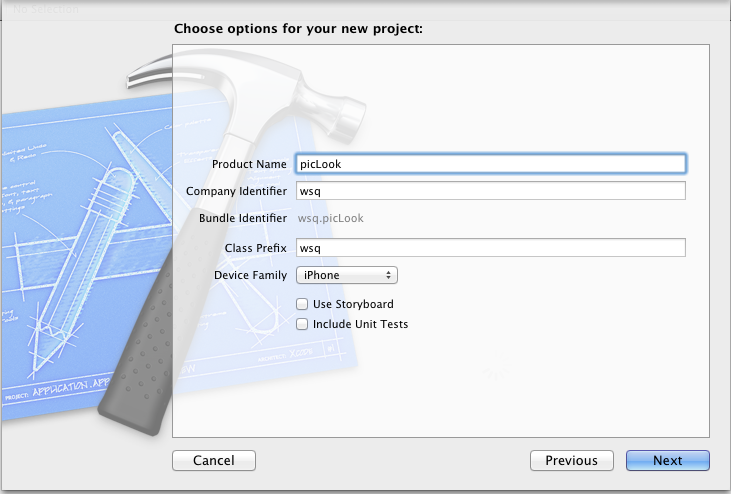
新建一个single view 工程:
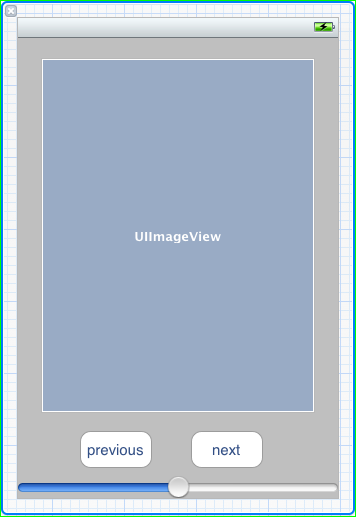
关闭ARC , 在.xib视图文件上拖放一个UIImageView 两个UIButton ,一个UISlider ,布局如图。
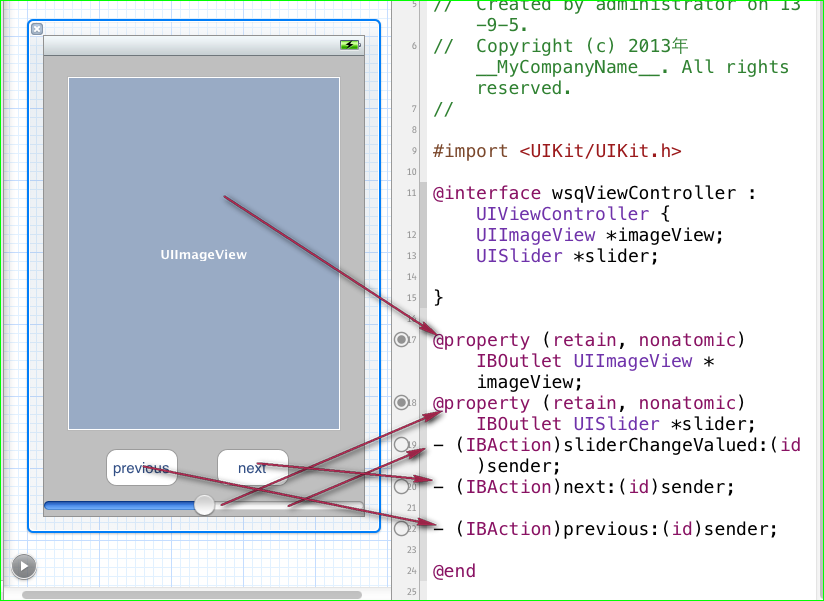
并为他们连线,
UIImageView 和 UISlider 分别定义插座变量,两个 UIButton 分别 连接两个Action next和previous ,在为 UISlider 连接一个Action 事件。
再在.h 文件中声明两个实例变量。 NSInteger index ; NSMutableArray* arrayPic ; 一个用来记录当前图片的index,一个用来做图片的容器,
用UISlider 来控制图片的透明度 (alpha 属性)。在slider 的界面构建起动作中添加代码,让图片的透明度等于 slider的value。
- (IBAction)sliderChangeValued:(id)sender {

    self.imageView.alpha = slider.value;

}
在两个UIButton 的界面构建起动作中添加代码,循环遍历arrayPic中的图片:
- (IBAction)next:(id)sender {

    if(index == [arrayPic count]){

        index = ;

    }

    self.imageView.image = [UIImage imageWithContentsOfFile:[arrayPic objectAtIndex:index]];

    index++;

}

- (IBAction)previous:(id)sender {

    if(index == -){

        index = ([arrayPic count] -);

    }

   self.imageView.image = [UIImage imageWithContentsOfFile:[arrayPic objectAtIndex:index]];

    index--;

}
至此:简单的图片查看器已经完成,

整个控制器类中的代码:
//

//  wsqViewController.h

//  picLook

//

//  Created by administrator on 13-9-5.

//  Copyright (c) 2013年 __MyCompanyName__. All rights reserved.

//

#import <UIKit/UIKit.h>

@interface wsqViewController : UIViewController {

    UIImageView *imageView;

    UISlider *slider;

    NSInteger index ;

    NSMutableArray* arrayPic ;

}

@property (retain, nonatomic) IBOutlet UIImageView *imageView;

@property (retain, nonatomic) IBOutlet UISlider *slider;

- (IBAction)sliderChangeValued:(id)sender;

- (IBAction)next:(id)sender;

- (IBAction)previous:(id)sender;

@end
//

//  wsqViewController.m

//  picLook

//

//  Created by administrator on 13-9-5.

//  Copyright (c) 2013年 __MyCompanyName__. All rights reserved.

//

#import "wsqViewController.h"

@implementation wsqViewController

@synthesize imageView;

@synthesize slider;

- (void)didReceiveMemoryWarning

{

    [super didReceiveMemoryWarning];

    // Release any cached data, images, etc that aren't in use.

}

#pragma mark - View lifecycle

- (void)viewDidLoad

{

    [super viewDidLoad];

    //获取mainbudle下所有 jpg格式的图片,

      arrayPic = [[NSMutableArray alloc ] initWithArray: [[NSBundle mainBundle] pathsForResourcesOfType:@"jpg" inDirectory:nil]];

    index = ;

    NSLog(@"%@",arrayPic);

}

- (void)viewDidUnload

{

    [self setImageView:nil];

    [self setSlider:nil];

    [super viewDidUnload];

    // Release any retained subviews of the main view.

    // e.g. self.myOutlet = nil;

}

- (void)viewWillAppear:(BOOL)animated

{

    [super viewWillAppear:animated];

}

- (void)viewDidAppear:(BOOL)animated

{

    [super viewDidAppear:animated];

}

- (void)viewWillDisappear:(BOOL)animated

{

    [super viewWillDisappear:animated];

}

- (void)viewDidDisappear:(BOOL)animated

{

    [super viewDidDisappear:animated];

}

- (BOOL)shouldAutorotateToInterfaceOrientation:(UIInterfaceOrientation)interfaceOrientation

{

    // Return YES for supported orientations

    return (interfaceOrientation != UIInterfaceOrientationPortraitUpsideDown);

}

- (void)dealloc {

    [arrayPic release];

    [imageView release];

    [slider release];

    [super dealloc];

}

- (IBAction)sliderChangeValued:(id)sender {

    self.imageView.alpha = slider.value;

}

- (IBAction)next:(id)sender {

    if(index == [arrayPic count]){

        index = ;

    }

    self.imageView.image = [UIImage imageWithContentsOfFile:[arrayPic objectAtIndex:index]];

    index++;

}

- (IBAction)previous:(id)sender {

    if(index == -){

        index = ([arrayPic count] -);

    }

   self.imageView.image = [UIImage imageWithContentsOfFile:[arrayPic objectAtIndex:index]];

    index--;

}

@end
Objective-C ,ios,iphone开发基础:快速实现一个简单的图片查看器的更多相关文章
- iOS开发-简单的图片查看器
现在你只要拿着手机,不管你Android还是iOS,新闻类的App不可避免都有一个功能就是图片查看,做个专题,查看一下内容,App Store中也有专门针对图片浏览的App,鉴于目前所知有限,无法做到 ...
- [置顶] Objective-C ,ios,iphone开发基础:UIAlertView使用详解
UIAlertView使用详解 Ios中为我们提供了一个用来弹出提示框的类 UIAlertView,他类似于javascript中的alert 和c#中的MessageBox(); UIAlertVi ...
- Objective-C ,ios,iphone开发基础:UIAlertView使用详解
UIAlertView使用详解 Ios中为我们提供了一个用来弹出提示框的类 UIAlertView,他类似于javascript中的alert 和c#中的MessageBox(); UIAlertVi ...
- Objective-C ,ios,iphone开发基础:使用GDataXML解析XML文档,(libxml/tree.h not found 错误解决方案)
使用GDataXML解析XML文档 在IOS平台上进行XML文档的解析有很多种方法,在SDK里面有自带的解析方法,但是大多情况下都倾向于用第三方的库,原因是解析效率更高.使用上更方便 这里主要介绍一下 ...
- Objective-C ,ios,iphone开发基础:picker控件详解与使用,(实现省市的二级联动)
第一步:新建一个单视图(single view)的工程, 命名为pickerTest,不要勾选下面两个选项,第一个是新版本里面的,第二个是单元测试,现在用不着. 点击next ->creat之 ...
- Objective-C ,ios,iphone开发基础:几个常用类-NSNumber
2013-08-21 在Objective-C,包括int double float 等等再内的基础数据类型都不是一个类,所以就不能给它们发送消息,也就是说不能调用方法,那怎么办呢 ?Objectiv ...
- Objective-C ,ios,iphone开发基础:JSON解析(使用苹果官方提供的JSON库:NSJSONSerialization)
json和xml的普及个人觉得是为了简化阅读难度,以及减轻网络负荷,json和xml 数据格式在格式化以后都是一种树状结构,可以树藤摸瓜的得到你想要的任何果子. 而不格式化的时候json和xml 又是 ...
- Objective-C ,ios,iphone开发基础:http网络编程
- (IBAction)loadData:(id)sender { NSURL* url = [NSURL URLWithString:@"http://162.105.65.251:808 ...
- Objective-C ,ios,iphone开发基础:3分钟教你做一个iphone手机浏览器
第一步:新建一个Single View工程: 第二步:新建好工程,关闭arc. 第三步:拖放一个Text Field 一个UIButton 和一个 UIWebView . Text Field 的ti ...
随机推荐
- 总结的Ubuntu的若干小知识
一.默认开机直接进入到Ubuntu命令行界面 安装Ubuntu后,开机会默认进入到图形界面,如果不喜欢图形界面,可以通过修改配置,直接进入命令行界面,还行节省100多兆的内存空间.具体方法如下: 修改 ...
- GCC4.8对new和delete的参数匹配新要求
一段通信协议的代码,早年在GCC 4.4.VS2013下编译都挺好的,移植到GCC 4.8 ,为C++ 11做准备,在编译的时候发现问题 源代码省略后的版本如下: class Zerg_App_Fra ...
- ubuntu下允许root用户ssh远程登录
原文:http://blog.sina.com.cn/s/blog_7e64a87b0100rn8w.html SSH服务器,可以通过SSH协议登录远程服务器,但是ubuntu默认是启用了root用户 ...
- svn IP地址变更后如何变更
通过grep ip地址,发现svn中url地址信息是记录在.svn文件夹entries文件中的,第一种方案应该是遍历目录下的entries文件,将ip替换为新的ip即可. 可以发现这个用sed命令即可 ...
- 设置VMWARE通过桥接方式使用主机网卡上网
1 Host-only连接方式 让虚机具有与宿主机不同的各自独立IP地址,但与宿主机位于不同网段,同时为宿主主机新增一个IP地址,且保证该IP地址与各虚机IP地址位于同一网段.最终结果是新建了一个由 ...
- FrameWork 建模时查询项的usage
§ Identifier:代表被用于分组或汇总与其相关的Fact数据的列.也代表一个索引列.还代表日期或时间列.§ Fact:代表一个包含数值数据可被分组或汇总的列,例如,产品成本.§ Attribu ...
- ocp 1Z0-043 61-130题解析
61. You are working in an online transaction processing (OLTP) environment. You realize that the sal ...
- HDU 5835 Danganronpa (贪心)
Danganronpa 题目链接: http://acm.hdu.edu.cn/showproblem.php?pid=5835 Description Chisa Yukizome works as ...
- 应用反射写的tostring方法
应用反射写的tostring方法 应用反射写的tostring方法,方便以后查询 代码 package com.chzhao.reflecttest; import java.lang.reflect ...
- UVa 1630 Folding (区间DP)
题意:折叠一个字符串,使得其成为一个尽量短的字符串 例如AAAAAA变成6(A) 而且这个折叠是可以嵌套的,例如 NEEEEERYESYESYESNEEEEERYESYESYES 会变成 2(N5( ...