
springboot打war包部署tomcat服务器,以及表单提交数据乱码处理
小白觉得springboot打成jar包直接使用内嵌的tomcat或jetty容器(java -jar xxx.jar)运行项目不利于定位问题,我还是习惯于查看tomcat或nginx的日志来定位问题,今天小白就讲讲springboot打成war部署JavaWeb项目于tomcat。
新建web项目 helloboot
开发工具:Spring Tool Suite(STS)
File->New->Spring Starter Project,如下图所示:


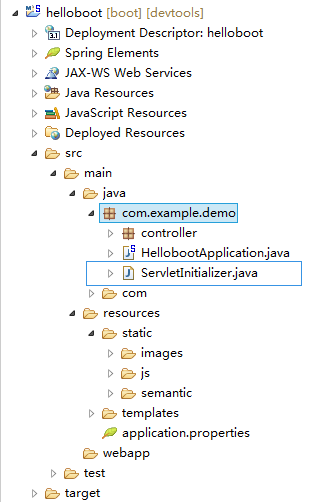
项目结构如下所示:
application.properties配置:
server.port=

server.context-path=/helloboot

spring.devtools.restart.additional-exclude=non-restart/**

spring.resources.static-locations=classpath:/resources/static/,classpath:/static/

spring.thymeleaf.cache=false

logging.level.org.springframework.security=INFO
pox.xml(自动生成的,未作修改):
<?xml version="1.0" encoding="UTF-8"?>

<project xmlns="http://maven.apache.org/POM/4.0.0" xmlns:xsi="http://www.w3.org/2001/XMLSchema-instance"

    xsi:schemaLocation="http://maven.apache.org/POM/4.0.0 http://maven.apache.org/xsd/maven-4.0.0.xsd">

    <modelVersion>4.0.</modelVersion>

    <groupId>com.example</groupId>

    <artifactId>demo</artifactId>

    <version>0.0.-SNAPSHOT</version>

    <packaging>war</packaging>

    <name>helloboot</name>

    <description>Demo project for Spring Boot</description>

    <parent>

        <groupId>org.springframework.boot</groupId>

        <artifactId>spring-boot-starter-parent</artifactId>

        <version>1.5..RELEASE</version>

        <relativePath/> <!-- lookup parent from repository -->

    </parent>

    <properties>

        <project.build.sourceEncoding>UTF-</project.build.sourceEncoding>

        <project.reporting.outputEncoding>UTF-</project.reporting.outputEncoding>

        <java.version>1.8</java.version>

    </properties>

    <dependencies>

        <dependency>

            <groupId>org.springframework.boot</groupId>

            <artifactId>spring-boot-starter-thymeleaf</artifactId>

        </dependency>

        <dependency>

            <groupId>org.springframework.boot</groupId>

            <artifactId>spring-boot-starter-web</artifactId>

        </dependency>

        <dependency>

            <groupId>org.springframework.boot</groupId>

            <artifactId>spring-boot-devtools</artifactId>

            <scope>runtime</scope>

        </dependency>

        <dependency>

            <groupId>org.springframework.boot</groupId>

            <artifactId>spring-boot-starter-tomcat</artifactId>

            <scope>provided</scope>

        </dependency>

        <dependency>

            <groupId>org.springframework.boot</groupId>

            <artifactId>spring-boot-starter-test</artifactId>

            <scope>test</scope>

        </dependency>

    </dependencies>

    <build>

        <plugins>

            <plugin>

                <groupId>org.springframework.boot</groupId>

                <artifactId>spring-boot-maven-plugin</artifactId>

            </plugin>

        </plugins>

    </build>

</project>
项目打包
1)在项目的启动类HellobootApplication.java的同级目录下新建ServletInitializer.java,代码如下,其位置可参考项目结构图:
package com.example.demo;

import org.springframework.boot.builder.SpringApplicationBuilder;

import org.springframework.boot.web.support.SpringBootServletInitializer;

public class ServletInitializer extends SpringBootServletInitializer {

    @Override

    protected SpringApplicationBuilder configure(SpringApplicationBuilder application) {

        return application.sources(HellobootApplication.class);

    }

}
2)用maven进行打包:Run AS -> Maven install,如下图所示打包成功,会在target目录下生成demo-0.0.1-SNAPSHOT.war

项目部署
进入tomcat的webapps子目录上传,上传完成后重命名为helloboot.war:
cd /root/tomcat/webapps
rz
mv demo-0.0.1-SNAPSHOT.war helloboot.war
修改tomcat的配置文件server.xml文件将8080端口改为8082,当然8080端口也是可以,由于本服务的8080端口已被占用。
进入tomcat的bin目录,启动tomcat:
cd /root/tomcat/bin
sh startup.sh
查看tomcat的日志:
cd /root/tomcat/logs

tail -f catalina.out
从日志可以看出启动成功:

项目访问
访问内网,可以通过xshell的通道访问:

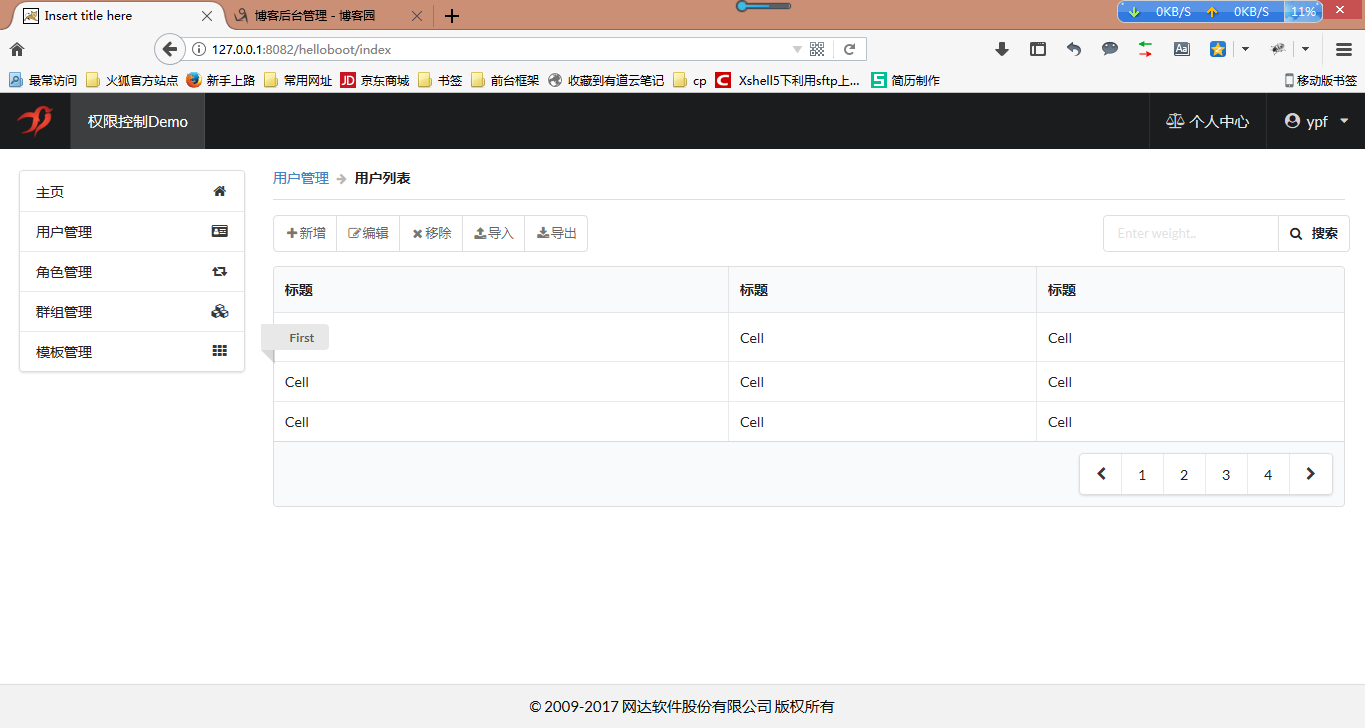
在浏览器地址栏中输入:http://127.0.0.1:8082/helloboot/index,可见项目打包发布成功。
乱码处理
今天小白在测试demo是发现通过表单提交的数据乱码,原因可能有两种,一种前端提交到后台的数据后台解析乱码,另一种是解析正常但是在写入数据库的时候由于数据库编码导致的乱码。小白就这两种情况进行测试,第一种情况通过日志发现打印出来的前端传到后台的数据正常,于是小白查看了mysql数据库的编码,如下所示:
mysql> show variables like 'character_set_database';

+------------------------+--------+

| Variable_name          | Value  |

+------------------------+--------+

| character_set_database | latin1 |

+------------------------+--------+

 row in set (0.01 sec)
收集资料尝试发现只要在mysql的my.cnf的中添加一行代码character-set-server=utf8,重新启动mysql即可
[root@localhost etc]# vi /etc/my.cnf

[root@localhost etc]# service mysqld restart
my.cnf:
[root@localhost etc]# cat /etc/my.cnf

# For advice on how to change settings please see

# http://dev.mysql.com/doc/refman/5.7/en/server-configuration-defaults.html

[mysqld]

#

# Remove leading # and set to the amount of RAM for the most important data

# cache in MySQL. Start at % of total RAM for dedicated server, else %.

# innodb_buffer_pool_size = 128M

#

# Remove leading # to turn on a very important data integrity option: logging

# changes to the binary log between backups.

# log_bin

#

# Remove leading # to set options mainly useful for reporting servers.

# The server defaults are faster for transactions and fast SELECTs.

# Adjust sizes as needed, experiment to find the optimal values.

# join_buffer_size = 128M

# sort_buffer_size = 2M

# read_rnd_buffer_size = 2M

datadir=/var/lib/mysql

socket=/var/lib/mysql/mysql.sock

# Disabling symbolic-links is recommended to prevent assorted security risks

symbolic-links=

character-set-server=utf8

log-error=/var/log/mysqld.log

pid-file=/var/run/mysqld/mysqld.pid
修改后的mysql数据库的编码,表单提交数据也正常了。
mysql> show variables like 'character_set_database';

+------------------------+-------+

| Variable_name          | Value |

+------------------------+-------+

| character_set_database | utf8  |

+------------------------+-------+

 row in set (0.06 sec)
springboot打war包部署tomcat服务器,以及表单提交数据乱码处理的更多相关文章
- Springboot解决war包放到Tomcat服务器上404的特殊情况
Springboot解决war包放到Tomcat服务器上404的特殊情况 原文链接:https://www.cnblogs.com/blog5277/p/9330577.html 原文作者:博客园-- ...
- 如何在阿里云上部署war包到tomcat服务器
一. 准备工作:xshell和xftp 首先我们得确保,xshell能够远程连接阿里云ECS,xftp能够保证windows和linux之间的文件传输(当然也可以选择FileZilla,但xftp感觉 ...
- springboot 学习之路 5(打成war包部署tomcat)
目录:[持续更新.....] spring 部分常用注解 spring boot 学习之路1(简单入门) spring boot 学习之路2(注解介绍) spring boot 学习之路3( 集成my ...
- 将war包部署到服务器的详细步骤
第一步: 先将项目打包成war文件,也就是将在项目上单击鼠标右键,选择Export: 选择WAR file,点击下一步: 会出现如下所示,选择你要保存的位置,点击完成: 在你所选择的地方会有个如下所示 ...
- springboot框架中集成thymeleaf引擎,使用form表单提交数据,debug结果后台获取不到数据
springboot框架中集成thymeleaf引擎,使用form表单提交数据,debug结果后台获取不到数据 表单html: <form class="form-horizontal ...
- 如何在windows上部署war包到tomcat服务器
一. 什么是war包 WAR(Web Archive file)网络应用程序文件,是与平台无关的文件格式,它允许将很多文件组合成一个压缩文件.war专用在web方面,一个war包可以理解为一个web项 ...
- SpringBoot项目war包部署
服务部署 记录原因 将本地SpringBoot项目通过war包部署到虚拟机中,验证服务器部署. 使用war包是为了方便替换配置文件等. 工具 对象 版本 Spring Boot 2.4.0 VMwar ...
- springboot 的war包在Tomcat中启动失败
springboot 默认是通常是打包成jar的,里面会内置一个tomcat容器 有时候我们需要使用以前打成war包的方式部署到对应的tomcat中, 具体springboot 怎么从jar改成war ...
- Web项目打成war包部署Tomcat时运行startup.bat直接闪退部署失败解决方案
即上篇通过将web项目打成war包部署到Tomcat服务器,解决mysql问题后,又出现了新问题,真是一波三折,所以将解决过程分享给大家,希望能帮助到小伙伴们~ 将打好的war包拷贝到Tomcat的w ...
随机推荐
- 关于strcpy的安全函数的选择
1)如果整个程序,在进行字符拷贝时,这个拷贝字符串的完整性,不影响整个程 序的运行,可以让其截取一部分字符串,程序继续执行.那么我们就可以选择安全 函数:strncpy_s 2)如果在进行字符串拷贝时 ...
- iPad和iPhone上的应用程序图标
iPad和iPhone上的应用程序图标 问:如何在iPad和iPhone使用我的应用程序包中的图标文件? 答:下面是处理文件的图标为iPhone专用的应用程序,iPad的专用应用程序,以及通用的应用程 ...
- InterlliJ idea文件夹里面无法新建java文件等
这两天开始实习,因为公司用的InterlliJ idea作为开发工具,所以我这两天也开始学习如何使用这个.所以想将在操作中遇到的问题做笔记发表到上面来.也方便自己随时查阅,也希望能帮助到正在阅读的你! ...
- 状压DP操作
1.’&’符号,x&y,会将两个十进制数在二进制下进行与运算,然后返回其十进制下的值.例如3(11)&2(10)=2(10). 2.’|’符号,x|y,会将两个十进制数在二进制 ...
- 多线程使用@Async注解创建多线程,自定义线程池
转载自博客https://www.jianshu.com/p/7ac04a501eba
- docker 部署springboot项目【转载】
https://www.cnblogs.com/ityouknow/p/8599093.html
- BZOJ - 3998 弦论 (后缀自动机)
#include<cstdio> #include<cstring> #include<queue> using namespace std; typedef lo ...
- Excel筛选操作
Excel的筛选操作如下: 选中指定列: 点击"开始"中的"排序和筛选" 点击如下小三角即可按条件进行筛选
- html中全选反选
<!--第一层--> <div class="first"> <div class="first_top"> <img ...
- 树莓派Zero W无键盘无屏幕初始化
买了个树莓派Zero W,结果发现没mini hdmi线 淘宝了一根mini hdmi,等了5天,拿到手后发现zero还没地接键盘,这下脑袋大了 查了下资料,发现树莓的系统,可以这boot分区中加入一 ...