
html中全选反选
<!--第一层-->

					<div class="first">

						<div class="first_top">

							<img src="../img/chartor4.png" class="first-img" />

							<input type="checkbox" name="resUuids" value="" id="all" class="first-inp" />

							<span>OM系统</span>

						</div>

						<!--第二层-->

						<div class="second">

							<div class="second_top">

								<img src="../img/chartor5.png" class="second-img" />

								<input type="checkbox" name="resUuid" value="" class="second-inp per-index"  />

								<span>发货方管理</span>

							</div>

							<!--第三层-->

							<div class="third">

								<div class="thired_top">

									<input type="checkbox" name="resUuids"  value=""  class="third-inp"/>

									<span>查询货主</span>

								</div>

								<div class="thired_top">

									<input type="checkbox" name="resUuids"  value=""  class="third-inp"/>

									<span>查询货主</span>

								</div>

								<div class="thired_top">

									<input type="checkbox" name="resUuids"  value=""  class="third-inp" />

									<span>查询货主</span>

								</div>

							</div>

						</div>

                                            </div>
.first {

	overflow: hidden;

	margin-left:10%;

}

.first_top {

	font-size: 16px;

}

.first_top img {

	float: left;

	margin-right: 10px;

	cursor: pointer;

}

.first_top input {

	width: 18px;

	height: 18px;

	border:1px solid #ccc;

	background: #fff !important;

	float: left;

	background-color: #f4a100 !important;

	margin-right: 10px;

}

.second_top {

	font-size: 16px;

	margin-left: 4%;

	margin-top: 1%;

}

.second_top img {

	float: left;

	margin-right: 10px;

	cursor: pointer;

}

.second_top input {

	width: 18px;

	height: 18px;

	box-sizing: border-box;

	border:1px solid #ccc;

	background: #fff !important;

	float: left;

	background-color: #f4a100;

	margin-right: 10px;

}

.thired_top {

	font-size: 16px;

	margin-left: 12%;

	margin-top: 1%;

}

.thired_top img {

	float: left;

	margin-right: 10px;

}

.thired_top input {

	width: 18px;

	height: 18px;

	box-sizing: border-box;

	border:1px solid #ccc;

	background: #fff !important;

	float: left;

	background-color: #f4a100;

	margin-right: 10px;

}
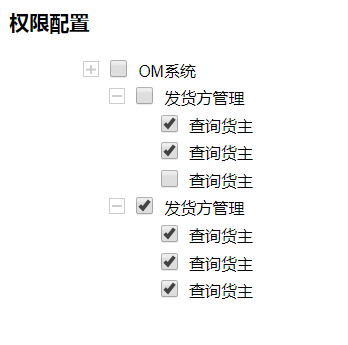
第一种:子级盒子全选中父级盒子选中

//盒子折叠

		//第一层

		$(".first-img").click(function(){

			$(this).parent().siblings().slideToggle(500);

		});

		//第二层

		$(".second-img").click(function(){

			$(this).parent().siblings().slideToggle(500);

		});

		//全选反选

		//第一层全选

		$("#all").click(function() {

		var op = $(this).parent().siblings().find("input[name='resUuids']");

		var pp = $(this).parent().siblings().find("input[name='resUuid']");

		     op.prop("checked", this.checked);

		     pp.prop("checked", this.checked);

		});

		//第二层全选

		$(".second-inp").click(function() {

		var op = $(this).parent().siblings().find("input[name='resUuids']");

		     op.prop("checked", this.checked);

		});

		//第三层反选

		$(".third-inp").click(function() {

			var lb = $(this).parent().parent().find('.third-inp');

			var	all = $(this).parent().parent().parent().parent().find('.second-inp');

			//给第二层盒子加上选中

			for(var i=0;i<lb.length;i++){

//				if($(lb[i]).prop("checked") == true){

//					$(this).parent().parent().siblings().find('.second-inp').prop("checked", true);

//					break

//				}else{

//					$(this).parent().parent().siblings().find('.second-inp').prop("checked", false);

//				}

				if($(lb[i]).prop("checked") == false){

					$(this).parent().parent().siblings().find('.second-inp').prop("checked", false);

					break

				}else{

					$(this).parent().parent().siblings().find('.second-inp').prop("checked", true);

				}

			}

			//给第一层盒子加上选中

			for(var j=0;j<all.length;j++){

				if($(all[j]).prop("checked") == false){

					$(this).parent().parent().parent().parent().find('.first-inp').prop("checked", false);

					break ;

				}else{

					$(this).parent().parent().parent().parent().find('.first-inp').prop("checked", true);

				}

			}

		});

		//第二层反选

			$(".per-index").click(function() {

			var nb = $(this).parent().parent().parent().find('.per-index');

			for(var i=0;i<nb.length;i++){

				if($(nb[i]).prop("checked") == false){

					$(".first-inp").prop("checked", false);

					return ;

				}else {

					$(".first-inp").prop("checked", true);

				}

			}

		});
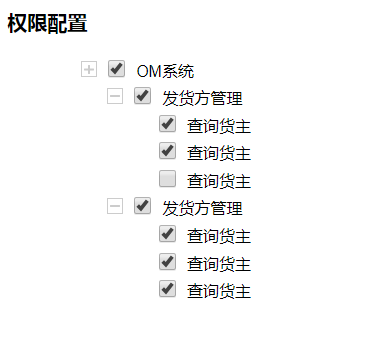
第二种:子级盒子只要有一个被选中父级盒子就被选中
//盒子折叠

		//第一层

		$(".first-img").click(function(){

			$(this).parent().siblings().slideToggle(500);

		});

		//第二层

		$(".second-img").click(function(){

			$(this).parent().siblings().slideToggle(500);

		});

		//全选反选

		//第一层全选

		$("#all").click(function() {

		var op = $(this).parent().siblings().find("input[name='resUuids']");

		var pp = $(this).parent().siblings().find("input[name='resUuid']");

		     op.prop("checked", this.checked);

		     pp.prop("checked", this.checked);

		});

		//第二层全选

		$(".second-inp").click(function() {

		var op = $(this).parent().siblings().find("input[name='resUuids']");

		     op.prop("checked", this.checked);

		});

		//第三层反选

		$(".third-inp").click(function() {

			var lb = $(this).parent().parent().find('.third-inp');

			var	all = $(this).parent().parent().parent().parent().find('.second-inp');

			//给第二层盒子加上选中

			for(var i=0;i<lb.length;i++){

				if($(lb[i]).prop("checked") == true){

					$(this).parent().parent().siblings().find('.second-inp').prop("checked", true);

					break

				}else{

					$(this).parent().parent().siblings().find('.second-inp').prop("checked", false);

				}

//				if($(lb[i]).prop("checked") == false){

//					$(this).parent().parent().siblings().find('.second-inp').prop("checked", false);

//					break

//				}else{

//					$(this).parent().parent().siblings().find('.second-inp').prop("checked", true);

//				}

			}

			//给第一层盒子加上选中

			for(var j=0;j<all.length;j++){

				if($(all[j]).prop("checked") == false){

					$(this).parent().parent().parent().parent().find('.first-inp').prop("checked", false);

					break ;

				}else{

					$(this).parent().parent().parent().parent().find('.first-inp').prop("checked", true);

				}

			}

		});

		//第二层反选

			$(".per-index").click(function() {

			var nb = $(this).parent().parent().parent().find('.per-index');

			for(var i=0;i<nb.length;i++){

				if($(nb[i]).prop("checked") == false){

					$(".first-inp").prop("checked", false);

					return ;

				}else {

					$(".first-inp").prop("checked", true);

				}

			}

		});
html中全选反选的更多相关文章
- 关于Winform下DataGridView中实现checkbox全选反选、同步列表项的处理
近期接手一个winform 项目,虽然之前有.net 的经验,但是对一些控件的用法还不是很熟悉. 这段时间将会记录一些在工作中遇到的坎坷以及对应的解决办法,写出来与大家分享并希望大神提出更好解决方法来 ...
- React中的全选反选问题
全选反选问题 1.在state里维护一个数组,例如showArr:[] 2.绑定点击事件的时候将当前这个当选按钮的index加进来 <span className='arrow' onClick ...
- JQuery 全选 反选 获取Table 中指定td的元素值
//全选 function initTableCheckbox() { var $thr = $('table thead tr'); var $checkAllTh = $('<th>& ...
- BootStrapt iCheck表单美化插件使用方法详解(含参数、事件等) 全选 反选
特色: 1.在不同浏览器(包括ie6+)和设备上都有相同的表现 — 包括 桌面和移动设备 2.支持触摸设备 — iOS.Android.BlackBerry.Windows Phone等系统 4.方便 ...
- 用javascript实现全选/反选组件
以下是本人制作的全选/反选 组件,供广大同行参考.指正: 效果如图: 在实现的过程中,全选和全部取消选中这两个功能较为简单,只需用for循环遍历所有复选框为true或false即可.反选也较为简单,也 ...
- jquery、js操作checkbox全选反选
全选反选checkbox在实际应用中比较常见,本文有个不错的示例,大家可以参考下 操作checkbox,全选反选//全选 function checkAll() { $('input[name=&qu ...
- 关于JQuery全选/反选第二次失效的问题
最近在项目中,遇到一个问题,测试全选/反选功能时,第一次对母框进行选中/非选中时,能同步子框的全选/反选状态,之后再点击母框,子框就没反应了.原代码大致结构关键如下: function selectA ...
- jQuery之标签操作和返回顶部、登录验证、全选反选、克隆示例
一.样式操作 1.JQ中的样式类 somenode.addClass();// 添加指定的CSS类名. somenode.removeClass();// 移除指定的CSS类名. somenode.h ...
- Android开发 ---基本UI组件5:监听下拉选项,动态绑定下拉选项、全选/反选,取多选按钮的值,长按事件,长按删除,适配器的使用,提示查询数据,activity控制多按钮
效果图: 效果描述: 1.当点击 1 按钮后,进入选择城市的页面,会监听到你选中的城市名称:动态为Spinner绑定数据 2.当点击 2 按钮后,进入自动查询数据页面,只要输入首字母,就会动态查找以该 ...
随机推荐
- redis源码分析之数据结构:跳跃表
跳跃表是一种随机化的数据结构,在查找.插入和删除这些字典操作上,其效率可比拟于平衡二叉树(如红黑树),大多数操作只需要O(log n)平均时间,但它的代码以及原理更简单. 和链表.字典等数据结构被广泛 ...
- 破解root
启动grub按E,进入编辑,ro 改为 rw init=/sysroot/bin/sh然后Ctrl+X进入单用户# chroot /sysroot# passwd root# touch /.auto ...
- Linux 串口调试工具汇总
minicomminicom 是一款启动速度快,功能强大的串口终端调试工具,当然缺点就是纯字符界面,没有图形界面的调试工具看起来直观方便,但是它功能十分强大,并且在一些没有屏幕的嵌入式主板上运行颇有用 ...
- unieap platform eclipse.ini vm设置
-vm C:\Program Files (x86)\Java\jdk1..0_45\bin\javaw.exe -startup plugins/org.eclipse.equinox.launch ...
- echats--》饼图 如何在环形中央设置 文字?
遇到一个需求,在环形图中央空白部分显示总数量. let data = { totalNum: "", data: [ { val ...
- 20191209 Linux就该这么学(1-3)
1. 部署虚拟环境安装 Linux 系统 RPM 是为了简化安装的复杂度,而 Yum软件仓库是为了解决软件包之间的依赖关系. 2. 新手必须掌握的Linux命令 通常来讲,计算机硬件是由运算器.控制器 ...
- leveldb Arena
背景我们都知道,对于一个高性能的服务器端程序来说,内存的使用非常重要.C++提供了new/delete来管理内存的申请和释放,但是对于小对象来说,直接使用new/delete代价比较大,要付出额外的空 ...
- 洛谷 P1578 奶牛浴场 题解
题面 1.定义有效子矩形为内部不包含任何障碍点且边界与坐标轴平行的子矩形.如图所示,第一个是有效子矩形(尽管边界上有障碍点),第二个不是有效子矩形(因为内部含有障碍点). 2.极大有效子矩形:一个有效 ...
- HDU 1159 Common Subsequence 最长公共子序列
HDU 1159 Common Subsequence 最长公共子序列 题意 给你两个字符串,求出这两个字符串的最长公共子序列,这里的子序列不一定是连续的,只要满足前后关系就可以. 解题思路 这个当然 ...
- Git_初步了解
Git入门篇 一:Git是什么?Git是目前世界上最先进的分布式版本控制系统.工作原理 / 流程: Workspace:工作区Index / Stage:暂存区Repository:仓库区(或本地仓库 ...