
enovia plm export to sap
UPC creation
UPC 结构
PLM 使用的UPC 是 14个数字组成的,兼容。
- 前两位为 0,后12位为有效数字,在SAP中0会被忽略,符合国际UPC通用 规则,

- 前一位为0,后13 位为有效数字,符合EAN规则

UPC 产生规则
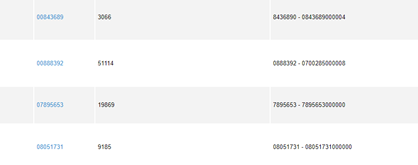
具体规则一:7位 + 5位 + 1 位 13位
算法分解:假设前面固定7位 为 0715799
中间5位0开始计算,每次产生一个新的UPC,需要加一
最后一位的产生规则如下。
* 071579917350 6 -> 0+1+7+9+7+5=29 7+5+9+1+3+0=25*3=75 29+75=104 10-4=6
* 071579917351 3 -> 0+1+7+9+7+5=29 7+5+9+1+3+1=26*3=78 29+78=107 10-7=3
* 071579917352 0 -> 0+1+7+9+7+5=29 7+5+9+1+3+2=27*3=81 29+81=110 10-0=10
* 071579917353 7 -> 0+1+7+9+7+5=29 7+5+9+1+3+3=28*3=84 29+84=113 10-3=7
* 071579917355 1 -> 0+1+7+9+7+5=29 7+5+9+1+3+5=30*3=90 29+90=119 10-9=1
* 071579917356 8 -> 0+1+7+9+7+5=29 7+5+9+1+3+6=31*3=93 29+93=122 10-2=8
* 071579917357 5 -> 0+1+7+9+7+5=29 7+5+9+1+3+7=32*3=96 29+96=125 10-5=5
* 071579917358 2 -> 0+1+7+9+7+5=29 7+5+9+1+3+8=33*3=99 29+99=128 10-8=2
* 071579917359 9 -> 0+1+7+9+7+5=29 7+5+9+1+3+9=34*3=102 29+102=131 10-1=9
* 071579917360 5 -> 0+1+7+9+7+6=30 7+5+9+1+3+0=25*3=75 30+75=105 10-5=5
* 071579917361 2 -> 0+1+7+9+7+6=30 7+5+9+1+3+1=26*3=78 30+78=108 10-8=2
* 071579917362 9 -> 0+1+7+9+7+6=30 7+5+9+1+3+2=27*3=81 30+81=111 10-1=9
public
static String calcolaCRC(String myCode) throws Exception {
String crc = "";
//
calcolo la somma delle cifre in pos pari e di quelle in pos dispari
int tot_pari = 0;
int tot_dispari = 0;
// i
caratteri in posizione pari sono in realta' in pos dispari e viceversa
// perche' quello che si definisce
PRIMO carattere e' in pos ZERO
for (int i = 0; i < myCode.length();
i++) {
if (i % 2 == 0) {
//
pos pari
tot_dispari += Integer.parseInt(myCode.substring(i, i + 1));
} else {
//
pos dispari
tot_pari += Integer.parseInt(myCode.substring(i, i + 1));
}
}
int tot = tot_dispari + 3 * tot_pari;
// del
totale mi serve solo l'ultima cifra
int i_crc = tot / 10;
i_crc = i_crc * 10;
i_crc = tot - i_crc;
crc = String.valueOf(10
- i_crc);
if (i_crc == 0) {
crc = "0";
}
return crc;
}
具体规则二:7位 + 4位 +1位 12位
07157991735 8
0*2 + 1*2 + (7*2-10+1)+ (9*2 -10 +1) + (7*2 -10 +1)+ (5*2 -10 +1) = 22
22%10 = 2
10-2 = 8
public static String calcolaOPCCRC(String OPC) throws Exception {
String crc = "";
int totSum = 0;
for (int i = 0; i < OPC.length(); i++) {
String curValue = OPC.substring(i, i + 1);
Integer intCurValue = new
Integer(curValue);
int parsedInt = intCurValue.intValue();
if (i % 2 == 0) {
parsedInt = parsedInt * 2;
if (parsedInt >= 10) {
parsedInt = parsedInt - 10 + 1;
}
}
totSum = totSum + parsedInt;
}
int
toSubtract = totSum % 10;
if (toSubtract == 0) {
toSubtract = 10;
}
int
crcInt = 10
- toSubtract;
crc
= new Integer(crcInt).toString();
return crc;
}
STID creation
与UPC一致
数据导出文件 文件名:MatrixDataExport-LUX_Products-True-91619142007919.xml
总体结构:
<MatrixDataExport>
<header>
//定义了一些很重要和系统集成有关的参数
</header>
<object>
//定义具体的导出的数据
</object>
</MatrixDataExport>
重要标签解释:
Transformation
<transformation>Z_MD_23_XSLT</transformation>
定义处理改xml的xslt 程序

sapSerialization
<SapSerialization>
<chrmas>1</chrmas>
<j3agri>1</j3agri>
<j3amat>1</j3amat>
</SapSerialization>
显示将要产生具体IDOC的数量 (目前来看,只有chrmas 有可能是2,其他都是1)
Chrmas
ßàZCHRMAS03
j3agrißàZJ3AGRI02
j3amatßàZ/AFS/MATMAS05
listZ08Chars

当前导出的物料,它的sku
属性有哪些。
物料属于不同的classification
的时候,它的characterstic
有所区别,
Z08属性 是说 某个classification
中的sku 属性。
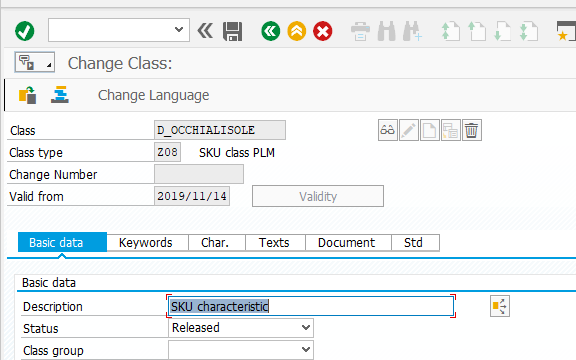
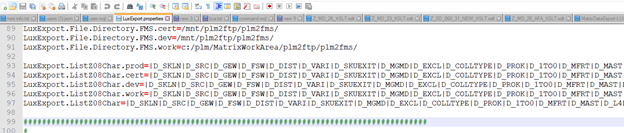
Plm 中 有一个配置文件专门用来配置数据导出的配置项,其中就有此项配置。
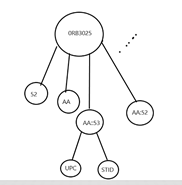
object :
数据结构为不规则的多叉树
数据转换过程
转换过程: (邀请PI协助一下)
PI 读取XML->根据transformation
定义决定产生哪些Idoc->读取xml里面所有的节点->根据对应的转换文件xslt进行转换->读取转换后文件的所有节点->做适配(mapping,一般不做什么事情)
XSL
XslT语言
将一个XML 转化成另外一种格式显示的语言
例子:将一个XML 转换成网页可以显示
index.xml (utf-8格式编辑)
<?xml version="1.0"
encoding="utf-8"?>
<catalog>
<cd>
<title>西游记 </title>
<artist>吴承恩</artist>
</cd>
<cd>
<title>红楼梦 </title>
<artist>曹雪芹</artist>
</cd>
</catalog>
index.xsl (utf-8格式编辑)
<?xml
version="1.0" encoding="utf-8"?>
<xsl:stylesheet
version="1.0"
xmlns:xsl="http://www.w3.org/1999/XSL/Transform">
<xsl:template
match="/">
<html>
<body>
<h2>My CD Collection</h2>
<table border="1">
<xsl:for-each select="index/cd">
<tr>
<td><xsl:value-of
select="title"/></td>
<td><xsl:value-of
select="artist"/></td>
</tr>
</xsl:for-each>
</table>
</body>
</html>
</xsl:template>
</xsl:stylesheet>
合并:
<?xml-stylesheet
type="text/xsl" href="index.xsl"?>
Chrome 浏览器 安全等级太高,不能引用本地xsl,
需要在 dos 命令里面启动chrome 带上参数 --allow-file-access-from-files
XPath语言
可以直接访问XML节点的语言
Idoc
ZSSD_KSERIAL
解释是第几条idoc
总 Counter 为3 的情况
IDoc 0000001634665213
counter 为1
IDoc 0000001634665215
counter 为 2
IDoc 0000001634665216(出错)
counter 为3
总Counter
为4的情况
IDoc 0000001634644375
IDoc 0000001634644376
IDoc 0000001634644377
IDoc 0000001634644378
ZMM_CLASSIFICATION_HEADER
里面暂时只看到 D_X , 可能是语言/或者国家
但是它分为两种,一种BUSINESS 一种TEXT, TEXT 为何,不太清楚
001 material
Z06 size
Z07
color
Z08 sku
ZSMMA_PLM_TRANSIT
料号,物料组类型,工厂,采购类型
E1MARA1
物料的相关属性
Size的相关属性
SKU 的相关属性
E1J3MRA
E1MAKTM
各种语言版本的描述信息
E1MARMM
(grid
value 的详细信息,根节点无特别意义)
/AFS/E1MARM Grid value
E1MEANM Grid value 对应的UPC/STID
enovia plm export to sap的更多相关文章
- enovia PLM: add characteristic to both prototype and product
Issue: add new mandatory attribute named LUX_HazardousMaterial to protoype and product, and export t ...
- enovia PLM : add new value to SPEO
Solution: Modify LUX_SPEO attribute in PLM Modify D_SPEO attribute in SAP , Login sap system F3 Tcod ...
- add a characteristic in enovia PLM
Problem: add a new Char. name D_COI6 that the description is Injected coloration #7 (COI6) in the D_ ...
- add new color number to the color drop down in enovia PLM
Ticket description:A55482L Ticket attachment: Open the attached page 2. Open the internationalizing ...
- form 表单的name
form 中 的name 很重要, 1. 可以用来查找对应的input 2.form 提交之后 会用来作为参数列表的名字 3.enovia plm 中,name 会和 table 的field 进行对 ...
- 程序间数据共享与传递:EXPORT/IMPORT、SAP/ABAP Memory
声明:原创作品,转载时请注明文章来自SAP师太技术博客( 博/客/园www.cnblogs.com):www.cnblogs.com/jiangzhengjun,并以超链接形式标明文章原始出处,否则将 ...
- 【ABAP系列】SAP ABAP如何在调试查看EXPORT/IMPORT 内存数据
公众号:SAP Technical 本文作者:matinal 原文出处:http://www.cnblogs.com/SAPmatinal/ 原文链接:[ABAP系列]SAP ABAP如何在调试查看E ...
- 【ABAP系列】SAP ABAP 给初学者-解读function函数的export和import等参数
公众号:SAP Technical 本文作者:matinal 原文出处:http://www.cnblogs.com/SAPmatinal/ 原文链接:[ABAP系列]SAP ABAP 给初学者-解读 ...
- 批量授一种权限给用户程序 plm enovia
set context user DanielDai;add program LUX_UserAssignment java execute immediate code 'import com.ma ...
随机推荐
- go 复合数据类型
数组 数组是一个由固定长度的特定类型元素组成的序列,一个数组可以由零个或多个元素组成.因为数组的长度是固定的,因此在Go语言中很少直接使用数组. 数组声明方式: #第一种 ] int balance ...
- qt 如何使用 lamda 表达式接收线程中发射的数据,并在里面更新 UI ?
Qt 信号和槽连接方式 常量 描述 Qt::AutoConnection (默认)如果接收方位于发出信号的线程中,则使用Qt::DirectConnection.否则,使用Qt::QueuedConn ...
- 算法8-5:Prim算法
Prim算法用于计算最小生成树.Prim算法分为两种,一种是懒汉式,一种是饿汉式. 懒汉式Prim 懒汉式Prim算法过程例如以下: 首先将顶点0增加到MST中 从MST与未訪问顶点之间边中选出最短的 ...
- 45.Sort List(链表排序)
Level: Medium 题目描述: Sort a linked list in O(n log n) time using constant space complexity. Example ...
- Ansible--06 ansible roles
Ansible roles roles不管是Ansible还是saltstack,我在写一键部署的时候,都不可能把所有的步骤全部写入到一个'剧本'文件当中,我们肯定需要把不同的工作模块,拆分开来,解耦 ...
- Python实现简单抓取功能
一直以来都想好好学习Python,但是每次学习了从基础感觉学了一会就感觉没意思.今天学习一下爬虫,也算是自己学python的目的吧,但是在学习过程中遇到很多困难,但幸好遇到了一篇好博文,分享给大家:h ...
- IronPython C#与Python相互调用
ironphy microsoft.scripting dll using System;using System.Collections.Generic;using System.Linq;usi ...
- 1.什么是微信小程序
微信小程序,简称CX,是一种不需要下载安装即可使用的应用,它实现了应用“触手可及”的梦想,用户扫一扫或者搜一下即可打开应用.也体现了“用完即走”的理念,用户不用关心是否安装太多应用的问题. 应用将无处 ...
- hibernate简单连接mysql数据库配置
使用hibernate连接mysql数据库 1:项目搭建好之后,在lib包中添加必要的jar包,和mysql数据库驱动jar包: jar包可以在hibernate的下载包(hibernate3.3.2 ...
- python学习--第二天 爬取王者荣耀英雄皮肤
今天目的是爬取所有英雄皮肤 在爬取所有之前,先完成一张皮肤的爬取 打开anacond调出编译器Jupyter Notebook 打开王者荣耀官网 下拉找到位于网页右边的英雄/皮肤 点击[+更多] 进入 ...