
add a characteristic in enovia PLM
Problem: add a new Char. name D_COI6 that the description is Injected coloration #7 (COI6) in the D_BUSINESS class in PLM and SAP.

Step1: to attain attribute name on business model.
The result of following command tell you all attributes of Color
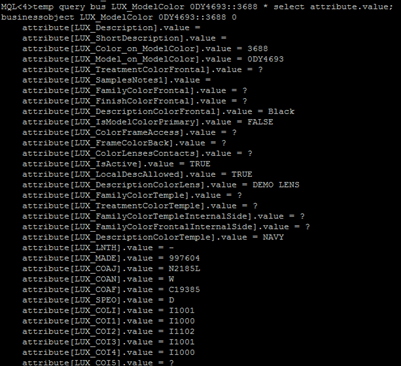
Because some of attributes were not selected to be displayed on the Color Characteristic Tab page, then we can infer what name we should assign to new attribute.
New attribute name: ‘LUX_COI6’
Step 2: create a new attribute named “LUX_COI6” in Business Model
It is better for assigning value to fields to compare with another similar attribute.
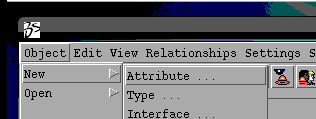
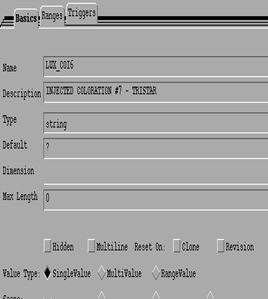
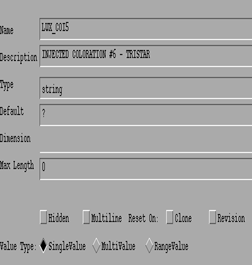
Step 3: add some properties to new attribute.
Compare the properties between LUX_COI5 and LUX_COI6,
There are so many properties that LUX_COI6 doesn’t include.
So that we need to add the properties to the new attribute in my own.
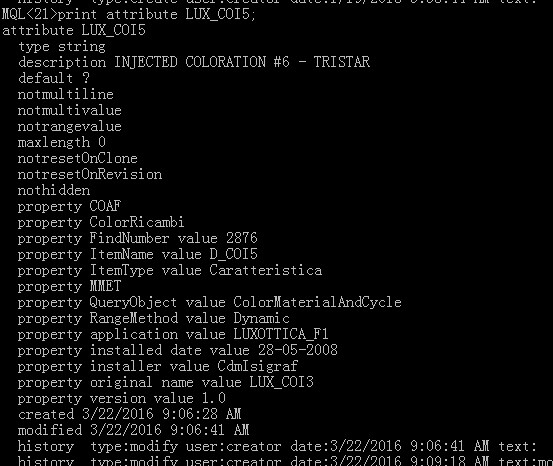
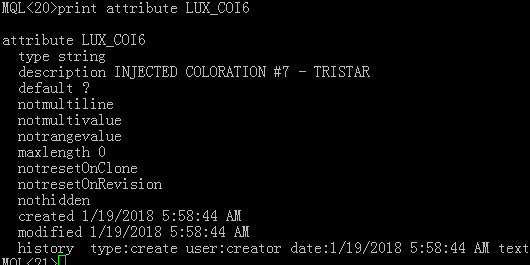
So execute the following command to add properties to LUX_COI6
modify attribute LUX_COI6
property COAF
property ColorRicambi
property FindNumber value 2878
property ItemName value D_COI6
property ItemType value Caratteristica
property MMET
property QueryObject value ColorMaterialAndCycle
property RangeMethod value Dynamic
property application value LUXOTTICA_F1
property 'installed date' value 28-05-2008
property installer value CdmIsigraf
property 'original name' value LUX_COI3
property version value 1.0;
FindNumber and ItemName are vital, other fields are not very helpful.
FindNumber will be showed as F/N at front-end page.
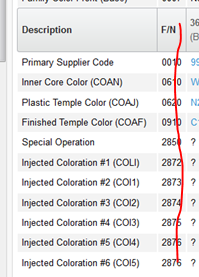
Step4: create a new interface named “LUX_COI6” in business model
Of course, comparing with similar interface will help you.
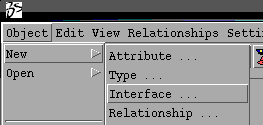
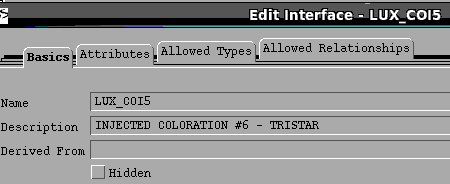
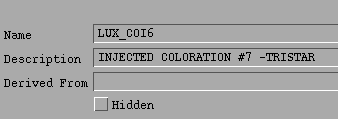
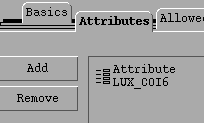
Add new attribute named “LUX_COI6”to the new interface
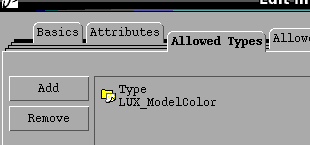
Add ‘LUX_ModelColor’ to the Allowed Types List of the interface.
Step5: create a new class Configuration Item
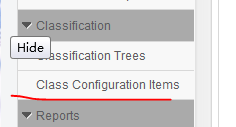
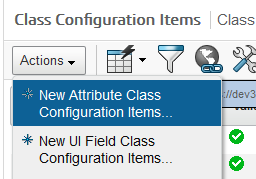
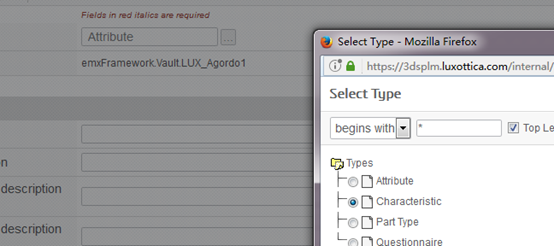
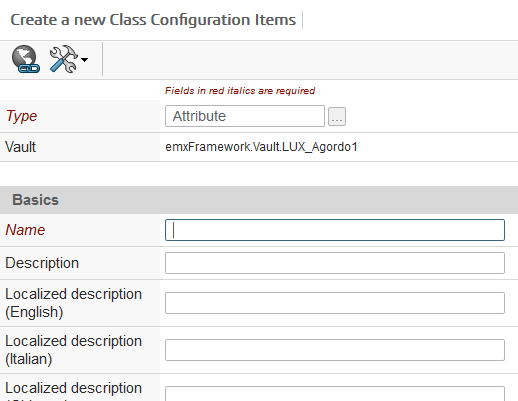
Then, how to define these field?
Look for other Configuration Items for reference.
- Analyze the page URL
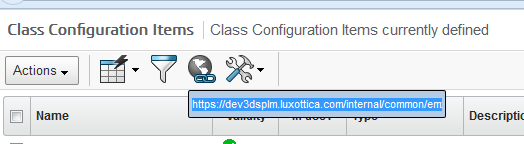

2. To see the Inquery with Business Model
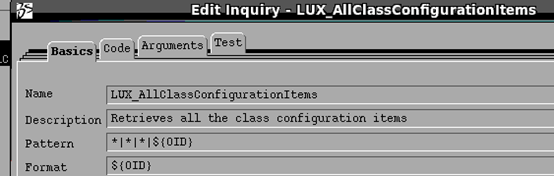
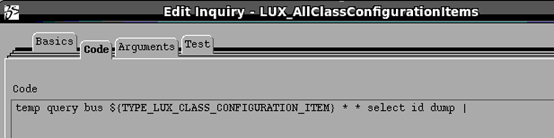
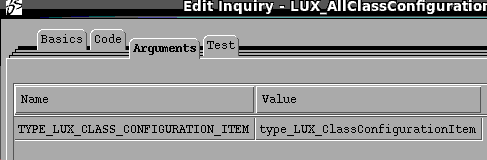
It says what mql command the Inquery employs.
The mql command we can know is :
temp query bus LUX_ClassConfigurationItem * * select id dump |
the command will query all objects of LUX_ClassConfigurationItem,
the amount of the result is too large, we need to filter useless objects out in accordance with our real situation.
So ,please use the following handled command:
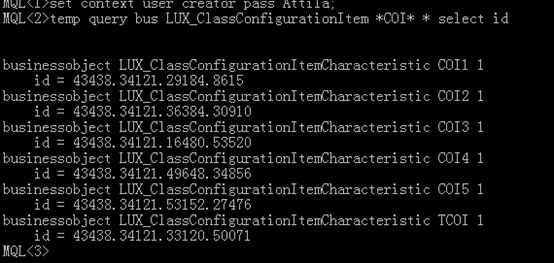
Print the detail of one of objects
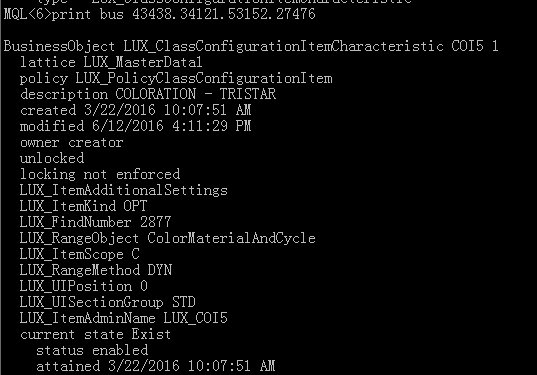
Then, as you can see from the above result , please refer to the result to set up a new Class Configuration Item.
Attention please: Admin name is the attribute name which you have already created in Business Model,
And the LUX_FindNumber is the same as FindNumber which is the property of attribute LUX_COI6 that you created before.

Then ,the new Configuration Item has been created .

We can query the object in mql.
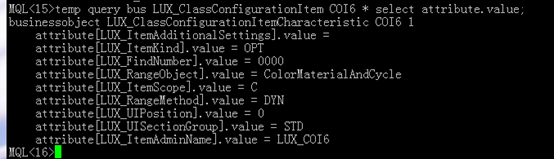
Step6: modify relationships of the new characteristic.
As you can see from the following result, the relationships of COI6 and COI5 are absolutely different.
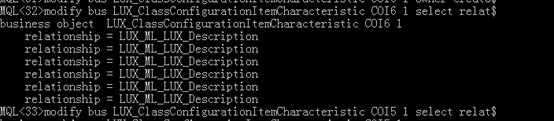
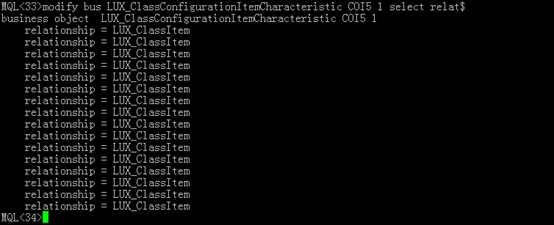
Why? I don’t know
Delete all relationships of COI6,
Execute the sub command in three times
disconnect bus LUX_ClassConfigurationItemCharacteristic COI6 1 relationship LUX_ML_LUX_Description
from LUX_ClassConfigurationItemCharacteristic COI6 1


Add new relationships to COI6 in compliance with COI5
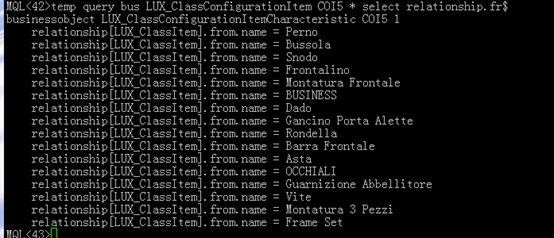
Execute the following command respectively
connect bus LUX_ClassConfigurationItemCharacteristic COI6 1 relationship LUX_ClassItem from LUX_ClassMaster Perno 1;
connect bus LUX_ClassConfigurationItemCharacteristic COI6 1 relationship LUX_ClassItem from LUX_ClassMaster Bussola 1;
connect bus LUX_ClassConfigurationItemCharacteristic COI6 1 relationship LUX_ClassItem from LUX_ClassMaster Snodo 1;
connect bus LUX_ClassConfigurationItemCharacteristic COI6 1 relationship LUX_ClassItem from LUX_ClassMaster Frontalino 1;
connect bus LUX_ClassConfigurationItemCharacteristic COI6 1 relationship LUX_ClassItem from LUX_ClassMaster Montatura Frontale 1;
connect bus LUX_ClassConfigurationItemCharacteristic COI6 1 relationship LUX_ClassItem from LUX_ClassMaster BUSINESS 1;
connect bus LUX_ClassConfigurationItemCharacteristic COI6 1 relationship LUX_ClassItem from LUX_ClassMaster Dado 1;
connect bus LUX_ClassConfigurationItemCharacteristic COI6 1 relationship LUX_ClassItem from LUX_ClassMaster Gancino Porta Alette 1;
connect bus LUX_ClassConfigurationItemCharacteristic COI6 1 relationship LUX_ClassItem from LUX_ClassMaster Rondella 1;
connect bus LUX_ClassConfigurationItemCharacteristic COI6 1 relationship LUX_ClassItem from LUX_ClassMaster Barra Frontale 1;
connect bus LUX_ClassConfigurationItemCharacteristic COI6 1 relationship LUX_ClassItem from LUX_ClassMaster Asta 1;
connect bus LUX_ClassConfigurationItemCharacteristic COI6 1 relationship LUX_ClassItem from LUX_ClassMaster OCCHIALI 1;
connect bus LUX_ClassConfigurationItemCharacteristic COI6 1 relationship LUX_ClassItem from LUX_ClassMaster Guarnizione Abbellitore 1;
connect bus LUX_ClassConfigurationItemCharacteristic COI6 1 relationship LUX_ClassItem from LUX_ClassMaster Vite 1;
connect bus LUX_ClassConfigurationItemCharacteristic COI6 1 relationship LUX_ClassItem from LUX_ClassMaster Montatura 3 Pezzi 1;
connect bus LUX_ClassConfigurationItemCharacteristic COI6 1 relationship LUX_ClassItem from LUX_ClassMaster Frame Set 1;
Step 7 :modify LuxotticaStringResource.properties
vim /opt/plm/webapp/internal/WEB-INF/classes/LuxotticaStringResource.properties
vim /opt/plm/webapp/3dspace/WEB-INF/classes/LuxotticaStringResource.properties

Then
Restart tomcat
Step7: add a characteristic to Color
now , it is the time to add a characteristic to Color
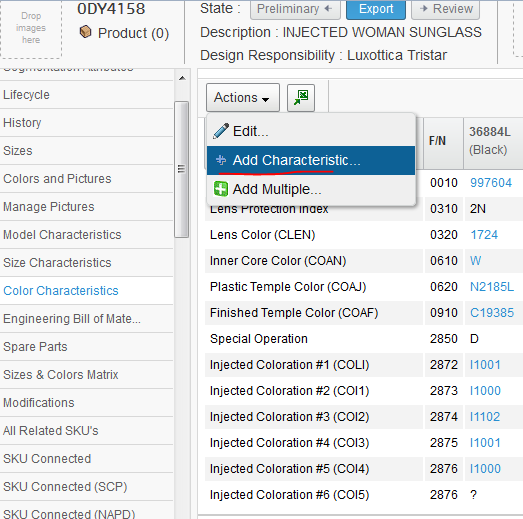
Unfortunately, we can’t find out COI6 ,why?
Because the vault of object of LUX_ClassConfigurationItem isn’t ‘LUX_MasterData1’
And the owner of LUX_ClassConfigurationItem isn’t creator




Execute the command below to modify the vault.
modify bus LUX_ClassConfigurationItemCharacteristic COI6 1 vault LUX_MasterData1

Then reloadcache, redirect to the page again.
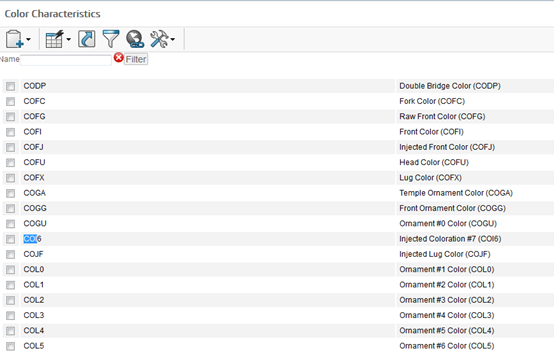
add a characteristic in enovia PLM的更多相关文章
- enovia PLM: add characteristic to both prototype and product
Issue: add new mandatory attribute named LUX_HazardousMaterial to protoype and product, and export t ...
- add new color number to the color drop down in enovia PLM
Ticket description:A55482L Ticket attachment: Open the attached page 2. Open the internationalizing ...
- enovia PLM : add new value to SPEO
Solution: Modify LUX_SPEO attribute in PLM Modify D_SPEO attribute in SAP , Login sap system F3 Tcod ...
- enovia plm export to sap
UPC creation UPC 结构 PLM 使用的UPC 是 14个数字组成的,兼容. 前两位为 0,后12位为有效数字,在SAP中0会被忽略,符合国际UPC通用 规则, 前一位为0,后13 位为 ...
- add characteristic to color
Problem: add a new Char. name D_COI6 that the description is Injected coloration #7 (COI6) in the D_ ...
- 低功耗蓝牙4.0BLE编程-nrf51822开发(11)-蓝牙串口代码分析
代码实例:点击打开链接 实现的功能是从uart口发送数据至另一个蓝牙串口,或是从蓝牙读取数据通过uart打印出数据. int main(void) { // Initialize leds_init( ...
- form 表单的name
form 中 的name 很重要, 1. 可以用来查找对应的input 2.form 提交之后 会用来作为参数列表的名字 3.enovia plm 中,name 会和 table 的field 进行对 ...
- 批量授一种权限给用户程序 plm enovia
set context user DanielDai;add program LUX_UserAssignment java execute immediate code 'import com.ma ...
- 前端性能优化:Add Expires headers
前端性能优化:Add Expires headers Expires headers 是什么? Expires headers:直接翻译是过期头.Expires headers 告诉浏览器是否应该从服 ...
随机推荐
- jmeter 后台运行 setsid bin/jmeter -n -t .jmx文件 -l .jtl文件
备注: 另外,在Linux下我们有时候希望线程可以在后台运行,这样我们关闭当前连接后,线程依然可以运行,这里提供一个将 jmeter命令设置为后台线程的方法. 使用setsid命令: setsid ...
- linux python3换pip 源
linux下python3 pip 安装模块 # python3 -m pip install pymysql 1)检查pip.conf文件是否存在 >> cd ~ > ...
- 一张图搞清楚Java异常机制
下面是Java异常类的组织结构,红色区域的异常类表示是程序需要显示捕捉或者抛出的. Throwable Throwable是Java异常的顶级类,所有的异常都继承于这个类. Error,Excepti ...
- 24-python基础-python3-浅拷贝与深拷贝(2)
4.copy 模块的 copy()和 deepcopy()函数 在处理列表和字典时,尽管传递引用常常是最方便的方法,但如果函数修改了传入的列表或字典,可能不希望这些变动影响原来的列表或字典.要做到 ...
- Maven入门指南12:将项目发布到私服
1 . 修改私服中仓库的部署策略 Release版本的项目应该发布到Releases仓库中,对应的,Snapshot版本应该发布到Snapshots仓库中.Maven根据pom.xml文件中版本号&l ...
- Spring Boot 中 @SpringBootApplication注解背后的三体结构探秘
概 述 SpringBoot 约定大于配置 的功力让我们如沐春风,在我之前写的文章<从SpringBoot到SpringMVC> 也对比过 SpringBoot 和 SpringMVC 这 ...
- 使用androidstudio时遇到的一些小错误
1 路径名字中不能有汉字 报如下错误:Error:(1, 0) Your project path contains non-ASCII characters. This will most lik ...
- caffer的三种文件类别
solver文件 是一堆超参数,比如迭代次数,是否用GPU,多少次迭代暂存一次训练所得参数,动量项,权重衰减(即正则化参数),基本的learning rate,多少次迭代打印一次loss,以及网络结构 ...
- 【Luogu】【关卡2-10】分治算法(2017年10月)
任务说明:将大问题拆分为小问题,分而治之,各个击破,然后在合并回来. 取余运算||快速幂 幂次方 逆序对 南蛮图腾
- application/x-www-form-urlencode/multipart/form-data
首先我们先认识下今天的application/x-www-form-urlencode/multipart/form-data属性所在的位置 1.form所属 在Form元素的语法中,EncType表 ...