
Android 加载大图片到内存
本文演示android中图片加载到内存
首先设计界面:
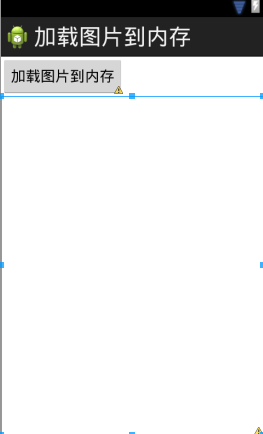
代码如下:
<LinearLayout xmlns:android="http://schemas.android.com/apk/res/android"

    xmlns:tools="http://schemas.android.com/tools"

    android:layout_width="match_parent"

    android:layout_height="match_parent"

    android:orientation="vertical"

    tools:context=".MainActivity" >

    <Button

        android:layout_width="wrap_content"

        android:layout_height="wrap_content"

        android:onClick="load"

        android:text="加载图片到内存" />

    <ImageView

        android:id="@+id/iv"

        android:layout_width="fill_parent"

        android:layout_height="fill_parent" />

</LinearLayout>
往mnt/sdcard中上传测试图片
添加逻辑部分代码:
public class MainActivity extends Activity {

    private ImageView iv;

    @Override

    protected void onCreate(Bundle savedInstanceState) {

        super.onCreate(savedInstanceState);

        setContentView(R.layout.activity_main);

        iv = (ImageView) findViewById(R.id.iv);

    }

    public void load() {

        Bitmap bitmap = BitmapFactory.decodeFile("/sdcard/a.jpg");

        iv.setImageBitmap(bitmap);

    }

}
运行代码,产生错误,原因是图片太大(选取的是大照片)
可以使用BitmapFactory中包含的静态类Options在不解析图片信息的前提下得到图片的宽高信息:
    BitmapFactory.Options opts = new Options();

        // 不去解析图片信息,只是得到图片的头部信息 宽高

        opts.inJustDecodeBounds = true;

        BitmapFactory.decodeFile("/sdcard/a.jpg", opts);

        int imageHeight = opts.outHeight;

        int imagewidth = opts.outWidth;

        System.out.println("图片宽:" + imagewidth);

        System.out.println("图片高" + imageHeight);
运行一下:
09-04 06:09:10.519: I/System.out(1812): 图片宽:2560
09-04 06:09:10.519: I/System.out(1812): 图片高1920
接下来得到手机屏幕的宽高:
        //得到手机屏幕的宽高

        WindowManager wm = (WindowManager)getSystemService(WINDOW_SERVICE);

        int height = wm.getDefaultDisplay().getHeight();

        int width = wm.getDefaultDisplay().getWidth();
可以看到getHeight与getWidth方法均已过时,使用下面的方法替代:
        // 得到手机屏幕的宽高

        WindowManager wm = (WindowManager) getSystemService(WINDOW_SERVICE);

        Point outSize = new Point();

        wm.getDefaultDisplay().getSize(outSize); // 3.0以后的版本才能使用
完整代码如下:
package com.wuyudong.loadimage;

import android.os.Bundle;

import android.annotation.SuppressLint;

import android.app.Activity;

import android.graphics.Bitmap;

import android.graphics.BitmapFactory;

import android.graphics.BitmapFactory.Options;

import android.graphics.Point;

import android.view.Menu;

import android.view.View;

import android.view.WindowManager;

import android.widget.ImageView;

public class MainActivity extends Activity {

    private ImageView iv;

    private int windowHeight;

    private int windowWidth;

    protected void onCreate(Bundle savedInstanceState) {

        super.onCreate(savedInstanceState);

        setContentView(R.layout.activity_main);

        iv = (ImageView) findViewById(R.id.iv);

        // 得到手机屏幕的宽高

        WindowManager wm = (WindowManager) getSystemService(WINDOW_SERVICE);

        windowHeight = wm.getDefaultDisplay().getHeight();

        windowWidth = wm.getDefaultDisplay().getWidth();

        //Point outSize = new Point();

        //wm.getDefaultDisplay().getSize(outSize); // 3.0以后的版本才能使用

        //windowHeight = outSize.y;

        //windowWidth = outSize.x;

    }

    public void load(View view) {

        // Bitmap bitmap = BitmapFactory.decodeFile("/sdcard/a.jpg");

        // iv.setImageBitmap(bitmap);

        // 图片解析的配置

        BitmapFactory.Options opts = new Options();

        // 不去解析图片信息,只是得到图片的头部信息 宽高

        opts.inJustDecodeBounds = true;

        BitmapFactory.decodeFile("/sdcard/a.jpg", opts);

        int imageHeight = opts.outHeight;

        int imagewidth = opts.outWidth;

        System.out.println("图片宽:" + imagewidth);

        System.out.println("图片高" + imageHeight);

        // 计算缩放比例

        int scaleX = imagewidth / windowWidth;

        int scaleY = imageHeight / windowHeight;

        int scale = 1;

        if (scaleX > scaleY & scaleY >= 1) {

            scale = scaleX;

        }

        if (scaleY > scaleX & scaleX >= 1) {

            scale = scaleY;

        }

        //解析图片

        opts.inJustDecodeBounds = false;

        //采样率

        opts.inSampleSize = scale;

        Bitmap bitmap = BitmapFactory.decodeFile("/sdcard/a.jpg", opts);

        iv.setImageBitmap(bitmap);

    }

}
Android 加载大图片到内存的更多相关文章
- Android -- 加载大图片到内存,从gallery获取图片,获取图片exif信息
1. 加载大图片到内存,从gallery获取图片 android默认的最大堆栈只有16M, 图片像素太高会导致内存不足的异常, 需要将图片等比例缩小到适合手机屏幕分辨率, 再加载. 从gallery ...
- Android学习笔记_51_转android 加载大图片防止内存溢出
首先来还原一下堆内存溢出的错误.首先在SD卡上放一张照片,分辨率为(3776 X 2520),大小为3.88MB,是我自己用相机拍的一张照片.应用的布局很简单,一个Button一个ImageView, ...
- android加载大图片到内存
1)演示效果: 1)代码演示: 布局代码: 权限配置:
- Android(java)学习笔记236:多媒体之加载大图片到内存(Bitmap API)
1.Bitmap (API使用) android里面的bitmap中,一个像素点需要4个byte去表示,这是因为android表示颜色是" argb ":其中 a 表示是透明度,然 ...
- Android开发中如何解决加载大图片时内存溢出的问题
Android开发中如何解决加载大图片时内存溢出的问题 在Android开发过程中,我们经常会遇到加载的图片过大导致内存溢出的问题,其实类似这样的问题已经屡见不鲜了,下面将一些好的解决方案分享给 ...
- Android(java)学习笔记179:多媒体之加载大图片到内存(Bitmap API)
1. Bitmap (API使用) android里面的bitmap中,一个像素点需要4个byte去表示,这是因为android表示颜色是" argb ":其中 a 表示是透明度, ...
- 图片_ _Android有效解决加载大图片时内存溢出的问题 2
Android有效解决加载大图片时内存溢出的问题 博客分类: Android Android游戏虚拟机算法JNI 尽量不要使用setImageBitmap或 setImageResource或 Bit ...
- Android有效解决加载大图片时内存溢出的问题
首先,您需要了解一下,图片占用内存的计算方法,传送门:http://blog.csdn.net/scry5566/article/details/11568751 尽量不要使用setImageBitm ...
- Android加载大图片OOM异常解决
尽量不要使用setImageBitmap或setImageResource或BitmapFactory.decodeResource来设置一张大图, 因为这些函数在完成decode后,最终都是通过 ...
随机推荐
- 精品资源:40个实用的 PSD 贴纸模板《下篇》
贴纸经常被网页设计师用于为标注网站中的不同元素,以此吸引访客的注意.此外,使用贴纸也使网站更具吸引力.虽然设计者可以使用 Photoshop 制作贴纸,但他们也可以利用从互联网上下载现成的模板.这些模 ...
- JAVA 设计模式 装饰者模式
用途 装饰者模式 (Decorator) 动态地给一个对象添加一些额外的职责.就增加功能来说,Decorator 模式相比生成子类更为灵活. 装饰者模式是一种结构式模式. 结构
- JavaScript变量和数据类型
变量 变量就是一个元素,类似于数学中的概念,用来指定表示一个对象.在JavaScript中,用来指定变量的关键字为var.当声明新变量时,可以使用关键词 "new" 来声明其类型 ...
- Moon转告给你一个比Log4net更好日志框架--TracerX Logger 及其对应的日志查看器
一.介绍 TracerX logger是一个易于上手,且拥有众多高级特性的.NET日志框架. 它能够发送输出结果到多目的地(循环文件.事件日志等....).它也能生成文本和二进制文件.它拥有一个强大的 ...
- Ubuntu14.04安装postgresql9.4
安装前的检查 首先查看是否已经安装了旧版本: dpkg -l |grep postgresql 如果已经安装了某个版本的postgresql,请先卸载. 安装postgresql 添加postgres ...
- 【原创】jQuery 仿百度输入标签插件
1.先上效果图 2.调用方式 <link href="/Styles/tagsinput.css" rel="stylesheet" type=" ...
- 快速学习JavaScript面向对象编程
到处都是属性.方法,代码极其难懂,天哪,我的程序员,你究竟在做什么?仔细看看这篇指南,让我们一起写出优雅的面向对象的JavaScript代码吧! 作为一个开发者,能否写出优雅的代码对于你的职业生涯至关 ...
- 在QTableWidget中添加QCheckBox并使其居中显示(转)
实现思路:把QCheckBox嵌入式到一个水平布局中 QWidget *widget; QHBoxLayout *hLayout; QCheckBox *ckb; ... ckb = ...
- Stream/Bytes[]/Image对象相互转化
Stream/Bytes[]/Image对象相互转化 Stream转Byte数组.Image转Byte数组.文件转Stream等 /// <summary> /// 将 Stream 转成 ...
- Entity Famework 的通过IOC注入实现
1. 前言 最近刚换了一家公司,由于之前的公司代码并没有用到项目框架,需要我整理下NHibernate与Entity Framework之间的区别及适用性.并写出相关的示例代码 面试的时候吹的牛,得把 ...