
Interpolation in MATLAB
| Mathematics |   |
One-Dimensional Interpolation
There are two kinds of one-dimensional interpolation in MATLAB:
Polynomial Interpolation
The function interp1 performs one-dimensional interpolation, an important operation for data analysis and curve fitting. This function uses polynomial techniques, fitting the supplied data with polynomial functions between data points and evaluating the appropriate function at the desired interpolation points. Its most general form is
yi = interp1(x,y,xi,
method)
y is a vector containing the values of a function, and x is a vector of the same length containing the points for which the values in y are given. xi is a vector containing the points at which to interpolate. method is an optional string specifying an interpolation method:
- Nearest neighbor interpolation (
method = 'nearest'). This method sets the value of an interpolated point to the value of the nearest existing data point. - Linear interpolation (
method = 'linear'). This method fits a different linear function between each pair of existing data points, and returns the value of the relevant function at the points specified byxi. This is the default method for theinterp1function. - Cubic spline interpolation (
method = 'spline'). This method fits a different cubic function between each pair of existing data points, and uses thesplinefunction to perform cubic spline interpolation at the data points. - Cubic interpolation (
method = 'pchip'or'cubic'). These methods are identical. They use thepchipfunction to perform piecewise cubic Hermite interpolation within the vectorsxandy. These methods preserve monotonicity and the shape of the data.
If any element of xi is outside the interval spanned by x, the specified interpolation method is used for extrapolation. Alternatively, yi = interp1(x,Y,xi,method,extrapval) replaces extrapolated values with extrapval. NaN is often used for extrapval.
All methods work with nonuniformly spaced data.
Speed, Memory, and Smoothness Considerations
When choosing an interpolation method, keep in mind that some require more memory or longer computation time than others. However, you may need to trade off these resources to achieve the desired smoothness in the result.
- Nearest neighbor interpolation is the fastest method. However, it provides the worst results in terms of smoothness.
- Linear interpolation uses more memory than the nearest neighbor method, and requires slightly more execution time. Unlike nearest neighbor interpolation its results are continuous, but the slope changes at the vertex points.
- Cubic spline interpolation has the longest relative execution time, although it requires less memory than cubic interpolation. It produces the smoothest results of all the interpolation methods. You may obtain unexpected results, however, if your input data is non-uniform and some points are much closer together than others.
- Cubic interpolation requires more memory and execution time than either the nearest neighbor or linear methods. However, both the interpolated data and its derivative are continuous.
The relative performance of each method holds true even for interpolation of two-dimensional or multidimensional data. For a graphical comparison of interpolation methods, see the section Comparing Interpolation Methods.
FFT-Based Interpolation
The function interpft performs one-dimensional interpolation using an FFT-based method. This method calculates the Fourier transform of a vector that contains the values of a periodic function. It then calculates the inverse Fourier transform using more points. Its form is
y = interpft(x,n)
x is a vector containing the values of a periodic function, sampled at equally spaced points. n is the number of equally spaced points to return.
| MATLAB Function Reference |   |
interp1
One-dimensional data interpolation (table lookup)
Syntax
yi = interp1(x,Y,xi)

yi = interp1(Y,xi)

yi = interp1(x,Y,xi,method)

yi = interp1(x,Y,xi,method,'extrap')

yi = interp1(x,Y,xi,method,extrapval)
Description
yi = interp1(x,Y,xi) returns vector yi containing elements corresponding to the elements of xi and determined by interpolation within vectors x and Y. The vector x specifies the points at which the data Y is given. If Y is a matrix, then the interpolation is performed for each column of Y and yi is length(xi)-by-size(Y,2).
yi = interp1(Y,xi) assumes that x = 1:N, where N is the length of Y for vector Y, or size(Y,1) for matrix Y.
yi = interp1(x,Y,xi,method)
'nearest' |
Nearest neighbor interpolation |
'linear' |
Linear interpolation (default) |
'spline' |
Cubic spline interpolation |
'pchip' |
Piecewise cubic Hermite interpolation |
'cubic' |
(Same as 'pchip') |
'v5cubic' |
Cubic interpolation used in MATLAB 5 |
For the 'nearest', 'linear', and 'v5cubic' methods, interp1(x,Y,xi,method) returns NaN for any element of xi that is outside the interval spanned by x. For all other methods, interp1 performs extrapolation for out of range values.
yi = interp1(x,Y,xi,method,'extrap') uses the specified method to perform extrapolation for out of range values.
yi = interp1(x,Y,xi,method,extrapval) returns the scalar extrapval for out of range values. NaN and 0 are often used for extrapval.
The interp1 command interpolates between data points. It finds values at intermediate points, of a one-dimensional function  that underlies the data. This function is shown below, along with the relationship between vectors
 x, Y, xi, and yi.

Interpolation is the same operation as table lookup. Described in table lookup terms, the table is [x,Y] and interp1 looks up the elements of xi in x, and, based upon their locations, returns values yi interpolated within the elements of Y.
Note interp1q is quicker than interp1 on non-uniformly spaced data because it does no input checking. For interp1q to work properly, x must be a monotonically increasing column vector and Y must be a column vector or matrix with length(X) rows. Type help interp1q at the command line for more information. |
Examples
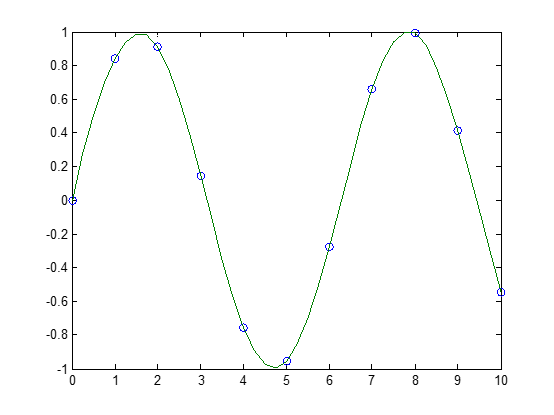
Example 1. Generate a coarse sine curve and interpolate over a finer abscissa.
x = 0:10;

y = sin(x);

xi = 0:.25:10;

yi = interp1(x,y,xi);

plot(x,y,'o',xi,yi)
- with 'spline' method:
x = 0:10;
y = sin(x);
xi = 0:.25:10;
yi = interp1(x,y,xi,'spline');
figure;plot(x,y,'o',xi,yi)
Example 2. Here are two vectors representing the census years from 1900 to 1990 and the corresponding United States population in millions of people.
t = 1900:10:1990;

p = [75.995  91.972  105.711  123.203  131.669...

     150.697  179.323  203.212  226.505  249.633];
The expression interp1(t,p,1975) interpolates within the census data to estimate the population in 1975. The result is
ans =

    214.8585
Now interpolate within the data at every year from 1900 to 2000, and plot the result.
 x = 1900:1:2000;

 y = interp1(t,p,x,'spline');

 plot(t,p,'o',x,y)
Sometimes it is more convenient to think of interpolation in table lookup terms, where the data are stored in a single table. If a portion of the census data is stored in a single 5-by-2 table,
tab =

    1950    150.697

    1960    179.323

    1970    203.212

    1980    226.505

    1990    249.633
then the population in 1975, obtained by table lookup within the matrix tab, is
p = interp1(tab(:,1),tab(:,2),1975)

p =

    214.8585
Algorithm
The interp1 command is a MATLAB M-file. The 'nearest' and 'linear' methods have straightforward implementations.
For the 'spline' method, interp1 calls a function spline that uses the functions ppval, mkpp, and unmkpp. These routines form a small suite of functions for working with piecewise polynomials. spline uses them to perform the cubic spline interpolation. For access to more advanced features, see the spline reference page, the M-file help for these functions, and the Spline Toolbox.
For the 'pchip' and 'cubic' methods, interp1 calls a function pchip that performs piecewise cubic interpolation within the vectors x and y. This method preserves monotonicity and the shape of the data. See the pchip reference page for more information.
See Also
interpft, interp2, interp3, interpn, pchip, spline
References
[1] de Boor, C., A Practical Guide to Splines, Springer-Verlag, 1978.
Interpolation in MATLAB的更多相关文章
- superresolution_v_2.0 Application超分辨率程序文档
SUPERRESOLUTION GRAPHICAL USER INTERFACE DOCUMENTATION Contents 1.- How to use this application. 2.- ...
- 数字图像处理实验(4):PROJECT 02-04 [Multiple Uses],Zooming and Shrinking Images by Bilinear Interpolation 标签: 图像处理MATLAB
实验要求: Zooming and Shrinking Images by Bilinear Interpolation Objective To manipulate another techniq ...
- MATLAB曲面插值及交叉验证
在离散数据的基础上补插连续函数,使得这条连续曲线通过全部给定的离散数据点.插值是离散函数逼近的重要方法,利用它可通过函数在有限个点处的取值状况,估算出函数在其他点处的近似值.曲面插值是对三维数据进行离 ...
- paper 121 :matlab中imresize函数
转自:http://www.cnblogs.com/rong86/p/3558344.html matlab中函数imresize简介: 函数功能:该函数用于对图像做缩放处理. 调用格式: B = i ...
- Matlab 进阶学习记录
最近在看 Faster RCNN的Matlab code,发现很多matlab技巧,在此记录: 1. conf_proposal = proposal_config('image_means', ...
- matlab中imresize
matlab中函数imresize简介: 函数功能:该函数用于对图像做缩放处理. 调用格式: B = imresize(A, m) 返回的图像B的长宽是图像A的长宽的m倍,即缩放图像. m大于1, 则 ...
- matlab 2012 vs2010混合编程
电脑配置: 操作系统:window 8.1 Matlab 2012a安装路径:D:\Program Files\MATLAB\R2012a VS2010 : OpenCV 2.4.3:D:\Progr ...
- 非刚性图像配准 matlab简单示例 demons算法
2011-05-25 17:21 非刚性图像配准 matlab简单示例 demons算法, % Clean clc; clear all; close all; % Compile the mex f ...
- MATLAB中的函数的归总
字符串操作函数 1. 函数eval可以用来执行用字符串表示的表达式 2. 函数deblank可以去掉字符串末尾的所有空格 3. 函数findstr可以用来在长 ...
随机推荐
- 一次线上http接口调用不通相关的解决过程
2016-05-25 08:58:34 昨天线上小白系统因为调用外部http接口,超时不释放,导致页面反应很慢,时间一长,报502错误. 上网查了下,502错误是因为服务对于客户的请求没有得到及时的反 ...
- js操作dom---创建一个域来输出调试信息
<!DOCTYPE HTML PUBLIC "-//W3C//DTD HTML 4.01 Transitional//EN" "http://www.w3.org/ ...
- Java第六次作业修改版
import java.util.ArrayList; import java.util.Collections; import java.util.Random; public class Draw ...
- 数据导出到excel
jsp页面: 数据table: <form action="/export.jsp" method="post" id="expform&quo ...
- Errore Http 404.2
问题一:IIS 7.5 请求的内容似乎是脚本,因而将无法由静态文件处理程序来处理 404.2就一个http status code, 在msdn上说:404.2 - ISAPI or CGI rest ...
- jQuery的使用
一.基本简介 1.下载:http://jquery.com提供了最新的jQuery框架下载.通常只需下载最小的jQuery包(Minified)即可. ( 目前最新的版本jquery-1.3.2.mi ...
- POJ2653判断直线是否相交
bool judge(node p1,node p2,node p3,node p4){ if(min(p1.x,p2.x)>max(p3.x,p4.x)||min(p1.y,p2.y)& ...
- UICollectionview实现自定义cell的移动删除
今天 ,有群里人询问了 ,支付宝首页的UICollectionview 的cell(其实不能成为cell,应该是item,不过大家习惯这么称呼了)怎么实现 自定义的拖拽 和删除,然后我查了下资料,它的 ...
- jquery jqPlot API 中文使用教程
jqPlot是一个灰常强大的图表工具,曲线,柱状,饼图,应该有尽有,更要命的是,调用方便~~ 官网:http://www.jqplot.com/ 这里贡献上中文教程,基本上所有的api都很齐全,供有需 ...
- Nginx反向代理配置可跨域
由于业务需要,同一项目中的前端代码放在静态环境中,而后端代码放在tomcat中,但此时问题却出现了:前端使用ajax请求后端获取数据时出现如下报错 XMLHttpRequest cannot load ...