
Oracle AWRDD报告生成和性能分析
我写的SQL调优专栏:https://blog.csdn.net/u014427391/article/category/8679315
对于局部的,比如某个页面列表sql,我们可以使用Oracle的执行计划进行sql调优,但是对于整个系统来说,你可以知道哪些sql比较耗时?当然可以通过查Oracle的共享池得到,不过Oracle系统本身就提供了几种性能分析报告,比如AWR、ASH、ADDM、AWRDD等等报告,本博客介绍一下AWRDD性能分析报告
AWRDD报告是Oracle针对不同时段的性能的一个比对报告
一、ADDM报告生成
继之前AWR、ASH方面的博客之后,https://smilenicky.blog.csdn.net/article/details/89414432,https://smilenicky.blog.csdn.net/article/details/89419185,我再写一篇ADDM方面的博客:
1.1 工具选择
对于Oracle数据库可以使用sqlplus或者plsql developer客户端软件
sqlplus 使用
可以使用sqlplus工具登录
进入数据库
sqlplus / as sysdba
查看用户
show parameter db_name
用登录之后才可以使用
plsql developer使用
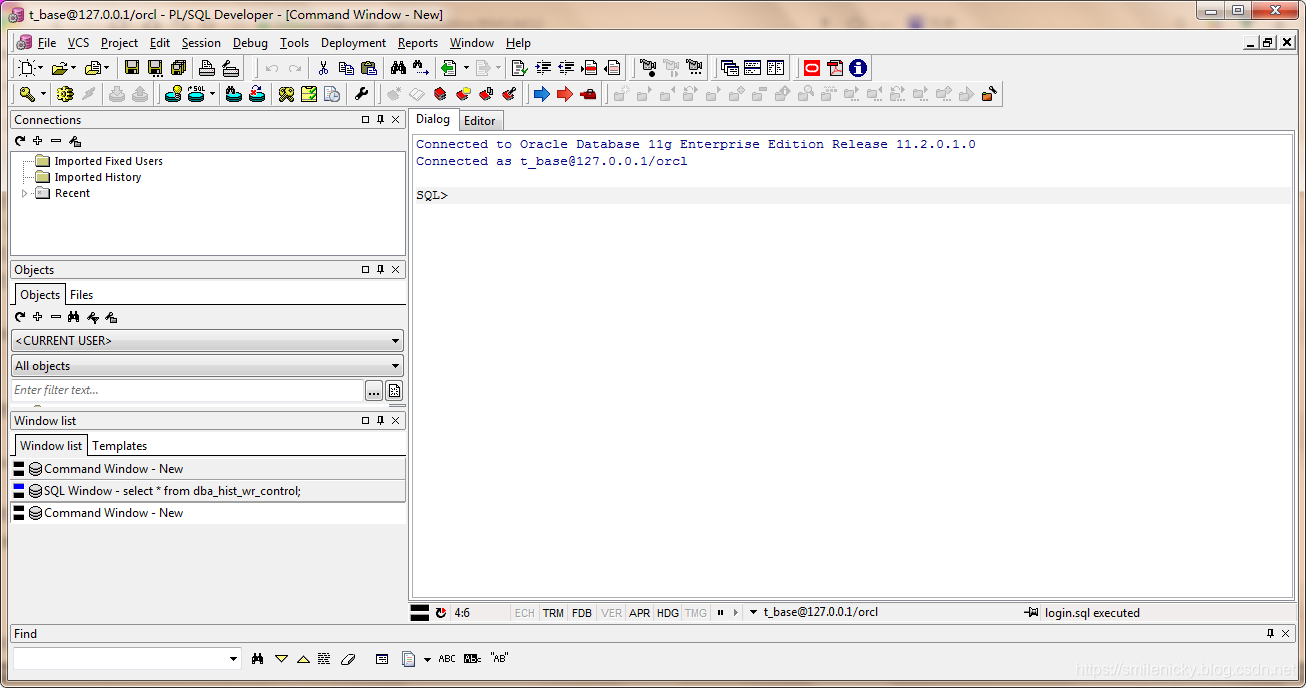
plsql developer也可以使用,登录之后,选择文件(File)->新建(New)->命令窗口(Command Window)
1.2 自动创建快照
开始压测后执行
exec DBMS_WORKLOAD_REPOSITORY.CREATE_SNAPSHOT ();
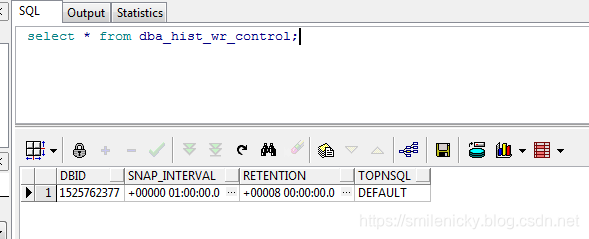
可以通过dba_hist_wr_control查看当前的配置情况,当前awr为每1小时做一次数据快照,保留时间为8天。
select * from dba_hist_wr_control;
修改配置,每隔30分钟收集一次,保存1天
execute dbms_workload_repository.modify_snapshot_settings(interval=>30,retention=>14000);
关闭自动收集
SQL>exec dbms_workload_repository.modify_snapshot_settings (interval=>0,retention=>24*60);
1.3 手工创建快照
除了自动创建快照,也可以手工创建快照
select dbms_workload_repository.create_snapshot() from dual;
1.4 AWRDD报告生成
对于sqlplus客户端的可以使用
@?/rdbms/admin/awrddrpt.sql
对于plsql客户端,我用绝对路径去执行,@?的命令找不到文件
这个要根据自己的Oracle安装路径去修改,例如:
@D:/oracle/product/11.1.0/db_1/RDBMS/ADMIN/awrddrpt.sql
(1)快照报告格式
Enter value for report_type:html
有两种格式html和txt,这里选择html
(2)快照搜集天数
Enter value for num_days:1
快速搜集的天数,这里可以填个数字
(3)快照开始id1
Enter value for begin_snap:449
要根据日志打印的快照id范围来填,所以我可以填写:449
(4)快照结束id1
Enter value for end_snap:451
要根据日志打印的快照id范围来填,所以我可以填写:451
(5)快照收集天数2
Enter value for num_days2:1
快照收集天数,这里也可以填个数字,主要是来对比
(6)快速开始id2
Enter value for begin_snap2:450
也要在日志打印的范围内取:这里取450
(7)快照结束id2
Enter value for end_snap2:452
也要在日志打印的范围内取:这里取452
(8)AWRDD报告名称
Enter value for report_name
填写ADDM报告的名称,我可以填写awrdd_20190421.html,然后在打印的日志里有文件保存的路径:,比如:D:\oracle\product\11.2.0\dbhome_1\RDBMS\ADMIN\awrddm.html
SQL> @D:/oracle/product/11.2.0/dbhome_1/RDBMS/ADMIN/awrddrpt.sql

Current Instance

~~~~~~~~~~~~~~~~

      DBID      DBID2 DB_NAME      INST_ INST_ INST_NAME

---------- ---------- ------------ ----- ----- ------------

1525762377 1525762377 ORCL             1     1 orcl

rpt_options

---------

0

Specify the Report Type

~~~~~~~~~~~~~~~~~~~~~~~

Would you like an HTML report, or a plain text report?

Enter 'html' for an HTML report, or 'text' for plain text

Defaults to 'html'

Type Specified:  html

Cannot SET TRIMSPOOL

Cannot SET UNDERLINE

Instances in this Workload Repository schema

~~~~~~~~~~~~~~~~~~~~~~~~~~~~~~~~~~~~~~~~~~~~

DBBID        INSTT DBB_NAME     INSTT_NAME   HOST

------------ ----- ------------ ------------ ------------

* 1525762377     1 ORCL         orcl         PC-201508171

                                             906

Database Id and Instance Number for the First Pair of Snapshots

~~~~~~~~~~~~~~~~~~~~~~~~~~~~~~~~~~~~~~~~~~~~~~~~~~~~~~~~~~~~~~~

Using 1525762377 for Database Id for the first pair of snapshots

Using 1 for Instance Number for the first pair of snapshots

dbid

---------

1525762377

inst_num

---------

1

inst_num

---------

1

dbid

---------

1525762377

max_snap_time

---------

21/04/2019

Specify the number of days of snapshots to choose from

~~~~~~~~~~~~~~~~~~~~~~~~~~~~~~~~~~~~~~~~~~~~~~~~~~~~~~

Entering the number of days (n) will result in the most recent

(n) days of snapshots being listed.  Pressing <return> without

specifying a number lists all completed snapshots.

Listing the last day's Completed Snapshots

INST_NAME    DB_NAME       SNAP_ID SNAPDAT            LV

------------ ------------ -------- ------------------ --

orcl         ORCL              448 21 Apr 2019 10:38   1

orcl         ORCL              449 21 Apr 2019 12:00   1

orcl         ORCL              450 21 Apr 2019 13:00   1

orcl         ORCL              451 21 Apr 2019 14:00   1

orcl         ORCL              452 21 Apr 2019 15:00   1

dbid

---------

1525762377

inst_num

---------

1

dbid

---------

1525762377

bid

---------

449

eid

---------

451

Specify the number of days of snapshots to choose from

~~~~~~~~~~~~~~~~~~~~~~~~~~~~~~~~~~~~~~~~~~~~~~~~~~~~~~

Entering the number of days (n) will result in the most recent

(n) days of snapshots being listed.  Pressing <return> without

specifying a number lists all completed snapshots.

Listing the last day's Completed Snapshots

INST_NAME    DB_NAME       SNAP_ID SNAPDAT            LV

------------ ------------ -------- ------------------ --

orcl         ORCL              448 21 Apr 2019 10:38   1

orcl         ORCL              449 21 Apr 2019 12:00   1

orcl         ORCL              450 21 Apr 2019 13:00   1

orcl         ORCL              451 21 Apr 2019 14:00   1

orcl         ORCL              452 21 Apr 2019 15:00   1

dbid2

---------

1525762377

inst_num2

---------

1

max_snap_time

---------

21/04/2019

inst_num2

---------

1

dbid2

---------

1525762377

max_snap_time

---------

21/04/2019

Specify the Second Pair of Begin and End Snapshot Ids

~~~~~~~~~~~~~~~~~~~~~~~~~~~~~~~~~~~~~~~~~~~~~~~~~~~~~

Second Begin Snapshot Id specified: 450

Second End   Snapshot Id specified: 452

bid2

---------

450

eid2

---------

452

inst_num2

---------

1

dbid2

---------

1525762377

bid2

---------

450

eid2

---------

452

Specify the Report Name

~~~~~~~~~~~~~~~~~~~~~~~

The default report file name is awrdiff_1_449_1_450.html  To use this name,

press <return> to continue, otherwise enter an alternative.

Using the report name awrdd.html

Started spooling to D:\oracle\product\11.2.0\dbhome_1\RDBMS\ADMIN\awrdd.html
二、AWRDD报告性能分析
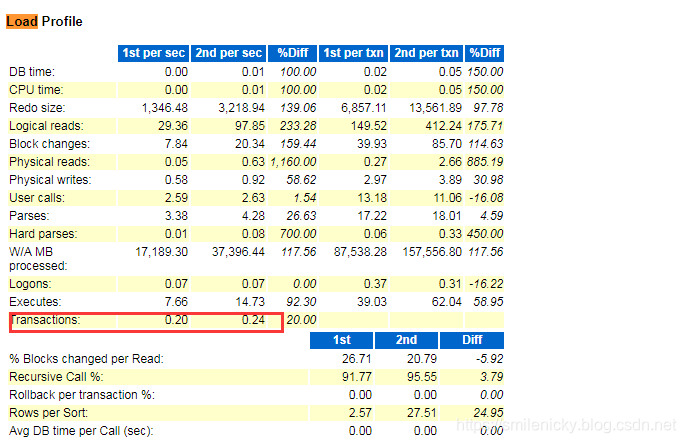
AWRDD的报告分析和AWR有些是类似的,不过都是不同时期的
(1) AWRDD之不同时期的load profile
(2) AWRDD之不同时期的等待事件

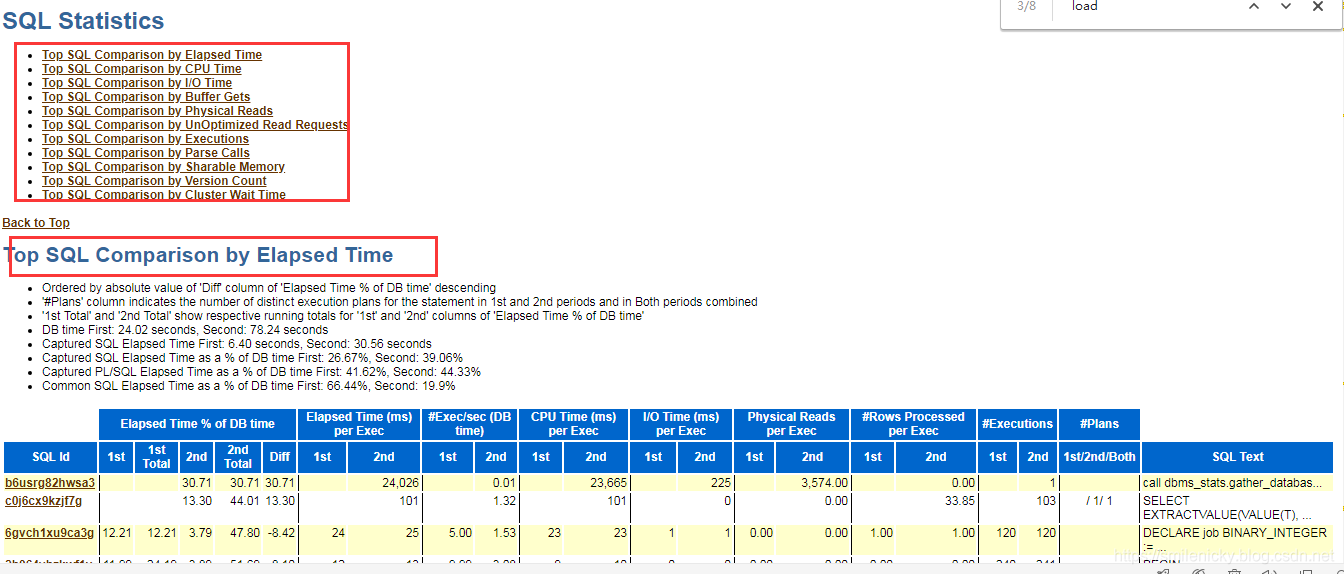
(3) AWRDD不同时期的TOP SQL对比
Oracle AWRDD报告生成和性能分析的更多相关文章
- Oracle ADDM报告生成和性能分析
我写的SQL调优专栏:https://blog.csdn.net/u014427391/article/category/8679315 对于局部的,比如某个页面列表sql,我们可以使用Oracle的 ...
- Oracle AWRSQRPT报告生成和性能分析
我写的SQL调优专栏:https://blog.csdn.net/u014427391/article/category/8679315 对于局部的,比如某个页面列表sql,我们可以使用Oracle的 ...
- Oracle ASH报告生成和性能分析
我写的SQL调优专栏:https://blog.csdn.net/u014427391/article/category/8679315 对于局部的,比如某个页面列表sql,我们可以使用Oracle的 ...
- Oracle AWR报告生成和性能分析
目录 一.AWE报告生成步骤 1.1 工具选择 1.2 自动创建快照 1.3 手工创建快照 1.4 生成AWR报告 二.AWR报告分析 2.1 AWR之DB Time 2.2 AWR之load_pro ...
- ORACLE AWR报告生成步骤
ORACLE AWR报告生成步骤 (以PL/SQL中命令窗口为例) 1.sqlplus或plsql的commod窗口(命令窗口)运行命令 @D:\oracle\product\10.2.0\db_1\ ...
- Oracle Update 语句语法与性能分析 - 多表关联
Oracle Update 语句语法与性能分析 - 多表关联 为了方便起见,建立了以下简单模型,和构造了部分测试数据: 在某个业务受理子系统BSS中, SQL 代码 --客户资料表 create ...
- [转]oracle awr报告生成和分析
转自:http://blog.csdn.net/cuker919/article/details/8767328 最近由于数据库cpu占用非常高,导致VCS常常自动切换,引起很多问题. 最近学习一下数 ...
- oracle sql语句跟踪及性能分析工具实现
在网上找了一大圈,没找着合适的工具来跟踪oracle一段时间的sql. 我们的场景是打算自动化跑遍所有场景(rft)+fiddler跟踪请求+后端跟踪sql,根据结果去分析慢的请求和sql,本来awr ...
- Oracle awr报告生成操作步骤
1.登录主机切换到oracle用户 ssh root@192.168.220.128 su - oracle 2.以sysdba身份登录数据库 sqlplus / as sysdba 3.执行@?/r ...
随机推荐
- Enabling Chrome Developer Tools inside Postman
Chrome's Developer Tools are an indispensable part of the modern web development workflow. However, ...
- 某校高中生利用Python,巧妙获取考试成绩,看到成绩后无言以对!
Python是非常有吸引力的编程语言,学习Python的不是帅哥就是美女.为什么这么说呢?因为我和我的女朋友都是学习Python认识的,小编肯定是帅哥,不用去怀疑,而且我眼光特高. 给大伙讲一个故事, ...
- RabbitMQ Network Partitions的预警和处理策略
网络分区的意义 RabbitMQ的模型类似交换机模型,且采用erlang这种电信网络方面的专用语言实现.RabbitMQ集群是不能跨LAN部署(如果要WAN部署需要采用专门的插件)的,也就是基于网络情 ...
- 【bzoj 2326】【HNOI 2011】数学作业
题解: 矩阵裸体. #include<cstdio> #include<cstring> #include<cmath> typedef long long ll; ...
- bzoj5342 CTSC2018 Day1T3 青蕈领主
首先显然的是,题中所给出的n个区间要么互相包含,要么相离,否则一定不合法. 然后我们可以对于直接包含的关系建出一棵树,于是现在的问题就是给n个节点分配权值,使其去掉最后一个点后不存在非平凡(长度大于1 ...
- linux学习之路(3)
vim编辑器使用 命令模式:控制光标移动,可对文本进行复制.粘贴.删除和查找等工作. 输入模式:正常的文本录入. 末行模式:保存或退出文档,以及设置编辑环境. vim中常用命令: dd 删除(剪切) ...
- Centos6.4 + mysql-5.6.38-linux-glibc2.12-x86_64.tar 实现mysql主从复制
mysql安装方法:http://www.cnblogs.com/lin3615/p/4376224.html 用到的是两台服务器 主:192.168.1.106 从:192.168.1.69 1.在 ...
- 基本服务器的AAA实验
一.实验拓扑 二.网络地址分配 三.不同网段互相PING通 PC-A ping PC-B PC-A ping PC-C PC-B ping PC-C 四.配置过程 (1)在路由器R1上配置本地用户账号 ...
- 微服务架构 - 巧妙获取被墙的Docker镜像
在国内由于种种原因,有些Docker镜像直接是获取不到的,特别是k8s中的一些镜像.本人在部署k8s中的helm组件时需要获取tiller镜像,如果直接用如下命令: docker pull gcr.i ...
- Shell学习心得(一):变量
1.begin #!/bin/bash echo "Hello World !" #! 是一个约定的标记,它告诉系统这个脚本需要什么解释器来执行,即使用哪一种 Shell. ec ...