
Struts2(六) 用Struts完成客户列表显示
Struts完成客户列表显示 所用的基础知识 在之前的随笔中已经讲过。这篇是介绍如何使用Struts 完成客户列表显示 。
下面是 完成的代码执行逻辑图:
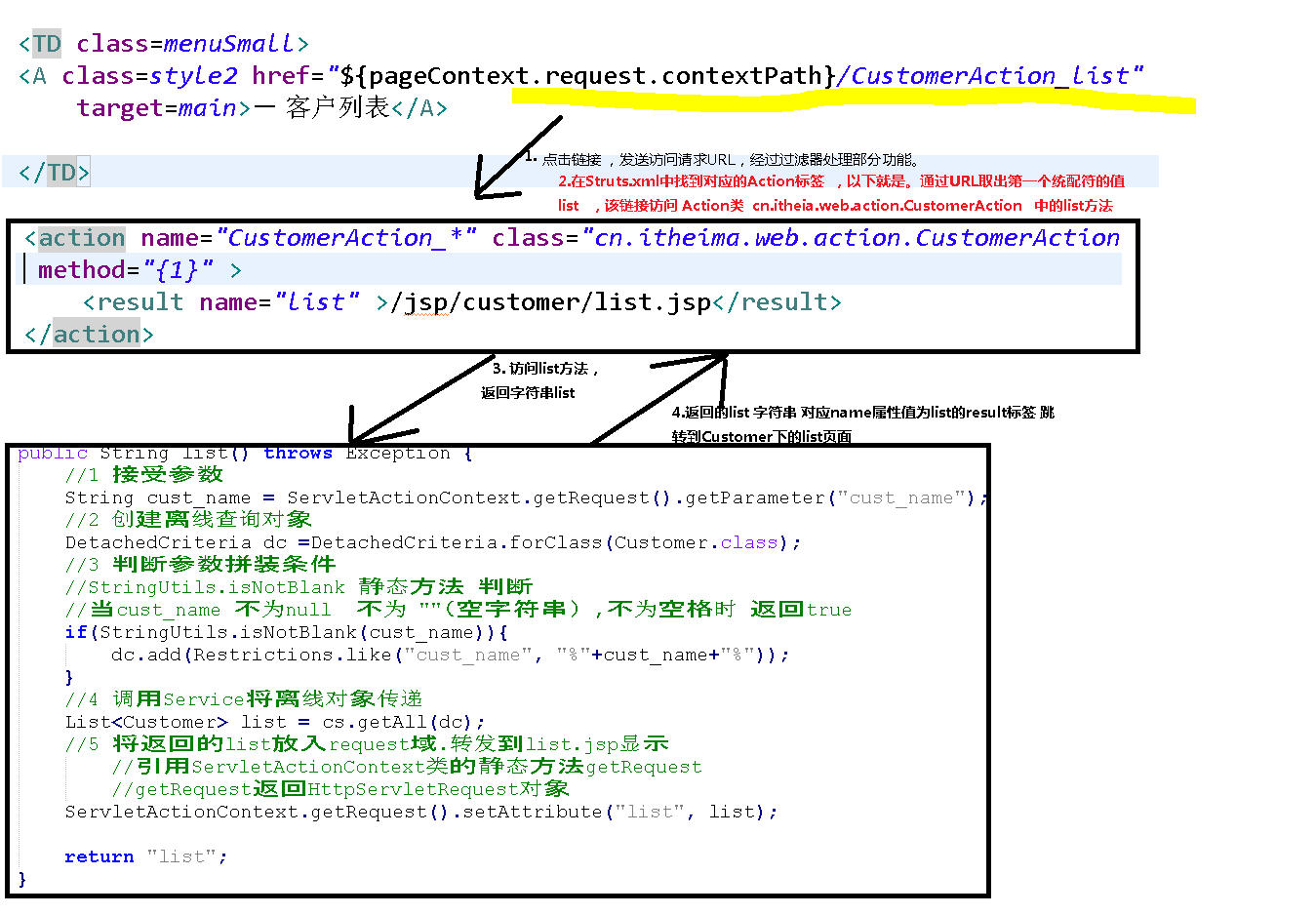
抽取项目部分代码 相信大家认真看一遍就明白的:
jsp 页面代码片段:
<TABLE cellSpacing=0 cellPadding=3 width=165 align=center border=0>
<TBODY>
<TR>
<TD class=mainMenu onClick="MenuDisplay('table_1');"><SPAN
class=span id=table_1Span>+</SPAN> 客户管理</TD>
</TR>
<TR>
<TD>
<TABLE id=table_1 style="DISPLAY: none" cellSpacing=0
cellPadding=2 width=155 align=center border=0>
<TBODY>
<TR>
<TD class=menuSmall><A class=style2 href="${pageContext.request.contextPath}/jsp/customer/add.jsp"
target=main>- 新增客户</A></TD>
</TR>
<TR>
<TD class=menuSmall><A class=style2 href="${pageContext.request.contextPath}/CustomerAction_list"
target=main>- 客户列表</A></TD>
</TR> </TBODY>
</TABLE>
</TD>
</TR>
<TR>
<TD background=images/new_027.jpg height=1></TD>
</TR>
<TR>
<TD class=mainMenu onClick="MenuDisplay('table_2');"><SPAN
class=span id=table_2Span>+</SPAN> 联系人管理</TD>
</TR>
<TR>
<TD>
<TABLE id=table_2 style="DISPLAY: none" cellSpacing=0
cellPadding=2 width=155 align=center border=0>
<TBODY>
<TR>
<TD class=menuSmall><A class=style2 href="${pageContext.request.contextPath}/jsp/linkman/add.jsp"
target=main>- 新增联系人</A></TD>
</TR>
<TR>
<TD class=menuSmall><A class=style2 href="linkmanServlet?method=list"
target=main>-联系人列表</A></TD>
</TR> </TBODY>
</TABLE>
</TD>
</TR>
<TR>
<TD background=images/new_027.jpg height=1></TD>
</TR>
<TR>
<TD class=mainMenu onClick="MenuDisplay('table_5');"><SPAN
class=span id=table_5Span>+</SPAN> 客户拜访管理</TD>
</TR>
<TR>
<TD>
<TABLE id=table_5 style="DISPLAY: none" cellSpacing=0
cellPadding=2 width=155 align=center border=0>
<TBODY>
<TR>
<TD class=menuSmall><A class=style2 href="#"
target=main>-新增客户拜访</A></TD>
</TR>
<TR>
<TD class=menuSmall><A class=style2 href="#"
target=main>-客户拜访列表</A></TD>
</TR> </TBODY>
</TABLE>
</TD>
</TR>
<TR>
<TD background=images/new_027.jpg height=1></TD>
</TR>
<TR>
<TD class=mainMenu onClick="MenuDisplay('table_3');"><SPAN
class=span id=table_3Span>+</SPAN> 综合查询</TD>
</TR>
<TR>
<TD>
<TABLE id=table_3 style="DISPLAY: none" cellSpacing=0
cellPadding=2 width=155 align=center border=0>
<TBODY>
<TR>
<TD class=menuSmall><A class=style2 href="#"
target=main>- 客户信息查询</A></TD>
</TR>
<TR>
<TD class=menuSmall><A class=style2 href="#"
target=main>- 联系人信息查询</A></TD>
</TR>
<TR>
<TD class=menuSmall><A class=style2 href="#"
target=main>- 客户拜访记录查询</A></TD>
</TR>
</TBODY>
</TABLE>
</TD>
</TR>
<TR>
<TD background=images/new_027.jpg height=1></TD>
</TR>
<TR>
<TD class=mainMenu onClick="MenuDisplay('table_4');"><SPAN
class=span id=table_4Span>+</SPAN> 统计分析</TD>
</TR>
<TR>
<TD>
<TABLE id=table_4 style="DISPLAY: none" cellSpacing=0
cellPadding=2 width=155 align=center border=0>
<TBODY>
<TR>
<TD class=menuSmall><A class=style2 href="#"
target=main>-客户行业统计</A></TD>
</TR>
<TR>
<TD class=menuSmall><A class=style2 href="#"
target=main>-客户来源统计</A></TD>
</TR> </TBODY>
</TABLE>
</TD>
</TR>
<TR>
<TD background=images/new_027.jpg height=1></TD>
</TR>
<TR>
<TD class=mainMenu onClick="MenuDisplay('table_6');"><SPAN
class=span id=table_6Span>+</SPAN>系统管理</TD>
</TR>
<TR>
<TD>
<TABLE id=table_6 style="DISPLAY: none" cellSpacing=0
cellPadding=2 width=155 align=center border=0>
<TBODY>
<TR>
<TD class=menuSmall><A class=style2 href="#"
target=main>-角色管理</A></TD>
</TR>
<TR>
<TD class=menuSmall><A class=style2 href="#"
target=main>-用户管理</A></TD>
</TR>
<TR>
<TD class=menuSmall><A class=style2 href="#"
target=main>-数据字典</A></TD>
</TR>
</TBODY>
</TABLE>
</TD>
</TR>
</TBODY>
</TABLE>
Action类 代码:
 public class CustomerAction extends ActionSupport {

     private CustomerService cs = new CustomerServiceImpl();

     public String list() throws Exception {

         //1 接受参数

         String cust_name = ServletActionContext.getRequest().getParameter("cust_name");

         //2 创建离线查询对象

         DetachedCriteria dc =DetachedCriteria.forClass(Customer.class);

         //3 判断参数拼装条件

         //StringUtils.isNotBlank 静态方法 判断

         //当cust_name 不为null  不为 ""(空字符串) ,不为空格时 返回true

         if(StringUtils.isNotBlank(cust_name)){

             dc.add(Restrictions.like("cust_name", "%"+cust_name+"%"));

         }

         //4 调用Service将离线对象传递

         List<Customer> list = cs.getAll(dc);

         //5 将返回的list放入request域.转发到list.jsp显示

             //引用ServletActionContext类的静态方法getRequest

             //getRequest返回HttpServletRequest对象

         ServletActionContext.getRequest().setAttribute("list", list);

         return "list";

     }

 }
Struts.xml :
 <?xml version="1.0" encoding="UTF-8"?>

 <!DOCTYPE struts PUBLIC

     "-//Apache Software Foundation//DTD Struts Configuration 2.3//EN"

     "http://struts.apache.org/dtds/struts-2.3.dtd">

 <struts>

     <!-- 指定struts2是否以开发模式运行

             1.热加载主配置.(不需要重启即可生效)

             2.提供更多错误信息输出,方便开发时的调试

      -->

     <constant name="struts.devMode" value="true"></constant>

     <package name="crm" namespace="/" extends="struts-default" >

         <action name="CustomerAction_*" class="cn.itheima.web.action.CustomerAction" method="{1}" >

             <result name="list" >/jsp/customer/list.jsp</result>

         </action>

     </package>

 </struts>
ServiceImpl 类
 import java.util.List;

 import org.hibernate.Session;

 import org.hibernate.Transaction;

 import org.hibernate.criterion.DetachedCriteria;

 import cn.itheima.dao.CustomerDao;

 import cn.itheima.dao.impl.CustomerDaoImpl;

 import cn.itheima.domain.Customer;

 import cn.itheima.service.CustomerService;

 import cn.itheima.utils.HibernateUtils;

 public class CustomerServiceImpl implements CustomerService {

     private CustomerDao customerDao = new CustomerDaoImpl();

     public List<Customer> getAll() {

         Session session =  HibernateUtils.getCurrentSession();

         //打开事务

         Transaction tx = session.beginTransaction();

         List<Customer> list = customerDao.getAll();

         //关闭事务

                 tx.commit();

         return list;

     }

     public List<Customer> getAll(DetachedCriteria dc) {

         Session session =  HibernateUtils.getCurrentSession();

         //打开事务

         Transaction tx = session.beginTransaction();

         List<Customer> list = customerDao.getAll(dc);

         //关闭事务

                 tx.commit();

         return list;

     }

 }
dao层实现类:
 import java.util.List;

 import org.hibernate.Criteria;

 import org.hibernate.Session;

 import org.hibernate.Transaction;

 import org.hibernate.criterion.DetachedCriteria;

 import cn.itheima.dao.CustomerDao;

 import cn.itheima.domain.Customer;

 import cn.itheima.utils.HibernateUtils;

 public class CustomerDaoImpl implements CustomerDao {

     public List<Customer> getAll() {

         //1 获得session

                 Session session = HibernateUtils.getCurrentSession();

         //2 创建Criteria对象

                 Criteria c = session.createCriteria(Customer.class);

         return c.list();

     }

 }
Struts2(六) 用Struts完成客户列表显示的更多相关文章
- 转载 Struts2的配置 struts.xml Action详解
在学习struts的时候,我们一定要掌握struts2的工作原理.只有当我们明确了在struts2框架的内部架构的实现过程,在配置整个struts 的框架时,可以很好的进行逻辑上的配置.接下来我就先简 ...
- struts2学习笔记--struts.xml配置文件详解
这一节主要讲解struts2里面的struts.xml的常用标签及作用: 解决乱码问题 <constant name="struts.i18n.encoding" value ...
- Struts2学习笔记--Struts例子及开发流程
参考资料:http://blog.csdn.net/hntyzgn2010/article/details/5547753 http://chenlh.iteye.com/blog/464341 入门 ...
- struts2.0中struts.xml配置文件详解
先来展示一个配置文件 <!DOCTYPE struts PUBLIC "-//Apache Software Foundation//DTD Struts Configuration ...
- 1-1 struts2 基本配置 struts.xml配置文件详解
详见http://www.cnblogs.com/dooor/p/5323716.html 一. struts2工作原理(网友总结,千遍一律) 1 客户端初始化一个指向Servlet容器(例如Tomc ...
- struts2之配置文件struts.xml详解
struts配置文件 struts.xml配置参数详解 struts.xml中很大一部分配置默认配置就好了 但是有些还是需要做了解 以便于理解 和修改 <?xml version=" ...
- Struts2学习:struts.xml引入自定义的xml文件
随着项目代码的增多,用一个struts.xml来管理所有功能模块的Action未免显得臃肿且结构不清晰,因此可以根据实际的功能划分,将各模块的Action放在自定义的xml文件中,再引入struts. ...
- Struts2(六)result
一.result简述 result:输出结果:第个Action返回一个字符串,Struts2根据这个值来决定响应结果 name属性:result的逻辑名.和Actin里的返回值匹配,默认"s ...
- Struts2(六.用标签显示用户列表及Value Stack和Stack Context)
一.用Struts2标签显示用户列表 原理: 在struts中可以通过在action中将所有用户的信息存入到某个范围中,然后转向userlist.jsp,进行访问 原则: 在jsp网页上,尽量不要出现 ...
随机推荐
- iOS-状态栏字体颜色【白色】【Xcode9.1】
Xcode9之前 设置状态栏颜色首先在info.plist文件中,加入UIViewControllerBasedStatusBarAppearance = false: <key>UIVi ...
- java 虚拟机--新生代与老年代GC [转]
原文链接:http://www.360doc.com/content/12/1023/16/9615799_243296263.shtml 1. Java堆中各代分布: 图1:Java堆中各代分布 Y ...
- BZOJ 1927: [Sdoi2010]星际竞速 [上下界费用流]
1927: [Sdoi2010]星际竞速 题意:一个带权DAG,每个点恰好经过一次,每个点有曲速移动到他的代价,求最小花费 不动脑子直接上上下界费用流过了... s到点连边边权为曲速的代价,一个曲速移 ...
- ES6 学习笔记之二 块作用域与闭包
"闭包是函数和声明该函数的词法环境的组合." 这是MDN上对闭包的定义. <JavaScript高级程序设计>中则是这样定义的:闭包是指有权访问另一个函数作用域中的变量 ...
- ubunt tftp服务器搭建
默认安装的Ubuntu系统没有包含TFTP的服务端和客户端,可以通过命令行来下载安装,步骤如下: (1)安装客户端. root@ www.linuxidc.com:~# apt-get install ...
- ZooKeeper简介与集群部署
ZooKeeper 是一个开源的分布式协调服务,由雅虎公司创建,是Google Chubby的开源实现,ZooKeeper的设计目标是将那些复杂且容易出错的分布式一致性服务封装起来,构成一个高效可靠的 ...
- 借腾讯开源 VasDolly,谈谈 Android 签名和多渠道打包的原理!
一.前言 Hi,大家好,我是承香墨影! 当我们需要发布一款 App 到应用市场的时候,一般需要我们针对不同的市场生产不同的渠道包,它们使用的是同一套代码,只是会包含一些各自的渠道信息,用于我们做数据分 ...
- Docker镜像的构成__Dockerfile
相比docker commit来说,Dockerfile的方法会更加自动化,更加方便快捷,而且功能也更强大.拿构建Nginx容器举例. 先创建一个目录 mkdir /opt/docker-file 进 ...
- C# 如何使用预处理指令?
#define Debug #define Release #undef Release #if Debug using System; #endif 注意:#define 必须在文档最前面
- APP性能测试(电量)
#encoding:utf-8 import csv import os import time #控制类 class Controller(object): def __init__(self, c ...