
沉淀,再出发——在Ubuntu Kylin15.04中配置Hadoop单机/伪分布式系统经验分享
在Ubuntu Kylin15.04中配置Hadoop单机/伪分布式系统经验分享
一、工作准备
首先,明确工作的重心,在Ubuntu Kylin15.04中配置Hadoop集群,这里我是用的双系统中的Ubuntu来配制的,不是虚拟机。在网上有很多配置的方案,我看了一下Ubuntu的版本有14.x,16.x等等,唯独缺少15.x,后来我也了解到,15.x出来一段时间就被下一个版本所替代了,可能有一定的问题吧,可是我还是觉得这个版本的用起来很舒服,但是当我安装了Ubuntu kylin15.04之后,网络配置成功,我开始使用sudo apt-get update更新一下软件源的时候,就遇到了非常大的麻烦,具体的介绍可以参考我的拙作Ubuntu版本更替所引发的“血案”,经过了一番斗争,我总算在打算安装16.x之前找到了解决办法,实现了一次技术上的沉淀!之后安装Hadoop集群总算是踏上了高速列车。解决了系统的问题,我们需要使用的原来还有vim或者gedit文本编辑工具,SSH,openssh-server,当然了Ubuntu默认是安装了openssh-client的,我们可以再安装一次,之后需要java的jre和jdk,需要hadoop,基本上需要这么多基本的原料,有了这些东西,我们就可以使用shell来尽情的发挥了。
1、vim或者gedit文本编辑工具;

2、ssh,openssh-server,openssh-client;

 3、jre和jdk,这里安装的是openjdk-7-jre openjdk-7-jdk;

 4、Hadoop 2.x.y;

 5、Ubuntu Kylin15.04;
二、创建hadoop用户
这一步是保证操作的纯洁性,至于是不是必须要以hadoop为用户名,这个地方还有待考证,不过作为初学者,我们就先从最基本的开始理解,主要的操作如下,增加用户名为hadoop,并且使用bash作为shell,之后设置密码,然后为hadoop赋予sudo权限,最后退出原系统,登录我们新创建的系统。
sudo useradd -m hadoop -s /bin/bash

sudo passwd hadoop

sudo adduser hadoop sudo
三、更新apt,并且安装一些工具软件
3.1、到了这里,我们使用新创建的用户登录系统,然后打开shell,在shell中运行如下命令,更新软件源:
sudo apt-get clean

sudo apt-get update

sudo apt-get upgrade
如果中途失败,提示get不到源,或者网络失败,我们的排查思路是,首先ping 公网,看看能不能够连接成功,其次检查DNS,/etc/hosts等,判断是不是域名系统的问题,最后我们使用源的IP来ping,如果都没有问题,那我们的问题可能就在于‘源’已经失去维护了,从以前的仓库中移除了,遇到这个问题,请参考我的拙作Ubuntu版本更替所引发的“血案”,基本上可以解决问题。
3.2、然后更新vim,安装ssh工具,具体操作如下:
sudo apt-get install vim

sudo apt-get install ssh

sudo apt-get install openssh-server

sudo apt-get install openssh-client
安装完成以后测试一下是否能够登陆localhost,自己登陆自己来测试是否可以使用ssh协议。如果不成功,我们启动一下ssh,并且使用ps和grep来看一下是否出现sshd,如果有代表程序启动成功,登录localhost会显示登录的结果,如果提示要更新或什么的不用理会。
ssh localhost

sudo /etc/init.d/ssh start

ps -e | grep ssh
之后我们生成并导出公钥,使得公钥可信任,我们每一次ssh就不用输入密码了。
cd ~/.ssh/

ssh-keygen -t rsa

      Generating public/private rsa key pair.

      Enter file in which to save the key (/home/hadoop/.ssh/id_rsa):

      Enter passphrase (empty for no passphrase):

      Enter same passphrase again:

      Your identification has been saved in /home/hadoop/.ssh/id_rsa.

      Your public key has been saved in /home/hadoop/.ssh/id_rsa.pub.

      The key fingerprint is:

      35:1f:b0:20:dc:03:0d:52:00:9b:34:51:7f:95:60:b6 hadoop@zyr-Aspire-V5-551G

cat ./id_rsa.pub >> ./authorized_keys
⦁    hadoop@zyr-Aspire-V5-551G:~$ ssh localhost

⦁    Welcome to Ubuntu 15.04 (GNU/Linux 3.19.0-15-generic x86_64)

⦁

⦁     * Documentation:  https://help.ubuntu.com/

⦁

⦁    15 packages can be updated.

⦁    9 updates are security updates.

⦁

⦁    Your Ubuntu release is not supported anymore.

⦁    For upgrade information, please visit:

⦁    http://www.ubuntu.com/releaseendoflife

⦁

⦁    New release '16.04.4 LTS' available.

⦁    Run 'do-release-upgrade' to upgrade to it.

⦁

⦁    Last login: Sat Mar  3 10:32:05 2018 from localhost
3.3、安装JAVA环境
在这里我们使用openjdk和openjre,这是非官方的开源的,安装起来更容易,更方便。
sudo apt-get install openjdk-7-jre openjdk-7-jdk
之后我们需要找到这些文件的安装路径:
hadoop@zyr-Aspire-V5-551G:~$ dpkg -L openjdk-7-jdk | grep '/bin/javac'

/usr/lib/jvm/java-7-openjdk-amd64/bin/javac
可以看到就是/usr/lib/jvm/java-7-openjdk-amd64安装路径,在这里我们使用的hadoop是2.9.0,java的环境是1.7.x,亲测通过,在官网上有这样的说法,当hadoop版本超过一定的级别的时候(2.7),必须使用java1.7以及之上的版本。之后我们修改环境变量,在开头增加export JAVA_HOME=/usr/lib/jvm/java-7-openjdk-amd64/,并且保存退出,然后使用source ~/.bashrc进行更新,通过下面的命令来测试java是否安装成功,环境变量是否匹配,系统是否正在使用我们配置的环境变量等信息。至此,java环境设置完成。
vim ~/.bashrc

hadoop@zyr-Aspire-V5-551G:~$ cat ~/.bashrc

export JAVA_HOME=/usr/lib/jvm/java-7-openjdk-amd64/

# ~/.bashrc: executed by bash(1) for non-login shells.

# see /usr/share/doc/bash/examples/startup-files (in the package bash-doc)

# for examples

   ……

source ~/.bashrc

hadoop@zyr-Aspire-V5-551G:~$ echo $JAVA_HOME

/usr/lib/jvm/java-7-openjdk-amd64/

hadoop@zyr-Aspire-V5-551G:~$ java -version

java version "1.7.0_95"

OpenJDK Runtime Environment (IcedTea 2.6.4) (7u95-2.6.4-0ubuntu0.15.04.1)

OpenJDK 64-Bit Server VM (build 24.95-b01, mixed mode)

hadoop@zyr-Aspire-V5-551G:~$ $JAVA_HOME/bin/java -version

java version "1.7.0_95"

OpenJDK Runtime Environment (IcedTea 2.6.4) (7u95-2.6.4-0ubuntu0.15.04.1)

OpenJDK 64-Bit Server VM (build 24.95-b01, mixed mode)
四、安装Hadoop
4.1、下载Hadoop
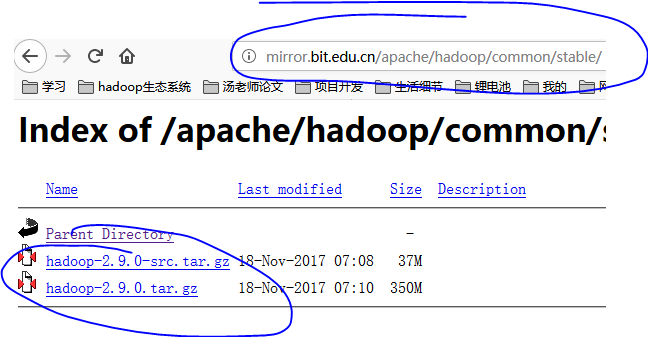
在官网,或者通过 http://mirror.bit.edu.cn/apache/hadoop/common/ 或者 http://mirrors.cnnic.cn/apache/hadoop/common/ 下载Hadoop的所有版本,一般选择下载最新的稳定版本,下载 “stable” 下的 hadoop-2.x.y.tar.gz 这个格式的文件,我们可以直接使用,简单的解压,并且放到相应的文件夹即可;另一个包含 src 的则是 Hadoop 源代码,需要进行编译才可使用,我们可以拿来作为学习,在后期研究Hadoop的架构,因为Hadoop是用java语言写的,所以通俗易读。另外要保证下载文件的安全性、完整性、可用性、不可否认性、可控性等,最好的是找到一个含有hash校验码的下载源,不过笔者亲测这个下载源是可靠的。通过浏览器下载即可,之后进行保存,记住保存的位置,便于我们后期的操作。在这里笔者使用的是次新版的2.9.0,如下图所示。
4.2、安装Hadoop
下载之后,我们将该压缩文件解压到/usr/local这个文件夹下,其实别的地方也是可以的,但是放在这里见名知意,恰到好处。之后我们进入这个文件夹下,通过mv的重命名功能将版本号去掉,改为hadoop,并且修改该文件夹的权限,使得该文件夹拥有hadoop的权限。并且我们使用ll命令来查看一下local下面的文件布局。
hadoop@zyr-Aspire-V5-551G:~$ sudo tar -zxf ~/Downloads/hadoop-2.9.0.tar.gz -C /usr/local

[sudo] password for hadoop:

hadoop@zyr-Aspire-V5-551G:~$ cd /usr/local/

hadoop@zyr-Aspire-V5-551G:/usr/local$ sudo mv ./hadoop-2.9.0/ ./hadoop

hadoop@zyr-Aspire-V5-551G:/usr/local$ sudo chown -R hadoop ./hadoop

hadoop@zyr-Aspire-V5-551G:/usr/local$ ll

total 44

drwxr-xr-x 11 root   root 4096  3月  3 11:07 ./

drwxr-xr-x 10 root   root 4096  4月 23  2015 ../

drwxr-xr-x  2 root   root 4096  4月 23  2015 bin/

drwxr-xr-x  2 root   root 4096  4月 23  2015 etc/

drwxr-xr-x  2 root   root 4096  4月 23  2015 games/

drwxr-xr-x  9 hadoop zyr  4096 11月 14 07:28 hadoop/

drwxr-xr-x  2 root   root 4096  4月 23  2015 include/

drwxr-xr-x  4 root   root 4096  4月 23  2015 lib/

lrwxrwxrwx  1 root   root    9  3月  2 20:16 man -> share/man/

drwxr-xr-x  2 root   root 4096  4月 23  2015 sbin/

drwxr-xr-x  8 root   root 4096  4月 23  2015 share/

drwxr-xr-x  2 root   root 4096  4月 23  2015 src/
解压之后就相当于安装了,这点我们要记住,特别的方便,之后我们开始检验一下安装的结果,通过 ./bin/hadoop version命令来判断是否安装成功,如下是安装成功之后的结果。到这里我们总算是安装好了hadoop,其实也并不复杂,但是从无到有的过程,每一步的细节都是非常值得我们注意的。
hadoop@zyr-Aspire-V5-551G:/usr/local$ cd hadoop/

hadoop@zyr-Aspire-V5-551G:/usr/local/hadoop$ ./bin/hadoop version

Hadoop 2.9.0

Subversion https://git-wip-us.apache.org/repos/asf/hadoop.git -r 756ebc8394e473ac25feac05fa493f6d612e6c50

Compiled by arsuresh on 2017-11-13T23:15Z

Compiled with protoc 2.5.0

From source with checksum 0a76a9a32a5257331741f8d5932f183

This command was run using /usr/local/hadoop/share/hadoop/common/hadoop-common-2.9.0.jar
五、单机Hadoop测试
到了这里,我们其实只是完成了单机上的Hadoop的安装,但是这些步骤在分布式上面是一样的,需要勤加练习,这样的Hadoop系统远不是集群系统,但是却迈出了关键性的一步,因为在一些学术研究中,到了这里我们就可以开发map reduce程序了,如果程序不是非常复杂,我们在单机上就可以完成,值得喜悦的是在Hadoop的安装包中早就集成了一些样例,我们可以通过这些样例来测试一下我们的Hadoop,比如WordCount、GREP 【正则表达式】等等,但是在我们兴奋之前,需要认识到,我们这样的程序并没有用到HDFS,而是使用的我们OS自带的文件系统FS,但是至少说这是一个里程碑。
我们首先切换到相关目录,然后创建一个input文件夹(名字无特殊要求),然后将一些文件放进去,这里我们放入的是一些配置文件来作为数据源,并且通过Hadoop自带的样例程序来测试一下我们的安装是不是成功的。
cd /usr/local/hadoop

mkdir ./input

cp ./etc/hadoop/*.xml ./input

hadoop@zyr-Aspire-V5-551G:/usr/local/hadoop$ ls ./etc/hadoop/

capacity-scheduler.xml      httpfs-env.sh            mapred-env.sh

configuration.xsl           httpfs-log4j.properties  mapred-queues.xml.template

container-executor.cfg      httpfs-signature.secret  mapred-site.xml.template

core-site.xml               httpfs-site.xml          slaves

hadoop-env.cmd              kms-acls.xml             ssl-client.xml.example

hadoop-env.sh               kms-env.sh               ssl-server.xml.example

hadoop-metrics2.properties  kms-log4j.properties     yarn-env.cmd

hadoop-metrics.properties   kms-site.xml             yarn-env.sh

hadoop-policy.xml           log4j.properties         yarn-site.xml

hdfs-site.xml               mapred-env.cmd
我们使用如下命令来测试我们的程序,首先我们可以执行一下./bin/hadoop jar ./share/hadoop/mapreduce/hadoop-mapreduce-examples-*.jar来看一下我们有哪些样例程序,然后我们使用其中的grep程序来从所有的输入文件中统计满足'dfs[a-z.]+'正则表达式的单词的个数是多少。
hadoop@zyr-Aspire-V5-551G:/usr/local/hadoop$ ./bin/hadoop jar ./share/hadoop/mapreduce/hadoop-mapreduce-examples-2.9.0.jar

An example program must be given as the first argument.

Valid program names are:

  aggregatewordcount: An Aggregate based map/reduce program that counts the words in the input files.

  aggregatewordhist: An Aggregate based map/reduce program that computes the histogram of the words in the input files.

  bbp: A map/reduce program that uses Bailey-Borwein-Plouffe to compute exact digits of Pi.

  dbcount: An example job that count the pageview counts from a database.

  distbbp: A map/reduce program that uses a BBP-type formula to compute exact bits of Pi.

  grep: A map/reduce program that counts the matches of a regex in the input.

  join: A job that effects a join over sorted, equally partitioned datasets

  multifilewc: A job that counts words from several files.

  pentomino: A map/reduce tile laying program to find solutions to pentomino problems.

  pi: A map/reduce program that estimates Pi using a quasi-Monte Carlo method.

  randomtextwriter: A map/reduce program that writes 10GB of random textual data per node.

  randomwriter: A map/reduce program that writes 10GB of random data per node.

  secondarysort: An example defining a secondary sort to the reduce.

  sort: A map/reduce program that sorts the data written by the random writer.

  sudoku: A sudoku solver.

  teragen: Generate data for the terasort

  terasort: Run the terasort

  teravalidate: Checking results of terasort

  wordcount: A map/reduce program that counts the words in the input files.

  wordmean: A map/reduce program that counts the average length of the words in the input files.

  wordmedian: A map/reduce program that counts the median length of the words in the input files.

  wordstandarddeviation: A map/reduce program that counts the standard deviation of the length of the words in the input files.

Eg:

       ./bin/hadoop jar ./share/hadoop/mapreduce/hadoop-mapreduce-examples-2.9.0.jar  wordcount ./input  ./output
真正MapReduce命令:
hadoop@zyr-Aspire-V5-551G:/usr/local/hadoop$ ./bin/hadoop jar ./share/hadoop/mapreduce/hadoop-mapreduce-examples-*.jar grep ./input ./output 'dfs[a-z.]+'
执行的结果是喜人的,我在这里将结果贴出来,但因为太长了,所以就缩进了。
 hadoop@zyr-Aspire-V5-551G:/usr/local/hadoop$ ./bin/hadoop jar ./share/hadoop/mapreduce/hadoop-mapreduce-examples-*.jar grep ./input ./output 'dfs[a-z.]+'

 18/03/03 11:20:28 INFO Configuration.deprecation: session.id is deprecated. Instead, use dfs.metrics.session-id

 18/03/03 11:20:28 INFO jvm.JvmMetrics: Initializing JVM Metrics with processName=JobTracker, sessionId=

 18/03/03 11:20:28 INFO input.FileInputFormat: Total input files to process : 8

 18/03/03 11:20:28 INFO mapreduce.JobSubmitter: number of splits:8

 18/03/03 11:20:30 INFO mapreduce.JobSubmitter: Submitting tokens for job: job_local325822439_0001

 18/03/03 11:20:31 INFO mapreduce.Job: The url to track the job: http://localhost:8080/

 18/03/03 11:20:31 INFO mapreduce.Job: Running job: job_local325822439_0001

 18/03/03 11:20:31 INFO mapred.LocalJobRunner: OutputCommitter set in config null

 18/03/03 11:20:31 INFO output.FileOutputCommitter: File Output Committer Algorithm version is 1

 18/03/03 11:20:31 INFO output.FileOutputCommitter: FileOutputCommitter skip cleanup _temporary folders under output directory:false, ignore cleanup failures: false

 18/03/03 11:20:31 INFO mapred.LocalJobRunner: OutputCommitter is org.apache.hadoop.mapreduce.lib.output.FileOutputCommitter

 18/03/03 11:20:31 INFO mapred.LocalJobRunner: Waiting for map tasks

 18/03/03 11:20:31 INFO mapred.LocalJobRunner: Starting task: attempt_local325822439_0001_m_000000_0

 18/03/03 11:20:31 INFO output.FileOutputCommitter: File Output Committer Algorithm version is 1

 18/03/03 11:20:31 INFO output.FileOutputCommitter: FileOutputCommitter skip cleanup _temporary folders under output directory:false, ignore cleanup failures: false

 18/03/03 11:20:31 INFO mapred.Task:  Using ResourceCalculatorProcessTree : [ ]

 18/03/03 11:20:31 INFO mapred.MapTask: Processing split: file:/usr/local/hadoop/input/hadoop-policy.xml:0+10206

 18/03/03 11:20:31 INFO mapred.MapTask: (EQUATOR) 0 kvi 26214396(104857584)

 18/03/03 11:20:31 INFO mapred.MapTask: mapreduce.task.io.sort.mb: 100

 18/03/03 11:20:31 INFO mapred.MapTask: soft limit at 83886080

 18/03/03 11:20:31 INFO mapred.MapTask: bufstart = 0; bufvoid = 104857600

 18/03/03 11:20:31 INFO mapred.MapTask: kvstart = 26214396; length = 6553600

 18/03/03 11:20:31 INFO mapred.MapTask: Map output collector class = org.apache.hadoop.mapred.MapTask$MapOutputBuffer

 18/03/03 11:20:31 INFO mapred.LocalJobRunner:

 18/03/03 11:20:31 INFO mapred.MapTask: Starting flush of map output

 18/03/03 11:20:31 INFO mapred.MapTask: Spilling map output

 18/03/03 11:20:31 INFO mapred.MapTask: bufstart = 0; bufend = 17; bufvoid = 104857600

 18/03/03 11:20:31 INFO mapred.MapTask: kvstart = 26214396(104857584); kvend = 26214396(104857584); length = 1/6553600

 18/03/03 11:20:32 INFO mapred.MapTask: Finished spill 0

 18/03/03 11:20:32 INFO mapred.Task: Task:attempt_local325822439_0001_m_000000_0 is done. And is in the process of committing

 18/03/03 11:20:32 INFO mapred.LocalJobRunner: map

 18/03/03 11:20:32 INFO mapred.Task: Task 'attempt_local325822439_0001_m_000000_0' done.

 18/03/03 11:20:32 INFO mapred.LocalJobRunner: Finishing task: attempt_local325822439_0001_m_000000_0

 18/03/03 11:20:32 INFO mapred.LocalJobRunner: Starting task: attempt_local325822439_0001_m_000001_0

 18/03/03 11:20:32 INFO output.FileOutputCommitter: File Output Committer Algorithm version is 1

 18/03/03 11:20:32 INFO output.FileOutputCommitter: FileOutputCommitter skip cleanup _temporary folders under output directory:false, ignore cleanup failures: false

 18/03/03 11:20:32 INFO mapreduce.Job: Job job_local325822439_0001 running in uber mode : false

 18/03/03 11:20:32 INFO mapred.Task:  Using ResourceCalculatorProcessTree : [ ]

 18/03/03 11:20:32 INFO mapred.MapTask: Processing split: file:/usr/local/hadoop/input/capacity-scheduler.xml:0+7861

 18/03/03 11:20:32 INFO mapreduce.Job:  map 100% reduce 0%

 18/03/03 11:20:32 INFO mapred.MapTask: (EQUATOR) 0 kvi 26214396(104857584)

 18/03/03 11:20:32 INFO mapred.MapTask: mapreduce.task.io.sort.mb: 100

 18/03/03 11:20:32 INFO mapred.MapTask: soft limit at 83886080

 18/03/03 11:20:32 INFO mapred.MapTask: bufstart = 0; bufvoid = 104857600

 18/03/03 11:20:32 INFO mapred.MapTask: kvstart = 26214396; length = 6553600

 18/03/03 11:20:32 INFO mapred.MapTask: Map output collector class = org.apache.hadoop.mapred.MapTask$MapOutputBuffer

 18/03/03 11:20:32 INFO mapred.LocalJobRunner:

 18/03/03 11:20:32 INFO mapred.MapTask: Starting flush of map output

 18/03/03 11:20:32 INFO mapred.Task: Task:attempt_local325822439_0001_m_000001_0 is done. And is in the process of committing

 18/03/03 11:20:32 INFO mapred.LocalJobRunner: map

 18/03/03 11:20:32 INFO mapred.Task: Task 'attempt_local325822439_0001_m_000001_0' done.

 18/03/03 11:20:32 INFO mapred.LocalJobRunner: Finishing task: attempt_local325822439_0001_m_000001_0

 18/03/03 11:20:32 INFO mapred.LocalJobRunner: Starting task: attempt_local325822439_0001_m_000002_0

 18/03/03 11:20:32 INFO output.FileOutputCommitter: File Output Committer Algorithm version is 1

 18/03/03 11:20:32 INFO output.FileOutputCommitter: FileOutputCommitter skip cleanup _temporary folders under output directory:false, ignore cleanup failures: false

 18/03/03 11:20:32 INFO mapred.Task:  Using ResourceCalculatorProcessTree : [ ]

 18/03/03 11:20:32 INFO mapred.MapTask: Processing split: file:/usr/local/hadoop/input/kms-site.xml:0+5939

 18/03/03 11:20:32 INFO mapred.MapTask: (EQUATOR) 0 kvi 26214396(104857584)

 18/03/03 11:20:32 INFO mapred.MapTask: mapreduce.task.io.sort.mb: 100

 18/03/03 11:20:32 INFO mapred.MapTask: soft limit at 83886080

 18/03/03 11:20:32 INFO mapred.MapTask: bufstart = 0; bufvoid = 104857600

 18/03/03 11:20:32 INFO mapred.MapTask: kvstart = 26214396; length = 6553600

 18/03/03 11:20:32 INFO mapred.MapTask: Map output collector class = org.apache.hadoop.mapred.MapTask$MapOutputBuffer

 18/03/03 11:20:32 INFO mapred.LocalJobRunner:

 18/03/03 11:20:32 INFO mapred.MapTask: Starting flush of map output

 18/03/03 11:20:33 INFO mapred.Task: Task:attempt_local325822439_0001_m_000002_0 is done. And is in the process of committing

 18/03/03 11:20:33 INFO mapred.LocalJobRunner: map

 18/03/03 11:20:33 INFO mapred.Task: Task 'attempt_local325822439_0001_m_000002_0' done.

 18/03/03 11:20:33 INFO mapred.LocalJobRunner: Finishing task: attempt_local325822439_0001_m_000002_0

 18/03/03 11:20:33 INFO mapred.LocalJobRunner: Starting task: attempt_local325822439_0001_m_000003_0

 18/03/03 11:20:33 INFO output.FileOutputCommitter: File Output Committer Algorithm version is 1

 18/03/03 11:20:33 INFO output.FileOutputCommitter: FileOutputCommitter skip cleanup _temporary folders under output directory:false, ignore cleanup failures: false

 18/03/03 11:20:33 INFO mapred.Task:  Using ResourceCalculatorProcessTree : [ ]

 18/03/03 11:20:33 INFO mapred.MapTask: Processing split: file:/usr/local/hadoop/input/kms-acls.xml:0+3518

 18/03/03 11:20:33 INFO mapred.MapTask: (EQUATOR) 0 kvi 26214396(104857584)

 18/03/03 11:20:33 INFO mapred.MapTask: mapreduce.task.io.sort.mb: 100

 18/03/03 11:20:33 INFO mapred.MapTask: soft limit at 83886080

 18/03/03 11:20:33 INFO mapred.MapTask: bufstart = 0; bufvoid = 104857600

 18/03/03 11:20:33 INFO mapred.MapTask: kvstart = 26214396; length = 6553600

 18/03/03 11:20:33 INFO mapred.MapTask: Map output collector class = org.apache.hadoop.mapred.MapTask$MapOutputBuffer

 18/03/03 11:20:33 INFO mapred.LocalJobRunner:

 18/03/03 11:20:33 INFO mapred.MapTask: Starting flush of map output

 18/03/03 11:20:33 INFO mapreduce.Job:  map 38% reduce 0%

 18/03/03 11:20:33 INFO mapred.Task: Task:attempt_local325822439_0001_m_000003_0 is done. And is in the process of committing

 18/03/03 11:20:33 INFO mapred.LocalJobRunner: map

 18/03/03 11:20:33 INFO mapred.Task: Task 'attempt_local325822439_0001_m_000003_0' done.

 18/03/03 11:20:33 INFO mapred.LocalJobRunner: Finishing task: attempt_local325822439_0001_m_000003_0

 18/03/03 11:20:33 INFO mapred.LocalJobRunner: Starting task: attempt_local325822439_0001_m_000004_0

 18/03/03 11:20:33 INFO output.FileOutputCommitter: File Output Committer Algorithm version is 1

 18/03/03 11:20:33 INFO output.FileOutputCommitter: FileOutputCommitter skip cleanup _temporary folders under output directory:false, ignore cleanup failures: false

 18/03/03 11:20:33 INFO mapred.Task:  Using ResourceCalculatorProcessTree : [ ]

 18/03/03 11:20:33 INFO mapred.MapTask: Processing split: file:/usr/local/hadoop/input/hdfs-site.xml:0+775

 18/03/03 11:20:33 INFO mapred.MapTask: (EQUATOR) 0 kvi 26214396(104857584)

 18/03/03 11:20:33 INFO mapred.MapTask: mapreduce.task.io.sort.mb: 100

 18/03/03 11:20:33 INFO mapred.MapTask: soft limit at 83886080

 18/03/03 11:20:33 INFO mapred.MapTask: bufstart = 0; bufvoid = 104857600

 18/03/03 11:20:33 INFO mapred.MapTask: kvstart = 26214396; length = 6553600

 18/03/03 11:20:33 INFO mapred.MapTask: Map output collector class = org.apache.hadoop.mapred.MapTask$MapOutputBuffer

 18/03/03 11:20:33 INFO mapred.LocalJobRunner:

 18/03/03 11:20:33 INFO mapred.MapTask: Starting flush of map output

 18/03/03 11:20:33 INFO mapred.Task: Task:attempt_local325822439_0001_m_000004_0 is done. And is in the process of committing

 18/03/03 11:20:33 INFO mapred.LocalJobRunner: map

 18/03/03 11:20:33 INFO mapred.Task: Task 'attempt_local325822439_0001_m_000004_0' done.

 18/03/03 11:20:33 INFO mapred.LocalJobRunner: Finishing task: attempt_local325822439_0001_m_000004_0

 18/03/03 11:20:33 INFO mapred.LocalJobRunner: Starting task: attempt_local325822439_0001_m_000005_0

 18/03/03 11:20:33 INFO output.FileOutputCommitter: File Output Committer Algorithm version is 1

 18/03/03 11:20:33 INFO output.FileOutputCommitter: FileOutputCommitter skip cleanup _temporary folders under output directory:false, ignore cleanup failures: false

 18/03/03 11:20:33 INFO mapred.Task:  Using ResourceCalculatorProcessTree : [ ]

 18/03/03 11:20:33 INFO mapred.MapTask: Processing split: file:/usr/local/hadoop/input/core-site.xml:0+774

 18/03/03 11:20:33 INFO mapred.MapTask: (EQUATOR) 0 kvi 26214396(104857584)

 18/03/03 11:20:33 INFO mapred.MapTask: mapreduce.task.io.sort.mb: 100

 18/03/03 11:20:33 INFO mapred.MapTask: soft limit at 83886080

 18/03/03 11:20:33 INFO mapred.MapTask: bufstart = 0; bufvoid = 104857600

 18/03/03 11:20:33 INFO mapred.MapTask: kvstart = 26214396; length = 6553600

 18/03/03 11:20:33 INFO mapred.MapTask: Map output collector class = org.apache.hadoop.mapred.MapTask$MapOutputBuffer

 18/03/03 11:20:33 INFO mapred.LocalJobRunner:

 18/03/03 11:20:33 INFO mapred.MapTask: Starting flush of map output

 18/03/03 11:20:33 INFO mapred.Task: Task:attempt_local325822439_0001_m_000005_0 is done. And is in the process of committing

 18/03/03 11:20:33 INFO mapred.LocalJobRunner: map

 18/03/03 11:20:33 INFO mapred.Task: Task 'attempt_local325822439_0001_m_000005_0' done.

 18/03/03 11:20:33 INFO mapred.LocalJobRunner: Finishing task: attempt_local325822439_0001_m_000005_0

 18/03/03 11:20:33 INFO mapred.LocalJobRunner: Starting task: attempt_local325822439_0001_m_000006_0

 18/03/03 11:20:33 INFO output.FileOutputCommitter: File Output Committer Algorithm version is 1

 18/03/03 11:20:33 INFO output.FileOutputCommitter: FileOutputCommitter skip cleanup _temporary folders under output directory:false, ignore cleanup failures: false

 18/03/03 11:20:33 INFO mapred.Task:  Using ResourceCalculatorProcessTree : [ ]

 18/03/03 11:20:33 INFO mapred.MapTask: Processing split: file:/usr/local/hadoop/input/yarn-site.xml:0+690

 18/03/03 11:20:33 INFO mapred.MapTask: (EQUATOR) 0 kvi 26214396(104857584)

 18/03/03 11:20:33 INFO mapred.MapTask: mapreduce.task.io.sort.mb: 100

 18/03/03 11:20:33 INFO mapred.MapTask: soft limit at 83886080

 18/03/03 11:20:33 INFO mapred.MapTask: bufstart = 0; bufvoid = 104857600

 18/03/03 11:20:33 INFO mapred.MapTask: kvstart = 26214396; length = 6553600

 18/03/03 11:20:33 INFO mapred.MapTask: Map output collector class = org.apache.hadoop.mapred.MapTask$MapOutputBuffer

 18/03/03 11:20:33 INFO mapred.LocalJobRunner:

 18/03/03 11:20:33 INFO mapred.MapTask: Starting flush of map output

 18/03/03 11:20:34 INFO mapred.Task: Task:attempt_local325822439_0001_m_000006_0 is done. And is in the process of committing

 18/03/03 11:20:34 INFO mapred.LocalJobRunner: map

 18/03/03 11:20:34 INFO mapred.Task: Task 'attempt_local325822439_0001_m_000006_0' done.

 18/03/03 11:20:34 INFO mapred.LocalJobRunner: Finishing task: attempt_local325822439_0001_m_000006_0

 18/03/03 11:20:34 INFO mapred.LocalJobRunner: Starting task: attempt_local325822439_0001_m_000007_0

 18/03/03 11:20:34 INFO output.FileOutputCommitter: File Output Committer Algorithm version is 1

 18/03/03 11:20:34 INFO output.FileOutputCommitter: FileOutputCommitter skip cleanup _temporary folders under output directory:false, ignore cleanup failures: false

 18/03/03 11:20:34 INFO mapred.Task:  Using ResourceCalculatorProcessTree : [ ]

 18/03/03 11:20:34 INFO mapred.MapTask: Processing split: file:/usr/local/hadoop/input/httpfs-site.xml:0+620

 18/03/03 11:20:34 INFO mapred.MapTask: (EQUATOR) 0 kvi 26214396(104857584)

 18/03/03 11:20:34 INFO mapred.MapTask: mapreduce.task.io.sort.mb: 100

 18/03/03 11:20:34 INFO mapred.MapTask: soft limit at 83886080

 18/03/03 11:20:34 INFO mapred.MapTask: bufstart = 0; bufvoid = 104857600

 18/03/03 11:20:34 INFO mapred.MapTask: kvstart = 26214396; length = 6553600

 18/03/03 11:20:34 INFO mapred.MapTask: Map output collector class = org.apache.hadoop.mapred.MapTask$MapOutputBuffer

 18/03/03 11:20:34 INFO mapred.LocalJobRunner:

 18/03/03 11:20:34 INFO mapred.MapTask: Starting flush of map output

 18/03/03 11:20:34 INFO mapred.Task: Task:attempt_local325822439_0001_m_000007_0 is done. And is in the process of committing

 18/03/03 11:20:34 INFO mapred.LocalJobRunner: map

 18/03/03 11:20:34 INFO mapred.Task: Task 'attempt_local325822439_0001_m_000007_0' done.

 18/03/03 11:20:34 INFO mapred.LocalJobRunner: Finishing task: attempt_local325822439_0001_m_000007_0

 18/03/03 11:20:34 INFO mapred.LocalJobRunner: map task executor complete.

 18/03/03 11:20:34 INFO mapred.LocalJobRunner: Waiting for reduce tasks

 18/03/03 11:20:34 INFO mapred.LocalJobRunner: Starting task: attempt_local325822439_0001_r_000000_0

 18/03/03 11:20:34 INFO output.FileOutputCommitter: File Output Committer Algorithm version is 1

 18/03/03 11:20:34 INFO output.FileOutputCommitter: FileOutputCommitter skip cleanup _temporary folders under output directory:false, ignore cleanup failures: false

 18/03/03 11:20:34 INFO mapred.Task:  Using ResourceCalculatorProcessTree : [ ]

 18/03/03 11:20:34 INFO mapred.ReduceTask: Using ShuffleConsumerPlugin: org.apache.hadoop.mapreduce.task.reduce.Shuffle@362850fb

 18/03/03 11:20:34 INFO reduce.MergeManagerImpl: MergerManager: memoryLimit=369937600, maxSingleShuffleLimit=92484400, mergeThreshold=244158832, ioSortFactor=10, memToMemMergeOutputsThreshold=10

 18/03/03 11:20:34 INFO reduce.EventFetcher: attempt_local325822439_0001_r_000000_0 Thread started: EventFetcher for fetching Map Completion Events

 18/03/03 11:20:34 INFO mapreduce.Job:  map 100% reduce 0%

 18/03/03 11:20:34 INFO reduce.LocalFetcher: localfetcher#1 about to shuffle output of map attempt_local325822439_0001_m_000003_0 decomp: 2 len: 6 to MEMORY

 18/03/03 11:20:34 INFO reduce.InMemoryMapOutput: Read 2 bytes from map-output for attempt_local325822439_0001_m_000003_0

 18/03/03 11:20:34 INFO reduce.MergeManagerImpl: closeInMemoryFile -> map-output of size: 2, inMemoryMapOutputs.size() -> 1, commitMemory -> 0, usedMemory ->2

 18/03/03 11:20:34 INFO reduce.LocalFetcher: localfetcher#1 about to shuffle output of map attempt_local325822439_0001_m_000000_0 decomp: 21 len: 25 to MEMORY

 18/03/03 11:20:34 INFO reduce.InMemoryMapOutput: Read 21 bytes from map-output for attempt_local325822439_0001_m_000000_0

 18/03/03 11:20:34 INFO reduce.MergeManagerImpl: closeInMemoryFile -> map-output of size: 21, inMemoryMapOutputs.size() -> 2, commitMemory -> 2, usedMemory ->23

 18/03/03 11:20:34 INFO reduce.LocalFetcher: localfetcher#1 about to shuffle output of map attempt_local325822439_0001_m_000006_0 decomp: 2 len: 6 to MEMORY

 18/03/03 11:20:34 INFO reduce.InMemoryMapOutput: Read 2 bytes from map-output for attempt_local325822439_0001_m_000006_0

 18/03/03 11:20:34 INFO reduce.MergeManagerImpl: closeInMemoryFile -> map-output of size: 2, inMemoryMapOutputs.size() -> 3, commitMemory -> 23, usedMemory ->25

 18/03/03 11:20:34 INFO reduce.LocalFetcher: localfetcher#1 about to shuffle output of map attempt_local325822439_0001_m_000005_0 decomp: 2 len: 6 to MEMORY

 18/03/03 11:20:34 INFO reduce.InMemoryMapOutput: Read 2 bytes from map-output for attempt_local325822439_0001_m_000005_0

 18/03/03 11:20:34 INFO reduce.MergeManagerImpl: closeInMemoryFile -> map-output of size: 2, inMemoryMapOutputs.size() -> 4, commitMemory -> 25, usedMemory ->27

 18/03/03 11:20:34 WARN io.ReadaheadPool: Failed readahead on ifile

 EBADF: Bad file descriptor

     at org.apache.hadoop.io.nativeio.NativeIO$POSIX.posix_fadvise(Native Method)

     at org.apache.hadoop.io.nativeio.NativeIO$POSIX.posixFadviseIfPossible(NativeIO.java:267)

     at org.apache.hadoop.io.nativeio.NativeIO$POSIX$CacheManipulator.posixFadviseIfPossible(NativeIO.java:146)

     at org.apache.hadoop.io.ReadaheadPool$ReadaheadRequestImpl.run(ReadaheadPool.java:208)

     at java.util.concurrent.ThreadPoolExecutor.runWorker(ThreadPoolExecutor.java:1145)

     at java.util.concurrent.ThreadPoolExecutor$Worker.run(ThreadPoolExecutor.java:615)

     at java.lang.Thread.run(Thread.java:745)

 18/03/03 11:20:34 INFO reduce.LocalFetcher: localfetcher#1 about to shuffle output of map attempt_local325822439_0001_m_000001_0 decomp: 2 len: 6 to MEMORY

 18/03/03 11:20:34 INFO reduce.InMemoryMapOutput: Read 2 bytes from map-output for attempt_local325822439_0001_m_000001_0

 18/03/03 11:20:34 INFO reduce.MergeManagerImpl: closeInMemoryFile -> map-output of size: 2, inMemoryMapOutputs.size() -> 5, commitMemory -> 27, usedMemory ->29

 18/03/03 11:20:34 INFO reduce.LocalFetcher: localfetcher#1 about to shuffle output of map attempt_local325822439_0001_m_000004_0 decomp: 2 len: 6 to MEMORY

 18/03/03 11:20:34 INFO reduce.InMemoryMapOutput: Read 2 bytes from map-output for attempt_local325822439_0001_m_000004_0

 18/03/03 11:20:34 INFO reduce.MergeManagerImpl: closeInMemoryFile -> map-output of size: 2, inMemoryMapOutputs.size() -> 6, commitMemory -> 29, usedMemory ->31

 18/03/03 11:20:34 INFO reduce.LocalFetcher: localfetcher#1 about to shuffle output of map attempt_local325822439_0001_m_000007_0 decomp: 2 len: 6 to MEMORY

 18/03/03 11:20:34 INFO reduce.InMemoryMapOutput: Read 2 bytes from map-output for attempt_local325822439_0001_m_000007_0

 18/03/03 11:20:34 INFO reduce.MergeManagerImpl: closeInMemoryFile -> map-output of size: 2, inMemoryMapOutputs.size() -> 7, commitMemory -> 31, usedMemory ->33

 18/03/03 11:20:34 INFO reduce.LocalFetcher: localfetcher#1 about to shuffle output of map attempt_local325822439_0001_m_000002_0 decomp: 2 len: 6 to MEMORY

 18/03/03 11:20:34 INFO reduce.InMemoryMapOutput: Read 2 bytes from map-output for attempt_local325822439_0001_m_000002_0

 18/03/03 11:20:34 INFO reduce.MergeManagerImpl: closeInMemoryFile -> map-output of size: 2, inMemoryMapOutputs.size() -> 8, commitMemory -> 33, usedMemory ->35

 18/03/03 11:20:34 INFO reduce.EventFetcher: EventFetcher is interrupted.. Returning

 18/03/03 11:20:34 INFO mapred.LocalJobRunner: 8 / 8 copied.

 18/03/03 11:20:34 INFO reduce.MergeManagerImpl: finalMerge called with 8 in-memory map-outputs and 0 on-disk map-outputs

 18/03/03 11:20:34 INFO mapred.Merger: Merging 8 sorted segments

 18/03/03 11:20:34 INFO mapred.Merger: Down to the last merge-pass, with 1 segments left of total size: 10 bytes

 18/03/03 11:20:34 INFO reduce.MergeManagerImpl: Merged 8 segments, 35 bytes to disk to satisfy reduce memory limit

 18/03/03 11:20:34 INFO reduce.MergeManagerImpl: Merging 1 files, 25 bytes from disk

 18/03/03 11:20:34 INFO reduce.MergeManagerImpl: Merging 0 segments, 0 bytes from memory into reduce

 18/03/03 11:20:34 INFO mapred.Merger: Merging 1 sorted segments

 18/03/03 11:20:34 INFO mapred.Merger: Down to the last merge-pass, with 1 segments left of total size: 10 bytes

 18/03/03 11:20:34 INFO mapred.LocalJobRunner: 8 / 8 copied.

 18/03/03 11:20:34 INFO Configuration.deprecation: mapred.skip.on is deprecated. Instead, use mapreduce.job.skiprecords

 18/03/03 11:20:34 INFO mapred.Task: Task:attempt_local325822439_0001_r_000000_0 is done. And is in the process of committing

 18/03/03 11:20:34 INFO mapred.LocalJobRunner: 8 / 8 copied.

 18/03/03 11:20:34 INFO mapred.Task: Task attempt_local325822439_0001_r_000000_0 is allowed to commit now

 18/03/03 11:20:34 INFO output.FileOutputCommitter: Saved output of task 'attempt_local325822439_0001_r_000000_0' to file:/usr/local/hadoop/grep-temp-876870354/_temporary/0/task_local325822439_0001_r_000000

 18/03/03 11:20:34 INFO mapred.LocalJobRunner: reduce > reduce

 18/03/03 11:20:34 INFO mapred.Task: Task 'attempt_local325822439_0001_r_000000_0' done.

 18/03/03 11:20:34 INFO mapred.LocalJobRunner: Finishing task: attempt_local325822439_0001_r_000000_0

 18/03/03 11:20:34 INFO mapred.LocalJobRunner: reduce task executor complete.

 18/03/03 11:20:35 INFO mapreduce.Job:  map 100% reduce 100%

 18/03/03 11:20:35 INFO mapreduce.Job: Job job_local325822439_0001 completed successfully

 18/03/03 11:20:35 INFO mapreduce.Job: Counters: 30

     File System Counters

         FILE: Number of bytes read=2993922

         FILE: Number of bytes written=7026239

         FILE: Number of read operations=0

         FILE: Number of large read operations=0

         FILE: Number of write operations=0

     Map-Reduce Framework

         Map input records=840

         Map output records=1

         Map output bytes=17

         Map output materialized bytes=67

         Input split bytes=869

         Combine input records=1

         Combine output records=1

         Reduce input groups=1

         Reduce shuffle bytes=67

         Reduce input records=1

         Reduce output records=1

         Spilled Records=2

         Shuffled Maps =8

         Failed Shuffles=0

         Merged Map outputs=8

         GC time elapsed (ms)=120

         Total committed heap usage (bytes)=3988258816

     Shuffle Errors

         BAD_ID=0

         CONNECTION=0

         IO_ERROR=0

         WRONG_LENGTH=0

         WRONG_MAP=0

         WRONG_REDUCE=0

     File Input Format Counters

         Bytes Read=30383

     File Output Format Counters

         Bytes Written=123

 18/03/03 11:20:35 INFO jvm.JvmMetrics: Cannot initialize JVM Metrics with processName=JobTracker, sessionId= - already initialized

 18/03/03 11:20:35 INFO input.FileInputFormat: Total input files to process : 1

 18/03/03 11:20:35 INFO mapreduce.JobSubmitter: number of splits:1

 18/03/03 11:20:35 INFO mapreduce.JobSubmitter: Submitting tokens for job: job_local1695778912_0002

 18/03/03 11:20:36 INFO mapreduce.Job: The url to track the job: http://localhost:8080/

 18/03/03 11:20:36 INFO mapreduce.Job: Running job: job_local1695778912_0002

 18/03/03 11:20:36 INFO mapred.LocalJobRunner: OutputCommitter set in config null

 18/03/03 11:20:36 INFO output.FileOutputCommitter: File Output Committer Algorithm version is 1

 18/03/03 11:20:36 INFO output.FileOutputCommitter: FileOutputCommitter skip cleanup _temporary folders under output directory:false, ignore cleanup failures: false

 18/03/03 11:20:36 INFO mapred.LocalJobRunner: OutputCommitter is org.apache.hadoop.mapreduce.lib.output.FileOutputCommitter

 18/03/03 11:20:36 INFO mapred.LocalJobRunner: Waiting for map tasks

 18/03/03 11:20:36 INFO mapred.LocalJobRunner: Starting task: attempt_local1695778912_0002_m_000000_0

 18/03/03 11:20:36 INFO output.FileOutputCommitter: File Output Committer Algorithm version is 1

 18/03/03 11:20:36 INFO output.FileOutputCommitter: FileOutputCommitter skip cleanup _temporary folders under output directory:false, ignore cleanup failures: false

 18/03/03 11:20:36 INFO mapred.Task:  Using ResourceCalculatorProcessTree : [ ]

 18/03/03 11:20:36 INFO mapred.MapTask: Processing split: file:/usr/local/hadoop/grep-temp-876870354/part-r-00000:0+111

 18/03/03 11:20:36 INFO mapred.MapTask: (EQUATOR) 0 kvi 26214396(104857584)

 18/03/03 11:20:36 INFO mapred.MapTask: mapreduce.task.io.sort.mb: 100

 18/03/03 11:20:36 INFO mapred.MapTask: soft limit at 83886080

 18/03/03 11:20:36 INFO mapred.MapTask: bufstart = 0; bufvoid = 104857600

 18/03/03 11:20:36 INFO mapred.MapTask: kvstart = 26214396; length = 6553600

 18/03/03 11:20:36 INFO mapred.MapTask: Map output collector class = org.apache.hadoop.mapred.MapTask$MapOutputBuffer

 18/03/03 11:20:36 INFO mapred.LocalJobRunner:

 18/03/03 11:20:36 INFO mapred.MapTask: Starting flush of map output

 18/03/03 11:20:36 INFO mapred.MapTask: Spilling map output

 18/03/03 11:20:36 INFO mapred.MapTask: bufstart = 0; bufend = 17; bufvoid = 104857600

 18/03/03 11:20:36 INFO mapred.MapTask: kvstart = 26214396(104857584); kvend = 26214396(104857584); length = 1/6553600

 18/03/03 11:20:36 INFO mapred.MapTask: Finished spill 0

 18/03/03 11:20:36 INFO mapred.Task: Task:attempt_local1695778912_0002_m_000000_0 is done. And is in the process of committing

 18/03/03 11:20:36 INFO mapred.LocalJobRunner: map

 18/03/03 11:20:36 INFO mapred.Task: Task 'attempt_local1695778912_0002_m_000000_0' done.

 18/03/03 11:20:36 INFO mapred.LocalJobRunner: Finishing task: attempt_local1695778912_0002_m_000000_0

 18/03/03 11:20:36 INFO mapred.LocalJobRunner: map task executor complete.

 18/03/03 11:20:36 INFO mapred.LocalJobRunner: Waiting for reduce tasks

 18/03/03 11:20:36 INFO mapred.LocalJobRunner: Starting task: attempt_local1695778912_0002_r_000000_0

 18/03/03 11:20:36 INFO output.FileOutputCommitter: File Output Committer Algorithm version is 1

 18/03/03 11:20:36 INFO output.FileOutputCommitter: FileOutputCommitter skip cleanup _temporary folders under output directory:false, ignore cleanup failures: false

 18/03/03 11:20:36 INFO mapred.Task:  Using ResourceCalculatorProcessTree : [ ]

 18/03/03 11:20:36 INFO mapred.ReduceTask: Using ShuffleConsumerPlugin: org.apache.hadoop.mapreduce.task.reduce.Shuffle@18e6a4dc

 18/03/03 11:20:36 INFO reduce.MergeManagerImpl: MergerManager: memoryLimit=370304608, maxSingleShuffleLimit=92576152, mergeThreshold=244401056, ioSortFactor=10, memToMemMergeOutputsThreshold=10

 18/03/03 11:20:36 INFO reduce.EventFetcher: attempt_local1695778912_0002_r_000000_0 Thread started: EventFetcher for fetching Map Completion Events

 18/03/03 11:20:36 INFO reduce.LocalFetcher: localfetcher#2 about to shuffle output of map attempt_local1695778912_0002_m_000000_0 decomp: 21 len: 25 to MEMORY

 18/03/03 11:20:36 INFO reduce.InMemoryMapOutput: Read 21 bytes from map-output for attempt_local1695778912_0002_m_000000_0

 18/03/03 11:20:36 INFO reduce.MergeManagerImpl: closeInMemoryFile -> map-output of size: 21, inMemoryMapOutputs.size() -> 1, commitMemory -> 0, usedMemory ->21

 18/03/03 11:20:36 INFO reduce.EventFetcher: EventFetcher is interrupted.. Returning

 18/03/03 11:20:36 INFO mapred.LocalJobRunner: 1 / 1 copied.

 18/03/03 11:20:36 INFO reduce.MergeManagerImpl: finalMerge called with 1 in-memory map-outputs and 0 on-disk map-outputs

 18/03/03 11:20:36 INFO mapred.Merger: Merging 1 sorted segments

 18/03/03 11:20:36 INFO mapred.Merger: Down to the last merge-pass, with 1 segments left of total size: 11 bytes

 18/03/03 11:20:36 INFO reduce.MergeManagerImpl: Merged 1 segments, 21 bytes to disk to satisfy reduce memory limit

 18/03/03 11:20:36 INFO reduce.MergeManagerImpl: Merging 1 files, 25 bytes from disk

 18/03/03 11:20:36 INFO reduce.MergeManagerImpl: Merging 0 segments, 0 bytes from memory into reduce

 18/03/03 11:20:36 INFO mapred.Merger: Merging 1 sorted segments

 18/03/03 11:20:36 INFO mapred.Merger: Down to the last merge-pass, with 1 segments left of total size: 11 bytes

 18/03/03 11:20:36 INFO mapred.LocalJobRunner: 1 / 1 copied.

 18/03/03 11:20:36 INFO mapred.Task: Task:attempt_local1695778912_0002_r_000000_0 is done. And is in the process of committing

 18/03/03 11:20:36 INFO mapred.LocalJobRunner: 1 / 1 copied.

 18/03/03 11:20:36 INFO mapred.Task: Task attempt_local1695778912_0002_r_000000_0 is allowed to commit now

 18/03/03 11:20:36 INFO output.FileOutputCommitter: Saved output of task 'attempt_local1695778912_0002_r_000000_0' to file:/usr/local/hadoop/output/_temporary/0/task_local1695778912_0002_r_000000

 18/03/03 11:20:36 INFO mapred.LocalJobRunner: reduce > reduce

 18/03/03 11:20:36 INFO mapred.Task: Task 'attempt_local1695778912_0002_r_000000_0' done.

 18/03/03 11:20:36 INFO mapred.LocalJobRunner: Finishing task: attempt_local1695778912_0002_r_000000_0

 18/03/03 11:20:36 INFO mapred.LocalJobRunner: reduce task executor complete.

 18/03/03 11:20:37 INFO mapreduce.Job: Job job_local1695778912_0002 running in uber mode : false

 18/03/03 11:20:37 INFO mapreduce.Job:  map 100% reduce 100%

 18/03/03 11:20:37 INFO mapreduce.Job: Job job_local1695778912_0002 completed successfully

 18/03/03 11:20:37 INFO mapreduce.Job: Counters: 30

     File System Counters

         FILE: Number of bytes read=1286912

         FILE: Number of bytes written=3123146

         FILE: Number of read operations=0

         FILE: Number of large read operations=0

         FILE: Number of write operations=0

     Map-Reduce Framework

         Map input records=1

         Map output records=1

         Map output bytes=17

         Map output materialized bytes=25

         Input split bytes=120

         Combine input records=0

         Combine output records=0

         Reduce input groups=1

         Reduce shuffle bytes=25

         Reduce input records=1

         Reduce output records=1

         Spilled Records=2

         Shuffled Maps =1

         Failed Shuffles=0

         Merged Map outputs=1

         GC time elapsed (ms)=0

         Total committed heap usage (bytes)=1058013184

     Shuffle Errors

         BAD_ID=0

         CONNECTION=0

         IO_ERROR=0

         WRONG_LENGTH=0

         WRONG_MAP=0

         WRONG_REDUCE=0

     File Input Format Counters

         Bytes Read=123

     File Output Format Counters

         Bytes Written=23
然后我们使用如下命令来查看运行的结果,可以看到程序运行成功,找到一个符合这样规则的答案。
hadoop@zyr-Aspire-V5-551G:/usr/local/hadoop$ cat ./output/*

1    dfsadmin

hadoop@zyr-Aspire-V5-551G:/usr/local/hadoop$ ll ./output/

total 20

drwxrwxr-x  2 hadoop hadoop 4096  3月  3 11:20 ./

drwxr-xr-x 11 hadoop zyr    4096  3月  3 11:20 ../

-rw-r--r--  1 hadoop hadoop   11  3月  3 11:20 part-r-00000

-rw-r--r--  1 hadoop hadoop   12  3月  3 11:20 .part-r-00000.crc

-rw-r--r--  1 hadoop hadoop    0  3月  3 11:20 _SUCCESS

-rw-r--r--  1 hadoop hadoop    8  3月  3 11:20 ._SUCCESS.crc
需要注意的是,我们接下来如果还要运行的计划,如果命令中的output不变是会出错的,错误是系统中已经存在这样的文件夹了,这里我们需要删除output文件夹然后再运行就好了!
rm -r ./output
再比如下面的WordCount程序,执行之后输入相应的结果。
./bin/hadoop jar ./share/hadoop/mapreduce/hadoop-mapreduce-examples-2.9.0.jar wordcount ./input ./output
在这个地方我们需要注意有的版本之中需要把hadoop目录下的etc/hadoop/hadoop-env.sh中的JAVA_HOME改成绝对路径,不然会报找不到JAVA_HOME的错误,另外我们还要注意如果说创建文件失败,权限不足,我们在命令的前面加入sudo来执行。
六、Hadoop伪分布式实例测试,HDFS
到这里,我们还没用到HDFS,下面就需要配置相关的文件,使得我们可以使用网络浏览器来查看程序运行情况,并且监控HDFS了。在修改文件之前,我们要养成好习惯,先备份再修改,这样我们就算是错误了还是可以回滚的,在这里需要在:/usr/local/hadoop/etc/hadoop/下修改两个文件:core-site.xml和hdfs-site.xml,具体的修改代码如下:
hadoop@zyr-Aspire-V5-551G:~$ cd  /usr/local/hadoop/

hadoop@zyr-Aspire-V5-551G:/usr/local/hadoop$ cp ./etc/hadoop/core-site.xml  ./etc/hadoop/core-site.xml.backup

hadoop@zyr-Aspire-V5-551G:/usr/local/hadoop$ gedit ./etc/hadoop/core-site.xml


hadoop@zyr-Aspire-V5-551G:/usr/local/hadoop$ cp ./etc/hadoop/hdfs-site.xml  ./etc/hadoop/hdfs-site.xml.backup

hadoop@zyr-Aspire-V5-551G:/usr/local/hadoop$ gedit ./etc/hadoop/hdfs-site.xml
在core-site.xml文件下,我们加入如下代码,其实就是将配置里面填充数据,里面默认为空。
<configuration>

        <property>

             <name>hadoop.tmp.dir</name>

             <value>file:/usr/local/hadoop/tmp</value>

             <description>Abase for other temporary directories.</description>

        </property>

        <property>

             <name>fs.defaultFS</name>

             <value>hdfs://localhost:9000</value>

        </property>

</configuration>
在hdfs-site.xml文件下,我们加入:
<configuration>

        <property>

             <name>dfs.replication</name>

             <value>1</value>

        </property>

        <property>

             <name>dfs.namenode.name.dir</name>

             <value>file:/usr/local/hadoop/tmp/dfs/name</value>

        </property>

        <property>

             <name>dfs.datanode.data.dir</name>

             <value>file:/usr/local/hadoop/tmp/dfs/data</value>

        </property>

</configuration>
然后我们使用./bin/hdfs namenode -format 格式化namenode节点
hadoop@zyr-Aspire-V5-551G:/usr/local/hadoop$ ./bin/hdfs namenode -format

/************************************************************

STARTUP_MSG: Starting NameNode

STARTUP_MSG:   host = zyr-Aspire-V5-551G/127.0.1.1

STARTUP_MSG:   args = [-format]

STARTUP_MSG:   version = 2.9.0

STARTUP_MSG:   classpath =

……

18/03/03 12:48:03 INFO common.Storage: Storage directory /usr/local/hadoop/tmp/dfs/name has been successfully formatted.

…...

18/03/03 12:48:03 INFO namenode.NameNode: SHUTDOWN_MSG:

/************************************************************

SHUTDOWN_MSG: Shutting down NameNode at zyr-Aspire-V5-551G/127.0.1.1

************************************************************/
开启 NameNode 和 DataNode 守护进程:
hadoop@zyr-Aspire-V5-551G:/usr/local/hadoop$ ls

bin  include  lib      LICENSE.txt  output      sbin   tmp

etc  input    libexec  NOTICE.txt   README.txt  share

hadoop@zyr-Aspire-V5-551G:/usr/local/hadoop$ ./sbin/start-dfs.sh

Starting namenodes on [localhost]

localhost: starting namenode, logging to /usr/local/hadoop/logs/hadoop-hadoop-namenode-zyr-Aspire-V5-551G.out

localhost: starting datanode, logging to /usr/local/hadoop/logs/hadoop-hadoop-datanode-zyr-Aspire-V5-551G.out

Starting secondary namenodes [0.0.0.0]

The authenticity of host '0.0.0.0 (0.0.0.0)' can't be established.

ECDSA key fingerprint is ca:78:98:94:a3:ae:56:dc:57:18:87:3e:d3:a6:13:cf.

Are you sure you want to continue connecting (yes/no)? yes

0.0.0.0: Warning: Permanently added '0.0.0.0' (ECDSA) to the list of known hosts.

0.0.0.0: starting secondarynamenode, logging to /usr/local/hadoop/logs/hadoop-hadoop-secondarynamenode-zyr-Aspire-V5-551G.out
通过jps命令查看,必须全部出现才算安装成功:
hadoop@zyr-Aspire-V5-551G:/usr/local/hadoop$ jps

12225 SecondaryNameNode

11865 NameNode

11989 DataNode

12376 Jps
如果出现错误,我们可以查看相关的日志来判断:
hadoop@zyr-Aspire-V5-551G:/usr/local/hadoop$ cd  /usr/local/hadoop/logs/

hadoop@zyr-Aspire-V5-551G:/usr/local/hadoop/logs$ ll

total 112

drwxrwxr-x  2 hadoop hadoop  4096  3月  3 12:56 ./

drwxr-xr-x 13 hadoop zyr     4096  3月  3 12:56 ../

-rw-rw-r--  1 hadoop hadoop 27917  3月  3 12:56 hadoop-hadoop-datanode-zyr-Aspire-V5-551G.log

-rw-rw-r--  1 hadoop hadoop   718  3月  3 12:56 hadoop-hadoop-datanode-zyr-Aspire-V5-551G.out

-rw-rw-r--  1 hadoop hadoop 33782  3月  3 12:58 hadoop-hadoop-namenode-zyr-Aspire-V5-551G.log

-rw-rw-r--  1 hadoop hadoop   718  3月  3 12:56 hadoop-hadoop-namenode-zyr-Aspire-V5-551G.out

-rw-rw-r--  1 hadoop hadoop 28631  3月  3 12:58 hadoop-hadoop-secondarynamenode-zyr-Aspire-V5-551G.log

-rw-rw-r--  1 hadoop hadoop   718  3月  3 12:56 hadoop-hadoop-secondarynamenode-zyr-Aspire-V5-551G.out

-rw-rw-r--  1 hadoop hadoop     0  3月  3 12:56 SecurityAuth-hadoop.audit

hadoop@zyr-Aspire-V5-551G:/usr/local/hadoop/logs$ cat hadoop-hadoop-datanode-zyr-Aspire-V5-551G.log

2018-03-03 12:56:23,450 INFO org.apache.hadoop.hdfs.server.datanode.DataNode: STARTUP_MSG:

/************************************************************

STARTUP_MSG: Starting DataNode

……
在这个地方我们需要注意,如果使用root权限开启应用,需要将root也加入到ssh的认证主机中去,不然会一直提示输入密码错误,登录失败之类的信息。
至此我们可以访问 Web 界面http://localhost:50070 查看 NameNode 和 Datanode 信息,还可以在线查看 HDFS 中的文件。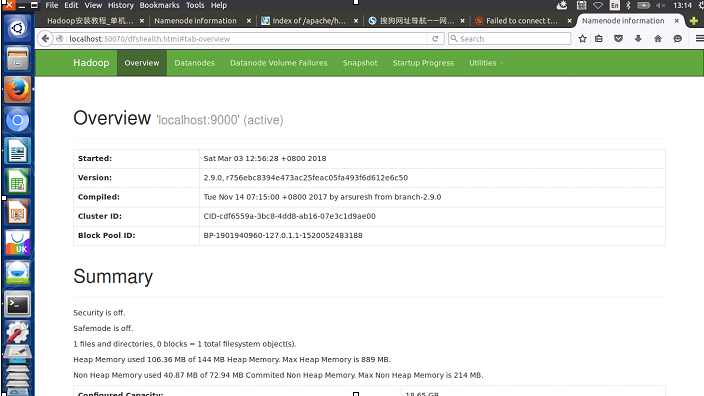
让我们再一次运行样例程序,首先创建hdfs文件系统中的文件夹/user/hadoop,我们可以在网页中看到。
hadoop@zyr-Aspire-V5-551G:/usr/local/hadoop$ ll

total 176

drwxr-xr-x 13 hadoop zyr      4096  3月  3 12:56 ./

drwxr-xr-x 11 root   root     4096  3月  3 11:07 ../

drwxr-xr-x  2 hadoop zyr      4096 11月 14 07:28 bin/

drwxr-xr-x  3 hadoop zyr      4096 11月 14 07:28 etc/

drwxr-xr-x  2 hadoop zyr      4096 11月 14 07:28 include/

drwxrwxr-x  2 hadoop hadoop   4096  3月  3 11:18 input/

drwxr-xr-x  3 hadoop zyr      4096 11月 14 07:28 lib/

drwxr-xr-x  2 hadoop zyr      4096 11月 14 07:28 libexec/

-rw-r--r--  1 hadoop zyr    106210 11月 14 07:28 LICENSE.txt

drwxrwxr-x  2 hadoop hadoop   4096  3月  3 12:56 logs/

-rw-r--r--  1 hadoop zyr     15915 11月 14 07:28 NOTICE.txt

drwxrwxr-x  2 hadoop hadoop   4096  3月  3 12:23 output/

-rw-r--r--  1 hadoop zyr      1366 11月 14 07:28 README.txt

drwxr-xr-x  3 hadoop zyr      4096 11月 14 07:28 sbin/

drwxr-xr-x  4 hadoop zyr      4096 11月 14 07:28 share/

drwxrwxr-x  3 hadoop hadoop   4096  3月  3 12:48 tmp/

hadoop@zyr-Aspire-V5-551G:/usr/local/hadoop$ ./bin/hdfs dfs -mkdir -p /user/hadoop
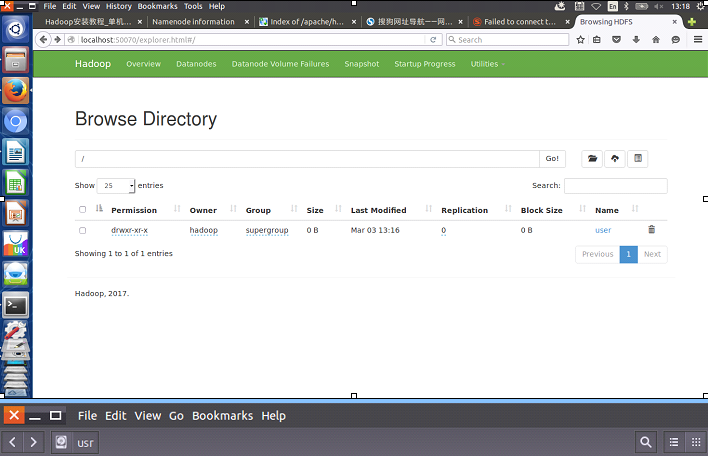
该文件夹是虚拟的,在真实的文件系统中不存在:
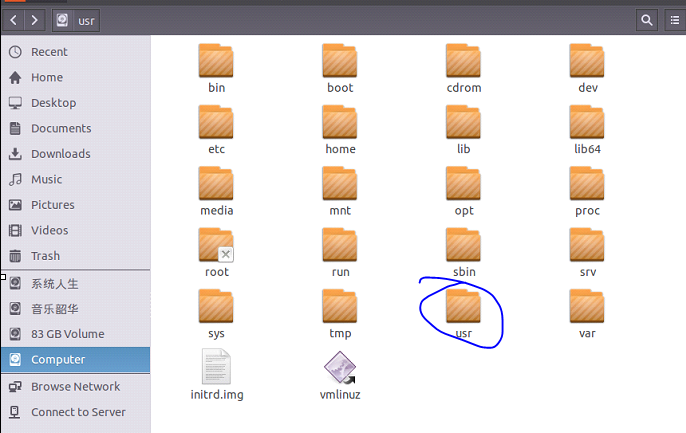
我们查看自己的位置:
hadoop@zyr-Aspire-V5-551G:/usr/local/hadoop$ pwd

/usr/local/hadoop
然后在虚拟的hdfs中,我们创建输入文件夹,并且从真实的文件系统中将文件通过hdfs的put命令放入该新加的文件夹中!
hadoop@zyr-Aspire-V5-551G:/usr/local/hadoop$ ./bin/hdfs dfs -mkdir -p input

hadoop@zyr-Aspire-V5-551G:/usr/local/hadoop$ ./bin/hdfs dfs -put ./etc/hadoop/*.xml input
我们还可以查看hdfs上的文件,通过网页查看来比较。
hadoop@zyr-Aspire-V5-551G:/usr/local/hadoop$ ./bin/hdfs dfs -ls input

Found 8 items

-rw-r--r--   1 hadoop supergroup       7861 2018-03-03 13:21 input/capacity-scheduler.xml

-rw-r--r--   1 hadoop supergroup       1117 2018-03-03 13:21 input/core-site.xml

-rw-r--r--   1 hadoop supergroup      10206 2018-03-03 13:21 input/hadoop-policy.xml

-rw-r--r--   1 hadoop supergroup       1187 2018-03-03 13:21 input/hdfs-site.xml

-rw-r--r--   1 hadoop supergroup        620 2018-03-03 13:21 input/httpfs-site.xml

-rw-r--r--   1 hadoop supergroup       3518 2018-03-03 13:21 input/kms-acls.xml

-rw-r--r--   1 hadoop supergroup       5939 2018-03-03 13:21 input/kms-site.xml

-rw-r--r--   1 hadoop supergroup        690 2018-03-03 13:21 input/yarn-site.xml

之后我们执行和以前同样的命令,观察结果,发现使用第一个命令是没有结果的,原因是从本地文件系统中查找,我已经删除了这个文件夹,肯定找不到的,第二个是通过hdfs来查找,这次真的找到了结果,因为配置文件做出了改变,所以结果稍微有所变化。从侧面证明了,我们的系统是在hdfs上运行的。
./bin/hadoop jar ./share/hadoop/mapreduce/hadoop-mapreduce-examples-*.jar grep ./input ./output 'dfs[a-z.]+'

hadoop@zyr-Aspire-V5-551G:/usr/local/hadoop$ cat ./output/*

hadoop@zyr-Aspire-V5-551G:/usr/local/hadoop$ ./bin/hdfs dfs -cat output/*

1    dfsadmin

1    dfs.replication

1    dfs.namenode.name.dir

1    dfs.datanode.data.dir
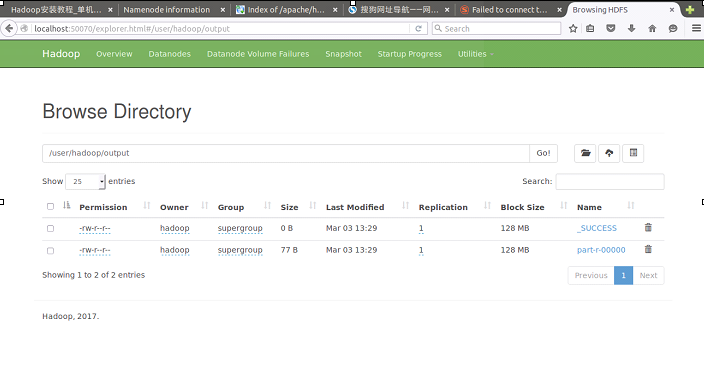
我将本地文件系统中的input和output都删除,但是从网站上依旧可以看到结果,更加证明了是在hdfs上运行的。

那hdfs到底给我们提供了多少命令呢,让我们使用help来查看:
hadoop@zyr-Aspire-V5-551G:/usr/local/hadoop$ ./bin/hdfs dfs -help

Usage: hadoop fs [generic options]

    [-appendToFile <localsrc> ... <dst>]

    [-cat [-ignoreCrc] <src> ...]

    [-checksum <src> ...]

    [-chgrp [-R] GROUP PATH...]

    [-chmod [-R] <MODE[,MODE]... | OCTALMODE> PATH...]

    [-chown [-R] [OWNER][:[GROUP]] PATH...]

    [-copyFromLocal [-f] [-p] [-l] [-d] <localsrc> ... <dst>]

    [-copyToLocal [-f] [-p] [-ignoreCrc] [-crc] <src> ... <localdst>]

    [-count [-q] [-h] [-v] [-t [<storage type>]] [-u] [-x] <path> ...]

    [-cp [-f] [-p | -p[topax]] [-d] <src> ... <dst>]

    [-createSnapshot <snapshotDir> [<snapshotName>]]

    [-deleteSnapshot <snapshotDir> <snapshotName>]

    [-df [-h] [<path> ...]]

    [-du [-s] [-h] [-x] <path> ...]

    [-expunge]

    [-find <path> ... <expression> ...]

    [-get [-f] [-p] [-ignoreCrc] [-crc] <src> ... <localdst>]

    [-getfacl [-R] <path>]

    [-getfattr [-R] {-n name | -d} [-e en] <path>]

    [-getmerge [-nl] [-skip-empty-file] <src> <localdst>]

    [-help [cmd ...]]

    [-ls [-C] [-d] [-h] [-q] [-R] [-t] [-S] [-r] [-u] [<path> ...]]

    [-mkdir [-p] <path> ...]

    [-moveFromLocal <localsrc> ... <dst>]

    [-moveToLocal <src> <localdst>]

    [-mv <src> ... <dst>]

    [-put [-f] [-p] [-l] [-d] <localsrc> ... <dst>]

    [-renameSnapshot <snapshotDir> <oldName> <newName>]

    [-rm [-f] [-r|-R] [-skipTrash] [-safely] <src> ...]

    [-rmdir [--ignore-fail-on-non-empty] <dir> ...]

    [-setfacl [-R] [{-b|-k} {-m|-x <acl_spec>} <path>]|[--set <acl_spec> <path>]]

    [-setfattr {-n name [-v value] | -x name} <path>]

    [-setrep [-R] [-w] <rep> <path> ...]

    [-stat [format] <path> ...]

    [-tail [-f] <file>]

    [-test -[defsz] <path>]

    [-text [-ignoreCrc] <src> ...]

    [-touchz <path> ...]

    [-truncate [-w] <length> <path> ...]

    [-usage [cmd ...]]

……
因此可以通过get将hdfs上的文件下载到本地:
hadoop@zyr-Aspire-V5-551G:/usr/local/hadoop$ ./bin/hdfs dfs -get output ./output

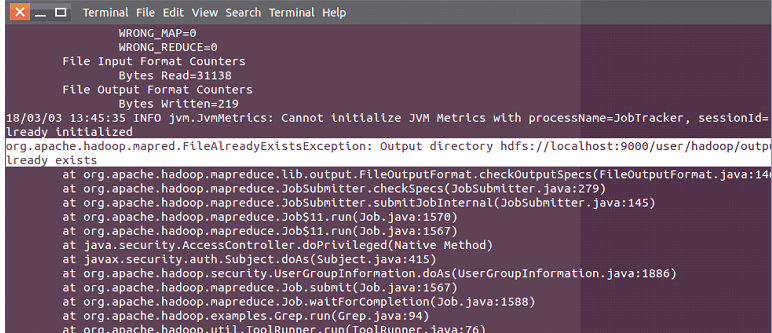
同样的,在hdfs上执行命令也需要注意文件夹不能一样,不然会报错:
这个时候我们可以通过如下命令来删除:
hadoop@zyr-Aspire-V5-551G:/usr/local/hadoop$ ./bin/hdfs dfs -rm -r output

Deleted output
然后再执行这样就可以了。
hadoop@zyr-Aspire-V5-551G:/usr/local/hadoop$ ./bin/hadoop jar ./share/hadoop/mapreduce/hadoop-mapreduce-examples-*.jar grep input output 'dfs[a-z.]+'
最后我们需要知道停止服务的命令:
hadoop@zyr-Aspire-V5-551G:/usr/local/hadoop$ ./sbin/stop-dfs.sh

Stopping namenodes on [localhost]

localhost: stopping namenode

localhost: stopping datanode

Stopping secondary namenodes [0.0.0.0]

0.0.0.0: stopping secondarynamenode

hadoop@zyr-Aspire-V5-551G:/usr/local/hadoop$ ./sbin/start-dfs.sh

Starting namenodes on [localhost]

localhost: starting namenode, logging to /usr/local/hadoop/logs/hadoop-hadoop-namenode-zyr-Aspire-V5-551G.out

localhost: starting datanode, logging to /usr/local/hadoop/logs/hadoop-hadoop-datanode-zyr-Aspire-V5-551G.out

Starting secondary namenodes [0.0.0.0]

0.0.0.0: starting secondarynamenode, logging to /usr/local/hadoop/logs/hadoop-hadoop-secondarynamenode-zyr-Aspire-V5-551G.out
七、安装YARN
在完成了上面的操作,我们基本上算是进入了hadoop的大门了,但是我们也必须知道yarn这个资源管理器,因为这是MapReduce的下一个版本,安装方式很简单,只用修改几个文件即可,在单机/伪分布式系统中,我们不建议使用yarn,因为这会大大的拖慢运行速度,杀鸡焉用牛刀,真正的用处是在大型的分布式集群中才能发挥yarn的威力!
我们首先在配置文件中找到mapred-site.xml.template这个文件,非常重要,将其备份之后,重命名成mapred-site.xml,在对其进行修改,这样就完成了一大半工作了!
hadoop@zyr-Aspire-V5-551G:/usr/local/hadoop$ pwd

/usr/local/hadoop

hadoop@zyr-Aspire-V5-551G:/usr/local/hadoop$ cp ./etc/hadoop/mapred-site.xml.template  ./etc/hadoop/mapred-site.xml.template.backup

hadoop@zyr-Aspire-V5-551G:/usr/local/hadoop$ mv ./etc/hadoop/mapred-site.xml.template  ./etc/hadoop/mapred-site.xml

hadoop@zyr-Aspire-V5-551G:/usr/local/hadoop$ gedit ./etc/hadoop/mapred-site.xml

hadoop@zyr-Aspire-V5-551G:/usr/local/hadoop$ gedit ./etc/hadoop/yarn-site.xml
修改的mapred-site.xml方法为,加入如下配置:
<configuration>

        <property>

             <name>mapreduce.framework.name</name>

             <value>yarn</value>

        </property>

</configuration>
之后我们对yarn-site.xml进行修改:
<configuration>

        <property>

             <name>yarn.nodemanager.aux-services</name>

             <value>mapreduce_shuffle</value>

            </property>

</configuration>
然后启动yarn,并用jps查看,可以看到多了三个进程。
hadoop@zyr-Aspire-V5-551G:/usr/local/hadoop$ ./sbin/start-yarn.sh

starting yarn daemons

starting resourcemanager, logging to /usr/local/hadoop/logs/yarn-hadoop-resourcemanager-zyr-Aspire-V5-551G.out

localhost: starting nodemanager, logging to /usr/local/hadoop/logs/yarn-hadoop-nodemanager-zyr-Aspire-V5-551G.out

hadoop@zyr-Aspire-V5-551G:/usr/local/hadoop$ ./sbin/mr-jobhistory-daemon.sh start historyserver

starting historyserver, logging to /usr/local/hadoop/logs/mapred-hadoop-historyserver-zyr-Aspire-V5-551G.out

hadoop@zyr-Aspire-V5-551G:/usr/local/hadoop$ jps

14423 DataNode

14291 NameNode

15642 Jps

15570 JobHistoryServer

15220 NodeManager

15008 ResourceManager

14655 SecondaryNameNode

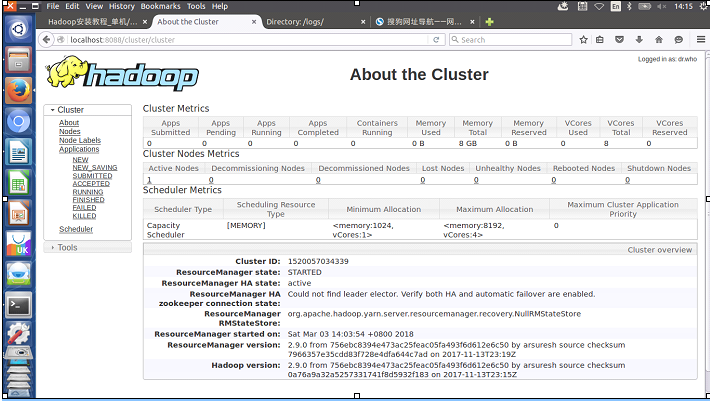
启动 YARN 之后,运行实例的方法还是一样的,仅仅是资源管理方式、任务调度不同。观察日志信息可以发现,不启用 YARN 时,是 “mapred.LocalJobRunner” 在跑任务,启用 YARN 之后,是 “mapred.YARNRunner” 在跑任务。启动 YARN 有个好处是可以通过 Web 界面查看任务的运行情况:http://localhost:8088/cluster,如下图所示。
不启动 YARN 需重命名 mapred-site.xml,如果不想启动 YARN,务必把配置文件 mapred-site.xml 重命名,改成 mapred-site.xml.template,需要用时改回来就行(这个时候不需要修改里面已经修改过的内容)。否则在该配置文件存在,而未开启 YARN 的情况下,运行程序会提示 “Retrying connect to server: 0.0.0.0/0.0.0.0:8032” 的错误,这也是为何该配置文件初始文件名为 mapred-site.xml.template。
再执行可以看到程序执行的非常缓慢,系统资源被大量占用,程序变得非常的卡顿,可以看到yarn的优缺点。
hadoop@zyr-Aspire-V5-551G:/usr/local/hadoop$ ./bin/hadoop jar ./share/hadoop/mapreduce/hadoop-mapreduce-examples-*.jar grep input output_yarn 'dfs[a-z.]+'
执行的日志如下:
18/03/03 14:23:43 INFO client.RMProxy: Connecting to ResourceManager at /0.0.0.0:8032

18/03/03 14:23:45 INFO input.FileInputFormat: Total input files to process : 8

18/03/03 14:23:45 INFO mapreduce.JobSubmitter: number of splits:8

18/03/03 14:23:45 INFO Configuration.deprecation: yarn.resourcemanager.system-metrics-publisher.enabled is deprecated. Instead, use yarn.system-metrics-publisher.enabled

18/03/03 14:23:47 INFO mapreduce.JobSubmitter: Submitting tokens for job: job_1520057034339_0002

18/03/03 14:23:48 INFO impl.YarnClientImpl: Submitted application application_1520057034339_0002

18/03/03 14:23:48 INFO mapreduce.Job: The url to track the job: http://zyr-Aspire-V5-551G:8088/proxy/application_1520057034339_0002/

18/03/03 14:23:48 INFO mapreduce.Job: Running job: job_1520057034339_0002

18/03/03 14:24:05 INFO mapreduce.Job: Job job_1520057034339_0002 running in uber mode : false

18/03/03 14:24:05 INFO mapreduce.Job:  map 0% reduce 0%

18/03/03 14:24:33 INFO mapreduce.Job:  map 13% reduce 0%

18/03/03 14:24:50 INFO mapreduce.Job:  map 63% reduce 0%

18/03/03 14:24:51 INFO mapreduce.Job:  map 75% reduce 0%

18/03/03 14:25:31 INFO mapreduce.Job:  map 100% reduce 0%

18/03/03 14:25:33 INFO mapreduce.Job:  map 100% reduce 100%

18/03/03 14:25:35 INFO mapreduce.Job: Job job_1520057034339_0002 completed successfully

18/03/03 14:25:35 INFO mapreduce.Job: Counters: 50

    File System Counters

        FILE: Number of bytes read=115

        FILE: Number of bytes written=1819819

        FILE: Number of read operations=0

        FILE: Number of large read operations=0

        FILE: Number of write operations=0

        HDFS: Number of bytes read=32095

        HDFS: Number of bytes written=219

        HDFS: Number of read operations=27

        HDFS: Number of large read operations=0

        HDFS: Number of write operations=2

    Job Counters

        Killed map tasks=2

        Launched map tasks=10

        Launched reduce tasks=1

        Data-local map tasks=10

        Total time spent by all maps in occupied slots (ms)=352992

        Total time spent by all reduces in occupied slots (ms)=36370

        Total time spent by all map tasks (ms)=352992

        Total time spent by all reduce tasks (ms)=36370

        Total vcore-milliseconds taken by all map tasks=352992

        Total vcore-milliseconds taken by all reduce tasks=36370

        Total megabyte-milliseconds taken by all map tasks=361463808

        Total megabyte-milliseconds taken by all reduce tasks=37242880

    Map-Reduce Framework

        Map input records=861

        Map output records=4

        Map output bytes=101

        Map output materialized bytes=157

        Input split bytes=957

        Combine input records=4

        Combine output records=4

        Reduce input groups=4

        Reduce shuffle bytes=157

        Reduce input records=4

        Reduce output records=4

        Spilled Records=8

        Shuffled Maps =8

        Failed Shuffles=0

        Merged Map outputs=8

        GC time elapsed (ms)=1582

        CPU time spent (ms)=16070

        Physical memory (bytes) snapshot=2409881600

        Virtual memory (bytes) snapshot=7588835328

        Total committed heap usage (bytes)=1692925952

    Shuffle Errors

        BAD_ID=0

        CONNECTION=0

        IO_ERROR=0

        WRONG_LENGTH=0

        WRONG_MAP=0

        WRONG_REDUCE=0

    File Input Format Counters

        Bytes Read=31138

    File Output Format Counters

        Bytes Written=219

18/03/03 14:25:36 INFO client.RMProxy: Connecting to ResourceManager at /0.0.0.0:8032

18/03/03 14:25:36 INFO input.FileInputFormat: Total input files to process : 1

18/03/03 14:25:37 INFO mapreduce.JobSubmitter: number of splits:1

18/03/03 14:25:37 INFO mapreduce.JobSubmitter: Submitting tokens for job: job_1520057034339_0003

18/03/03 14:25:38 INFO impl.YarnClientImpl: Submitted application application_1520057034339_0003

18/03/03 14:25:38 INFO mapreduce.Job: The url to track the job: http://zyr-Aspire-V5-551G:8088/proxy/application_1520057034339_0003/

18/03/03 14:25:38 INFO mapreduce.Job: Running job: job_1520057034339_0003

18/03/03 14:25:58 INFO mapreduce.Job: Job job_1520057034339_0003 running in uber mode : false

18/03/03 14:25:58 INFO mapreduce.Job:  map 0% reduce 0%

18/03/03 14:26:11 INFO mapreduce.Job:  map 100% reduce 0%

18/03/03 14:26:22 INFO mapreduce.Job:  map 100% reduce 100%

18/03/03 14:26:24 INFO mapreduce.Job: Job job_1520057034339_0003 completed successfully

18/03/03 14:26:24 INFO mapreduce.Job: Counters: 49

    File System Counters

        FILE: Number of bytes read=115

        FILE: Number of bytes written=403351

        FILE: Number of read operations=0

        FILE: Number of large read operations=0

        FILE: Number of write operations=0

        HDFS: Number of bytes read=351

        HDFS: Number of bytes written=77

        HDFS: Number of read operations=7

        HDFS: Number of large read operations=0

        HDFS: Number of write operations=2

    Job Counters

        Launched map tasks=1

        Launched reduce tasks=1

        Data-local map tasks=1

        Total time spent by all maps in occupied slots (ms)=9271

        Total time spent by all reduces in occupied slots (ms)=9646

        Total time spent by all map tasks (ms)=9271

        Total time spent by all reduce tasks (ms)=9646

        Total vcore-milliseconds taken by all map tasks=9271

        Total vcore-milliseconds taken by all reduce tasks=9646

        Total megabyte-milliseconds taken by all map tasks=9493504

        Total megabyte-milliseconds taken by all reduce tasks=9877504

    Map-Reduce Framework

        Map input records=4

        Map output records=4

        Map output bytes=101

        Map output materialized bytes=115

        Input split bytes=132

        Combine input records=0

        Combine output records=0

        Reduce input groups=1

        Reduce shuffle bytes=115

        Reduce input records=4

        Reduce output records=4

        Spilled Records=8

        Shuffled Maps =1

        Failed Shuffles=0

        Merged Map outputs=1

        GC time elapsed (ms)=178

        CPU time spent (ms)=2890

        Physical memory (bytes) snapshot=490590208

        Virtual memory (bytes) snapshot=1719349248

        Total committed heap usage (bytes)=298319872

    Shuffle Errors

        BAD_ID=0

        CONNECTION=0

        IO_ERROR=0

        WRONG_LENGTH=0

        WRONG_MAP=0

        WRONG_REDUCE=0

    File Input Format Counters

        Bytes Read=219

    File Output Format Counters

        Bytes Written=77
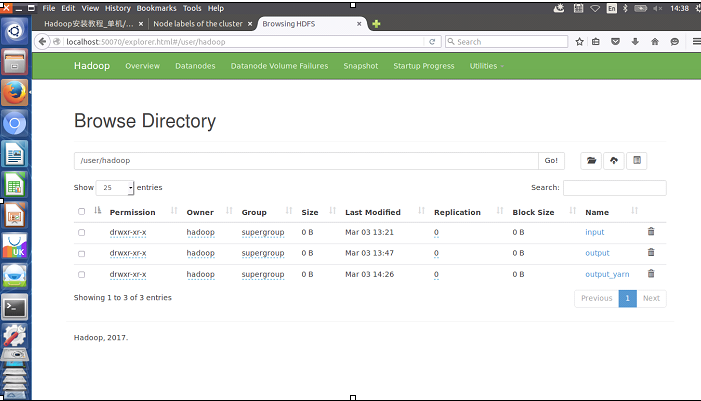
hadoop@zyr-Aspire-V5-551G:/usr/local/hadoop$ ./bin/hdfs dfs -ls

Found 3 items

drwxr-xr-x   - hadoop supergroup          0 2018-03-03 13:21 input

drwxr-xr-x   - hadoop supergroup          0 2018-03-03 13:47 output

drwxr-xr-x   - hadoop supergroup          0 2018-03-03 14:26 output_yarn

hadoop@zyr-Aspire-V5-551G:/usr/local/hadoop$ ./bin/hdfs dfs -cat ./output/*

1    dfsadmin

1    dfs.replication

1    dfs.namenode.name.dir

1    dfs.datanode.data.dir

hadoop@zyr-Aspire-V5-551G:/usr/local/hadoop$ ./bin/hdfs dfs -cat ./output_yarn/*

1    dfsadmin

1    dfs.replication

1    dfs.namenode.name.dir

1    dfs.datanode.data.dir
关闭 YARN 的脚本如下:
hadoop@zyr-Aspire-V5-551G:/usr/local/hadoop$ jps

14423 DataNode

14291 NameNode

18221 Jps

15570 JobHistoryServer

15220 NodeManager

15008 ResourceManager

14655 SecondaryNameNode

hadoop@zyr-Aspire-V5-551G:/usr/local/hadoop$ ./sbin/stop-yarn.sh

stopping yarn daemons

stopping resourcemanager

localhost: stopping nodemanager

localhost: nodemanager did not stop gracefully after 5 seconds: killing with kill -9

no proxyserver to stop

hadoop@zyr-Aspire-V5-551G:/usr/local/hadoop$ ./sbin/mr-jobhistory-daemon.sh stop historyserver

stopping historyserver

hadoop@zyr-Aspire-V5-551G:/usr/local/hadoop$ jps

14423 DataNode

14291 NameNode

14655 SecondaryNameNode

18427 Jps
关闭之后再执行程序,发现不能运行这是在配置了yarn并关闭之后的必然结果。
hadoop@zyr-Aspire-V5-551G:/usr/local/hadoop$ ./bin/hadoop jar ./share/hadoop/mapreduce/hadoop-mapreduce-examples-*.jar grep input output_yarn_close 'dfs[a-z.]+'
结果如下:
 18/03/03 14:42:20 INFO client.RMProxy: Connecting to ResourceManager at /0.0.0.0:8032

 18/03/03 14:42:21 INFO ipc.Client: Retrying connect to server: 0.0.0.0/0.0.0.0:8032. Already tried 0 time(s); retry policy is RetryUpToMaximumCountWithFixedSleep(maxRetries=10, sleepTime=1000 MILLISECONDS)

 18/03/03 14:42:22 INFO ipc.Client: Retrying connect to server: 0.0.0.0/0.0.0.0:8032. Already tried 1 time(s); retry policy is RetryUpToMaximumCountWithFixedSleep(maxRetries=10,

 …...

 18/03/03 14:42:40 INFO ipc.Client: Retrying connect to server: 0.0.0.0/0.0.0.0:8032. Already tried 9 time(s); retry policy is RetryUpToMaximumCountWithFixedSleep(maxRetries=10, sleepTime=1000 MILLISECONDS)

 18/03/03 14:42:40 INFO retry.RetryInvocationHandler: java.net.ConnectException: Your endpoint configuration is wrong; For more details see:  http://wiki.apache.org/hadoop/UnsetHostnameOrPort, while invoking ApplicationClientProtocolPBClientImpl.getNewApplication over null after 1 failover attempts. Trying to failover after sleeping for 31517ms.

 After modify the yarn file,the mapreduce program running well.

 The  http://localhost:8088/cluster  could not find.
八、项目小结
至此,我们已经从最开始的配置系统,到之后的配置ssh,java环境,安装hadoop,单机hadoop运行,伪分布式hadoop运行,以及最后的安装yarn,使用yarn运行,不知不觉的,我们对hadoop的基本主线有了本质性的把握,深入的了解了hdfs,知道了MapReduce的执行过程,了解了很多的命令,同时也锻炼了自己的查找问题,分析问题,解决问题的能力,在一番沉淀之后,我们将会搭建真正的集群,不积跬步无以至千里,细节决定成败,虚心,踏实,不断的积累,未来必将属于我们!静下心来,认真探索,深入研究,前方的风景无限美好~~~
沉淀,再出发——在Ubuntu Kylin15.04中配置Hadoop单机/伪分布式系统经验分享的更多相关文章
- 沉淀再出发:如何在eclipse中查看java的核心代码
沉淀再出发:如何在eclipse中查看java的核心代码 一.前言 很多时候我们在eclipse中按F3键打算查看某一个系统类的定义的时候,总是弹出找不到类这样的界面,这里我们把核心对应的代码加进 ...
- 在 Ubuntu 14.04 中配置 PXE 服务器
PXE(预启动执行环境Preboot Execution Environment)服务器允许用户从网络中启动 Linux 发行版并且可以不需要 Linux ISO 镜像就能同时在数百台 PC 中安装. ...
- 在ubuntu 12.04 中配置java环境(安装jdk, tomcat, maven, eclipse)
1. 安装jdk 1.7 在ubuntu( /usr/lib/jvm/java-7-openjdk-amd64 )中默认有安装jdk 1.7 如果没有 可下载 : http://www.oracle. ...
- 沉淀,再出发——安装windows10和ubuntu kylin15.04双系统心得体会
安装windows10和ubuntu kylin15.04双系统心得体会 一.安装次序 很简单,两种安装次序,"先安装windows后安装linux:先安装linux后安装wind ...
- 沉淀再出发:java中的HashMap、ConcurrentHashMap和Hashtable的认识
沉淀再出发:java中的HashMap.ConcurrentHashMap和Hashtable的认识 一.前言 很多知识在学习或者使用了之后总是会忘记的,但是如果把这些只是背后的原理理解了,并且记忆下 ...
- 沉淀再出发:在python3中导入自定义的包
沉淀再出发:在python3中导入自定义的包 一.前言 在python中如果要使用自己的定义的包,还是有一些需要注意的事项的,这里简单记录一下. 二.在python3中导入自定义的包 2.1.什么是模 ...
- 沉淀再出发:java中的equals()辨析
沉淀再出发:java中的equals()辨析 一.前言 关于java中的equals,我们可能非常奇怪,在Object中定义了这个函数,其他的很多类中都重载了它,导致了我们对于辨析其中的内涵有了混淆, ...
- 沉淀再出发:java中注解的本质和使用
沉淀再出发:java中注解的本质和使用 一.前言 以前XML是各大框架的青睐者,它以松耦合的方式完成了框架中几乎所有的配置,但是随着项目越来越庞大,XML的内容也越来越复杂,维护成本变高.于是就有人提 ...
- 沉淀再出发:java中线程池解析
沉淀再出发:java中线程池解析 一.前言 在多线程执行的环境之中,如果线程执行的时间短但是启动的线程又非常多,线程运转的时间基本上浪费在了创建和销毁上面,因此有没有一种方式能够让一个线程执行完自己的 ...
随机推荐
- backupMysql.sh
#!/bin/sh #!/bin/bash function backup() { for i in $* do mysqldump -h$hostip -P$port -u$username -p$ ...
- python中的进程池
1.进程池的概念 python中,进程池内部会维护一个进程序列.当需要时,程序会去进程池中获取一个进程. 如果进程池序列中没有可供使用的进程,那么程序就会等待,直到进程池中有可用进程为止. 2.进程池 ...
- Mysql 查询重复的记录
我们都会使用distinct去除重复值,今天调试一个问题,业务需要查询出重复的数据,实现如下: 查询帖子的被哪些用户收藏,其中user_id,post_id可以唯一确定一条记录: 先使用post_id ...
- Android Studio 3.1 Beta 1发布,如何及时下载更新
每次收到Android Studio更新提示,总是延迟一段时间才能下载的到或者更新成功.架梯子也不行.而且更新检测也是时断时续.Android Studio 3.0.1使用一段时间,多开几个工程.经常 ...
- js 面向对象 继承
继承方式有四种: 1.call 2.apply 3.prototype 4.for in call 和 apply 的主要区别: call 传参数只能一个一个的传, apply 因为是用数组,所以可以 ...
- rsync推送和拉取
rsync格式: # 拷贝本地文件.当SRC和DES路径信息都不包含有单个冒号":"分隔符时就启动这种工作模式.如:rsync -a /data /backup rsync [OP ...
- SpringMVC源码情操陶冶-InterceptorsBeanDefinitionParser拦截器解析器
解析mvc:interceptors节点 观察下InterceptorsBeanDefinitionParser的源码备注 /** * {@link org.springframework.beans ...
- bzoj 3812: 主旋律 [容斥原理 状压DP]
3812: 主旋律 题意:一张有向图,求它的生成子图是强连通图的个数.\(n \le 15\) 先说一个比较暴力的做法. 终于知道n个点图的是DAG的生成子图个数怎么求了. 暴力枚举哪些点是一个scc ...
- AGC017 F - Zigzag
传送门 Time limit : 4sec / Memory limit : 256MB Score : 1600 points Problem Statement There are N(N+1)⁄ ...
- C++ cin.get及getline的用法
1.cin.get() 从指定的输入流中提取一个字符,函数的返回值就是这个字符.文件结束符会返回EOF,一般以-1代表EOF. #include<iostream> using names ...