
C# 之三类文件的读写( .XML,.INI 和 .TXT 文件)
笔记之用,关于三类.xml, .ini, .txt 文件的 C# 读写,请多多指教!
1,第一类:.xml 文件的读写
先贴上xml文件,下面对这个文件进行操作:
<?xml version="1.0" encoding="utf-8"?>

<NetWork name="GlobalNet" Version="2.0.0.0">

  <Factory name="China" StationNum="0">

    <Machine name="FireBird">

      <IpAddr name="192.168.65.111" />

      <ValidChannel num="1" />

      <ValidChannel num="2" />

      <ValidChannel num="3" />

    </Machine>

  </Factory>

  <Factory name="UK" StationNum="1">

    <Machine name="NuEagle">

      <IpAddr name="192.168.65.180" />

    </Machine>

  </Factory>

  <Factory name="USA" StationNum="2">

    <Machine name="Felix">

      <IpAddr name="192.168.65.48" />

    </Machine>

  </Factory>

</NetWork>
操作之前,有几点需要弄清:
a, 节点/元素:如下图Network,Factory,Machine这一类都可以称之为元素或节点;
b, 元素阶层(深度);最顶层为0,依次加1;如图NetWork的深度为0,Factory为1,Machine为2,IpAddr为3。
c, 属性; 属性的形式为:属性名=”属性值”,比如 name="GlobalNet" ,name就是属性,GlobalNet就是属性值。
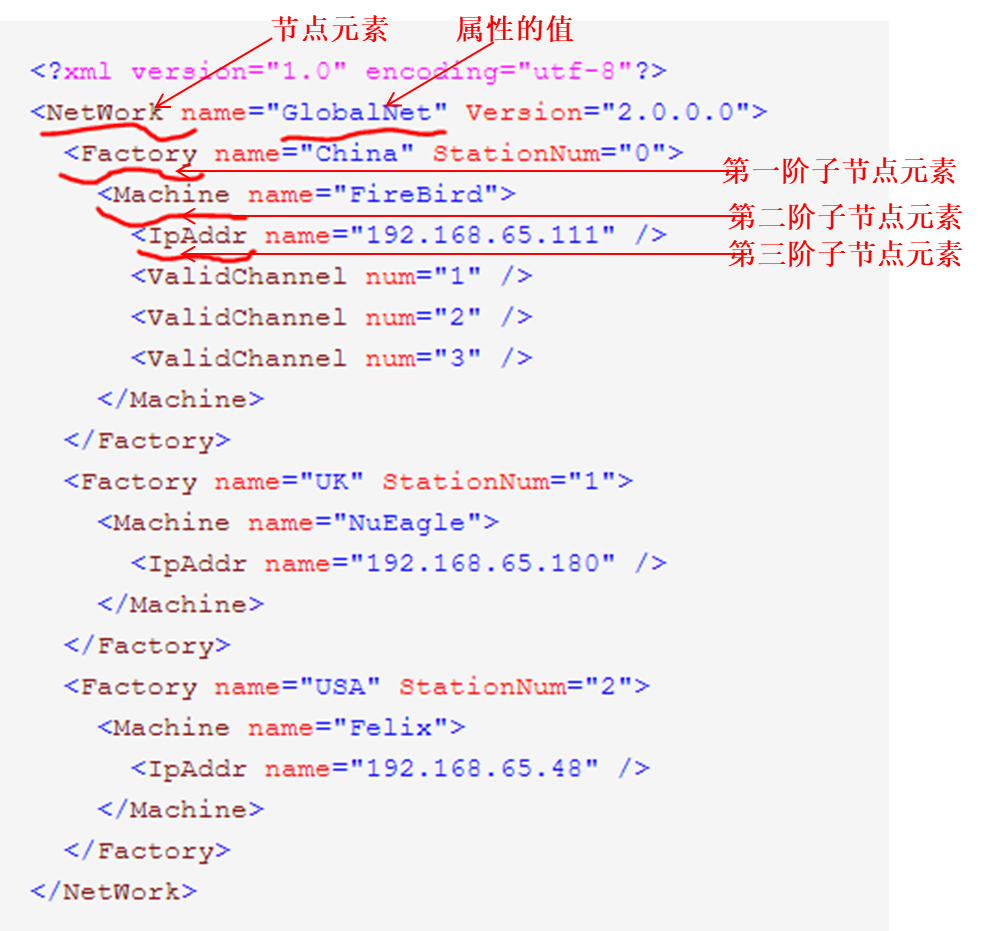
C# 的xml的读取可用 XmlReader,这里说一下ReadToDescendant,它用来查找子代(子元素节点),并且可以定位到子节点,如图当找完工厂(Factory)后要去找机器(Machine):
using (XmlReader reader = XmlReader.Create(@"C:\Users\user\Desktop\network.xml"))

            {

                while (reader.Read())

                {

                    if (reader.IsStartElement())

                    {

                        switch (reader.Name.ToString())

                        {

                            //依据工厂来划分每一个站

                            case "Factory":

                                //获取工厂名以及工厂号

                                string factoryName = reader.GetAttribute("name");

                                string factoryNo = reader.GetAttribute("StationNum");

                                //获取工厂下的机器名

                                 reader.ReadToDescendant("Machine");

                                 string machineName = reader.GetAttribute("name");

                                //获取机器的IP

                                reader.ReadToDescendant("IpAddr");

                                string machineIP = reader.GetAttribute("name");

                                break;

                        }

                    }

                }

            }
2,第二类:INI 文件的读写。
这里会用到kernel32这个库,他本身有两个我们可以拿来用的函数(WritePrivateProfileString,WritePrivateProfileString)去处理 .ini 文件;这里将读写放在一个类里,我们先来看看这个类的内容.
using System;

using System.IO;

using System.Runtime.InteropServices;

using System.Text;

namespace Ini

{

    /// <summary>

    /// Create a New INI file to store or load data

    /// </summary>

    public class IniFile

    {

        public string path;

        [DllImport("kernel32")]

        private static extern long WritePrivateProfileString(string section,string key,string val,string filePath);

        [DllImport("kernel32")]

        private static extern int GetPrivateProfileString(string section,string key,string def,StringBuilder retVal,int size,string filePath);

        /// <summary>

        /// INIFile 构造

        /// </summary>

        /// <param name="INIPath"></param>

        public IniFile(string INIPath)

        {

            path = INIPath;

        }

        /// <summary>

        /// INI文件写入数据

        /// </summary>

        /// <param name="Section"></param>

        /// Section name

        /// <param name="Key"></param>

        /// Key Name

        /// <param name="Value"></param>

        /// Value Name

        public void IniWriteValue(string Section,string Key,string Value)

        {

            WritePrivateProfileString(Section,Key,Value,this.path);

        }

        /// <summary>

        /// 从Ini文件读取数据值

        /// </summary>

        /// <param name="Section"></param>

        /// <param name="Key"></param>

        /// <param name="Path"></param>

        /// <returns></returns>

        public string IniReadValue(string Section,string Key)

        {

            StringBuilder temp = new StringBuilder();

            int i = GetPrivateProfileString(Section,Key,"",temp,,this.path);

            return temp.ToString();

        }

    }

}
那么对应MySQL的 my.ini 文件如何操作,下面将示范如何在mysqld区间读取并且改变server-id 这个键的值:
my.ini 节选:
[mysqld]

# The next three options are mutually exclusive to SERVER_PORT below.

# skip-networking

# shared-memory-base-name=MYSQL

# The Pipe the MySQL Server will use

# socket=MYSQL

# The TCP/IP Port the MySQL Server will listen on

port=3306

# Path to installation directory. All paths are usually resolved relative to this.

# basedir="C:/Program Files/MySQL/MySQL Server 5.7/"

……

# Binary Logging.

# log-bin

# Error Logging.

log-error="NENGKA.err"

# Server Id.

server-id=111

……
C#读写 my.ini :
//MySQL的配置文档的修改

IniFile ini = new IniFile("my.ini");

ini.IniReadValue("mysqld", "server-id");

string IPAdd = "";

ini.IniWriteValue("mysqld", "server-id", IPAdd);
3, 第三类:C# 读写 Text。
如下,这段代码是读取mysql输出的内容(略有省略),为了简化输出,方便客户查看,所有需要做一个解析。
txt 文件内容:
Slave_IO_State: Waiting for master to send event

                  Master_Host: *.*.*.*

                Connect_Retry: 60

              Master_Log_File: mysql-bin.000001

          Read_Master_Log_Pos: 10726644

               Relay_Log_File: mysqld-relay-bin.000056

                Relay_Log_Pos: 231871

        Relay_Master_Log_File: mysql-bin.000001

……

             Slave_IO_Running: Yes

            Slave_SQL_Running: Yes

……

              Replicate_Do_DB: data1

  Replicate_Wild_Ignore_Table:

                   Last_Errno: 0

                   Last_Error:

                 Skip_Counter: 0

          Exec_Master_Log_Pos: 10726644

              Relay_Log_Space: 232172

              Until_Condition: None

               Until_Log_File:

……
这里主要使用FileStream,StreamReader,不断的ReadLine找出关键字。
//简化MySQL命令的输出

bool Slave_IO_Running = false;

bool Slave_SQL_Running = false;

string file = @"C:\Users\user\Desktop\mysqloutput.txt";

using(FileStream fs = new FileStream(file,FileMode.Open,FileAccess.Read))

using (StreamReader sr = new StreamReader(fs))

{

  try

      {

        string currentLine = sr.ReadLine();

        while (currentLine != null)

          {

             //判断Slave_IO_Running是否在运行

              if (currentLine.Contains("Slave_IO_Running"))

              {

                 Slave_IO_Running = currentLine.Split(':')[].Trim() == "Yes" ? true : false;

              }

              //判断Slave_SQL_Running是否在运行

              if (currentLine.Contains("Slave_SQL_Running"))

              {

                  Slave_SQL_Running = currentLine.Split(':')[].Trim() == "Yes" ? true : false;

              }

                currentLine = sr.ReadLine();

              }

              fs.Close();

              sr.Close();

            }

     catch

      {

      }

}
C# 之三类文件的读写( .XML,.INI 和 .TXT 文件)的更多相关文章
- java算法面试题:编写一个程序,将a.txt文件中的单词与b.txt文件中的单词交替合并到c.txt文件中,a.txt文件中的单词用回车符分隔,b.txt文件中用回车或空格进行分隔。
package com.swift; import java.io.BufferedReader; import java.io.BufferedWriter; import java.io.File ...
- 使用Java将搜狗词库文件(文件后缀为.scel)转为.txt文件
要做一个根据词库进行筛选主要词汇的功能,去搜狗下载专业词汇词库时,发现是.scel文件,且通过转换工具(http://tools.bugscaner.com/sceltotxt/)转换为txt时报错如 ...
- C语言对文件的读写操作以及处理CSV文件的方法
#include <stdio.h> #define F_PATH "d:\myfile\file.txt" int main(void) { FILE *fp = N ...
- python pandas 中文件的读写——read_csv()读取文件
read_csv()读取文件1.python读取文件的几种方式read_csv 从文件,url,文件型对象中加载带分隔符的数据.默认分隔符为逗号read_table 从文件,url,文件型对象中加载带 ...
- C++文件处理(一):读/写txt文件
C++文件处理与C语言不同,C++文件处理使用的是:流(stream) C++头文件fstream定义了三个类型来支持文件IO
- java 根据Url下载对应的文件到指定位置,读txt文件获取url
package test; import java.io.BufferedReader; import java.io.File; import java.io.FileInputStream; im ...
- dom4j的读写xml文件,读写xml字符串
百度了一些博客,大同小异,在选取jar包工具的时候大概看了下,大抵是jdom原始,dom4j优秀.于是做了些练习. 参考:http://www.cnblogs.com/mengdd/archive/2 ...
- 基于java:读写一个英文的txt文件,记录单词个数,并输出十个出现最多的单词及出现的个数;
import java.io.FileNotFoundException; import java.io.FileReader; import java.io.IOException; class W ...
- Android开发---如何操作资源目录中的资源文件4 ---访问xml的配置资源文件的内容
Android开发---如何操作资源目录中的资源文件4 XML,位于res/xml/,这些静态的XML文件用于保存程序的数据和结构. XmlPullParser可以用于解释xml文件 效果图: 描述: ...
随机推荐
- htmlcss渐变及兼容性
自我总结,欢饮拍砖. <!DOCTYPE HTML> <html lang="en"> <head> <meta content ...
- 精通libGDX-RPG开发实战
从今天开始,我会陆陆续续做一个五脏俱全的rpg小品游戏. 素材使用<圣剑英雄传II>的素材 游戏名称< Inspiration > 教程目录(暂定): Chapter 1: 开 ...
- 弥补wxpython无背景图片缺陷
思路: 通过设置Panel的背景样式为wx.BG_STYLE_CUSTOM: self.SetBackgroundStyle(wx.BG_STYLE_CUSTOM) 绑定Panel的背景事情: sel ...
- Yii框架里用grid.CGridView调用pager扩展不显示最后一页按钮的解决
有如下一例,调用zii.widgets.grid.CGridView显示Blog信息,代码如下: $this->widget('zii.widgets.grid.CGridView', arra ...
- POJ Christmas Game [树上删边游戏 Multi-SG]
传送门 题意: 有N 个局部联通的图.Harry 和Sally 轮流从图中删边,删去一条边后,不与根节点相连的部分将被移走.Sally 为先手.图是通过从基础树中加一些边得到的.所有形成的环保证不共用 ...
- vue2.0路由进阶
一.路由的模式 第一种用history方式实现,HTML5使用window.history.pushState()实现路由的切换而不刷新页面. 第二种使用hash值的方式来实现. vue2.0两种都可 ...
- 【翻译】我如何使用CSS来制作bitsofcode Logo动画
翻译文章,翻译不好,还望大家指出 原文地址:How I Animated the bitsofcode Logo with CSS 我是css动画的新手,这样说是因为我只在有限的案例中使用过他们,而且 ...
- XAMPP简介、安转、使用
虽然没有写Mac安装方法及使用, 但方法也都大相径庭, 殊途同归而已. XAMPP简介 XAMPP是一款开源.免费的网络服务器软件,经过简单安装后,就可以在个人电脑上搭建服务器环境.本文为大家介绍Wi ...
- CentOS7上Docker安装与卸载
安装 1.安装Docker 参见:https://docs.docker.com/engine/installation/linux/centos/ 2.直接使用root安装(更新系统) yum up ...
- Linux一些常用操作
1.linux swap分区 可采用文件的方式 dd if=/dev/zero of=/var/swap bs=1024 count=2048000 mkswap /var/swap swapon / ...