
asp.net 文件上传 Uploadify HTML5 带进度条
参考的https://www.cnblogs.com/lvdabao/p/3452858.html这位,在此基础上略有修改:
1.根据Layer,将上传附件做成弹窗显示,引入frame弹窗,在项目当中能够通用
2.附件支持上移,下移排序功能
先贴出上传html页面,JS的代码
<script type="text/javascript">

        $(function () {

            $('#upload').Huploadify({

                auto: true,

                fileTypeExts: '*.jpg;*.pdf;*.docx;*.doc;*.txt;*.ppt;*.pptx;*.gif;*.xls;*.rar;*.sql;*.ico;*.zip;*.csv;*.tiff;*.xlsx;*.mp3;*.mp4;*.vsdx;*.png',

                multi: true,

                formData: { key: 123456, key2: 'vvvv' },

                fileSizeLimit: 99999999,//限制上传文件大小

                showUploadedPercent: true,//是否实时显示上传的百分比,如20%

                showUploadedSize: false,//是否实时显示已上传的文件大小,如1M/2M

                removeTimeout: 9999999,

                uploader: '../ashx/Upload.ashx',

                onUploadStart: function (file) {

                    //console.log('开始上传');

                },

                onInit: function () {

                    //console.log('初始化');

                    InitUpload();

                },

                onUploadComplete: function () {

                    //console.log('上传完成');

                },

                onDelete: function (file) {

                    //console.log('删除的文件:' + file);

                    //console.log(file);

                },

                onUploadSuccess: function (file, data, response) {

                    var jsondata = eval('(' + data + ')');

                    if (jsondata.resultcode == "1000") {

                        $("#hid_filepath_" + file.index).val(jsondata.datas.FilePath);

                        $("#hid_filename_" + file.index).val(jsondata.datas.FileName);

                        $("#hid_filetitle_" + file.index).val(jsondata.datas.FileTitle);

                        //显示确定按钮

                        $("#upload_submit").show();

                    } else {

                        layer.msg(jsondata.errormsg);

                        $("#fileupload_1_" + file.index).remove();

                    }

                },

                onUploadError: function (file, errorCode, errorMsg, errorString) {

                    alert("上传出现错误,请联系管理员!");

                    $("#fileupload_1_" + file.index).remove();

                    console.log("失败:" + file.name + "_errorcode:" + errorCode + "_errorMsg:" + errorMsg + "_errorString:" + errorString);

                }

            });

            //上移

            $("#upload").on("click", ".up_btn", function () {

                var now_id = $(this).parent().attr('id');

                var up_id = $(this).parent().prev().attr('id');

                if (up_id != null && up_id != "undefined") {

                    var nowhtml = $("#" + now_id).prop("outerHTML");

                    $("#" + up_id).before(nowhtml);

                    $(this).parent().remove();

                } else {

                    alert("已经是第一个,无法上移!");

                }

            });

            //下移

            $("#upload").on("click", ".down_btn", function () {

                var now_id = $(this).parent().attr('id');

                var next_id = $(this).parent().next().attr('id');

                if (next_id != null && next_id != "undefined") {

                    var nowhtml = $("#" + now_id).prop("outerHTML");

                    $("#" + next_id).after(nowhtml);

                    $(this).parent().remove();

                } else {

                    alert("已经是最后一个,无法下移!");

                }

            });

            //删除

            $("#upload").on("click", ".delfilebtn", function () {

                $(this).parent().remove();

                if ($(".uploadify-queue-item").length <= 0) {

                    //隐藏确定按钮

                    $("#upload_submit").hide();

                }

            });

            //确定

            $("#upload_submit").click(function () {

                var index = parent.layer.getFrameIndex(window.name); //获取窗口索引

                var filename_h = "";

                var filepath_h = "";

                var filetitle_h = "";

                $(".hidden_name").each(function () {

                    filename_h += $(this).val() + ",";

                });

                $(".hidden_file").each(function () {

                    filepath_h += $(this).val() + ",";

                });

                $(".hidden_title").each(function () {

                    filetitle_h += $(this).val() + ",";

                });

                filename_h = filename_h.substr(0, filename_h.length - 1);

                filepath_h = filepath_h.substr(0, filepath_h.length - 1);

                filetitle_h = filetitle_h.substr(0, filetitle_h.length - 1);

                var arr_a = filepath_h.split(',');

                var arr_b = filename_h.split(',');

                var arr_c = filetitle_h.split(',');

                var strHtml = "";

                for (var i = 0; i < arr_a.length; i++) {

                    var name = arr_b[i];

                    if (arr_b[i].length > 15) {

                        var name2 = arr_b[i].substr(arr_b[i].indexOf('.') - 3, arr_b[i].length);

                        var name1 = arr_b[i].substr(0, 7) + "......" + name2;

                        name = name1;

                    }

                    strHtml += "<a  href='" + arr_a[i] + "' title='" + arr_c[i] + "' target='_blank'>" + name + ";</a>";

                }

                parent.$("#div_link").html(strHtml);

                parent.$("#hidden_filepath").val(filepath_h);

                parent.$("#hidden_filename").val(filename_h);

                parent.layer.close(index);

            });

        });

        //初始化

        function InitUpload() {

            //得到已上传文件html

            var paths = parent.$("#hidden_filepath").val();

            var names = parent.$("#hidden_filename").val();

            var namesarray = names.split(',');

            var index = 1;

            parent.$("#div_link").find("a").each(function () {

                var txt = $(this).text().substr(0, $(this).text().length - 1);

                var path = $(this).attr("href");

                var title = $(this).attr("title");

                var divhtml = '';

                divhtml += '<div id="fileupload_1_' + index + '" class="uploadify-queue-item"><div class="uploadify-progress">';

                divhtml += '<div class="uploadify-progress-bar" style="width:100%;"></div></div>';

                divhtml += '<span class="up_percent">100%</span><span class="delfilebtn">删除</span>';

                divhtml += '<span id="upbtn_' + index + '" class="up_btn">上移</span><span id="downbtn_' + index + '" class="down_btn">下移</span>';

                divhtml += '<span class="up_filename">' + txt + '</span>';

                divhtml += '<input type="hidden" id="hid_filepath_' + index + '" class="hidden_file" value="' + path + '">';

                divhtml += '<input type="hidden" id="hid_filename_' + index + '" class="hidden_name" value="' + namesarray[index - 1] + '">';

                divhtml += '<input type="hidden" id="hid_filetitle_' + index + '" class="hidden_title" value="' + title + '"></div>';

                $("#file_upload_1-queue").append(divhtml);

                index += 1;

            });

            if (parent.$("#div_link").find("a").length > 0) {

                //显示确定按钮

                $("#upload_submit").show();

            }

        }

    </script>
接下来是html代码:
<div id="upload_div">

        <div id="upload"></div>

        <div style="float: right;">

            <input id="upload_submit" style="display: none;" type="button" value="确定" />

        </div>

    </div>
以下是调用附件页面HTML,隐藏的两个input是存储附件信息:
                                            <input id="layer_btn_upload" type="button" value="选择" />

                                            <div id="div_link">

                                            </div>

                                            <input type="hidden" id="hidden_filepath" />

                                            <input type="hidden" id="hidden_filename" />
然后是点击按钮上传附件事件:
            //弹窗上传附件

            $("#layer_btn_upload").click(function () {

                layerIndex = layer.open({

                    type: 2,

                    offset: '50px',//上 左,弹窗位置

                    shadeClose: true,

                    area: ['820px', '320px'],

                    title: "附件上传",

                    content: '../Upload.html'//链接页面

                });

            });
需要引用的JS和CSS
jquery.js//必须
layer.js//弹窗插件:http://layer.layui.com/
upload.html需要的CSS和JS
<link href="../assets/uploadify/Huploadify.css" rel="stylesheet" />
<script src="../assets/js/jquery.js"></script>
<script src="../assets/layer/layer.js"></script>
<script src="../assets/uploadify/jquery.Huploadify.js"></script>
页面效果:
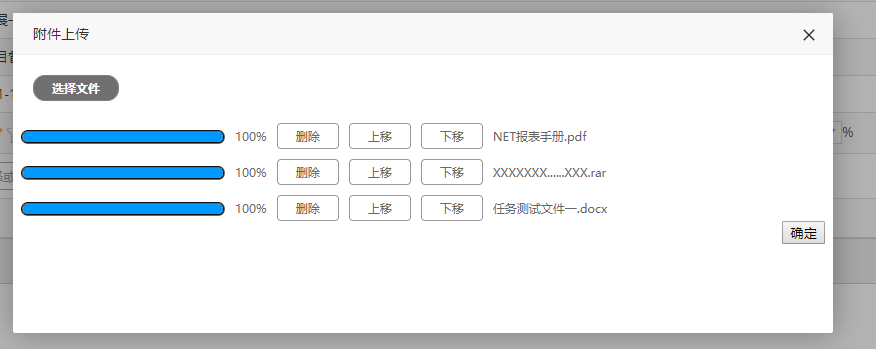

Layer官网下载
文件过大有可能会报404错误解决方案:web.config
<system.web>

    <httpRuntime executionTimeout="3600" maxRequestLength="204800" requestValidationMode="2.0" />

<system.web>

   <system.webServer>

    <validation validateIntegratedModeConfiguration="false" />

    <security>

      <requestFiltering>

        <requestLimits maxAllowedContentLength="2097152000" maxQueryString="5000" maxUrl="8000"></requestLimits>

      </requestFiltering>

    </security>

  </system.webServer>
asp.net 文件上传 Uploadify HTML5 带进度条的更多相关文章
- Ajax文件上传并添加Bootstrap进度条
1.项目中需要用到文件上传和显示进度,网上各种插件搞得头晕,决定自己实现一个 三个步骤:Ajax上传文件,获取上传进度,显示进度 html: <!DOCTYPE HTML> <htm ...
- asp.net 文件上传示例整理
ASP.NET依托.net framework类库,封装了大量的功能,使得上传文件非常简单,主要有以下三种基本方法. 方法一:用Web控件FileUpload,上传到网站根目录. 代码如下 复制代码 ...
- 文件上传~Uploadify上传控件~续(多文件上传)
对于Uploadify文件上传之前已经讲过一次(文件上传~Uploadify上传控件),只不过没有涉及到多文件的上传,这回主要说一下多个文件的上传,首先,我们要清楚一个概念,多文件上传前端Upload ...
- IIS7.5修改asp的文件上传限制方法
第一.IIS7.5修改asp的文件上传限制方法 1.打开IIS 2.打开面板中的应用程序开发 asp 3.找到最后的限制属性 4.修改其中的最大请求实体主体限制的值:默认为200000字节,等于195 ...
- asp.net文件上传进度条研究
文章:asp.net 文件上传进度条实现代码
- Cookie操作、ASP.Net文件上传HttpPostedFile
概述 Cookie用来保存客户浏览器请求服务器页面的请求信息. 我们可以存放非敏感的用户信息,保存时间可以根据需要设置.如果没有设置Cookie失效日期,它的生命周期保存到关闭浏览器为止,Cookie ...
- Android OkHttp文件上传与下载的进度监听扩展
http://www.loongwind.com/archives/290.html 上一篇文章介绍了用Retrofit实现文件的上传与下载,但是我们发现没办法监听上传下载的进度,毕竟我们在做开发的时 ...
- js实现图片上传预览及进度条
原文js实现图片上传预览及进度条 最近在做图片上传的时候,由于产品设计的比较fashion,上网找了比较久还没有现成的,因此自己做了一个,实现的功能如下: 1:去除浏览器<input type= ...
- 打造 html5 文件上传组件,实现进度显示及拖拽上传,支持秒传+分片上传+断点续传,兼容IE6+及其它标准浏览器
老早就注册了博客园帐号,昨天才发现,连博客都没开,Github也是一样,深觉惭愧,赶紧潜个水压压惊`(*∩_∩*)′ 言归正传.大概许多人都会用到文件上传的功能,上传的库貌似也不少,比如(jQuery ...
随机推荐
- 2017"百度之星"程序设计大赛 - 资格赛【1001 Floyd求最小环 1002 歪解(并查集),1003 完全背包 1004 01背包 1005 打表找规律+卡特兰数】
度度熊保护村庄 Accepts: 13 Submissions: 488 Time Limit: 2000/1000 MS (Java/Others) Memory Limit: 32768/3276 ...
- 用adb录制手机屏幕视频
adb shell screenrecord命令可以用来录制Android手机视频 screenrecord是一个shell命令,支持Android4.4(API level 19)以上,支持视频格式 ...
- Spark算子--mapPartitions和mapPartitionsWithIndex
mapPartitions--Transformation类算子 代码示例 result mapPartitionsWithIndex--Transformation类算子 代码示例 result ...
- Oracle_基本函数查询综合
Oracle_基本函数查询综合 --[1]查询出每各月倒数第三天受雇的所有员工 select; --[2]找出早于30年前受雇的员工 select>; select; select; ...
- 【转载】keil5中加入STM32F10X_HD,USE_STDPERIPH_DRIVER的原因
初学STM32,在RealView MDK 环境中使用STM32固件库建立工程时,初学者可能会遇到编译不通过的问题.出现如下警告或错误提示: warning: #223-D: function &qu ...
- UWP: 通过命令行启动 UWP 应用
最近在开发应用的过程中,我遇到了如标题所述的需求,其实主要是为了能够快捷启动应用,正像我们可以在"运行"对话框中可以输入一些可执行程序的名称后,就能够直接启动它:这样做,可以增加 ...
- phpwind9.0升级到php7后出现的问题修复
最近将一个两年多以前的用phpwind9.0搭建的论坛升级到php7,遇到了页面无法打开,显示为500错误,排查了一整天时间,终于解决! 1.打开文件:src/applications/appcent ...
- 【开发技术】Java生成验证码
Java生成验证码 为了防止用户恶意,或者使用软件外挂提交一些内容,就得用验证码来阻止,虽然这个会影响用户体验,但为了避免一些问题很多网站都使用了验证码;今天下午参考文档弄了一个验证码,这里分享一下; ...
- 高质量JAVA代码编写规范
1. Java 命名约定 除了以下几个特例之外,命名时应始终采用完整的英文描述符.此外,一般应采用小写字母,但类名.接口名以及任何非初始单词的第一个字母要大写. 1.1 一般概念 * 尽量使用完整的英 ...
- git学习网址
git的学习网址:http://www.liaoxuefeng.com/wiki/0013739516305929606dd18361248578c67b8067c8c017b000/