
Spring Cloud config之二:功能介绍
本文主要从一些spring-cloud-config-server 包中的注解和类来分析配置中心是如何对外提供配置。
从@EnableConfigServer开始
为了让一个spring boot应用成为配置中心,我们需要使用@EnableConfigServer注解
@Target(ElementType.TYPE)

@Retention(RetentionPolicy.RUNTIME)

@Documented

@Import(ConfigServerConfiguration.class)

public @interface EnableConfigServer {

}
可以看出,它引入了ConfigServerConfiguration
@Configuration

public class ConfigServerConfiguration {

    class Marker {}

    @Bean

    public Marker enableConfigServerMarker() {

        return new Marker();

    }

}
ConfigServerConfiguration 装配了一个MarkerBean。这个bean则有开启了ConfigServerAutoConfiguration(看下面的代码中的@ConditionalOnBean参数)
@Configuration

@ConditionalOnBean(ConfigServerConfiguration.Marker.class)

@EnableConfigurationProperties(ConfigServerProperties.class)

@Import({ EnvironmentRepositoryConfiguration.class, CompositeConfiguration.class, ResourceRepositoryConfiguration.class,

        ConfigServerEncryptionConfiguration.class, ConfigServerMvcConfiguration.class, TransportConfiguration.class })

public class ConfigServerAutoConfiguration {

}
这里又引入了多个配置类,包括:
EnvironmentRepositoryConfiguration
CompositeConfiguration
ResourceRepositoryConfiguration
ConfigServerEncryptionConfiguration
ConfigServerMvcConfiguration
TransportConfiguration
接下来介绍EnvironmentRepositoryConfiguration
EnvironmentRepositoryConfiguration
EnvironmentRepositoryConfiguration是配置中心的关键Configuration类。这个配置类中包含很多实现了EnvironmentRepository接口的类,每个实现类都对应一种类型(git/svn/navtie/vault)的配置。 EnvironmentRepositoryConfiguration通过profile注解(对当前应用的环境)决定使用装配哪个EnvironmentRepository Bean。默认是MultipleJGitEnvironmentRepository
@Configuration

@Import({ JdbcRepositoryConfiguration.class, VaultRepositoryConfiguration.class, SvnRepositoryConfiguration.class,

        NativeRepositoryConfiguration.class, GitRepositoryConfiguration.class,

        DefaultRepositoryConfiguration.class })

public class EnvironmentRepositoryConfiguration {

    @Bean

    @ConditionalOnProperty(value = "spring.cloud.config.server.health.enabled", matchIfMissing = true)

    public ConfigServerHealthIndicator configServerHealthIndicator(

            EnvironmentRepository repository) {

        return new ConfigServerHealthIndicator(repository);

    }

    @Configuration

    @ConditionalOnProperty(value = "spring.cloud.config.server.consul.watch.enabled")

    protected static class ConsulEnvironmentWatchConfiguration {

        @Bean

        public EnvironmentWatch environmentWatch() {

            return new ConsulEnvironmentWatch();

        }

    }

    @Configuration

    @ConditionalOnMissingBean(EnvironmentWatch.class)

    protected static class DefaultEnvironmentWatch {

        @Bean

        public EnvironmentWatch environmentWatch() {

            return new EnvironmentWatch.Default();

        }

    }

}

@Configuration

@ConditionalOnMissingBean(EnvironmentRepository.class)

class DefaultRepositoryConfiguration {

    @Autowired

    private ConfigurableEnvironment environment;

    @Autowired

    private ConfigServerProperties server;

    @Autowired(required = false)

    private TransportConfigCallback transportConfigCallback;

    @Bean

    public MultipleJGitEnvironmentRepository defaultEnvironmentRepository() {

        MultipleJGitEnvironmentRepository repository = new MultipleJGitEnvironmentRepository(

                this.environment);

        repository.setTransportConfigCallback(this.transportConfigCallback);

        if (this.server.getDefaultLabel() != null) {

            repository.setDefaultLabel(this.server.getDefaultLabel());

        }

        return repository;

    }

}

@Configuration

@ConditionalOnMissingBean(EnvironmentRepository.class)

@Profile("native")

class NativeRepositoryConfiguration {

    @Autowired

    private ConfigurableEnvironment environment;

    @Autowired

    private ConfigServerProperties configServerProperties;

    @Bean

    public NativeEnvironmentRepository nativeEnvironmentRepository() {

        NativeEnvironmentRepository repository = new NativeEnvironmentRepository(

                this.environment);

        repository.setDefaultLabel(configServerProperties.getDefaultLabel());

        return repository;

    }

}

@Configuration

@Profile("git")

class GitRepositoryConfiguration extends DefaultRepositoryConfiguration {

}

@Configuration

@Profile("subversion")

class SvnRepositoryConfiguration {

    @Autowired

    private ConfigurableEnvironment environment;

    @Autowired

    private ConfigServerProperties server;

    @Bean

    public SvnKitEnvironmentRepository svnKitEnvironmentRepository() {

        SvnKitEnvironmentRepository repository = new SvnKitEnvironmentRepository(

                this.environment);

        if (this.server.getDefaultLabel() != null) {

            repository.setDefaultLabel(this.server.getDefaultLabel());

        }

        return repository;

    }

}

@Configuration

@Profile("vault")

class VaultRepositoryConfiguration {

    @Bean

    public VaultEnvironmentRepository vaultEnvironmentRepository(

            HttpServletRequest request, EnvironmentWatch watch) {

        return new VaultEnvironmentRepository(request, watch, new RestTemplate());

    }

}

@Configuration

@Profile("jdbc")

class JdbcRepositoryConfiguration {

    @Bean

    public JdbcEnvironmentRepository jdbcEnvironmentRepository(JdbcTemplate jdbc) {

        return new JdbcEnvironmentRepository(jdbc);

    }

}
EnvironmentRepository
EnvironmentRepository是一个配置管理仓库接口,抽象了获取配置的方法:
Environment findOne(String application, String profile, String label);
它的实现类有很多,如下图所示:
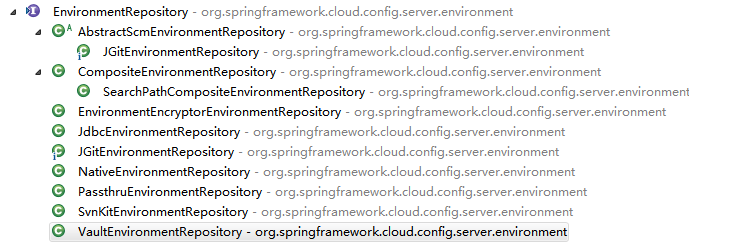
从名字中大概可以看出,这些类应该是用于加载不同类型的配置(后面会再介绍)。
上面说的主要是configserver服务端如何自动配置和加载配置文件的,下面说说这些配置如何暴露在微服务系统中。对外提供接口的类,就是EnvironmentController
交互入口1:EnvironmentController
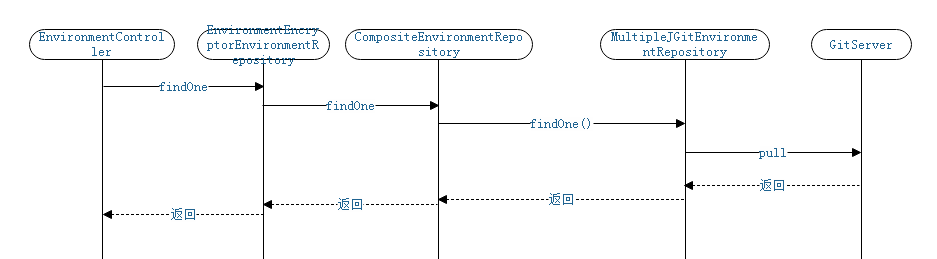
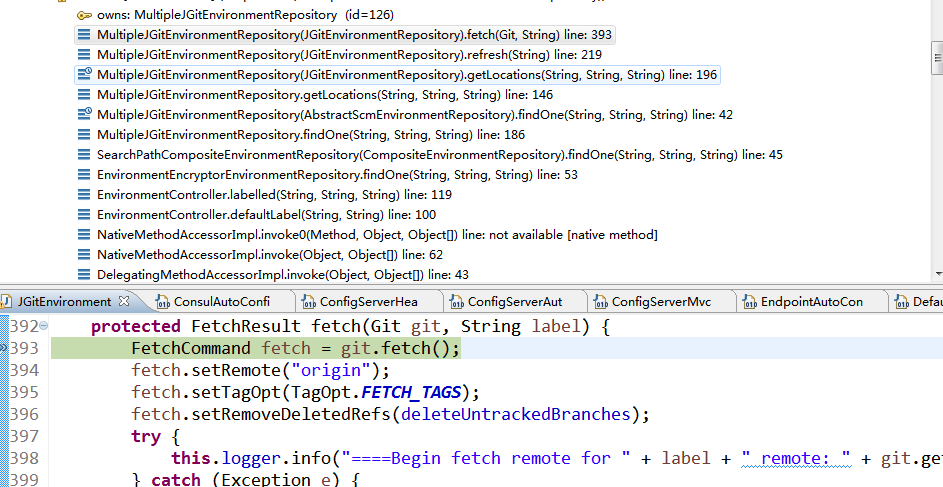
EnvironmentController是spring-cloud-config-server包的一个controller,其他服务一般是通过这个controller获取相应配置。
@RestController

@RequestMapping(method = RequestMethod.GET, path = "${spring.cloud.config.server.prefix:}")

public class EnvironmentController {

    private EnvironmentRepository repository;

    private ObjectMapper objectMapper;

    public EnvironmentController(EnvironmentRepository repository,

            ObjectMapper objectMapper) {

        this.repository = repository;

        this.objectMapper = objectMapper;

    }

    // 获取配置的接口

    ...

}
它的关键成员变量有两个:
一般情况Spring为EnvironmentController注入的类是EnvironmentEncryptorEnvironmentRepository。ObjectMapper用于当请求json格式的配置时的序列化。
EnvironmentController提供了多种获取配置的方法,这些方法主要接受application profile label这三个(或者更少)的参数,这三个参数的具体含义可以参考官网的说明,下面列举了部分方法:
@RequestMapping("/{name}/{profiles:.*[^-].*}")

public Environment defaultLabel(@PathVariable String name,

                                @PathVariable String profiles) {

    return labelled(name, profiles, null);

}

@RequestMapping("/{name}/{profiles}/{label:.*}")

public Environment labelled(@PathVariable String name, @PathVariable String profiles,

                            @PathVariable String label) {

    if (label != null && label.contains("(_)")) {

        // "(_)" is uncommon in a git branch name, but "/" cannot be matched

        // by Spring MVC

        label = label.replace("(_)", "/");

    }

    Environment environment = this.repository.findOne(name, profiles, label);

    return environment;

}
我们访问http://localhost:8081/config/mysql/dev(这是作者的配置,每个人可能不一样), 进入defaultLabel方法,它会再调用labelled方法(由于没有制定label参数,所以label传了个null)。
    @RequestMapping("/{name}/{profiles}/{label:.*}")

    public Environment labelled(@PathVariable String name, @PathVariable String profiles,

            @PathVariable String label) {

        if (name != null && name.contains("(_)")) {

            // "(_)" is uncommon in a git repo name, but "/" cannot be matched

            // by Spring MVC

            name = name.replace("(_)", "/");

        }

        if (label != null && label.contains("(_)")) {

            // "(_)" is uncommon in a git branch name, but "/" cannot be matched

            // by Spring MVC

            label = label.replace("(_)", "/");

        }

        StopWatch sw = new StopWatch("labelled");

        sw.start();

        logger.info("EnvironmentController.labelled()开始,name={},profiles={},label={}", name, profiles, label);

        Environment environment = this.repository.findOne(name, profiles, label);

        sw.stop();

        logger.info("EnvironmentController.labelled()结束,name={},profiles={},label={},耗时={}", name, profiles, label, sw.getTotalTimeMillis());

        return environment;

    }
在labelled方法中,会调用repository的findOne()来加载配置,然后返回给配置获取方。
各式各样的配置仓库类
EnvironmentEncryptorEnvironmentRepository
前面提到spring config 通过EnvironmentEncryptorEnvironmentRepository加载配置
public class EnvironmentEncryptorEnvironmentRepository implements EnvironmentRepository {

    private EnvironmentRepository delegate;

    private EnvironmentEncryptor environmentEncryptor;

    public EnvironmentEncryptorEnvironmentRepository(EnvironmentRepository delegate,

            EnvironmentEncryptor environmentEncryptor) {

        this.delegate = delegate;

        this.environmentEncryptor = environmentEncryptor;

    }

    @Override

    public Environment findOne(String name, String profiles, String label) {

        Environment environment = this.delegate.findOne(name, profiles, label);

        if (this.environmentEncryptor != null) {

            environment = this.environmentEncryptor.decrypt(environment);

        }

        if (!this.overrides.isEmpty()) {

            environment.addFirst(new PropertySource("overrides", this.overrides));

        }

        return environment;

    }

}
它有一个解密器environmentEncryptor用于对加密存放的配置进行解密,另外包含一个EnvironmentRepository的实现类delegate,这里注入的类是SearchPathCompositeEnvironmentRepository
SearchPathCompositeEnvironmentRepository
SearchPathCompositeEnvironmentRepository本身并没有findOne()方法,由它的父类CompositeEnvironmentRepository实现。
public class SearchPathCompositeEnvironmentRepository extends CompositeEnvironmentRepository implements SearchPathLocator {

    public SearchPathCompositeEnvironmentRepository(List<EnvironmentRepository> environmentRepositories) {

        super(environmentRepositories);

    }

}
CompositeEnvironmentRepository
CompositeEnvironmentRepository有一个EnvironmentRepository的列表。从它的findOne()方法可以看出:当有多个配置存放方式时,CompositeEnvironmentRepository会遍历所有EnvironmentRepository来获取所有配置。
public class CompositeEnvironmentRepository implements EnvironmentRepository {

   protected List<EnvironmentRepository> environmentRepositories;

   public CompositeEnvironmentRepository(List<EnvironmentRepository> environmentRepositories) {

      //Sort the environment repositories by the priority

      Collections.sort(environmentRepositories, OrderComparator.INSTANCE);

      this.environmentRepositories = environmentRepositories;

   }

   @Override

   public Environment findOne(String application, String profile, String label) {

      Environment env = new Environment(application, new String[]{profile}, label, null, null);

      if(environmentRepositories.size() == 1) {

         Environment envRepo = environmentRepositories.get(0).findOne(application, profile, label);

         env.addAll(envRepo.getPropertySources());

         env.setVersion(envRepo.getVersion());

         env.setState(envRepo.getState());

      } else {
         //遍历

         for (EnvironmentRepository repo : environmentRepositories) {

            env.addAll(repo.findOne(application, profile, label).getPropertySources());

         }

      }

      return env;

   }

}
小结一下:虽然实现了EnvironmentRepository接口。但EnvironmentEncryptorEnvironmentRepository只是一个代理, SearchPathCompositeEnvironmentRepository/CompositeEnvironmentRepository也没有具体加载配置的逻辑。
而真正加载配置的类存放在CompositeEnvironmentRepository的environmentRepositories列表。
包括:NativeEnvironmentRepository: 获取本地配置;SvnRepositoryConfiguration: 获取存放在svn中的配置;VaultEnvironmentRepository: 获取存放在vault中的配置;GitRepositoryConfiguration:获取存放在git中的配置;
接下来介绍NativeEnvironmentRepository。
NativeEnvironmentRepository
NativeEnvironmentRepository 用于加载本地(native)配置。它加载配置时,其实是以特定环境(传入的profile)启动了另外一个微型spring boot应用,通过这个应用获取所有的配置,然后调用clean过滤,得到所需配置。
@ConfigurationProperties("spring.cloud.config.server.native")

public class NativeEnvironmentRepository

        implements EnvironmentRepository, SearchPathLocator, Ordered {

    @Override

    public Environment findOne(String config, String profile, String label) {

        SpringApplicationBuilder builder = new SpringApplicationBuilder(

                PropertyPlaceholderAutoConfiguration.class);

        ConfigurableEnvironment environment = getEnvironment(profile);

        builder.environment(environment);

        builder.web(false).bannerMode(Mode.OFF);

        if (!logger.isDebugEnabled()) {

            // Make the mini-application startup less verbose

            builder.logStartupInfo(false);

        }

        String[] args = getArgs(config, profile, label);

        // Explicitly set the listeners (to exclude logging listener which would change

        // log levels in the caller)

        builder.application()

                .setListeners(Arrays.asList(new ConfigFileApplicationListener()));

        ConfigurableApplicationContext context = builder.run(args);

        environment.getPropertySources().remove("profiles");

        try {

            return clean(new PassthruEnvironmentRepository(environment).findOne(config,

                    profile, label));

        }

        finally {

            context.close();

        }

    }

    private ConfigurableEnvironment getEnvironment(String profile) {

        ConfigurableEnvironment environment = new StandardEnvironment();

        environment.getPropertySources()

                .addFirst(new MapPropertySource("profiles",

                        Collections.<String, Object>singletonMap("spring.profiles.active",

                                profile)));

        return environment;

    }

    protected Environment clean(Environment value) {

        Environment result = new Environment(value.getName(), value.getProfiles(),

                value.getLabel(), this.version, value.getState());

        for (PropertySource source : value.getPropertySources()) {

            String name = source.getName();

            if (this.environment.getPropertySources().contains(name)) {

                continue;

            }

            name = name.replace("applicationConfig: [", "");

            name = name.replace("]", "");

            if (this.searchLocations != null) {

                boolean matches = false;

                String normal = name;

                if (normal.startsWith("file:")) {

                    normal = StringUtils

                            .cleanPath(new File(normal.substring("file:".length()))

                                    .getAbsolutePath());

                }

                String profile = result.getProfiles() == null ? null

                        : StringUtils.arrayToCommaDelimitedString(result.getProfiles());

                for (String pattern : getLocations(result.getName(), profile,

                        result.getLabel()).getLocations()) {

                    if (!pattern.contains(":")) {

                        pattern = "file:" + pattern;

                    }

                    if (pattern.startsWith("file:")) {

                        pattern = StringUtils

                                .cleanPath(new File(pattern.substring("file:".length()))

                                        .getAbsolutePath())

                                + "/";

                    }

                    if (logger.isTraceEnabled()) {

                        logger.trace("Testing pattern: " + pattern

                                + " with property source: " + name);

                    }

                    if (normal.startsWith(pattern)

                            && !normal.substring(pattern.length()).contains("/")) {

                        matches = true;

                        break;

                    }

                }

                if (!matches) {

                    // Don't include this one: it wasn't matched by our search locations

                    if (logger.isDebugEnabled()) {

                        logger.debug("Not adding property source: " + name);

                    }

                    continue;

                }

            }

            logger.info("Adding property source: " + name);

            result.add(new PropertySource(name, source.getSource()));

        }

        return result;

    }

}
交互入口2:ConfigServerHealthIndicator,健康检查
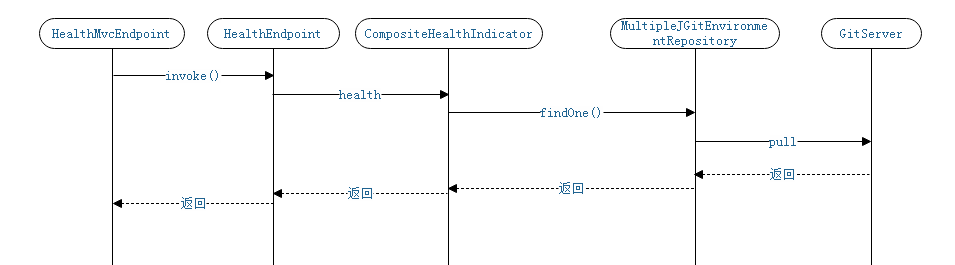
ConfigServerHealthIndicator怎么加入到HealthEndpoint的,及怎么被调用的:
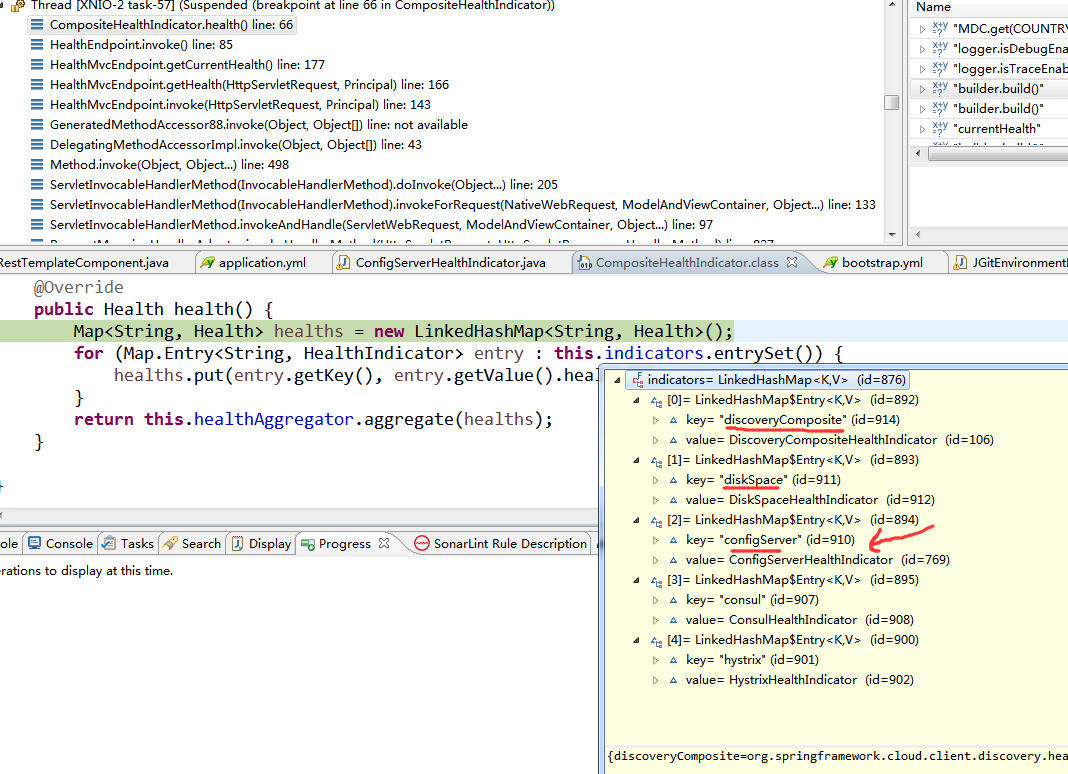
上面的调用是遍历indicators,每个indicator代表一种健康检查的HealthIndicator的实现类。
这些indicator是怎么加入的呢?
根据HealthIndicator接口类调用BeanFactoryUtils.beanNamesForTypeIncludingAncestors(this, requiredType, true, descriptor.isEager());找到所有实现类。然后把它放到上面的indicators里。
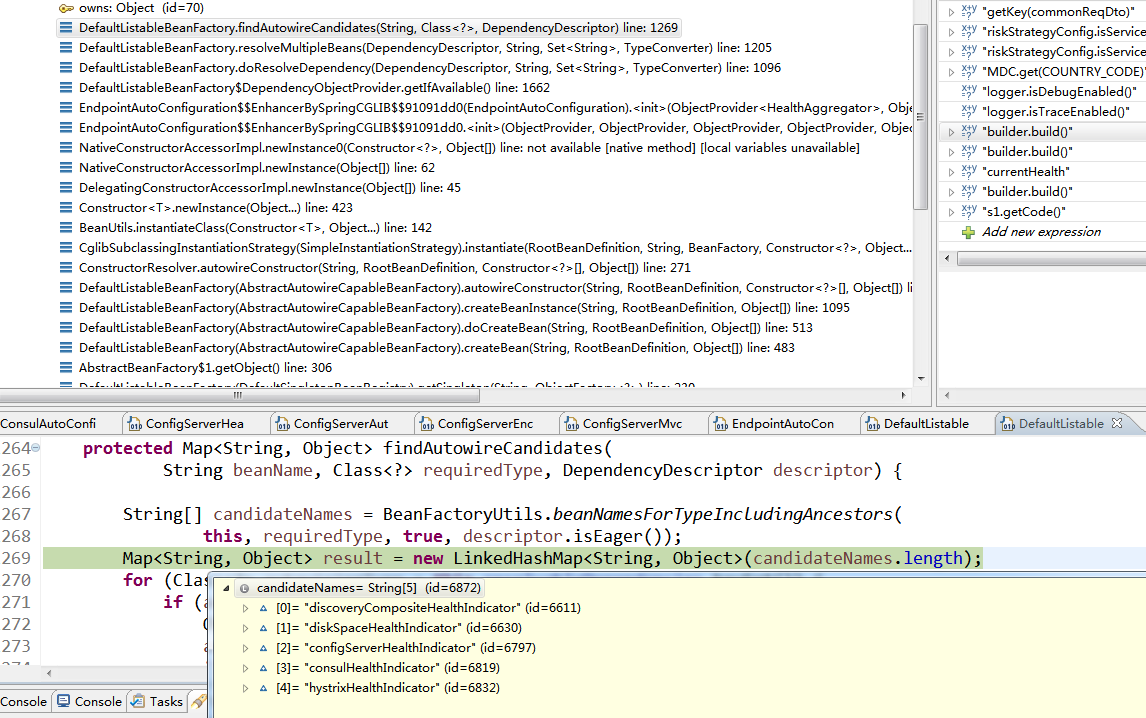
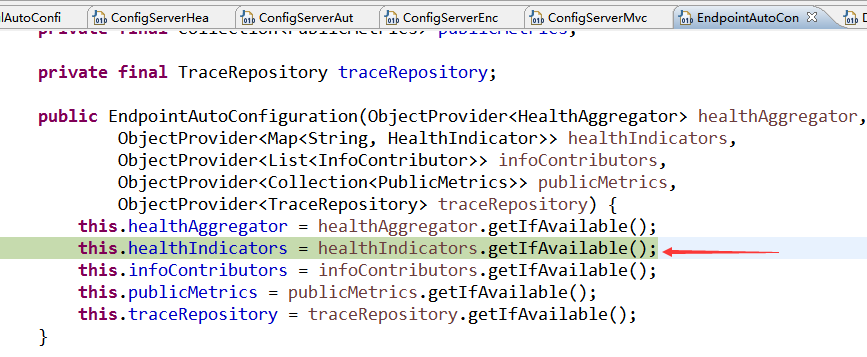
在EndpointAutoConfiguration的构造函数中,发起上述的调用。
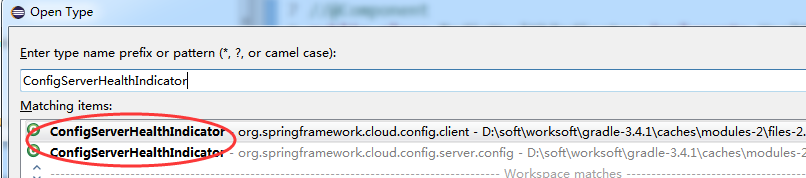
在具体看ConfigServerHealthIndicator
config-server和config-server client都有这个类,用于对资源配置中心的EnvironmentRepository是否正常工作的检测。
config-server服务端
config-server服务端的健康检查的自动配置的代码如下,同时可见spring.cloud.config.server.health.enabled的配置项是一个开关。
@Configuration

@Import({ JdbcRepositoryConfiguration.class, VaultRepositoryConfiguration.class, SvnRepositoryConfiguration.class,

        NativeRepositoryConfiguration.class, GitRepositoryConfiguration.class,

        DefaultRepositoryConfiguration.class })

public class EnvironmentRepositoryConfiguration {

    @Bean

    @ConditionalOnProperty(value = "spring.cloud.config.server.health.enabled", matchIfMissing = true)

    public ConfigServerHealthIndicator configServerHealthIndicator(

            EnvironmentRepository repository) {

        return new ConfigServerHealthIndicator(repository);

    }
config-server端的ConfigServerHealthIndicator的源码:
@ConfigurationProperties("spring.cloud.config.server.health")

public class ConfigServerHealthIndicator extends AbstractHealthIndicator {

    private EnvironmentRepository environmentRepository;

    private Map<String, Repository> repositories = new LinkedHashMap<>();

    public ConfigServerHealthIndicator(EnvironmentRepository environmentRepository) {

        this.environmentRepository = environmentRepository;

    }

    @PostConstruct

    public void init() {

        if (this.repositories.isEmpty()) {

            this.repositories.put("app", new Repository());

        }

    }

    @Override

    protected void doHealthCheck(Health.Builder builder) throws Exception {

        builder.up();

        List<Map<String, Object>> details = new ArrayList<>();

        for (String name : this.repositories.keySet()) {

            Repository repository = this.repositories.get(name);

            String application = (repository.getName() == null)? name : repository.getName();

            String profiles = repository.getProfiles();

            try {

                Environment environment = this.environmentRepository.findOne(application, profiles, repository.getLabel());

                HashMap<String, Object> detail = new HashMap<>();

                detail.put("name", environment.getName());

                detail.put("label", environment.getLabel());

                if (environment.getProfiles() != null && environment.getProfiles().length > 0) {

                    detail.put("profiles", Arrays.asList(environment.getProfiles()));

                }

                if (!CollectionUtils.isEmpty(environment.getPropertySources())) {

                    List<String> sources = new ArrayList<>();

                    for (PropertySource source : environment.getPropertySources()) {

                        sources.add(source.getName());

                    }

                    detail.put("sources", sources);

                }

                details.add(detail);

            } catch (Exception e) {

                HashMap<String, String> map = new HashMap<>();

                map.put("application", application);

                map.put("profiles", profiles);

                builder.withDetail("repository", map);

                builder.down(e);

                return;

            }

        }

        builder.withDetail("repositories", details);

    }
config-server client端
config-server client端的健康检查的自动配置的代码如下,同时可见health.config.enabled是是否对config-server的健康检查的开关(config-server端的资源配置中心的EnvironmentRepository是否正常工作的检测)
@Configuration

public class ConfigClientAutoConfiguration {

    @Configuration

    @ConditionalOnClass(HealthIndicator.class)

    @ConditionalOnBean(ConfigServicePropertySourceLocator.class)

    @ConditionalOnProperty(value = "health.config.enabled", matchIfMissing = true)

    protected static class ConfigServerHealthIndicatorConfiguration {

        @Bean

        public ConfigServerHealthIndicator configServerHealthIndicator(

                ConfigServicePropertySourceLocator locator,

                ConfigClientHealthProperties properties, Environment environment) {

            return new ConfigServerHealthIndicator(locator, environment, properties);

        }

    }
健康检查的核心代码:
public class ConfigServerHealthIndicator extends AbstractHealthIndicator {

    public ConfigServerHealthIndicator(ConfigServicePropertySourceLocator locator,

            Environment environment, ConfigClientHealthProperties properties) {

        this.environment = environment;

        this.locator = locator;

        this.properties = properties;

    }

    @Override

    protected void doHealthCheck(Builder builder) throws Exception {

        PropertySource<?> propertySource = getPropertySource();

        builder.up();

        if (propertySource instanceof CompositePropertySource) {

            List<String> sources = new ArrayList<>();

            for (PropertySource<?> ps : ((CompositePropertySource) propertySource).getPropertySources()) {

                sources.add(ps.getName());

            }

            builder.withDetail("propertySources", sources);

        } else if (propertySource!=null) {

            builder.withDetail("propertySources", propertySource.toString());

        } else {

            builder.unknown().withDetail("error", "no property sources located");

        }

    }
Spring Cloud config之二:功能介绍的更多相关文章
- Spring Cloud系列(二) 介绍
Spring Cloud系列(一) 介绍 Spring Cloud是基于Spring Boot实现的微服务架构开发工具.它为微服务架构中涉及的配置管理.服务治理.断路器.智能路由.微代理.控制总线.全 ...
- Spring Cloud Config(二):基于Git搭建配置中心
1.简述 本文选用Git作为配置仓库,新建两个环境的配置文件夹,dev 和 test,文件夹中分别存放 Config Client 端的配置文件,目录结构如下: ├ ─ ─ dev └ ─ ─ con ...
- Spring Cloud Config(配置中心)
每天学习一点点 编程PDF电子书.视频教程免费下载:http://www.shitanlife.com/code 一.简介 Spring Cloud Config为分布式系统中的外部配置提供服务器和客 ...
- Spring Cloud Config(一):聊聊分布式配置中心 Spring Cloud Config
目录 Spring Cloud Config(一):聊聊分布式配置中心 Spring Cloud Config Spring Cloud Config(二):基于Git搭建配置中心 Spring Cl ...
- Spring Cloud config之一:分布式配置中心入门介绍
Spring Cloud Config为服务端和客户端提供了分布式系统的外部化配置支持.配置服务器为各应用的所有环境提供了一个中心化的外部配置.它实现了对服务端和客户端对Spring Environm ...
- Spring Cloud Config 配置中心 自动加解密功能 jasypt方式
使用此种方式会存在一种问题:如果我配置了自动配置刷新,则刷新过后,加密过后的密文无法被解密.具体原因分析,看 SpringCloud 详解配置刷新的原理 使用 jasypt-spring-boot- ...
- 介绍一下Spring Cloud Config
Spring Cloud Config为分布式系统中的外部配置提供服务器和客户端支持.使用Config Server,您可以在所有环境中管理应用程序的外部属性.客户端和服务器上的概念映射与Spring ...
- spring cloud config搭建说明例子(二)-添加eureka
添加注册eureka 服务端 ConfigServer pom.xml <dependency> <groupId>org.springframework.cloud</ ...
- Spring Cloud(十二):分布式链路跟踪 Sleuth 与 Zipkin【Finchley 版】
Spring Cloud(十二):分布式链路跟踪 Sleuth 与 Zipkin[Finchley 版] 发表于 2018-04-24 | 随着业务发展,系统拆分导致系统调用链路愈发复杂一个前端请 ...
随机推荐
- CodeIgniter $this->db->where()的自定义语句写法问题
.自定义字符串:你可以手动的编写子句:$where = "name='Joe' AND status='boss' OR status='active'"; $this->d ...
- 《Python》 文件操作
一.文件操作基本流程: 1.文件基本操作初识: 打开文件: 文件句柄 = open(‘文件路径’,‘编码方式’,‘打开方式’) 第一种:f = open('d:\'a.txt',encoding='u ...
- 2019.1.11 EDVT
Processing Gain and Occupied Bandwidth ESA Basic Setup (11b)Span 110MHzRBW 100kHzVBW 100kHzSweep Tim ...
- L210 Ebola
Progress in fighting Democratic Republic of the Congo's Ebola outbreak, the second worst ever, will ...
- Translate Exercises(3) 科技英语翻译
[1] CMOS logic is a newer technology, based on the use of complementary MOS transistorsto perform lo ...
- anu - proptypes
//为了兼容yo var check = function () { return check; }; check.isRequired = check; export var PropTypes = ...
- Android下打印堆栈的两种方法
1. for(StackTraceElement i:Thread.currentThread().getStackTrace()){ System.out.println(i); } 2. Log. ...
- 分析苹果代充产业链 汇率差+退款造就三线城市千万富翁_中新游戏研究_Joynews中新游戏
分析苹果代充产业链 汇率差+退款造就三线城市千万富翁_中新游戏研究_Joynews中新游戏 CNG:近日有媒体曝出8月22日这一天,有一家淘宝店卖出了351张面值4000南非南特的App Store ...
- Eclipse Error: The refactoring does not change any source code
最近在做android项目的过程中遇到这样一个问题,新增一个activity的时候添加不成,eclipse提示The refactoring does not change any source co ...
- 多重背包!!!(二进制优化的01背包)hdoj-2844
#include <iostream> #include <cstdio> #include <cstring> #include <algorithm> ...