
spring boot: GlobalDefaultExceptionHandler方法内的友好错误提示,全局异常捕获
spring boot: GlobalDefaultExceptionHandler方法内的友好错误提示,全局异常捕获
当你的某个控制器内的某个方法报错,基本上回显示出java错误代码,非常不友好,这个时候可以通过新建GlobalDefaultExceptionHandler.java文件,
1.加上@ControllerAdvice注解,
2. 然后复写defaultExceptionHandler方法,在方法上添加@ResponseBody输出注解,
以及@ExceptionHandler(Exception.class)注解,就能友好的已文字的信息显示错误信息l
package com.muyang.boot22.config;

import javax.servlet.http.HttpServletRequest;

import org.springframework.web.bind.annotation.ControllerAdvice;

import org.springframework.web.bind.annotation.ExceptionHandler;

import org.springframework.web.bind.annotation.ResponseBody;

@ControllerAdvice

public class GlobalDefaultExceptionHandler {

	@ExceptionHandler(Exception.class)

	@ResponseBody

	public String defaultExceptionHandler(HttpServletRequest req,Exception e){

		//是返回的String.

		//ModelAndView -- 介绍 模板引擎...?

//		ModelAndView mv = new ModelAndView();

//		mv.setViewName(viewName);

		return "对不起,服务器繁忙,请稍后再试!";

	}

}
参考项目:
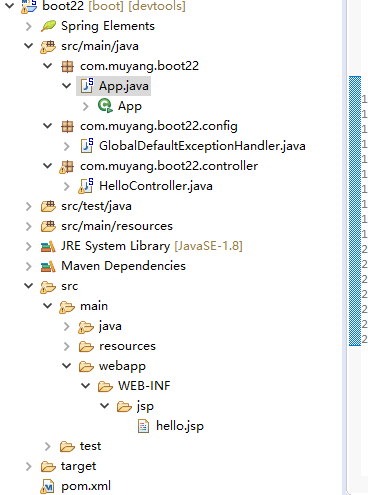
pom.xml参考代码
  <parent>

  	<groupId>org.springframework.boot</groupId>

  	<artifactId>spring-boot-starter-parent</artifactId>

  	<version>1.5.9.RELEASE</version>

  </parent>

  <properties>

    <project.build.sourceEncoding>UTF-8</project.build.sourceEncoding>

    <java.version>1.8</java.version>

  </properties>

  <dependencies>

  <!-- spring mvc,aop,restful,fastjson -->

  <dependency>

  	<groupId>org.springframework.boot</groupId>

  	<artifactId>spring-boot-starter-web</artifactId>

  </dependency>

  <!-- jstl -->

  <dependency>

  	<groupId>javax.servlet</groupId>

  	<artifactId>jstl</artifactId>

  </dependency>

  <!-- tomcat的支持 -->

  <dependency>

  	<groupId>org.springframework.boot</groupId>

  	<artifactId>spring-boot-starter-tomcat</artifactId>

  	<scope>provided</scope>

  </dependency>

  <dependency>

  	<groupId>org.apache.tomcat.embed</groupId>

  	<artifactId>tomcat-embed-jasper</artifactId>

  	<scope>provided</scope>

  </dependency>

    <dependency>

      <groupId>junit</groupId>

      <artifactId>junit</artifactId>

      <version>3.8.1</version>

      <scope>test</scope>

    </dependency>

    <!-- fastjson -->

    <dependency>

			<groupId>com.alibaba</groupId>

			<artifactId>fastjson</artifactId>

			<version>1.2.15</version>

		</dependency>

    <!-- 热部署 -->

    <dependency>

    	<groupId>org.springframework.boot</groupId>

    	<artifactId>spring-boot-devtools</artifactId>

    	<optional>true</optional>

    	<scope>true</scope>

    </dependency>

  </dependencies>

  <build>

  	<plugins>

  		<!-- 热部署  -->

  		<plugin>

  			<groupId>org.springframework.boot</groupId>

  			<artifactId>spring-boot-maven-plugin</artifactId>

  			<configuration>

  				<!--fork :  如果没有该项配置,呢个devtools不会起作用,即应用不会restart -->

  				<fork>true</fork>

  			</configuration>

  		</plugin>

  	</plugins>

  </build>
App.java参考代码
package com.muyang.boot22;

import org.springframework.boot.SpringApplication;

import org.springframework.boot.autoconfigure.SpringBootApplication;

import org.springframework.boot.autoconfigure.web.HttpMessageConverters;

import org.springframework.context.annotation.Bean;

import org.springframework.http.converter.HttpMessageConverter;

import com.alibaba.fastjson.serializer.SerializerFeature;

import com.alibaba.fastjson.support.config.FastJsonConfig;

import com.alibaba.fastjson.support.spring.FastJsonHttpMessageConverter;

/**

 * Hello world!

 *

 */

@SpringBootApplication

public class App

{

	//fastJson配置

	@Bean

	public HttpMessageConverters fastJsonHttpMessageConverters()

	{

		FastJsonHttpMessageConverter fastConverter = new FastJsonHttpMessageConverter();

		FastJsonConfig fastJsonConfig = new FastJsonConfig();

		fastJsonConfig.setSerializerFeatures(SerializerFeature.PrettyFormat);

		fastConverter.setFastJsonConfig(fastJsonConfig);

		HttpMessageConverter<?> converter = fastConverter;

		return new HttpMessageConverters(converter);

	}

    public static void main( String[] args )

    {

        //System.out.println( "Hello World!" );

    	SpringApplication.run(App.class, args);

    }

}
HelloController.java样例
package com.muyang.boot22.controller;

import java.util.Map;

import org.springframework.stereotype.Controller;

import org.springframework.web.bind.annotation.RequestMapping;

@Controller

public class HelloController

{

	@RequestMapping("/hello")

	public void index(Map<String, Object>map)

	{

		//map.put("name", "张三");

		//return "hello";

		int i = 1024/0;

	}

}
运行App.java
访问 http://localhost:8080/hello时,报错。能友好提示
spring boot: GlobalDefaultExceptionHandler方法内的友好错误提示,全局异常捕获的更多相关文章
- Spring Boot部署方法
Spring Boot部署方法 网上搜到的部署方法无非是打成jar包,然后shell执行nohup java调用jar命令,或者是打成war包然后部署到tomcat或者jetty容器上面. S ...
- SpringBoot图文教程15—项目异常怎么办?「跳转404错误页面」「全局异常捕获」
有天上飞的概念,就要有落地的实现 概念十遍不如代码一遍,朋友,希望你把文中所有的代码案例都敲一遍 先赞后看,养成习惯 SpringBoot 图文教程系列文章目录 SpringBoot图文教程1-Spr ...
- 使用spring利用HandlerExceptionResolver实现全局异常捕获
最近一直没有时间更新是因为一直在更新自己使用的框架. 之后会慢慢带来对之前使用的spring+mvc+mybatis的优化. 会使用一些新的特性,实现一些新的功能. 我会尽量分离业务,封装好再拿出来. ...
- SpringBoot 源码解析 (六)----- Spring Boot的核心能力 - 内置Servlet容器源码分析(Tomcat)
Spring Boot默认使用Tomcat作为嵌入式的Servlet容器,只要引入了spring-boot-start-web依赖,则默认是用Tomcat作为Servlet容器: <depend ...
- Spring Boot项目的内嵌容器
一.关于容器 刚才开始使用spring boot的开发者会有种很直观的感觉,servlet容器“不见了”.之前开发web项目,都是把程序写完后部署到servlet容器(比如Tomcat),但是使用sp ...
- Spring Boot提供RESTful接口时的错误处理实践
使用Spring Boot开发微服务的过程中,我们会使用别人提供的接口,也会设计接口给别人使用,这时候微服务应用之间的协作就需要有一定的规范. 基于rpc协议,我们一般有两种思路:(1)提供服务的应用 ...
- Spring Boot移除内嵌Tomcat,使用非web方式启动
前言:当我们使用Spring Boot编写了一个批处理应用程序,该程序只是用于后台跑批数据,此时不需要内嵌的tomcat,简化启动方式使用非web方式启动项目,步骤如下: 1.在pom.xml文件中去 ...
- Spring Boot run()方法剖析
Spring Boot自动配置部分重点介绍了相关注解,关于main中调用的run方法并没有阐述过.run方法的作用是什么呢?只有注解没有main里的run方法Spring Boot工程就好比身体个方面 ...
- Spring Boot 发布方法 - 原创
发布方式 构建Jar包,cmd命令行运行Spring Boot程序 第一步:在pom.xml中将packing节点值修改为jar,如下面加粗部分: <groupId>com.example ...
随机推荐
- Servlet—基础
什么是Servlet? 1 . jsp经编译后就变成了Servlet.(JSP的本质就是Servlet,JVM只能识别java的类,不能识别JSP的代 码,Web容器将JSP的代码编译成JVM能够识别 ...
- Codeforces Round #440 (Div. 2, based on Technocup 2018 Elimination Round 2) D. Something with XOR Queries
地址:http://codeforces.com/contest/872/problem/D 题目: D. Something with XOR Queries time limit per test ...
- REST服务安全-双向认证
1. 创建服务器密钥,其密钥库为 d:/mykeys/server.ks,注意keypass和storepass保持一致,它们分别代表 密钥密码和密钥库密码,注意 CN=localhost 中,loc ...
- mysql备份恢复详解
前言 为什么需要备份数据? 数据的备份类型 MySQL备份数据的方式 备份需要考虑的问题 设计合适的备份策略 实战演练 使用cp进行备份 使用mysqldump+复制BINARY LOG备份 使用lv ...
- pyDay7
内容来自廖雪峰的官方网站 1.如果给定一个list或tuple,我们可以通过for循环来遍历这个list或tuple,这种遍历我们称为迭代(Iteration). 2.只要是可迭代对象,无论有无下标, ...
- 在浏览器输入url后并回车发生了哪些过程
1.解析URL ________________________________________________________________________ 关于URL: URL(Universa ...
- 认识电脑的开机流程与主引导分区(MBR)
在前篇随笔中,已经谈到了CMOS与BIOS,CMOS是记录各项硬件参数(包括系统时间.设备的I/O地址.CPU的电压和频率等)且嵌入到主板上面的存储器,BIOS是一个写入到主板上的韧体(韧体是写入到硬 ...
- linux下命令行工具gcp显示拷贝进度条
1.环境: ubuntu16.04 Linux jello 4.4.0-89-generic #112-Ubuntu SMP Mon Jul 31 19:38:41 UTC 2017 x86_64 x ...
- loj 诗歌
链接 链接 思路 好久之前的考试题了吧,之前貌似抄的题解 现在理解了怕忘了,就写个题解记录一下吧,题目还是不错的 枚举中间点j \[H_{i}-H_{j}=H_{j}-H_{k}\] \[H_{k}+ ...
- springboot整合mybatis将sql打印到日志(转)
在前台请求数据的时候,sql语句一直都是打印到控制台的,有一个想法就是想让它打印到日志里,该如何做呢? 见下面的mybatis配置文件: <?xml version="1.0" ...