
Spring,Struts2,MyBatis,Activiti,Maven,H2,Tomcat集成(一)——Maven,Tomcat,Spring集成
1、 创建Maven Web工程
(1) 磁盘上创建Maven工程所需要的文件夹结构如下;
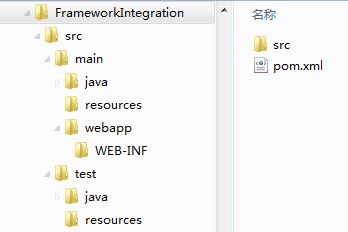
(2) 在与src同级目录中创建pom.xml文件;
<project xmlns="http://maven.apache.org/POM/4.0.0" xmlns:xsi="http://www.w3.org/2001/XMLSchema-instance"

  xsi:schemaLocation="http://maven.apache.org/POM/4.0.0 http://maven.apache.org/maven-v4_0_0.xsd">

  <modelVersion>4.0.0</modelVersion>

  <groupId>com.coshaho</groupId>

  <artifactId>FrameIntegration</artifactId>

  <packaging>war</packaging>

  <version>0.0.1-SNAPSHOT</version>

  <name>FrameIntegration Maven Webapp</name>

  <url>http://maven.apache.org</url>

</project>
(3) Eclipse导入新建的Maven工程;
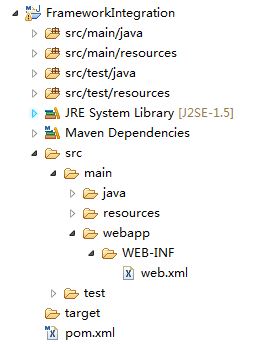
(4) 在WEB-INF目录下创建web.xml文件。
<!DOCTYPE web-app PUBLIC

 "-//Sun Microsystems, Inc.//DTD Web Application 2.3//EN"

 "http://java.sun.com/dtd/web-app_2_3.dtd" >

<web-app version="3.0" xmlns="http://java.sun.com/xml/ns/javaee"

     xmlns:xsi="http://www.w3.org/2001/XMLSchema-instance"

     xsi:schemaLocation="http://java.sun.com/xml/ns/javaee

     http://java.sun.com/xml/ns/javaee/web-app_3_0.xsd">

  <display-name>Framework Integration Web Application</display-name>

</web-app>
2、 集成Tomcat
(1) 在pom.xml文件中添加如下配置;
  <!-- 将Web项目自动部署到tomcat服务器的相关 配置信息-->

  <build>

    <!-- 将WebProject项目打包成WebProject.war自动部署到tomcat服务器的webapps目录下面 -->

    <finalName>FrameIntegrationWeb</finalName>

    <resources>

      <resource>

        <directory>src/main/java</directory>

        <includes>

          <include>**/*.properties</include>

          <include>**/*.xml</include>

        </includes>

        <!-- 是否替换资源中的属性-->

        <filtering>false</filtering>

      </resource>

      <resource>

        <directory>src/main/resources</directory>

      </resource>

      <resource>

        <directory>src/main/webapp</directory>

      </resource>

    </resources>

    <plugins>

      <plugin>

        <groupId>org.codehaus.cargo</groupId>

        <artifactId>cargo-maven2-plugin</artifactId>

        <version>1.2.3</version>

        <configuration>

          <container>

            <!-- 指明使用的tomcat服务器版本 -->

            <containerId>tomcat7x</containerId>

            <!--指明tomcat服务器的安装目录 -->

            <home>D:/software/apache-tomcat-7.0.64</home>

          </container>

          <type>existing</type>

          <home>D:/software/apache-tomcat-7.0.64</home>

          <properties>

            <!-- 监听端口配置;方便远程调试 -->

            <cargo.jvmargs>

              -Xdebug

              -Xrunjdwp:transport=dt_socket,server=y,suspend=n,address=8989

            </cargo.jvmargs>

          </properties>

        </configuration>

        <executions>

          <execution>

            <id>cargo-run</id>

            <phase>install</phase>

            <goals>

              <goal>run</goal>

            </goals>

          </execution>

        </executions>

      </plugin>

    </plugins>

  </build>
(2) src/main/webapp目录下添加index.jsp文件;
<html>

<body>

<h2>Web is started successfully!</h2>

</body>

</html>
(3) 测试Tomcat集成效果,eclipse中Run As->Maven install,前台访问http://localhost:8080/FrameIntegrationWeb。
3、 集成spring
(1) 添加Maven依赖(先添加最小依赖包);
<!-- spring4 -->

<!-- spring-core包含spring-core,logging -->

<dependency>

<groupId>org.springframework</groupId>

<artifactId>spring-core</artifactId>

<version>4.1.4.RELEASE</version>

</dependency>

<!-- spring-context包含spring-context, aop, beans, expression, aopalliance -->

<dependency>

<groupId>org.springframework</groupId>

<artifactId>spring-context</artifactId>

<version>4.1.4.RELEASE</version>

</dependency>

<!-- 用于单元测试 -->

<dependency>

<groupId>junit</groupId>

<artifactId>junit</artifactId>

<version>4.12</version>

<scope>test</scope>

</dependency>
(2) 在src/main/resources目录下配置spring.xml文件;
<?xml version="1.0" encoding="UTF-8"?>

<beans xmlns="http://www.springframework.org/schema/beans"

xmlns:xsi="http://www.w3.org/2001/XMLSchema-instance"

xmlns:context="http://www.springframework.org/schema/context"

xsi:schemaLocation="http://www.springframework.org/schema/beans

http://www.springframework.org/schema/beans/spring-beans-3.0.xsd

http://www.springframework.org/schema/context

http://www.springframework.org/schema/context/spring-context-3.0.xsd">

    <!-- 自动扫描com.coshaho.learn下面所有class文件 (自动注入) -->

    <context:component-scan base-package="com.coshaho.learn"/>

</beans>
(3) web.xml文件中配置spring监听器;
<listener>

<listener-class>org.springframework.web.context.ContextLoaderListener</listener-class>

</listener>

<context-param>

<param-name>contextConfigLocation</param-name>

  <param-value>classpath:spring.xml</param-value>

</context-param>
(4) spring测试,写如下测试类并进行单元测试。
a. HelloWorldServiceI.java
package com.coshaho.learn.service;

public interface HelloWorldServiceI

{

    String sayHello();

}
b. HelloWorldServiceImpl.java
package com.coshaho.learn.service.impl;

import org.springframework.stereotype.Service;

import com.coshaho.learn.service.HelloWorldServiceI;

@Service("helloWorldServiceImpl")

public class HelloWorldServiceImpl implements HelloWorldServiceI

{

    public String sayHello()

    {

        return "Hello world, spring!";

    }

}
c. SpringTest.java
package com.coshaho.learn.service.test;

import org.junit.Test;

import org.springframework.context.ApplicationContext;

import org.springframework.context.support.ClassPathXmlApplicationContext;

import com.coshaho.learn.service.HelloWorldServiceI;

public class SpringTest

{

    @Test

    public void helloWorldTest()

    {

        @SuppressWarnings("resource")

        ApplicationContext context = new ClassPathXmlApplicationContext("classpath:spring.xml");

        HelloWorldServiceI helloWorld = (HelloWorldServiceI)context.getBean("helloWorldServiceImpl");

        System.out.println(helloWorld.sayHello());

    }

}
d. Eclipse Run As->Junit Test
Spring,Struts2,MyBatis,Activiti,Maven,H2,Tomcat集成(一)——Maven,Tomcat,Spring集成的更多相关文章
- 手动配置三大框架整合:Spring+Struts2+mybatis
如今主流的项目框架中,数据库持久层有可能不是hibernate,而是mybatis或者ibatis,事实上它们都是一样的,以下我来把环境搭建一下: [导入相关jar包]新建web项目projectms ...
- 整合Spring+Struts2+Mybatis加spring单元测试等
前言 自己是在CentOS7的IntelliJ IDEA里开发的,里面中文输入法有问题经常用不了,所以这里用了很多chinglish,希望不要介意: 一:pom依赖 <?xml version= ...
- 用IntelliJ IDEA 开发Spring+SpringMVC+Mybatis框架 分步搭建一:建立MAVEN Web项目
一:创建maven web项目er
- Spring+SpringMVC+MyBatis+easyUI整合进阶篇(十二)Spring集成Redis缓存
作者:13 GitHub:https://github.com/ZHENFENG13 版权声明:本文为原创文章,未经允许不得转载. 整合Redis 本来以为类似的Redis教程和整合代码应该会很多,因 ...
- spring+struts2+mybatis
struts2.2.3 + spring3.1.0 + mybatis3.1.0集成简单demo 项目下载地址:http://download.csdn.net/detail/afgasdg/4171 ...
- 整合第二次(SSM第一次)------------>spring+struts2+mybatis
今天我们来讲解一下SSM整合,感觉整合这个比上一篇整合更费时,原因在于自己不太熟悉MyBatis了,下午的时候恶补了一下,看了一下相关的文档和PDF电子书,知识真的是你不用就会忘记的,以后还是不能懈怠 ...
- Spring+Struts2+Mybatis框架搭建时的常见典型问题
搭建SSM框架时,总是遇到这样那样的问题,有的一眼就能看出来,有的需要经验的积累.现将自己搭建SSM框架时遇到的典型问题总结如下: 一.Struts2框架下的action中无法使用@Autowired ...
- 6、Spring+Struts2+MyBatis(mybatis有代理)整合增删改查
1.创建如下的oracle脚本 create table userinfo (id ), name ), password telephone ), isadmin )); --4.2 用户表序列 c ...
- 5、Spring+Struts2+MyBatis+分页(mybatis无代理)增删改查
1.创建如下项目结构 2.在src下的com.entity包下创建Dept.java package com.entity; /** * 部门表 * @author Holly老师 * */ publ ...
- Spring+Struts2+Mybatis整合
1. 创建项目 2. 添加Spring能力 使用MyEclipse自动加载Struts2和Spring的jar包和配置文件,并在web.xml文件中添加上下文和监听器 web.xml文件如下: < ...
随机推荐
- Android 模糊效果 FastBlur
import android.graphics.Bitmap; import android.graphics.Canvas; import android.graphics.Paint; impor ...
- 【转】常用html转义符,JavaScript转义符
HTML字符实体(Character Entities),转义字符串(Escape Sequence) 为什么要用转义字符串? HTML中<,>,&等有特殊含义(<,> ...
- POJ-1887 Testing the CATCHER(dp,最长下降子序列)
Testing the CATCHER Time Limit: 1000MS Memory Limit: 30000K Total Submissions: 16515 Accepted: 6082 ...
- slam学习资源
从零开始学slam: http://blog.csdn.net/akunainiannian/article/details/45363731 史上最全的SLAM学习资料收集 http://www. ...
- MapReduce分组
分组:相同key的value进行分组 例子:如下输入输出,右边的第一列没有重复值,第二列取得是当第一列相同时第二例取最大值 分析:首先确定<k3,v3>,k3的选择两种方式, 方法1. ...
- python读取文件行号和内容的便捷方法
处理数据时候,需要得到数据所在和行号,使用enumerate时便捷的方法: file = open('file.txt','r') for (num,value) in enumerate(file) ...
- ResourceManager High Availability
Introduction This guide provides an overview of High Availability of YARN’s ResourceManager, and det ...
- 算术平均数 print('arithmeticAverageSingleCompressionRatio:', sum(singleCompressionRatio)/len(singleCompressionRatio))
print('arithmeticAverageSingleCompressionRatio:', sum(singleCompressionRatio)/len(singleCompressionR ...
- PAC 自动代理
最近看了 HTTP权威指南 里面有关于 代理的介绍,代理有很多种,今天主要来说说 自动代理PAC PAC(Proxy Auto Config) 是一个 Script:经由编写这个 Script,我们 ...
- CF359B Permutation 构造
正解:构造 解题报告: 这个是传送门! 昂直接讲思路趴?毕竟这种构造题的话除了思路也没什么好说的只要想明白辽还是通常来说难度不大的QwQ 首先提供一个对正解毫无启发的由正解启发而来的想法QAQ 就首先 ...