
[vue]vue-book
我们打算要做这几个模块
首页 列表 收藏 添加

home.vue -->

list.vue -->app.vue --> main.js
安装环境
npm i vue-cli -g

vue init webpack vue-book
选择图标
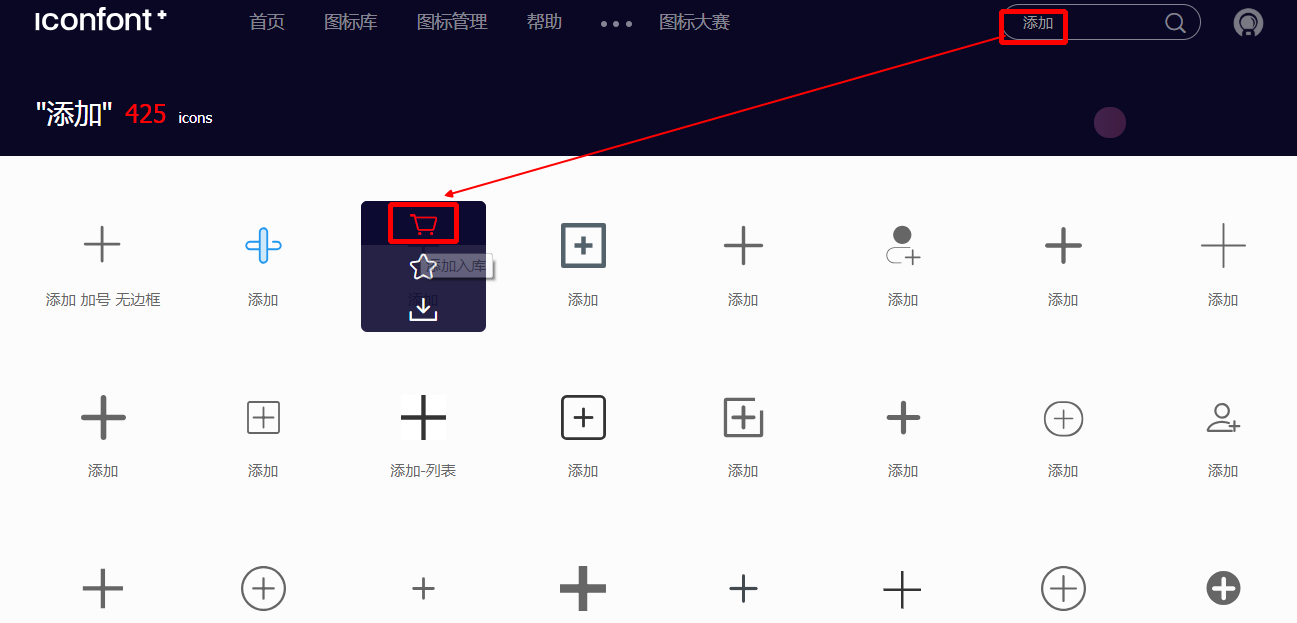
逐次选择好


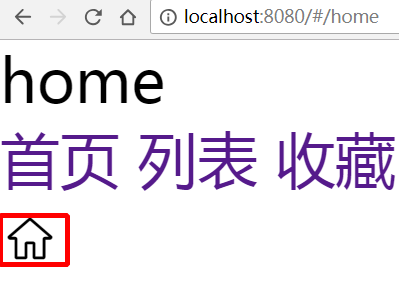
新建那几个vue组件
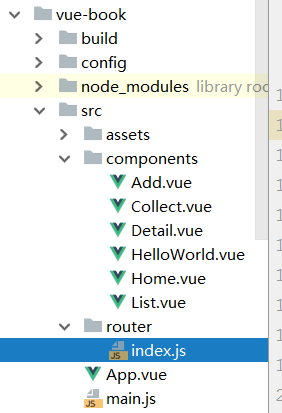
- Home.vue

<template>

    <div>home</div>

</template>

<script>

    export default {

        data() {

            return {}

        },

        methods: {},

        computed: {},

        componets: {}

    }

</script>

<style scoped>

</style>

...
- index.js

import Vue from 'vue'

import Router from 'vue-router'

import HelloWorld from '@/components/HelloWorld'

import Add from "../components/Add.vue"

import Collect from "../components/Collect.vue"

import Detail from "../components/Detail.vue"

import Home from "../components/Home.vue"

import List from "../components/List.vue"

Vue.use(Router);

export default new Router({

  routes: [

    {path: "/add", component: Add},

    {path: "/collect", component: Collect},

    {path: "/detail", component: Detail},

    {path: "/home", component: Home},

    {path: "/list", component: List},

  ]

})
- App.vue

<template>

  <div id="app">

    <router-view></router-view>

    <router-link to="/home">首页</router-link>

    <router-link to="/list">列表</router-link>

    <router-link to="/collect">收藏</router-link>

    <router-link to="/add">添加</router-link>

  </div>

</template>

<script>

  export default {

    name: 'App'

  }

</script>

<style>  <!-- 公共样式,不带scope -->

  * {

    margin: 0;

    padding: 0;

  }

  ul li {

    list-style: none;

  }

  a {

    text-decoration: none;

  }

  input button {

    -webkit-appearance: none;

    -moz-appearance: none;

    appearance: none;

  }

</style>

第二版: Tab.vue隔离
- Tab.vue
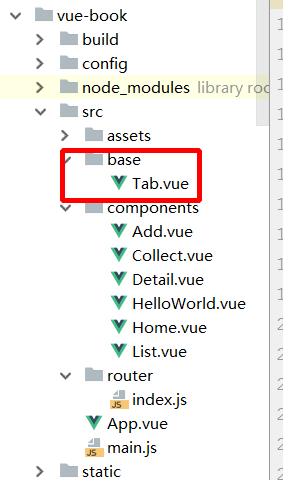
<template>

  <div>

    <router-link to="/home">首页</router-link>

    <router-link to="/list">列表</router-link>

    <router-link to="/collect">收藏</router-link>

    <router-link to="/add">添加</router-link>

  </div>

</template>

<style scoped>

</style>
- App.vue
<template>

  <div id="app">

    <router-view></router-view>

    <Tab></Tab>

  </div>

</template>

<script>

  import Tab from "./base/Tab.vue"

  export default {

    name: 'app',

    components: {

      Tab

    }

  }

</script>

<style>

  * {

    margin: 0;

    padding: 0;

  }

  ul li {

    list-style: none;

  }

  a {

    text-decoration: none;

  }

  input button {

    -webkit-appearance: none;

    -moz-appearance: none;

    appearance: none;

  }

</style>
[vue]vue-book的更多相关文章
- Javascript - Vue - vue对象
vue提供了一整套前端解决方案,可以提升企业开发效率 vue的处理过程 app.js 项目入口,所有请求最先进入此模块进行处理 route.js 由app.js调用,处理路由的分发 controlle ...
- Vue - vue.js 常用指令
Vue - vue.js 常用指令 目录: 一. vuejs模板语法之常用指令 1. 常用指令: v-html 2. 常用指令: v-text 3. 常用指令: v-for 4. 常用指令: v-if ...
- 前端开发 Vue Vue.js和Nodejs的关系
首先vue.js 是库,不是框架,不是框架,不是框架. Vue.js 使用了基于 HTML 的模版语法,允许开发者声明式地将 DOM 绑定至底层 Vue 实例的数据. Vue.js 的核心是一个允许你 ...
- [Vue] : Vue概述
什么是Vue.js Vue.js 是目前最火的一个前端框架,React是最流行的一个前端框架. Vue.js 是前端的主流框架之一,和Angular.js.React.js 一起,并成为前端三大主流框 ...
- Property 'validate' does not exist on type 'Element | Element[] | Vue | Vue[]'. Property 'valid...
使用vue-cli 3.0+Element-ui时候,调用form表单校验时候出现的问题是: Property 'validate' does not exist on type 'Element | ...
- Vue Vue.use() / Vue.component / router-view
Vue.use Vue.use 的作用是安装插件 Vue.use 接收一个参数 如果这个参数是函数的话,Vue.use 直接调用这个函数注册组件 如果这个参数是对象的话,Vue.use 将调用 ins ...
- vue & vue router & dynamic router
vue & vue router & dynamic router https://router.vuejs.org/guide/essentials/dynamic-matching ...
- vue & vue router & match bug
vue & vue router & match bug match bugs solution name must be router https://stackoverflow.c ...
- [Vue] vue中setInterval的问题
vue中使用setInterval this.chatTimer = setInterval(() => { console.log(this.chatTimer); this.chatMsg( ...
- [Vue] vue跳转外部链接
问题 vue 跳转外部链接问题,当跳转的时候会添加在当前地址后面 var url = 'www.baidu.com' //跳转1 window.localtion.href = url //跳转2 w ...
随机推荐
- numpy基本方法
在学习python的时候常常需要numpy这个库,每次都是用一个查一个,这个,终于见到一个完整的总结了http://blog.csdn.net/blog_empire/article/details/ ...
- 【抓包分析】Charles和 夜神模拟器 对安卓应用进行抓包分析
准备工具 : 1 Charles : https://www.charlesproxy.com (收费) 2 夜神模拟器 : https://www.yeshen.com (免费) 2 模拟 ...
- 【Linux】python 2.x 升级 python3.x 之后 yum命令出现except OSError, e: ^ SyntaxError: invalid syntax
python2.7升级到python3.6.4 文章链接 : https://zhuanlan.zhihu.com/p/33660059 我在服务器上.把linux默认安装的python2.7 升级 ...
- 决策树归纳算法之ID3
学习是一个循序渐进的过程,我们首先来认识一下,什么是决策树.顾名思义,决策树就是拿来对一个事物做决策,作判断.那如何判断呢?凭什么判断呢?都是值得我们去思考的问题. 请看以下两个简单例子: 第一个例子 ...
- jquery.sparkline.js简介
jQuery线状图插件Sparkline 官网地址:http://omnipotent.net/jquery.sparkline/ 文档地址:http://omnipotent.net/jquery. ...
- MySQL使用查询结果生成临时表
MySQL中不支持对同一个表使用其查询结果更新or删除本表内数据(也就是update或delete后的where条件为针对相同表的select),解决方案是创建临时表做过度保存中间数据: 可以直接使用 ...
- jQuery("dom").get()的源码分析
该方法是绑定在jQuery.prototype上的一个静态方法,目的是取出jQuery对象中的某个或全部DOM元素. 使用方法: $("someDOM").get(index); ...
- sencha touch list(列表) item(单行)单击事件触发顺序
测试代码如下 Ext.define('app.view.new.List', { alternateClassName: 'newList', extend: 'app.view.util.MyLis ...
- Android MediaScanner
一.MediaScanner 的使用 1)Intent.ACTION_MEDIA_SCANNER_SCAN_FILE:扫描指定文件 public void scanFileAsync(Context ...
- 【CF840C】On the Bench DP
[CF840C]On the Bench 题意:给你一个长度为n的数组{ai},定义一个1到n的排列是合法的,当且仅当对于$1\le i <n$,$a_i\times a_{i+1}$不是完全平 ...