
Arduino IDE for ESP8266 教程(一) 局域网 网页查看数据 不控制
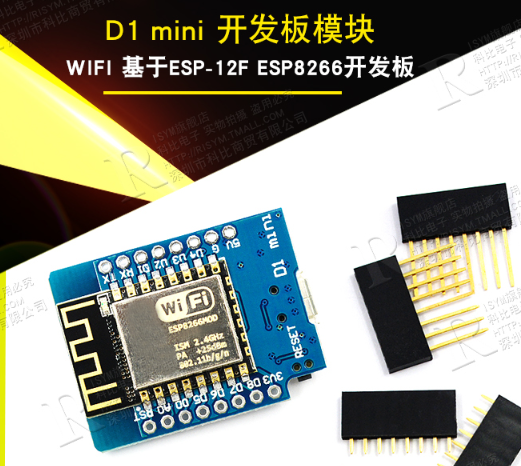
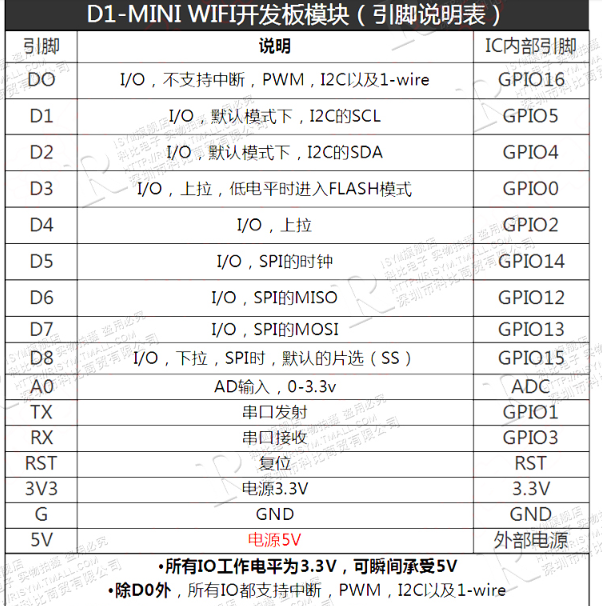
淘宝;https://detail.tmall.com/item.htm?id=536504922008&spm=a1z09.2.0.0.5e160c66c76b3g&_u=e1qf7bf52e27
产品资料:http://www.kbgogo.com/forum.php?mod=viewthread&tid=64&extra=
烧录时版型和参数选择
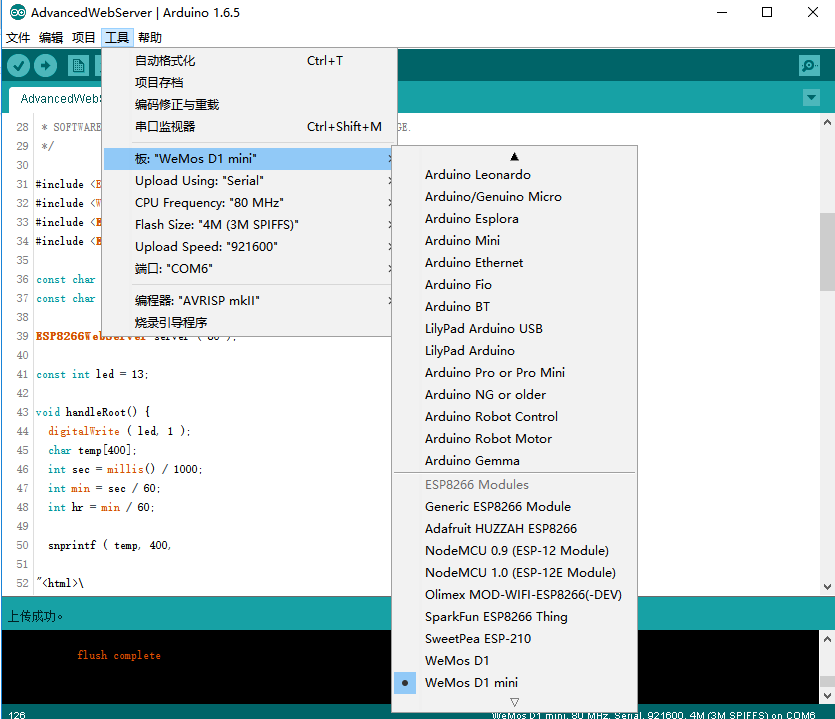
测试样例1
说明:
- 程序输入 你要连接的路由器 名+密码。
- 烧录进入wemos d1 mini 板,程序自动连接路由器,并返回自己分配到的地址。
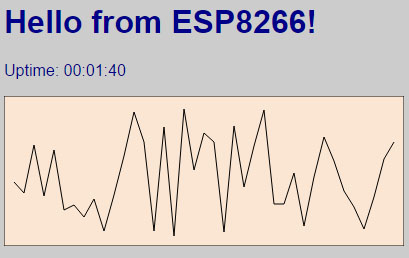
- 手机或电脑连接在同一个路由器下,打开网页,输入刚才返回的地址,网页看到结果。
1 烧录程序
/*

 * Copyright (c) 2015, Majenko Technologies

 * All rights reserved.

 *

 * Redistribution and use in source and binary forms, with or without modification,

 * are permitted provided that the following conditions are met:

 *

 * * Redistributions of source code must retain the above copyright notice, this

 *   list of conditions and the following disclaimer.

 *

 * * Redistributions in binary form must reproduce the above copyright notice, this

 *   list of conditions and the following disclaimer in the documentation and/or

 *   other materials provided with the distribution.

 *

 * * Neither the name of Majenko Technologies nor the names of its

 *   contributors may be used to endorse or promote products derived from

 *   this software without specific prior written permission.

 *

 * THIS SOFTWARE IS PROVIDED BY THE COPYRIGHT HOLDERS AND CONTRIBUTORS "AS IS" AND

 * ANY EXPRESS OR IMPLIED WARRANTIES, INCLUDING, BUT NOT LIMITED TO, THE IMPLIED

 * WARRANTIES OF MERCHANTABILITY AND FITNESS FOR A PARTICULAR PURPOSE ARE

 * DISCLAIMED. IN NO EVENT SHALL THE COPYRIGHT HOLDER OR CONTRIBUTORS BE LIABLE FOR

 * ANY DIRECT, INDIRECT, INCIDENTAL, SPECIAL, EXEMPLARY, OR CONSEQUENTIAL DAMAGES

 * (INCLUDING, BUT NOT LIMITED TO, PROCUREMENT OF SUBSTITUTE GOODS OR SERVICES;

 * LOSS OF USE, DATA, OR PROFITS; OR BUSINESS INTERRUPTION) HOWEVER CAUSED AND ON

 * ANY THEORY OF LIABILITY, WHETHER IN CONTRACT, STRICT LIABILITY, OR TORT

 * (INCLUDING NEGLIGENCE OR OTHERWISE) ARISING IN ANY WAY OUT OF THE USE OF THIS

 * SOFTWARE, EVEN IF ADVISED OF THE POSSIBILITY OF SUCH DAMAGE.

 */

#include <ESP8266WiFi.h>

#include <WiFiClient.h>

#include <ESP8266WebServer.h>

#include <ESP8266mDNS.h>

const char *ssid = "dongdong";

const char *password = "dongdong";

ESP8266WebServer server ( 80 );

const int led = 13;

void handleRoot() {

	digitalWrite ( led, 1 );

	char temp[400];

	int sec = millis() / 1000;

	int min = sec / 60;

	int hr = min / 60;

	snprintf ( temp, 400,

"<html>\

  <head>\

    <meta http-equiv='refresh' content='5'/>\

    <title>ESP8266 Demo</title>\

    <style>\

      body { background-color: #cccccc; font-family: Arial, Helvetica, Sans-Serif; Color: #000088; }\

    </style>\

  </head>\

  <body>\

    <h1>Hello from ESP8266!</h1>\

    <p>Uptime: %02d:%02d:%02d</p>\

    <img src=\"/test.svg\" />\

  </body>\

</html>",

		hr, min % 60, sec % 60

	);

	server.send ( 200, "text/html", temp );

	digitalWrite ( led, 0 );

}

void handleNotFound() {

	digitalWrite ( led, 1 );

	String message = "File Not Found\n\n";

	message += "URI: ";

	message += server.uri();

	message += "\nMethod: ";

	message += ( server.method() == HTTP_GET ) ? "GET" : "POST";

	message += "\nArguments: ";

	message += server.args();

	message += "\n";

	for ( uint8_t i = 0; i < server.args(); i++ ) {

		message += " " + server.argName ( i ) + ": " + server.arg ( i ) + "\n";

	}

	server.send ( 404, "text/plain", message );

	digitalWrite ( led, 0 );

}

void setup ( void ) {

	pinMode ( led, OUTPUT );

	digitalWrite ( led, 0 );

	Serial.begin ( 115200 );

	WiFi.begin ( ssid, password );

	Serial.println ( "" );

	// Wait for connection

	while ( WiFi.status() != WL_CONNECTED ) {

		delay ( 500 );

		Serial.print ( "." );

	}

	Serial.println ( "" );

	Serial.print ( "Connected to " );

	Serial.println ( ssid );

	Serial.print ( "IP address: " );

	Serial.println ( WiFi.localIP() );

	if ( MDNS.begin ( "esp8266" ) ) {

		Serial.println ( "MDNS responder started" );

	}

	server.on ( "/", handleRoot );

	server.on ( "/test.svg", drawGraph );

	server.on ( "/inline", []() {

		server.send ( 200, "text/plain", "this works as well" );

	} );

	server.onNotFound ( handleNotFound );

	server.begin();

	Serial.println ( "HTTP server started" );

}

void loop ( void ) {

	server.handleClient();

}

void drawGraph() {

	String out = "";

	char temp[100];

	out += "<svg xmlns=\"http://www.w3.org/2000/svg\" version=\"1.1\" width=\"400\" height=\"150\">\n";

 	out += "<rect width=\"400\" height=\"150\" fill=\"rgb(250, 230, 210)\" stroke-width=\"1\" stroke=\"rgb(0, 0, 0)\" />\n";

 	out += "<g stroke=\"black\">\n";

 	int y = rand() % 130;

 	for (int x = 10; x < 390; x+= 10) {

 		int y2 = rand() % 130;

 		sprintf(temp, "<line x1=\"%d\" y1=\"%d\" x2=\"%d\" y2=\"%d\" stroke-width=\"1\" />\n", x, 140 - y, x + 10, 140 - y2);

 		out += temp;

 		y = y2;

 	}

	out += "</g>\n</svg>\n";

	server.send ( 200, "image/svg+xml", out);

}
2 连接路由器
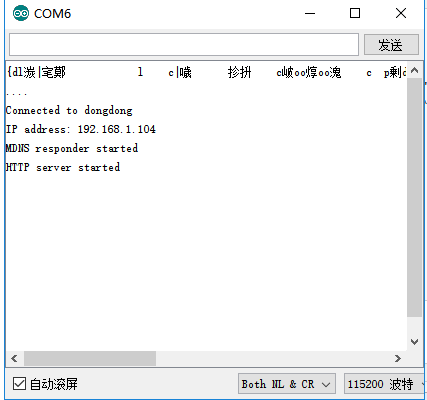
我们只需要用浏览器打开这个IP就可以看到8266输出的内容了。
Arduino IDE for ESP8266 教程(一) 局域网 网页查看数据 不控制的更多相关文章
- Arduino IDE for ESP8266教程(0)配置IDE
淘宝链接 https://detail.tmall.com/item.htm?id=540067174120&spm=a1z09.2.0.0.6f7c6509ujAvQs&_u=71q ...
- Arduino IDE for ESP8266教程(三)HTTP客户端
整个教程就以上传Yeelink数据点为目的制作一个HTTP客户端. 1获取账号 http://www.cnblogs.com/imfanqi/p/4419915.html 2代码教程 http://w ...
- Arduino IDE for ESP8266教程(四)网页控制灯 简单页面
修改ssid和passwd,将程序烧写到8266上,等待串口返回连接成功的消息,连接成功之后可以看到返回有一个ip地址,使用浏览器方位这个ip地址就可以看到这个消息: 连接路由器后,返回IP地址 19 ...
- Arduino IDE for ESP8266教程(二) 创建WIFI AP模式
创建WIFI热点 #include <ESP8266WiFi.h> void setup() { Serial.begin ( 115200 ); Serial.println(" ...
- Arduino IDE搭建ESP8266开发环境,文件下载过慢解决方法 | ESP-01制作WiFi开关教程,改造宿舍灯
1. Arduino IDE配置ESP8266环境 参考:https://www.jianshu.com/p/cb0274d612b5 首先从 Arduino 官网 下载最新版本的 Arduino I ...
- ESP8266开发之旅 进阶篇② 闲聊Arduino IDE For ESP8266烧录配置
授人以鱼不如授人以渔,目的不是为了教会你具体项目开发,而是学会学习的能力.希望大家分享给你周边需要的朋友或者同学,说不定大神成长之路有博哥的奠基石... QQ技术互动交流群:ESP8266&3 ...
- Arduino IDE 安装esp8266 2.4.rc2的编译环境
2.4. 版本, 有一个我需要的功能, 串口缓存, 可以修改. Serial.setRxBufferSize(1024); //修改为1024个字节. 安装步骤: 1. 需要FQ. 推荐用" ...
- ARDUINO MEGA2560 经过ESP8266 WIFI模块上传温湿度数据到 OneNet 服务器
简述 原来写了一个C++的wifi库但是发现用c++ arduino这小身板有点扛不住,代码比较大,使用String类型数据处理速度慢,而且很容易无缘无故跑飞.而且封装成库后使用还需要修改arduin ...
- Arduino IDE for ESP8266 (4)局域网 网页图形化控制灯 路由系统
用到的路由系统文件(备用) 链接:https://pan.baidu.com/s/1bqR7Lc7 密码:7w2z 教程http://www.windworkshop.cn/?p=1274
随机推荐
- 【转载】To the Virgins, to Make Much of Time
Gather ye rosebuds while ye may Old Time is still a-flying And this same flower that smiles today To ...
- 使用WPF教你一步一步实现连连看(二)
连连看算法 第一步:我们考虑在同行或者同列的情况: 同行或者同列又分三种情况: 第一:边线,RowNum或者ColNum等于0或者9 第二:两个相邻 第三:同行不相邻,这种事有条件的,所在行(或列)的 ...
- SQL Server Service Broker(简称SSB)资料
SQL server Service Broker (下面简称SSB) 是SQL server 里面比较独特的一个功能.它可帮助开发人员构建异步的松散耦合应用程序.SSB的一些功能和好处包括有: 数据 ...
- char和string的不同点
'a'是char, "a"是char string,这两者都是普通的字符和字符串,和C中没什么不同 值得注意的是后者包含两个字符,末尾有一个隐身的'\0' 而:string str ...
- SQL Server 中的一些概念
学习SQL Server 2012编程入门经典(第4版)的笔记 1.事务日志 任意数据库的更改起初不进入数据库本身,而是不断地被写入到事务日志. 日志是数据进入磁盘上的最先位置. 2.表 数据库中实际 ...
- python中集合-set
集合-set 集合是高中数学中的一个概念 一堆确定的无序的唯一的数据,集合中每一个数据成为一个元素 # 集合的定义 s = set() print(type(s)) print(s) print(&q ...
- api接口签名认证的一种方式
请求方 try { using (var client = new HttpClient()) { StringContent content = new StringContent(strParam ...
- C# 插件式开发
在网上找了下插件式编程的资料,这里自己先借鉴下别人的,同时发现有自己的看法,不过由于本人水平有限,不一定有参考价值,写出来一方面是为了总结自己,以求提高,另一方面也希望各为朋友看到我的不足,给我提出宝 ...
- Java网络编程--套接字Socket
一.套接字Socket IP地址标志Internet上的计算机,端口号标志正在计算机上运行的进程(程序). 端口号被规定为一个16位的0--65535之间的整数,其中,0--1023被预先定义的服务通 ...
- (网页)jQuery UI 实例 - 日期选择器(Datepicker)
默认功能 日期选择器(Datepicker)绑定到一个标准的表单 input 字段上.把焦点移到 input 上(点击或者使用 tab 键),在一个小的覆盖层上打开一个交互日历.选择一个日期,点击页面 ...