
Angular6封装LED时钟数字组件
一、运行截图
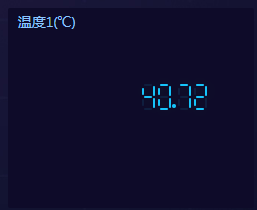
截图1:
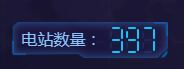
截图2:
二、代码
html代码:
 <div class="time" >

   <ng-container #container>

   </ng-container>

 </div>

 <ng-template #child_elem>

   <div class="digit minutes">

     <div class="segment "></div>

     <div class="segment "></div>

     <div class="segment "></div>

     <div class="segment "></div>

     <div class="segment "></div>

     <div class="segment "></div>

     <div class="segment "></div>

   </div>

 </ng-template>

 <ng-template #point_elem>

   <div class="separator minutes"></div>

 </ng-template>
css代码:
 .time {

     height: 40px;

     position: absolute;

     top:;

     left: 28%;

     width: 100px;

     margin-left: 0px;

     text-align: center;

     z-index:;

     margin-top: -7px;

   }

   .time .digit {

     width: 16px;

     height: 44px;

     position: relative;

     display: inline-block;

     margin-top: 2px;

   }

   .digit .segment {

     background:#11c4fb;

     border-radius:2px;

     position:absolute;

     opacity:0.1;

     transition:opacity 0.2s;

     -webkit-transition:opacity 0.2s;

     -ms-transition:opacity 0.2s;

     -moz-transition:opacity 0.2s;

     -o-transition:opacity 0.2s;

   }

   .digit .segment.on, .separator {

     opacity:;

     background:#11c4fb;

     box-shadow:0 0 30px rgba(0,255,0,0.1);

     transition:opacity 0s;

     -webkit-transition:opacity 0s;

     -ms-transition:opacity 0s;

     -moz-transition:opacity 0s;

     -o-transition:opacity 0s;

   }

   .time .separator {

     width: 4px;

     height: 4px;

     background: #11c4fb;

     border-radius: 50%;

     display: inline-block;

     position: relative;

     bottom: 10px;

   }

   .digit .segment:nth-child(1) {

     top: 10px;

     left: 4px;

     right: 4px;

     height: 2px;

     background: #11c4fb;

   }

   .digit .segment:nth-child(2) {

     top: 12px;

     right: 1px;

     width: 2px;

     height: 75px;

     height: calc(71% - 21px);

     background: #11c4fb;

   }

   .digit .segment:nth-child(3) {

     bottom: 10px;

     right: 1px;

     width: 2px;

     height: 72px;

     height: calc(71% - 21px);

     background: #11c4fb;

   }

   .digit .segment:nth-child(4) {

     bottom: 8px;

     right: 4px;

     height: 2px;

     left: 4px;

     background: #11c4fb;

   }

   .digit .segment:nth-child(5) {

     bottom: 12px;

     left: 2px;

     width: 2px;

     height: 75px;

     height: calc(70% - 24px);

     background: #11c4fb;

   }

   .digit .segment:nth-child(6) {

     top: 14px;

     left: 2px;

     width: 2px;

     height: 75px;

     height: calc(70% - 24px);

     background: #11c4fb;

   }

   .digit .segment:nth-child(7) {

     bottom: 95px;

     bottom: calc(71% - 11px);

     right: 4px;

     left: 4px;

     height: 2px;

     background: #11c4fb;

   }
ts代码:
 import { Component, OnInit, Input, ViewChild, ViewContainerRef, TemplateRef, ElementRef, QueryList, SimpleChanges } from '@angular/core';

 @Component({

   selector: 'app-led-clockfont',

   templateUrl: './led-clockfont.component.html',

   styleUrls: ['./led-clockfont.component.css']

 })

 export class LedClockfontComponent implements OnInit {

   @ViewChild("container", {read: ViewContainerRef}) container_elem: ViewContainerRef;

   @ViewChild("child_elem") tpl_elem: TemplateRef<any>;

   @ViewChild("point_elem") tpl_point_elem: TemplateRef<any>;

   @Input() fontValue:number = 0;

   //数值模型数组,0,1,2,3,4,5,6,7,8,9

   private digitSegments = [

       [1, 2, 3, 4, 5, 6],

       [2, 3],

       [1, 2, 7, 5, 4],

       [1, 2, 7, 3, 4],

       [6, 7, 2, 3],

       [1, 6, 7, 3, 4],

       [1, 6, 5, 4, 3, 7],

       [1, 2, 3],

       [1, 2, 3, 4, 5, 6, 7],

       [1, 2, 7, 3, 6, 4]

   ]

   constructor(private el:ElementRef) {

    }

   ngOnInit() {

   }

   ngOnChanges(changes: SimpleChanges): void {

     if(parseFloat(this.fontValue.toString())){

       this.createDomContainer();

     }else{

       //Do-nothing

     }

     // this.createDomContainer();

   }

   createDomContainer(){

     //根据当前数值长度处理DOM容器

     if(0 !== this.fontValue.toString().length){

       //清空容器内视图

       this.container_elem.clear();

       //处理容器内视图

       let view = null;

       let point_index = this.fontValue.toString().indexOf('.');

       for(let i=0;i<this.fontValue.toString().length;i++){

         if((-1 != point_index) && (i == point_index)){

           view = this.tpl_point_elem.createEmbeddedView(null);

           this.container_elem.insert(view);

         }else{

           view = this.tpl_elem.createEmbeddedView(null);

           this.container_elem.insert(view);

         }

       }

       this.typeConversionst();

     }else{

       //Do-nothing

     }

   }

   //截取数字,类型转换

   typeConversionst(){

     let _minutes = this.el.nativeElement.querySelectorAll('.minutes');

     //字符串格式

     let fontValue_string = this.fontValue.toString();

     //转化成number类型,调用设置数值方法,设置数值

     if(0 != _minutes.length){

       for(let i=0;i<_minutes.length;i++){

         this.setNumber(_minutes[i], parseInt(fontValue_string.slice(i,i+1)), 1);

       }

     }

   }

   setNumber(digit, number, on){

     let segments = digit.querySelectorAll('.segment');

     let current = parseInt(digit.getAttribute('data-value'));

     if(!isNaN(number)){

       //处理数字

       this.digitSegments[number].forEach(function(digitSegment, index) {

         setTimeout(function() {

           segments[digitSegment - 1].classList.add('on');

         }, index * 1)

       });

       digit.setAttribute('data-value', number);

     }else{

       //Do-nothing

     }

   }

 }
三、使用
图一使用:
 <p *ngIf="selfFontStyle == 'clockStyle' && value != '--'" style="height: 140px;line-height: 120px;text-align: right;font-size: 40px;color: #13b4eb;position: relative;float: right;right: 130px;">

   <app-led-clockfont  [fontValue]="value"  *ngIf="selfFontStyle == 'clockStyle'"></app-led-clockfont>

   <!-- value = 40.72  -->

 </p>
图二使用:
 <app-led-clockfont [fontValue]="mapComponentConfig.length"></app-led-clockfont>

 <!-- mapComponentConfig.length = 397 -->
四、说明
利用Angular6创建一个led-clockfont组件,目录结构如下图:
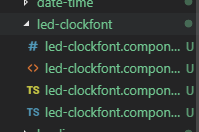
css代码详见第二步 css代码,html代码详见第二步 html代码,ts代码详见第二步 ts代码。
使用部分详见第三步
Angular6封装LED时钟数字组件的更多相关文章
- C#进阶系列——一步一步封装自己的HtmlHelper组件:BootstrapHelper(三:附源码)
前言:之前的两篇封装了一些基础的表单组件,这篇继续来封装几个基于bootstrap的其他组件.和上篇不同的是,这篇的有几个组件需要某些js文件的支持. 本文原创地址:http://www.cnblog ...
- 原生JS面向对象思想封装轮播图组件
原生JS面向对象思想封装轮播图组件 在前端页面开发过程中,页面中的轮播图特效很常见,因此我就想封装一个自己的原生JS的轮播图组件.有了这个需求就开始着手准备了,代码当然是以简洁为目标,轮播图的各个功能 ...
- C#进阶系列——一步一步封装自己的HtmlHelper组件:BootstrapHelper
前言:之前学习过很多的Bootstrap组件,博主就在脑海里构思:是否可以封装一套自己Bootstrap组件库呢.再加上看到MVC的Razor语法里面直接通过后台方法输出前端控件的方式,于是打算仿照H ...
- JS组件系列——封装自己的JS组件,你也可以
前言:之前分享了那么多bootstrap组件的使用经验,这篇博主打算研究下JS组件的扩展和封装,我们来感受下JQuery为我们提供$.Extend的神奇,看看我们怎么自定义自己的组件,比如我们想扩展一 ...
- JS组件系列——分享自己封装的Bootstrap树形组件:jqTree
前言:之前的一篇介绍了下如何封装自己的组件,这篇再次来体验下自己封装组件的乐趣.看过博主博客的园友应该记得之前分享过一篇树形菜单的使用JS组件系列——Bootstrap 树控件使用经验分享,这篇里面第 ...
- JS组件系列——封装自己的JS组件
前言:之前分享了那么多bootstrap组件的使用经验,这篇博主打算研究下JS组件的扩展和封装,我们来感受下JQuery为我们提供$.Extend的神奇,看看我们怎么自定义自己的组件,比如我们想扩展一 ...
- 从零开始教你封装自己的vue组件
组件(component)是vue.js最强大的功能之一,它可以实现功能的复用,以及对其他逻辑的解耦.但经过一段时间的使用,我发现自己并没有在业务中发挥出组件的最大价值.相信很多刚开始使用vue的朋友 ...
- Android Widget小组件开发(一)——Android实现时钟Widget组件的步骤开发,这些知识也是必不可少的!
Android Widget小组件开发(一)--Android实现时钟Widget组件的步骤开发,这些知识也是必不可少的! PS:学习自某网站(不打广告) 这个小组件相信大家都很熟悉吧,以前的墨迹天气 ...
- vue和echarts 封装的 v-charts 图表组件
https://v-charts.js.org/#/ 在使用 echarts 生成图表时,经常需要做繁琐的数据类型转化.修改复杂的配置项,v-charts 的出现正是为了解决这个痛点.基于 Vue2. ...
随机推荐
- mac中启动jmeter方法
1.mac中安装了jdk后,不需要去配置环境变量 2.现在jmeter包,解压缩后.打开terminal 3.在terminal中输入命令:sh jmeter.sh 打开Terminnal的方法: T ...
- KeepAlived+Nginx 安装
yum install -y gcc gcc-c++ openssl openssl-devel 目前keepalived最新版本下载:[root@rhel ~]#wget -c http://www ...
- Python 有序字典(OrderedDict)与 普通字典(dict)
Python 的基础数据类型中的字典类型分为:无序字典 与 有序字典 两种类型 1.无序字典(普通字典): my_dict = dict()my_dict["name"] = &q ...
- Linux下Redis安装使用教程
https://redis.io/download 第一步:安装redis需要在有c语言的编译环境下,执行命令安装c语言环境: yum install gcc-c++ https://blog.csd ...
- MyEclipse + Maven开发Web工程的详细配置过程
好久没做Web方面的开发,今天突然想弄弄SpringMVC,因为不久前又学了点Maven觉得非常好,所以在弄SpringMVC这个Web框架时想使用Maven来做,但是问题又来了,我一直是在Eclip ...
- celery异步认知
celery是异步任务的框架 是由python实现的异步框架. 在使用celery我们经常分为三个部分, 第一部分就是我们所说的客户端, 就是发起异步任务的一方, 第二部分 任务队列 broker 第 ...
- I2C软件调试思路并知识总结
I2C是一种只使用两根线的串行通信协议.一根线是串行数据线SDA,另外一种是串行时钟线SCL. I²C允许相当大的工作电压范围,但典型的电压准位为+3.3V或+5v. I²C的参考设计使用一个7比特长 ...
- Python九九乘法表三种方案
方法一: row = 1 # 定义起始行 while row <= 9: # 最大打印 9 行 col = 1 # 定义起始列 while col <= row: # 最大打印 row 列 ...
- hdu 6058---Kanade's sum(链表)
题目链接 Problem Description Give you an array A[1..n]of length n. Let f(l,r,k) be the k-th largest elem ...
- Spring Cloud OAuth2.0 微服务中配置 Jwt Token 签名/验证
关于 Jwt Token 的签名与安全性前面已经做了几篇介绍,在 IdentityServer4 中定义了 Jwt Token 与 Reference Token 两种验证方式(https://www ...