
聊聊HTTP gzip压缩与常见的Android网络框架
进入主题之前,我们先来看一下客户端与服务器通信过程中,如果服务器支持,HTTP gzip压缩是如何实现的?
如图所示:
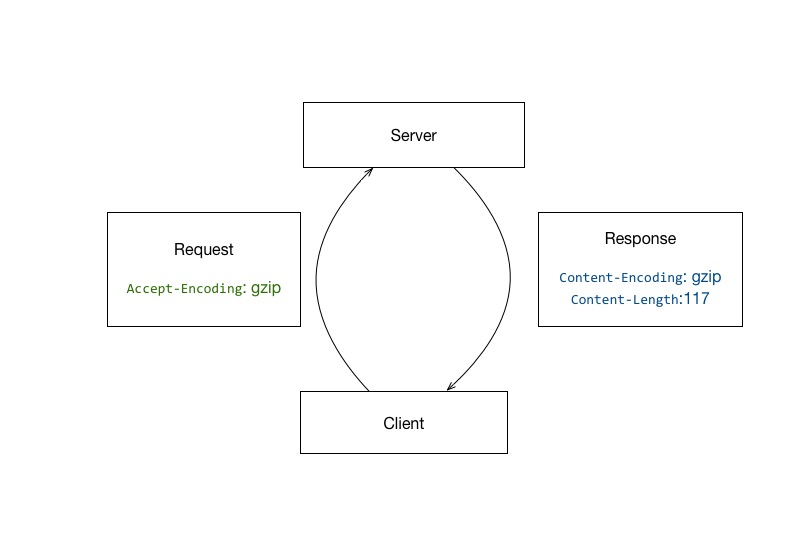
request header中声明Accept-Encoding: gzip,告知服务器客户端接受gzip的数据。
服务器支持的情况下,返回gzip后的response body,同时加入以下header:
Content-Encoding: gzip:表明body是gzip过的数据Content-Length:117:表示body gzip压缩后的数据大小,便于客户端使用。
或
Transfer-Encoding: chunked:分块传输编码
OK,HTTP gzip压缩的基本流程我们理清楚了,来看在Android各网络框架中表现有什么差异。
OkHttp
OkHttp作为目前Android最火的网络库,应用范围较广,相比于Android自带的HttpUrlConnection、Apache坑也少很多。
我们首先来看这个库的实现:
(注:以下代码基于OkHttp 3.4.1, 之前的版本逻辑也是一样的,但3.4.0开始将这些逻辑抽离到了内置的interceptor中,看起来较为方便)
// If we add an "Accept-Encoding: gzip" header field we're responsible for also decompressing

// the transfer stream.

boolean transparentGzip = false;

if (userRequest.header("Accept-Encoding") == null) {

  transparentGzip = true;

  requestBuilder.header("Accept-Encoding", "gzip");

}
如果header中没有Accept-Encoding,默认自动添加 ,且标记变量transparentGzip为true。
if (transparentGzip

    && "gzip".equalsIgnoreCase(networkResponse.header("Content-Encoding"))

    && HttpHeaders.hasBody(networkResponse)) {

  GzipSource responseBody = new GzipSource(networkResponse.body().source());

  Headers strippedHeaders = networkResponse.headers().newBuilder()

      .removeAll("Content-Encoding")

      .removeAll("Content-Length")

      .build();

  responseBuilder.headers(strippedHeaders);

  responseBuilder.body(new RealResponseBody(strippedHeaders, Okio.buffer(responseBody)));

}
针对返回结果,如果同时满足以下三个条件:
transparentGzip为true,即之前自动添加了Accept-Encoding- header中标明了
Content-Encoding为gzip - 有body
移除 Content-Encoding、Content-Length,并对结果进行解压缩。
可以看到以上逻辑完成了:
- 开发者没有添加
Accept-Encoding时,自动添加Accept-Encoding: gzip - 自动添加的request,response支持自动解压
- 手动添加不负责解压缩
- 自动解压时移除
Content-Length,所以上层Java代码想要contentLength时为-1 - 自动解压时移除
Content-Encoding - 自动解压时,如果是分块传输编码,
Transfer-Encoding: chunked不受影响。
以上6点是我们通过OkHttp源码得出的结论,我们以此来继续看下其他框架。
HttpUrlConnection
1. 是否自动添加Accept-Encoding: gzip
官网有过说明:
In Gingerbread, we added transparent response compression. HttpURLConnection will automatically add this header to outgoing requests, and handle the corresponding response:
Accept-Encoding: gzip
Take advantage of this by configuring your Web server to compress responses for clients that can support it. If response compression is problematic, the class documentation shows how to disable it.
即:2.3后默认是gzip,不加Accept-Encoding会被自动添加上Accept-Encoding: gzip。
2. 自动添加的request,response是否支持自动解压
By default, this implementation of HttpURLConnection requests that servers use gzip compression and it automatically decompresses the data for callers of getInputStream().
即返回的数据是已经自动解压缩的。
3. 手动添加是否负责解压缩
By default, this implementation of HttpURLConnection requests that servers use gzip compression and it automatically decompresses the data for callers of getInputStream(). The Content-Encoding and Content-Length response headers are cleared in this case. Gzip compression can be disabled by setting the acceptable encodings in the request header:
urlConnection.setRequestProperty("Accept-Encoding", "identity");
Setting the Accept-Encoding request header explicitly disables automatic decompression and leaves the response headers intact; callers must handle decompression as needed, according to the Content-Encoding header of the response.
例子中只提到设置为identity时可以禁止gzip压缩。
但是请注意最后一段提到,显式声明会禁止自动解压,同时保留header完整性,需要根据Content-Encoding来自己处理response。
实测4.1 - 6.0 版本之后发现,并不是非要指定identity才能屏蔽,指定gzip一样也不会解压缩。so,只要是显式声明过,都不会再处理,即:手动添加不会负责解压缩。
4. 自动解压时Content-Length问题
Since HTTP’s Content-Length header returns the compressed size, it is an error to use getContentLength() to size buffers for the uncompressed data. Instead, read bytes from the response until InputStream.read() returns -1.
即:getContentLength() 值为gzip压缩时的数据大小。
之前提到OkHttp在处理gzip压缩时会把Content-Length移除,contentLength在Java层获取为-1,而HttpURLConnection 在Android 4.4以后底层是由OkHttp实现的,那文档中提到的getContentLength()是compressed size是否还继续成立呢?
实测后发现 :
- 4.4之后的版本,
Content-Length被移除,getContentLength()= -1 - 2.3- 4.3之间,
Content-Length没有移除,getContentLength()= compressed size
5. 自动解压时的Content-Encoding
与Content-Length对应:
- 4.4之后的版本,
Content-Encoding被移除 - 2.3- 4.3之间,
Content-Encoding存在,无变化。
6. 自动解压时的分块编码传输
与OkHttp相同,Transfer-Encoding: chunked不受影响。
Apache
这里不再赘述,仅阐述结论:
无自动添加、解压机制。
总结
1、是否支持自动添加Accept-Encoding与数据自动解压?
| name | transparent response compression |
|---|---|
| OkHttp | yes |
| HttpUrlConnection | yes |
| Apache | no |
2、支持自动后,response header的表现如何?
| name | Content-Encoding: gzip | Header : Content-Length | Java : ContentLength |
|---|---|---|---|
| OkHttp | 被移除 | 被移除 | -1 |
| HttpUrlConnection(2.3 ~ 4.3) | 不变 | 不变 | compressed size |
| HttpUrlConnection(4.4 ~ ?) | 被移除 | 被移除 | -1 |
或
| name | Content-Encoding: gzip | Transfer-Encoding: chunked |
|---|---|---|
| OkHttp | 被移除 | 不变 |
| HttpUrlConnection(2.3 ~ 4.3) | 不变 | 不变 |
| HttpUrlConnection(4.4 ~ ?) | 被移除 | 不变 |
3、自动模式启动后,在Java中获取contentLength无论是哪个版本的HttpUrlConnection还是OkHttp都是不可信的,都不是解压缩之后的值(可能为-1或compressed size),因此最好不要通过contentLength来做什么操作。
4、HttpUrlConnection、OkHttp均是手动添加不自动解压缩,Apache没有自动添加自动解压功能。三者在手动添加Accept-Encoding后,表现一致(利用这个特点,可以做一个在三者之上的网络框架,随意切换三种通道)。
参考资料
聊聊HTTP gzip压缩与常见的Android网络框架的更多相关文章
- Android网络框架Volley(体验篇)
Volley是Google I/O 2013推出的网络通信库,在volley推出之前我们一般会选择比较成熟的第三方网络通信库,如: android-async-http retrofit okhttp ...
- Android网络框架Volley
Volley是Google I/O 2013推出的网络通信库,在volley推出之前我们一般会选择比较成熟的第三方网络通信库,如: android-async-http retrofit okhttp ...
- Android网络框架Volley(实战篇)
之前讲了ym—— Android网络框架Volley(体验篇),大家应该了解了volley的使用,接下来我们要看看如何把volley使用到实战项目里面,我们先考虑下一些问题: 从上一篇来看 mQu ...
- Android网络框架-Volley实践 使用Volley打造自己定义ListView
这篇文章翻译自Ravi Tamada博客中的Android Custom ListView with Image and Text using Volley 终于效果 这个ListView呈现了一些影 ...
- ym—— Android网络框架Volley(终极篇)
转载请注明本文出自Cym的博客(http://blog.csdn.net/cym492224103).谢谢支持! 没看使用过Volley的同学能够,先看看Android网络框架Volley(体验篇)和 ...
- 几种常见的Android自动化测试框架及其应用
随着Android应用得越来越广,越来越多的公司推出了自己移动应用测试平台.例如,百度的MTC.东软易测云.Testin云测试平台…….由于自己所在项目组就是做终端测试工具的,故抽空了解了下几种常见的 ...
- Android网络框架技术
网络相关1. Asynchronous Http Client for Android Android异步Http请求项目地址:https://github.com/loopj/android-asy ...
- Android网络框架OkHttp之get请求(源码初识)
概括 OkHttp现在很火呀.于是上个星期就一直在学习OkHttp框架,虽然说起来已经有点晚上手了,貌似是2013年就推出了.但是现在它版本更加稳定了呀.这不,说着说着,OkHttp3.3版本在这几天 ...
- Android网络框架源码分析一---Volley
转载自 http://www.jianshu.com/p/9e17727f31a1?utm_campaign=maleskine&utm_content=note&utm_medium ...
随机推荐
- MSTP-多生成树协议
多生成树协议MSTP(Multiple Spanning Tree Protocol)是IEEE 802.1s中定义的一种新型生成树协议.简单说来,STP/RSTP是基于端口的,PVST+是基于VLA ...
- OpenStack-Ocata版+CentOS7.6 云平台环境搭建 — 3.安装配置OpenStack认证服务(keystone)
节点配置信息说明: 控制节点:controller: IP:192.168.164.128 hostname&hosts:likeadmin 计算加点:Nova: IP:192.168.164 ...
- linux下i2c的驱动架构分析和应用
i2c在linux下的代码在/driver/i2c下面,总体代码如下所示: i2c-core.c 这个文件实现了I2C核心的功能以及/proc/bus/i2c*接口. i2c-dev.c 实现 ...
- Python——pytessercat识别简单的验证码
什么是验证码 验证码(CAPTCHA)是“Completely Automated Public Turing test to tell Computersand Humans Apart” (全自动 ...
- Xamarin.Android 调用手机拍照功能
最近开发Android遇到了调用本地拍照功能,于是在网上搜了一些方法,加上自己理解的注释,在这儿记录下来省的下次用时候找不到,同事也给正在寻找调用本地拍照功能的小伙伴一些帮助~ 实现思路:首先加载-- ...
- [每天解决一问题系列 - 0013] 如何修改WiX Burn内置的窗口
问题描述: 我们产品的burn安装包仅支持.net 3.5 sp1以上,在只有.net 2.0的机器上会给用户弹一个窗口,告诉用户为什么不能够安装的原因.本来burn已经内置了,但是在日文操作系统下, ...
- 005. Asp.Net Routing与MVC 之三: 路由在MVC的使用
上次讲到请求如何激活Controller和Action,这次讲下MVC中路由的使用.本次两个关注点: 遗留:ModelBinder.BindModel的过程 MVC中路由的使用 MVC 5中的Acti ...
- IMSI
国际移动用户识别码(IMSI:International Mobile Subscriber Identification Number)是区别移动用户的标志,储存在SIM卡中,可用于区别移动用户的有 ...
- ACM 要学
初期: 一.基本算法: (1)枚举. (poj1753,poj2965) (2)贪心(poj1328,poj2109,poj2586) (3)递归和分治法. (4)递推. (5)构造法.(po ...
- LearnOpenGL学习笔记(四)——着色器类编写
之前我们将着色器的代码用glsl写好之后,保存为字符串指针,然后用一个函数去编译它,这是一种手段,对于简单的着色器代码可以这样.但当我们针对复杂的着色器,我们发现编写.编译.管理着色器是一件麻烦事.我 ...