
Postgresql 密码设置
今天下午 陷进去了 其实很简单的一个事情结果浪费了 接近一个小时. 做事情必须要细致一些. 自己的确做的不好.
这里面简单说一下pg_hba.conf 和 postgresql 密码的一些设置问题.
1. windows 机器
安装pg 时 有一个 让输入密码的地址 这个 直接输入密码就可以了.
然后如果想修改密码的话 可以在命令行里面处理.:
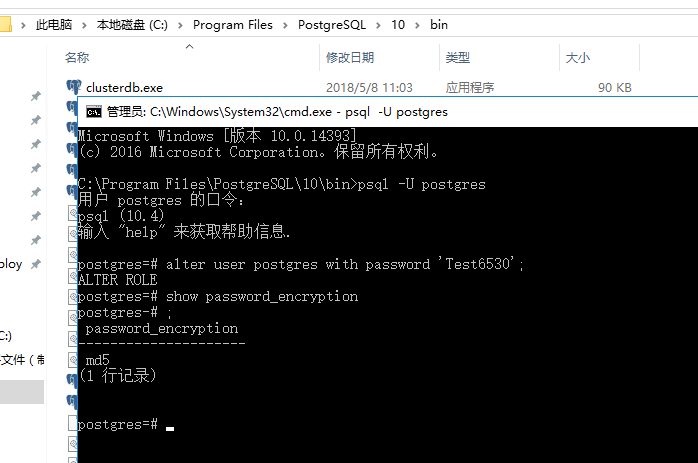
然后修改 data 目录下面的 : pg_hba.conf
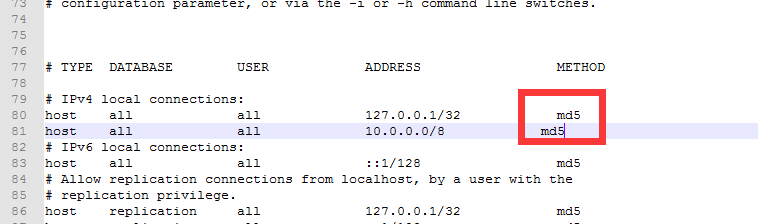
注意里面的配置文件内容:
The first field is the connection type: "local" is a Unix-domain

socket, "host" is either a plain or SSL-encrypted TCP/IP socket,

"hostssl" is an SSL-encrypted TCP/IP socket, and "hostnossl" is a

plain TCP/IP socket.

DATABASE can be "all", "sameuser", "samerole", "replication", a

database name, or a comma-separated list thereof. The "all"

keyword does not match "replication". Access to replication

must be enabled in a separate record (see example below).

USER can be "all", a user name, a group name prefixed with "+", or a

comma-separated list thereof.  In both the DATABASE and USER fields

you can also write a file name prefixed with "@" to include names

from a separate file.

ADDRESS specifies the set of hosts the record matches.  It can be a

host name, or it is made up of an IP address and a CIDR mask that is

an integer (between  and  (IPv4) or  (IPv6) inclusive) that

specifies the number of significant bits in the mask.  A host name

that starts with a dot (.) matches a suffix of the actual host name.

Alternatively, you can write an IP address and netmask in separate

columns to specify the set of hosts.  Instead of a CIDR-address, you

can write "samehost" to match any of the server's own IP addresses,

or "samenet" to match any address in any subnet that the server is

directly connected to.

METHOD can be "trust", "reject", "md5", "password", "scram-sha-256",

"gss", "sspi", "ident", "peer", "pam", "ldap", "radius" or "cert".

Note that "password" sends passwords in clear text; "md5" or

"scram-sha-256" are preferred since they send encrypted passwords.

OPTIONS are a set of options for the authentication in the format

NAME=VALUE.  The available options depend on the different

authentication methods -- refer to the "Client Authentication"

section in the documentation for a list of which options are

available for which authentication methods.

Database and user names containing spaces, commas, quotes and other

special characters must be quoted.  Quoting one of the keywords

"all", "sameuser", "samerole" or "replication" makes the name lose

its special character, and just match a database or username with

that name.

This file is read on server startup and when the server receives a

SIGHUP signal.  If you edit the file on a running system, you have to

SIGHUP the server for the changes to take effect, run "pg_ctl reload",

or execute "SELECT pg_reload_conf()".

Put your actual configuration here
2. linux机器的话 也不复杂
而且 postgres 用户的话 不需要输入密码就可以登录了 能够直接修改密码...

其他配置文件都是一样的.
Postgresql 密码设置的更多相关文章
- 更改MySQL/Postgresql密码
Parrot包括几个SQL引擎,但是当它们被预先安装时,默认密码未被配置,并且拒绝访问其root用户. 重新配置Mysql / Mariadb密码 停止MySQL服务. sudo service my ...
- redis密码设置、访问权限控制等安全设置
redis作为一个高速数据库,在互联网上,必须有对应的安全机制来进行保护,方法有2,如下. 1.比较安全的办法是采用绑定IP的方式来进行控制. 请在redis.conf文件找到如下配置 # If y ...
- GRUB密码设置
通过编辑GRUB启动参数可以轻松的进入单用户模式从而修改root密码,GRUB的密码设置可分为全局密码和菜单密码. 一,全局密码设置 在splashimage这个参数的下一行可以加上passw ...
- Linux - root初始密码设置
Ubuntu刚安装后,不能在terminal中运行su命令,因为root没有默认密码,需要手动设定. 以安装ubuntu时输入的用户名登陆,该用户在admin组中,有权限给root设定密码. 给roo ...
- xampp默认mysql密码设置,修改mysql的默认空密码
xampp默认mysql密码设置,修改mysql的默认空密码 分类: xampp2012-09-12 11:24 30264人阅读 评论(5) 收藏 举报 mysqlphpmyadminauthent ...
- (转)mysql账号权限密码设置方法
原文:http://www.greensoftcode.net/techntxt/2013410134247568042483 mysql账号权限密码设置方法 我的mysql安装在c:\mysql 一 ...
- ubuntu 第一次安装时 默认root 密码设置
Ubuntu刚安装后,不能在terminal中运行su命令,因为root没有默认密码,需要手动设定. 以安装ubuntu时输入的用户名登陆,该用户在admin组中,有权限给root设定密码. 给roo ...
- Spring+SpringMVC+MyBatis+easyUI整合进阶篇(十一)redis密码设置、安全设置
警惕 前一篇文章<Spring+SpringMVC+MyBatis+easyUI整合进阶篇(九)Linux下安装redis及redis的常用命令和操作>主要是一个简单的介绍,针对redis ...
- redis的密码设置(windows与linux相同)
接着我们昨天的说,昨天redis的启动已经了解,今天来说说redis的密码设置.(不管怎么说redis也是数据库,也需要密码) 修改密码可以2种行径.第一种,直接修改配置文件,打开redis.conf ...
随机推荐
- oracle11gR2 手工创建基于asm存储的oracle实例
http://www.cnblogs.com/beanbee/archive/2012/09/22/2697689.html使用命令行手工建立Oracle11gR2数据库 通过命令行建立一个数据库可以 ...
- Saltstack管理对象属性之grains和pillar组件
Grains组件 Grains是saltstack记录minion的一些静态信息组件,可以简单的理解为grains里面记录着每台minion的一些常用的属性,比如cpu.内存.磁盘.网络信息等,可以通 ...
- 软概(lesson 2):课堂测试
一.测试题目 二.完成过程 1.设计思想 ①连接mysql数据库 ②设计user类,增加参数 ③设计add类,向数据库内增加内容 ④设计addInput页面,完成录入操作 ⑤设计add页面,接收录入的 ...
- (推荐)用C++来开发Skyline应用
原文地址:http://www.hailongchang.org/index.php/archives/category/terraexplorer 供大家学习参考.
- HNOI2017做题笔记
HNOI2017 单旋(线段树.set) 手玩旋转操作(忽略手玩过程)可以发现:一次单旋对原树的变化实际上很小. 对于父子关系,单旋最小值会将\(Spaly\)上最小值变成原来根的父亲,将最小值的点右 ...
- CF1039D You Are Given a Tree 根号分治、二分、贪心
传送门 似乎直接做不太好做-- 当你不会做的时候就可以考虑根号算法了(或许是这样的 考虑如果只有一个询问如何计算答案. 显然是可以贪心的,思路与NOIP2018D1T3是相同的.每一个点向上传一条链, ...
- Asp.Net MVC页面显示后台处理进度问题
这个问题的背景是,用户通过浏览器上传文件或Excel数据到系统中,页面需要时时显示后台处理进度,以增强用户的体验. 在GitHub上找到一个一个项目,基本实现了这个功能,具体效果如下图 代码实现过程大 ...
- 一个有趣的问题——HTTP是“超文本传输协议”还是“超文本转移协议”
最近在看<HTTP图解>这本书,书中提到了对国内对HTTP协议名称的翻译问题,并且给出了一些网友讨论的原稿链接,我看了一下觉得挺有意思的,另外我本人也觉得翻译对于理解协议本身非常重要,就整 ...
- AT2134 Zigzag MST
题面 题解 这个题目主要是连边很奇怪,但是我们可以发现一个性质:权值是递增的. 于是像下图的连边:(加边方式为\((A_1, B_1, 1)\)) 其实可以等价于如下连边: 于是我们将其变成了在环上连 ...
- JVM规范系列第4章:Class文件格式
这一章节讲的是字节码的整个组成格式,读懂了这一章,就读懂了字节码文件.对于这一章的学习,我更推荐作为工具书去查找.最好是找一个最简单的Hello World例子,一个字节一个字节去分析其含义.在分析过 ...