
在windows中安装OpenSSH,无密码登录,永远不断线
到这里下载最新安装包:https://github.com/PowerShell/Win32-OpenSSH/releases
下载下来解压,然后用管理员打开服务器自带的PowerShell,运行下列命令:
cd C:\OpenSSH-Win64\OpenSSH-Win64
Set-ExecutionPolicy unrestricted
.\install-sshd.ps1
.\ssh-keygen.exe -A
假定host1是本地主机,host2是远程主机。由于种种原因,这两台主机之间无法连通。但是,另外还有一台host3,可以同时连通前面两台主机。因此,很自然的想法就是,通过host3,将host1连上host2。
我们在host1执行下面的命令:
"本地端口:目标主机:目标主机端口"
$ ssh -L 2121:host2:21 host3
监听本地2121端口,当访问本地2121端口时,数据将通过host3 转发到host2 的21 端口。
$ ssh -N -L 0.0.0.0:80:localhost:80 pi@host3
监听本地80端口,当访问本地80 端口时会 转发到host3的80端口, 这里的localhost是指的是host3的“本地”
另一个例子是通过host3的端口转发,ssh登录host2。
$ ssh -L 9001:host2:22 host3
这时,只要ssh登录本机的9001端口,就相当于登录host2了。-p参数表示指定登录端。
$ ssh -p 9001 localhost
还是接着看上面那个例子,host1与host2之间无法连通,必须借助host3转发。但是,特殊情况出现了,host3是一台内网机器,它可以连接外网的host1,但是反过来就不行,外网的host1连不上内网的host3。这时,"本地端口转发"就不能用了,怎么办?
解决办法是,既然host3可以连host1,那么就从host3上建立与host1的SSH连接,然后在host1上使用这条连接就可以了。
我们在host3执行下面的命令:
$ ssh -R 2121:host2:21 host1
R参数也是接受三个值,分别是"远程主机端口:目标主机:目标主机端口"。这条命令的意思,就是让host1监听它自己的2121端口,然后将所有数据经由host3,转发到host2的21端口。由于对于host3来说,host1是远程主机,所以这种情况就被称为"远程端口绑定"。
绑定之后,我们在host1就可以连接host2了:
$ ftp localhost:2121
做代理
ssh -D 8081 xxx@host
在host上建立8081端口的代理。
设置SSH免密登陆:
(这一步可以忽略) [服务段]:通常linux下会修改ssh_config文件来修改ssh配置,但在安装目录并没有发现这个文件,查阅官方wiki后发现,原来是在C:\ProgramData\ssh目录下(此目录为隐藏目录)
端口号:Port 22
密钥访问:PubkeyAuthentication yes
密码访问:PasswordAuthentication no
空密码:PermitEmptyPasswords no
[客户段] 生成公私钥匙。 输入命令,不要使用保护密码,设置保护密码为空。
ssh-keygen -t rsa
生成的密钥,在C:\Users\[账户名]\.ssh 下。将公钥 id_rsa.pub 发送到[服务端] 并放在C:\Users\[账户名]\.ssh,并重新命名为authorized_keys(也可在ssh_config修改路径)
设置完成后重启sshd服务。
[客户端] 使用ssh连接,需要加上私钥id_ssh,举例子如下:
ssh -i id_rsa -N -L 0.0.0.0:3306:localhost:3306 administrator@10.168.1.154
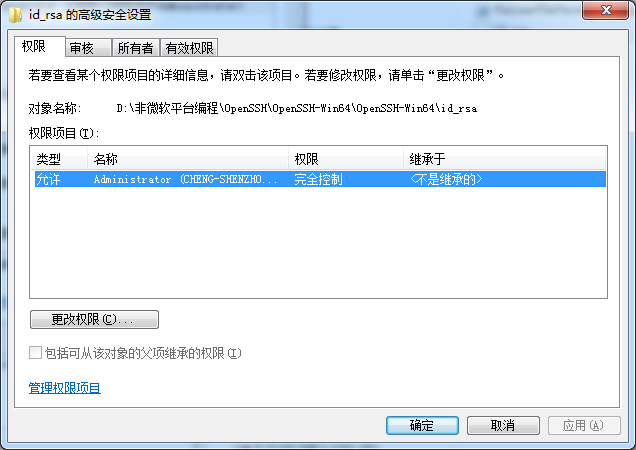
这时候会遇到Permissions for 'id_rsa' are too open. 的问题。
需要把其他人的权限全部去掉,只保留自己能够访问,不用父级目录继承权限。这样就可以自动登陆了,但是第一次需要输入yes。以后就可以无人值守了。如果发现仍然要输入密码,那么进入[服务端]运行 FixHostFilePermissions.ps1 和 FixUserFilePermissions.ps1 的powershell脚本就可真正的免密登录了。

网上不断线的教程很多,包括用了autossh,但是仍然不好使。最终找到下面的方法:
在使用本地连接L方式时候,可以设置循环,保证永不掉线。
@echo off

echo ***

:LOOP

echo [%HOST%] [%date% %time%] ssh running...

ssh -i id_rsa -N -L 0.0.0.0::localhost: administrator@10.168.1.154

timeout  > NUL

goto LOOP

echo [%HOST%] [%date% %time%] exited
但是在使用远程连接R的时候,上述方法不一定好使, 因为网络断了连接不会自动终端,也就无法触发循环。可以尝试使用TCPkeepAlive=yes 还有配置ServerAliveInterval向服务器发送请求判断是否掉线。实测发现,即使网络断线后,一旦网络恢复稳定后,会自动重新连接。
ssh.exe -i id_rsa -o StrictHostKeyChecking=no -o TCPKeepAlive=yes -o ServerAliveInterval= -N -R :10.8.69.4:7999 administrator@10.168.1.154
踩过的坑:
命令行不识别空格时:C:\Program Files\用C:\Progra~1\替代
Windows Service2012R2即使配置了.ssh/authorized_keys公钥,连接时依然显示没有注册公钥。。。
查阅了官方wiki判断可能是权限问题:Fix SSH file permissions
进入C:\Program Files\OpenSSH(安装目录),右键 FixHostFilePermissions.ps1【使用PowerShell运行】,命令行提示全选是,重启sshd服务后密钥连接正常
附: 常见错误如下:
Error message: channel 3: open failed: connect failed: Connection refused
Change localhost to 127.0.0.1 in the ssh -L parameter.
Cannot listen on port X on local machine because of network policies.
Try to use another port locally. Ports such as 3306 (MySQL) may have been left open. These are good to use for SSH tunneling if you aren’t already running MySQL.
Error message: Privileged ports can only be forwarded by root.
Use a port above 1024, or try to set up the SSH tunnel as root.
Error message: bind: Address already in use, channel_setup_fwd_listener: cannot listen to port: xxxx, Could not request local forwarding.
Some local server process is already listening on the local port you’re trying to forward to. Pick a different local port and configure your program to connect to th at port instead. If your program cannot be configured to listen to a different port, try to find what server process is occupying that port (netstat -a on Linux or lsof -i -P on Mac OS X) and stop it. Retry setting up the tunnel.
I want other hosts on my network to be able to use the tunnel I established.
By default, only local clients can connect to SSH tunnels established this way.
Use the -g option when setting up the tunnel. Realize that this is insecure, but it may make sense in certain scenarios.
I don’t know what local port is available for me to use.
Linux: netstat -a | grep LISTEN
Mac OS X: lsof -i -P | grep LISTEN
will show you the ports that are in use. Generally, you can pick any that’s not already taken. To make sure you’re not breaking some other unknown protocol, check the IANA Well-known Port Numbers list and pick one that’s not taken.
If you’ve not been able to debug this so far, try passing the -v parameter to ssh to see verbose output. Add another -v for more verbose output.
在windows中安装OpenSSH,无密码登录,永远不断线的更多相关文章
- 怎样把windows中安装的程序列出来?
症状/问题我怎样把windows中安装的程序信息输出到一个文本文件中?解决方法使用 windows 操作系统中的命令:wmic就可以做到.下面的命令就可以把系统中安装的程序都输出到文件ProgramL ...
- windows中安装python
windows中安装python 在windows中安装python的步骤如下. 1.下载python的安装包 python的安装包地址为: https://www.python.org/ftp/py ...
- 在Windows中安装PostgreSQL
在Windows中安装PostgreSQL 虽然PostgreSQL是为类UNIX平台开发的,但它却是可以移植的.从7.1版本开始,PostgreSQL可以编译安装和作为一个PostgreSQL服务器 ...
- Windows中安装Scrapy
在linux中安装Scrapy只需要导入一些非python的支持包,在windows中安装Scrapy则是一波三折. 总之来说,主要分为以下几个步骤,可能由于系统问题(国内个人机子,甚至是小企业的机子 ...
- 在Windows中安装MinGW-w64(有图,一步一步)
在Windows中安装MinGW-w64 发表回复 如需配合Sublime Text 3编译C程序, 请参考本站文章: 使用Sublime Text 3与MinGW-w64编译C语言程序 MinGW, ...
- 下载文件时-修改文件名字 Redis在Windows中安装方法 SVN安装和使用(简单版) WinForm-SQL查询避免UI卡死 Asp.Net MVC Https设置
下载文件时-修改文件名字 1后台代码 /// <summary> /// 文件下载2 /// </summary> /// <param name="Fil ...
- Python原来这么好学-1.1节: 在windows中安装Python
这是一本教同学们彻底学通Python的高质量学习教程,认真地学习每一章节的内容,每天只需学好一节,帮助你成为一名卓越的Python程序员: 本教程面向的是零编程基础的同学,非科班人士,以及有一定编程水 ...
- 在Windows中安装PySpark环境
在Windows中安装PySpark环境 安装Python 可以选择安装官方版本的Python,或是Anaconda,对应的地址如下. 下载地址 Python:https://www.python.o ...
- windows下安装openssh服务并实现远程登录
需要准备的工具: winscp 点击下载 openssh 点击下载 步骤: 在远程计算机安装 1.首先安装openssh,双击并安装 2.指定用户的home directory为C:\ ...
随机推荐
- uva1636 - Headshot(条件概率)
简单的条件概率题,直接再来一枪没子弹的概率是所有子串”00“的数目除以‘0’的数目,随机转一下再打没子弹的概率是‘0’的数目除以总数目. #include<iostream> #inclu ...
- IEflash遇到flash遮挡
遇到IE中(包括IE6+)弹窗广告要flash遮挡的问题,后来想到了常用的iframe方法(参见<解决IE6 select z-index无效,遮挡div的bug>),最终成功了flash ...
- HDU - 5307 :He is Flying (分治+FFT)(非正解)
JRY wants to drag racing along a long road. There are nn sections on the road, the ii-th section has ...
- 快速构建一个 Springboot
快速构建一个 Springboot 官网:http://projects.spring.io/spring-boot/ Spring Boot可以轻松创建可以“运行”的独立的,生产级的基于Spring ...
- 用javascript实现base64编码器以及图片的base64编码
前面的话 base-64作为常见的编码函数,在基本认证.摘要认证以及一些HTTP扩展中得到了大量应用.在前端领域,也常常把图片转换为base-64编码在网络中传输.本文将详细介绍base64的原理及用 ...
- getParameter() getInputStream()和getReader() 区别
我们经常用servlet和jsp, 经常用request.getParameter() 来得到数据. request.getParameter() request.getInputStream() r ...
- 手机访问PC网站自动跳转到手机网站代码(转)
4G时代,手机网站已经非常普遍了,一般手机网站都有一个二级域名来访问,比如 m.16css.com 如果手机直接访问www.16css.com 就是PC网站,在手机上浏览电脑版网站体验非常不好. 如果 ...
- Machine Learning的Python环境设置
Machine Learning目前经常使用的语言有Python.R和MATLAB.如果采用Python,需要安装大量的数学相关和Machine Learning的包.一般安装Anaconda,可以把 ...
- html5 日常小结
HTML5新标签汇总 1. html5新的 (input type=类型) 元素 <input type="number" name="quantity" ...
- TCP和UDP数据包大小限制
1.概述 首先要看TCP/IP协议,涉及到四层:链路层,网络层,传输层,应用层. 其中以太网(Ethernet)的数据帧在链路层 IP包在网络层 TCP或UDP包在传输层 TCP或UDP中的数据(Da ...