
EntityFramework 学习 一 Update Entity Graph using DbContext:
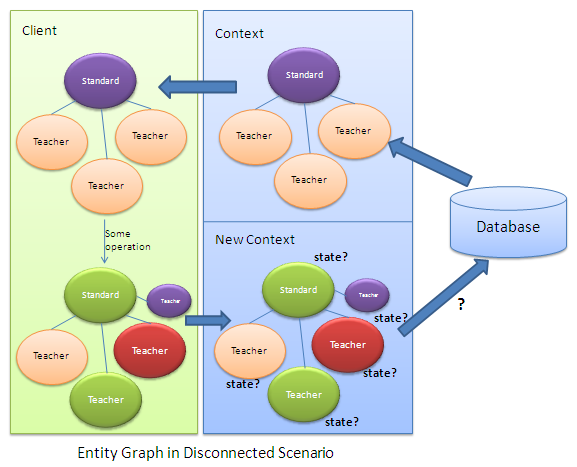
使用主键属性
每个实体必须有主键
默认值的id属性值必须为0
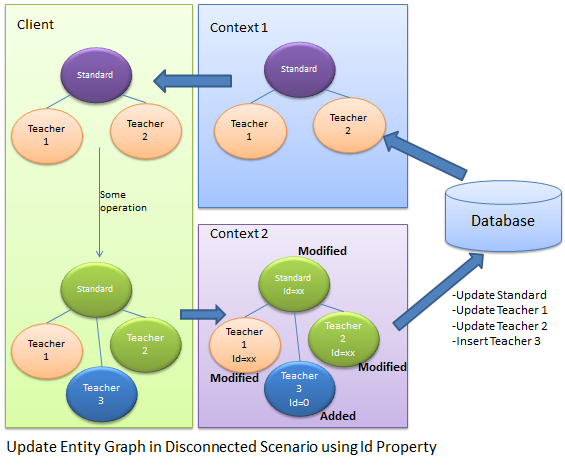
在context2中,它不知道实体的状态,
只能通过实体的主键来判断实体的状态
如果主键为0,则是新的对象,不为0 就是修改
Standard disconnectedStandard = null;

using (var context = new SchoolDBEntities())

{

    context.Configuration.ProxyCreationEnabled = false;

    disconnectedStandard = context.Standards.Where(s => s.StandardId == 58).Include(s => s.Teachers).FirstOrDefault<Standard>();

}

//Update Standard in disconnected mode

disconnectedStandard.StandardName = "Edited Standard Name";

//Update teachers collection by editing first teacher and adding new teacher

disconnectedStandard.Teachers.ElementAt(0).TeacherName = "Edited Teacher Name";

disconnectedStandard.Teachers.Add(new Teacher() { TeacherName = "New Teacher", StandardId = disconnectedStandard.StandardId });

using (var newContext = new SchoolDBEntities())

{

    //mark standard based on StandardId

    newContext.Entry(disconnectedStandard).State = disconnectedStandard.StandardId == 0 ? EntityState.Added : EntityState.Modified;

    //mark teacher based on StandardId

    foreach (Teacher tchr in disconnectedStandard.Teachers)

        newContext.Entry(tchr).State = tchr.TeacherId == 0 ? EntityState.Added : EntityState.Modified;

    newContext.SaveChanges();

}
使用主键的好处有:
1.不需要多余的代码来决定实体的状态
2.良好的性能
不好的地方有 ;
1.每个实体都需要有主键,没有主键就不能确定实体的状态
2.不能决定unchanged状态的实体,如果实体没有改变也会被设置为modified状态,这就没必要去更新没有改变的实体
3.不能删除实体
方法2:
设置实体的State属性
首先,创建一个带有枚举参数的接口
interface IEntityObjectState

{

    EntityObjectState ObjectState { get; set; }

}

public enum EntityObjectState

{

    Added,

    Modified,

    Deleted,

    Unchanged

}
其次,每个实体都实现该接口
public partial class Standard:IEntityObjectState

{

    public Standard()

    {

        this.Students = new HashSet<Student>();

        this.Teachers = new HashSet<Teacher>();

    }

    public int StandardId { get; set; }

    public string StandardName { get; set; }

    public string Description { get; set; }

    public virtual ICollection<Student> Students { get; set; }

    public virtual ICollection<Teacher> Teachers { get; set; }

    [NotMapped]

    public EntityObjectState ObjectState

    {

        get;

        set;

    }

}

public partial class Teacher:IEntityObjectState

{

    public Teacher()

    {

        this.Courses = new HashSet<Course>();

    }

    public int TeacherId { get; set; }

    public string TeacherName { get; set; }

    public Nullable<int> StandardId { get; set; }

    public virtual ICollection<Course> Courses { get; set; }

    public virtual Standard Standard { get; set; }

    [NotMapped]

    public EntityObjectState ObjectState

    {

        get;

        set;

    }

}
在客户端设置实体的状态
Teacher existingTeacher = null;

using (var context = new SchoolDBEntities())

{

    context.Configuration.ProxyCreationEnabled = false;

    existingTeacher = context.Teachers.FirstOrDefault<Teacher>();

}

Standard disconnectedStandard = new Standard() { StandardName = "New Standard", ObjectState = EntityObjectState.Added };

existingTeacher.ObjectState = EntityObjectState.Modified;

//add existing teacher(in db) to standard

disconnectedStandard.Teachers.Add(existingTeacher);

//add new standard

disconnectedStandard.Teachers.Add(new Teacher() { TeacherName = "New teacher", StandardId = disconnectedStandard.StandardId, ObjectState = EntityObjectState.Added });
using (var newContext = new SchoolDBEntities())

{

    //check the ObjectState property and mark appropriate EntityState

    if (disconnectedStandard.ObjectState == EntityObjectState.Added)

        newContext.Entry(disconnectedStandard).State = System.Data.Entity.EntityState.Added;

    else if (disconnectedStandard.ObjectState == EntityObjectState.Modified)

        newContext.Entry(disconnectedStandard).State =System.Data.Entity.EntityState.Modified;

    else if (disconnectedStandard.ObjectState == EntityObjectState.Deleted)

        newContext.Entry(disconnectedStandard).State = System.Data.Entity.EntityState.Deleted;

    else

        newContext.Entry(disconnectedStandard).State = System.Data.Entity.EntityState.Unchanged;

    //check the ObjectState property of each teacher and mark appropriate EntityState

    foreach (Teacher tchr in disconnectedStandard.Teachers)

    {

        if (tchr.ObjectState == EntityObjectState.Added)

            newContext.Entry(tchr).State = System.Data.Entity.EntityState.Added;

        else if (tchr.ObjectState == EntityObjectState.Modified)

            newContext.Entry(tchr).State = System.Data.Entity.EntityState.Modified;

        else if (tchr.ObjectState == EntityObjectState.Deleted)

            newContext.Entry(tchr).State = System.Data.Entity.EntityState.Deleted;

        else

            newContext.Entry(tchr).State = System.Data.Entity.EntityState.Unchanged;

    }

    //save changes

    newContext.SaveChanges();

}
EntityFramework 学习 一 Update Entity Graph using DbContext:的更多相关文章
- EntityFramework 学习 一 Add Entity Graph using DbContext:
//Create student in disconnected mode Student newStudent = new Student() { StudentName = "New S ...
- Entity Framework Tutorial Basics(27):Update Entity Graph
Update Entity Graph using DbContext: Updating an entity graph in disconnected scenario is a complex ...
- EntityFramework 学习 一 Update Existing Entity using DBContext in Disconnected Scenario
using System; using System.Collections.Generic; public partial class Student { public Student() { th ...
- EntityFramework 学习 一 Delete Entity using DBContext in Disconnected Scenario
Student studentToDelete; . Get student from DB using (var ctx = new SchoolDBEntities()) { studentToD ...
- EntityFramework 学习 一 Validate Entity
可以为实体实现自定义验证,重写DBContext中的个ValidateEntity方法 protected override System.Data.Entity.Validation.DbEntit ...
- EntityFramework 学习 一 Colored Entity in Entity Framework 5.0
You can change the color of an entity in the designer so that it would be easy to see related groups ...
- Entity Framework Tutorial Basics(26):Add Entity Graph
Add Entity Graph using DbContext: Adding entity graph with all new entities is a simple task. We can ...
- EntityFramework 学习 一 Disconnected Entities
如何把断开的实体添加到新的context上下文中 1.首先,我们需要把实体附加到新的context上下文实例中. 2.其次,手动的给实体设置适当的实体状态,因为新的context上下文不知道断开的实体 ...
- Entityframework:“System.Data.Entity.Internal.AppConfig”的类型初始值设定项引发异常。
<configSections> <!-- For more information on Entity Framework configuration, visit http:// ...
随机推荐
- UIWebView的全屏截图
项目开发中,我们可能会遇到如下的应用场景:将一篇文章,进行截屏(需要全屏截取,包括滚动部分)后,分享到新浪微博.邮箱等等.前段时间,我在应用开发中实现了该功能,代码也是从网上找到的,自己整理了一下.主 ...
- MIC中offload语法总结
MIC中offload的用法如下: #pragma offload specifier [,specifier...]specifier可以填入的选项为:target 例:taget(mic:0)if ...
- git 撤销已经push到远端的代码
其实是没有直接让远端代码回复到某次的指令,实现撤销push的思路如下: 1.先让代码恢复到想要恢复的前一次提交记录 2.重新提交代码,覆盖端上的代码,就相当于撤销了push 的提交 实现方式如下: 1 ...
- [CMD]重启电脑
https://zhidao.baidu.com/question/686086701903450132.html bat是批处理,可以调用关机命令关机. 制作方法如下: 打开记事本程序: 输入如下内 ...
- 【CodeM初赛B轮】A 贪心
[CodeM初赛B轮]A 题目大意:给你一棵树,起初所有点都是白色的,你每次都能选择一个白点i,将这个点i到根路径上的所有到i的距离<k[i]的点都染成黑色(根和i也算,已经被染成黑色的点还是黑 ...
- A/B(逆元)
A/B Time Limit: 1000/1000 MS (Java/Others) Memory Limit: 32768/32768 K (Java/Others)Total Submiss ...
- rm_invalid_file
import xlrd import time import sys import os import requests import sqlite3 import threading curPath ...
- 区分Web前端和后端(转载)
转载自:http://blog.csdn.net/rosetta/article/details/53871766 前言 做C开发将近六年,基本上没有接触过web相关的东西,原来听别人说web相关 ...
- ABAP 发邮件(三)
[转自http://blog.sina.com.cn/s/blog_7c7b16000101bnxk.html]SAP ABAP 发邮件方法三(OO) *&------------------ ...
- activiti基础--0------------------------------生成23张表
1.工作流activiti.cfg.xml配置文件 <beans xmlns="http://www.springframework.org/schema/beans" xm ...