
Entity Framework Tutorial Basics(27):Update Entity Graph
Update Entity Graph using DbContext:
Updating an entity graph in disconnected scenario is a complex task. It is easy to add a new entity graph in disconnected mode, but to update an entity graph needs careful design consideration.
The problem in updating an entity graph in the disconnected scenario, is that the context doesn't know what operation was performed on it at the client side. As per the following figure, the new context doesn't know the state of each entity:
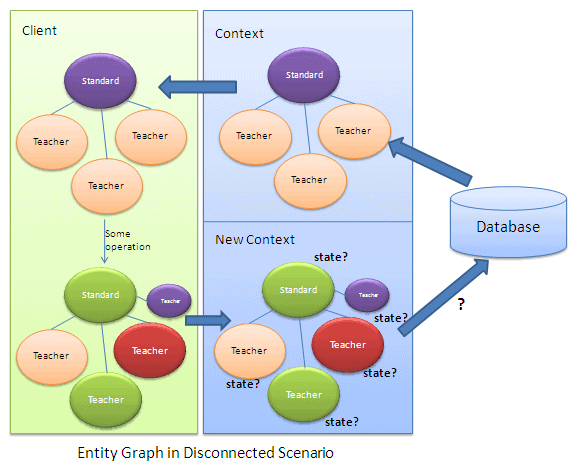
We need to identify the states of each entity in the entity graph, before calling the SaveChages() method of context. There are different patterns to identify entity state, which we need to consider in designing data layer with Entity Framework.
Patterns of Identifying Entity State in disconnected scenario:
There are several ways (some shown below) to identify an entity state in disconnected scenario:
- Using PrimaryKey (Id) property of an entity
- Having state property in entity set
Note: You can create your own design to identify an entity state based on your architecture. This is just for learning purposes.
1) Using PrimaryKey property of an entity:
You can use the PrimaryKey (Id) property of each entity to determine its entity state. However, you have to decide which of the following architectural rule to use:
- Each type of entity must have Id property (PK)
- Default value of Id property should be 0
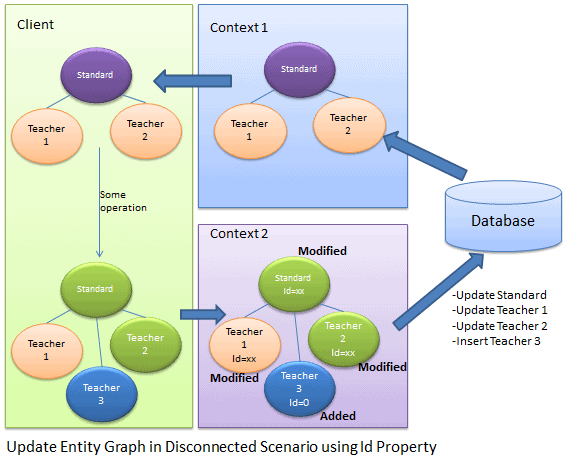
As you can see in the figure shown above, the client fetches the Standard and Teacher entity graph and does some operations on it and then sends it to Context 2 to save the changes.
In the disconnected scenario, context2 doesn't know the state of each entity. It has to determine the state of the Standard entity by using StandardId and the state of the Teacher entity by using TeacherId property. If StandardId and TeacherID value is zero, that means it is a new entity and if it is not zero then it is a modified entity.
In the above figure, Standard, Teacher 1, and Teacher 2 have a non-zero Id property value so they are marked as Modified and Teacher 3 Id is zero so it is marked as Added.
The code snippet shown below uses Id property to mark an entity state:
Standard disconnectedStandard = null;

using (var context = new SchoolDBEntities())

{

    context.Configuration.ProxyCreationEnabled = false;

    disconnectedStandard = context.Standards.Where(s => s.StandardId == ).Include(s => s.Teachers).FirstOrDefault<Standard>();

}

//Update Standard in disconnected mode

disconnectedStandard.StandardName = "Edited Standard Name";

//Update teachers collection by editing first teacher and adding new teacher

disconnectedStandard.Teachers.ElementAt().TeacherName = "Edited Teacher Name";

disconnectedStandard.Teachers.Add(new Teacher() { TeacherName = "New Teacher", StandardId = disconnectedStandard.StandardId });

using (var newContext = new SchoolDBEntities())

{

    //mark standard based on StandardId

    newContext.Entry(disconnectedStandard).State = disconnectedStandard.StandardId ==  ? EntityState.Added : EntityState.Modified;

    //mark teacher based on StandardId

    foreach (Teacher tchr in disconnectedStandard.Teachers)

        newContext.Entry(tchr).State = tchr.TeacherId ==  ? EntityState.Added : EntityState.Modified;

    newContext.SaveChanges();

}
Advantages:
- No need for extra coding/processing to determine entity state.
- Good performance.
Disadvantages:
- Every entity type needs to have an Id property. It cannot determine states of an entity that do not have Id property.
- Cannot identify an Unchanged entity. It is set to Modified state even if the entity is not changed at all. So, there is an unnecessary database update statement for an unchanged entity.
- Cannot handle delete entity scenario. It needs to handle deletion separately.
2) Having State property in every entity:
Another way to determine entity state is to have a State property in every entity type and set an appropriate state from the client side in disconnected mode. Then we just need to set the entity state as the state property of an entity object before calling SaveChanges of the new context.
Example:
First of all, create an IEntityState interface with enum property called ObjectState:
interface IEntityObjectState

{

    EntityObjectState ObjectState { get; set; }

}

public enum EntityObjectState

{

    Added,

    Modified,

    Deleted,

    Unchanged

}
Now, implement an IEntityObjectState in each entity class, e.g. Standard and Teacher entity, as shown below:
public partial class Standard:IEntityObjectState

{

    public Standard()

    {

        this.Students = new HashSet<Student>();

        this.Teachers = new HashSet<Teacher>();

    }

    public int StandardId { get; set; }

    public string StandardName { get; set; }

    public string Description { get; set; }

    public virtual ICollection<Student> Students { get; set; }

    public virtual ICollection<Teacher> Teachers { get; set; }

    [NotMapped]

    public EntityObjectState ObjectState

    {

        get;

        set;

    }

}

public partial class Teacher:IEntityObjectState

{

    public Teacher()

    {

        this.Courses = new HashSet<Course>();

    }

    public int TeacherId { get; set; }

    public string TeacherName { get; set; }

    public Nullable<int> StandardId { get; set; }

    public virtual ICollection<Course> Courses { get; set; }

    public virtual Standard Standard { get; set; }

    [NotMapped]

    public EntityObjectState ObjectState

    {

        get;

        set;

    }

}
Set the appropriate state in disconnected mode on client side:
Teacher existingTeacher = null;

using (var context = new SchoolDBEntities())

{

    context.Configuration.ProxyCreationEnabled = false;

    existingTeacher = context.Teachers.FirstOrDefault<Teacher>();

}

Standard disconnectedStandard = new Standard() { StandardName = "New Standard", ObjectState = EntityObjectState.Added };

existingTeacher.ObjectState = EntityObjectState.Modified;

//add existing teacher(in db) to standard

disconnectedStandard.Teachers.Add(existingTeacher);

//add new standard

disconnectedStandard.Teachers.Add(new Teacher() { TeacherName = "New teacher", StandardId = disconnectedStandard.StandardId, ObjectState = EntityObjectState.Added });
Set the entity state as per ObjectState before calling SaveChanges.
using (var newContext = new SchoolDBEntities())

{

    //check the ObjectState property and mark appropriate EntityState

    if (disconnectedStandard.ObjectState == EntityObjectState.Added)

        newContext.Entry(disconnectedStandard).State = System.Data.Entity.EntityState.Added;

    else if (disconnectedStandard.ObjectState == EntityObjectState.Modified)

        newContext.Entry(disconnectedStandard).State =System.Data.Entity.EntityState.Modified;

    else if (disconnectedStandard.ObjectState == EntityObjectState.Deleted)

        newContext.Entry(disconnectedStandard).State = System.Data.Entity.EntityState.Deleted;

    else

        newContext.Entry(disconnectedStandard).State = System.Data.Entity.EntityState.Unchanged;

    //check the ObjectState property of each teacher and mark appropriate EntityState

    foreach (Teacher tchr in disconnectedStandard.Teachers)

    {

        if (tchr.ObjectState == EntityObjectState.Added)

            newContext.Entry(tchr).State = System.Data.Entity.EntityState.Added;

        else if (tchr.ObjectState == EntityObjectState.Modified)

            newContext.Entry(tchr).State = System.Data.Entity.EntityState.Modified;

        else if (tchr.ObjectState == EntityObjectState.Deleted)

            newContext.Entry(tchr).State = System.Data.Entity.EntityState.Deleted;

        else

            newContext.Entry(tchr).State = System.Data.Entity.EntityState.Unchanged;

    }

    //save changes

    newContext.SaveChanges();

}
Advantages:
- No need for extra coding/processing to determine the entity state
- Handles Added, Modified, Deleted, and Unchanged states properly
- No unnecessary update call for unchanged entities.
Disadvantage:
- Need to set the appropriate states of each entity in disconnected mode. So there is a need to be extra careful in disconnected mode.
Entity Framework Tutorial Basics(27):Update Entity Graph的更多相关文章
- Entity Framework Tutorial Basics(4):Setup Entity Framework Environment
Setup Entity Framework Environment: Entity Framework 5.0 API was distributed in two places, in NuGet ...
- Entity Framework Tutorial Basics(42):Colored Entity
Colored Entity in Entity Framework 5.0 You can change the color of an entity in the designer so that ...
- Entity Framework Tutorial Basics(5):Create Entity Data Model
Create Entity Data Model: Here, we are going to create an Entity Data Model (EDM) for SchoolDB datab ...
- Entity Framework Tutorial Basics(26):Add Entity Graph
Add Entity Graph using DbContext: Adding entity graph with all new entities is a simple task. We can ...
- Entity Framework Tutorial Basics(24):Update Single Entity
Update Existing Entity using DBContext in Disconnected Scenario: In this chapter, you will learn how ...
- Entity Framework Tutorial Basics(40):Validate Entity
Validate Entity You can write custom server side validation for any entity. To accomplish this, over ...
- Entity Framework Tutorial Basics(1):Introduction
以下系列文章为Entity Framework Turial Basics系列 http://www.entityframeworktutorial.net/EntityFramework5/enti ...
- Entity Framework Tutorial Basics(32):Enum Support
Enum in Entity Framework: You can now have an Enum in Entity Framework 5.0 onwards. EF 5 should targ ...
- Entity Framework Tutorial Basics(31):Migration from EF 4.X
Migration from Entity Framework 4.1/4.3 to Entity Framework 5.0/6.0 To migrate your existing Entity ...
随机推荐
- 20179203 《Linux内核原理与分析》第十一周作业
一.环境的使用和搭建 首先我的攻击机和靶机都搭建在虚拟机上,选用的是VMware Workstation Pro虚拟机. 攻击机选用的是Linux kali 2017.2版本,而靶机安装的是XP sp ...
- bae3.0第四步 第一个polls系统
1.创建自己的app 进入新建的blog工程目录,执行其下面的manage.py来创建polls应用,命令为: python manage.py startapp polls2.定义app的model ...
- Azure Managed Disk
Azure的磁盘存储是保存在存储账户中的Page Blob.由于Azure Storage Account的各种限制,在设计VM的磁盘存储时,要符合Azure磁盘存储账户的最佳实践,请参考:http: ...
- myelipse中部署路径deploy location出现错误
背景: 因java_web项目中的所有代码以及资源文件突然无法提交,在尝试过诸多方法无果后,果断删除项目重新将down下来.启动Tomcat无问题,使用原来的访问连接报错.经检查发现加载至Tomcat ...
- phonegap中使用自带浏览器打开链接
<center><a id="ssl2" href="#" onclick="window.open('http://127.0.0 ...
- 2015.1.10 解决DataGridView SelectionChanged事件自动触发问题
DataGridView SelectionChanged事件总是在数据源更改时自动触发,这点很讨厌. 可用CellClick和KeyUp事件和一个函数替代SelectionChanged事件 pri ...
- pa15-三省吾身
序号 项 1 凡事提前10分钟 凡事提前10分钟,会让你有充裕的时间应对可能的突发事件,更加从容. 试着把起床闹钟提前10分钟,你就会发现你出门不必急匆匆,早饭也可慢慢享用,一整天的状态也 ...
- javascript——对象的概念——创建对象与销毁对象
一.创建对象 1.创建空对象 方式一: var o ={};o; //Object {} typeof(o); //"object" 方式二: var o=new Object() ...
- xcopy 命令行
https://www.cnblogs.com/yang-hao/p/6003308.html xcopy-参数详解 XCOPY——目录复制命令 1.功能:复制指定的目录和目录下的所有文件连同目 ...
- Solr5.5.3的研究之路 ---1、从Mysql导入数据并创建索引
公司需要用到全文检索,故使用Solr,也是新人一枚,本人查看的前提是Solr已经安装部署成功,我用的服务器是自带的Jetty 1.创建Collection [root@whoami bin]# ./s ...