
EntityFramework 学习 一 Update Entity Graph using DbContext:
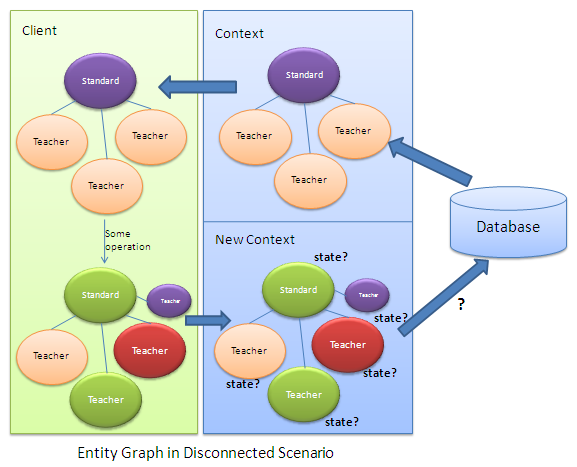
使用主键属性
每个实体必须有主键
默认值的id属性值必须为0
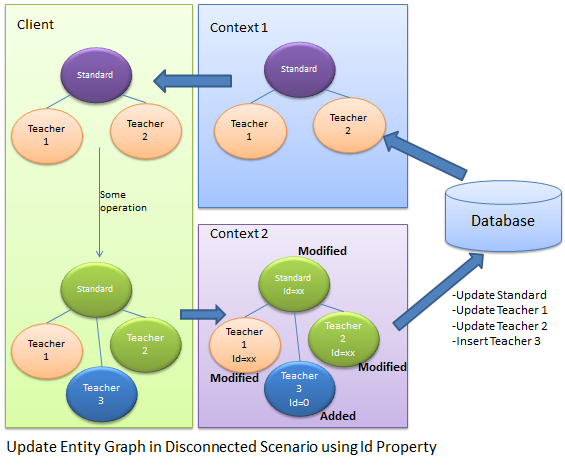
在context2中,它不知道实体的状态,
只能通过实体的主键来判断实体的状态
如果主键为0,则是新的对象,不为0 就是修改
Standard disconnectedStandard = null;

using (var context = new SchoolDBEntities())

{

    context.Configuration.ProxyCreationEnabled = false;

    disconnectedStandard = context.Standards.Where(s => s.StandardId == 58).Include(s => s.Teachers).FirstOrDefault<Standard>();

}

//Update Standard in disconnected mode

disconnectedStandard.StandardName = "Edited Standard Name";

//Update teachers collection by editing first teacher and adding new teacher

disconnectedStandard.Teachers.ElementAt(0).TeacherName = "Edited Teacher Name";

disconnectedStandard.Teachers.Add(new Teacher() { TeacherName = "New Teacher", StandardId = disconnectedStandard.StandardId });

using (var newContext = new SchoolDBEntities())

{

    //mark standard based on StandardId

    newContext.Entry(disconnectedStandard).State = disconnectedStandard.StandardId == 0 ? EntityState.Added : EntityState.Modified;

    //mark teacher based on StandardId

    foreach (Teacher tchr in disconnectedStandard.Teachers)

        newContext.Entry(tchr).State = tchr.TeacherId == 0 ? EntityState.Added : EntityState.Modified;

    newContext.SaveChanges();

}
使用主键的好处有:
1.不需要多余的代码来决定实体的状态
2.良好的性能
不好的地方有 ;
1.每个实体都需要有主键,没有主键就不能确定实体的状态
2.不能决定unchanged状态的实体,如果实体没有改变也会被设置为modified状态,这就没必要去更新没有改变的实体
3.不能删除实体
方法2:
设置实体的State属性
首先,创建一个带有枚举参数的接口
interface IEntityObjectState

{

    EntityObjectState ObjectState { get; set; }

}

public enum EntityObjectState

{

    Added,

    Modified,

    Deleted,

    Unchanged

}
其次,每个实体都实现该接口
public partial class Standard:IEntityObjectState

{

    public Standard()

    {

        this.Students = new HashSet<Student>();

        this.Teachers = new HashSet<Teacher>();

    }

    public int StandardId { get; set; }

    public string StandardName { get; set; }

    public string Description { get; set; }

    public virtual ICollection<Student> Students { get; set; }

    public virtual ICollection<Teacher> Teachers { get; set; }

    [NotMapped]

    public EntityObjectState ObjectState

    {

        get;

        set;

    }

}

public partial class Teacher:IEntityObjectState

{

    public Teacher()

    {

        this.Courses = new HashSet<Course>();

    }

    public int TeacherId { get; set; }

    public string TeacherName { get; set; }

    public Nullable<int> StandardId { get; set; }

    public virtual ICollection<Course> Courses { get; set; }

    public virtual Standard Standard { get; set; }

    [NotMapped]

    public EntityObjectState ObjectState

    {

        get;

        set;

    }

}
在客户端设置实体的状态
Teacher existingTeacher = null;

using (var context = new SchoolDBEntities())

{

    context.Configuration.ProxyCreationEnabled = false;

    existingTeacher = context.Teachers.FirstOrDefault<Teacher>();

}

Standard disconnectedStandard = new Standard() { StandardName = "New Standard", ObjectState = EntityObjectState.Added };

existingTeacher.ObjectState = EntityObjectState.Modified;

//add existing teacher(in db) to standard

disconnectedStandard.Teachers.Add(existingTeacher);

//add new standard

disconnectedStandard.Teachers.Add(new Teacher() { TeacherName = "New teacher", StandardId = disconnectedStandard.StandardId, ObjectState = EntityObjectState.Added });
using (var newContext = new SchoolDBEntities())

{

    //check the ObjectState property and mark appropriate EntityState

    if (disconnectedStandard.ObjectState == EntityObjectState.Added)

        newContext.Entry(disconnectedStandard).State = System.Data.Entity.EntityState.Added;

    else if (disconnectedStandard.ObjectState == EntityObjectState.Modified)

        newContext.Entry(disconnectedStandard).State =System.Data.Entity.EntityState.Modified;

    else if (disconnectedStandard.ObjectState == EntityObjectState.Deleted)

        newContext.Entry(disconnectedStandard).State = System.Data.Entity.EntityState.Deleted;

    else

        newContext.Entry(disconnectedStandard).State = System.Data.Entity.EntityState.Unchanged;

    //check the ObjectState property of each teacher and mark appropriate EntityState

    foreach (Teacher tchr in disconnectedStandard.Teachers)

    {

        if (tchr.ObjectState == EntityObjectState.Added)

            newContext.Entry(tchr).State = System.Data.Entity.EntityState.Added;

        else if (tchr.ObjectState == EntityObjectState.Modified)

            newContext.Entry(tchr).State = System.Data.Entity.EntityState.Modified;

        else if (tchr.ObjectState == EntityObjectState.Deleted)

            newContext.Entry(tchr).State = System.Data.Entity.EntityState.Deleted;

        else

            newContext.Entry(tchr).State = System.Data.Entity.EntityState.Unchanged;

    }

    //save changes

    newContext.SaveChanges();

}
EntityFramework 学习 一 Update Entity Graph using DbContext:的更多相关文章
- EntityFramework 学习 一 Add Entity Graph using DbContext:
//Create student in disconnected mode Student newStudent = new Student() { StudentName = "New S ...
- Entity Framework Tutorial Basics(27):Update Entity Graph
Update Entity Graph using DbContext: Updating an entity graph in disconnected scenario is a complex ...
- EntityFramework 学习 一 Update Existing Entity using DBContext in Disconnected Scenario
using System; using System.Collections.Generic; public partial class Student { public Student() { th ...
- EntityFramework 学习 一 Delete Entity using DBContext in Disconnected Scenario
Student studentToDelete; . Get student from DB using (var ctx = new SchoolDBEntities()) { studentToD ...
- EntityFramework 学习 一 Validate Entity
可以为实体实现自定义验证,重写DBContext中的个ValidateEntity方法 protected override System.Data.Entity.Validation.DbEntit ...
- EntityFramework 学习 一 Colored Entity in Entity Framework 5.0
You can change the color of an entity in the designer so that it would be easy to see related groups ...
- Entity Framework Tutorial Basics(26):Add Entity Graph
Add Entity Graph using DbContext: Adding entity graph with all new entities is a simple task. We can ...
- EntityFramework 学习 一 Disconnected Entities
如何把断开的实体添加到新的context上下文中 1.首先,我们需要把实体附加到新的context上下文实例中. 2.其次,手动的给实体设置适当的实体状态,因为新的context上下文不知道断开的实体 ...
- Entityframework:“System.Data.Entity.Internal.AppConfig”的类型初始值设定项引发异常。
<configSections> <!-- For more information on Entity Framework configuration, visit http:// ...
随机推荐
- Linux系统下如何监测磁盘的使用空间
不管是我们在安装软件还是监测软件的使用性能,我们都要随时掌握系统磁盘的使用情况. 使用df命令 df df命令用于显示磁盘分区上的可使用的磁盘空间.默认显示单位为KB.可以利用该命令来获取硬盘被占用了 ...
- Atitit..jdk java 各版本新特性 1.0 1.1 1.2 1.3 1.4 1.5(5.0) 1.6(6.0) 7.0 8.0 9.0 attilax 大总结
Atitit..jdk java 各版本新特性 1.0 1.1 1.2 1.3 1.4 1.5(5.0) 1.6(6.0) 7.0 8.0 9.0 attilax 大总结 1.1. Java的编年史2 ...
- 启动avd Android模拟器缓慢 HAXM自动安装失败
问题1.更新Android sdk镜像,腾讯镜像地址 android-mirror.bugly.qq.com 使用方法如图 问题2.自动更新HAXM失败解决方法 手动下载地址 http://softw ...
- bbb u-boot SPI 启动
beagle bone black的u-boot编译时已经为SPI准备好了 MLO.byteswap,这个文件应该直接写入到SPI flash的偏移0位置,根据am335x的手册,SPI内可以保存多份 ...
- Gmail收不到邮件咋办?
http://www.ipip.net/ping.php 分别输入 imap.gmail.com pop.gmail.com smtp.gmail.com 选择 国外 , 然后点ping,找到对应的 ...
- Viewer 是一款强大的 jQuery 图像浏览插件。
Viewer 是一款强大的 jQuery 图像浏览插件. 主要功能: 支持选项 支持方法 支持事件 支持触摸 支持移动 支持缩放 支持旋转 支持键盘 跨浏览器支持 链接: viewer的官方演示,及g ...
- 蒙特卡洛方法计算圆周率的三种实现-MPI openmp pthread
蒙特卡洛方法实现计算圆周率的方法比较简单,其思想是假设我们向一个正方形的标靶上随机投掷飞镖,靶心在正中央,标靶的长和宽都是2 英尺.同时假设有一个圆与标靶内切.圆的半径是1英尺,面积是π平方英尺.如果 ...
- git学习之安装(二)
安装Git 最早Git是在Linux上开发的,很长一段时间内,Git也只能在Linux和Unix系统上跑.不过,慢慢地有人把它移植到了Windows上.现在,Git可以在Linux.Unix.Mac和 ...
- 并行编程(2) - sum.msic.Unsafe 二
整理了几个曾经从网上记录sum.msic.Unsafe类的演示样例.供大家參考: package com.fish.unsafe; import java.io.File; import java.i ...
- xpath 获取父级,和同级
XPath轴(XPath Axes)可定义某个相对于当前节点的节点集: 1.child 选取当前节点的所有子元素 2.parent 选取当前节点的父节点 3.descendant 选取当前节点的所有后 ...