
Entity Framework Code-First(3):Setup Environment
Setup Development Environment for EF Code-First:
Let's setup the development environment for Code-First before starting on it.
Install the following tools to work with Entity Framework Code-First:
- .NET Framework 4.5
- Visual Studio 2012
- MS SQL Server 2008/2012 Express
Install EF via Nuget:
Here, we will install Entity Framework API (EntityFramework.dll) via NuGet in the VS 2012 console application. (You can install EF via NuGet the same way in any version of Visual Studio.)
First, create the console application. Right click on your project in the solution explorer and select Manage NuGet Packages..
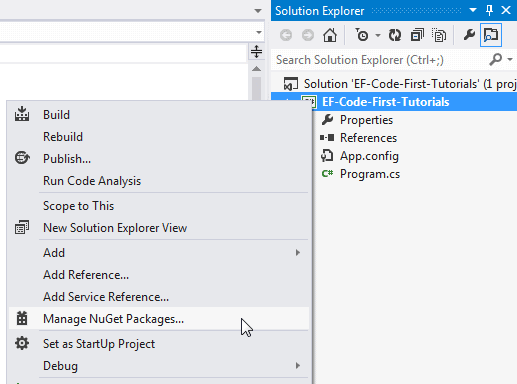
This will open Manage NuGet Packages dialogue box. Now, select Online in the left bar and search for EntityFramework as shown below.
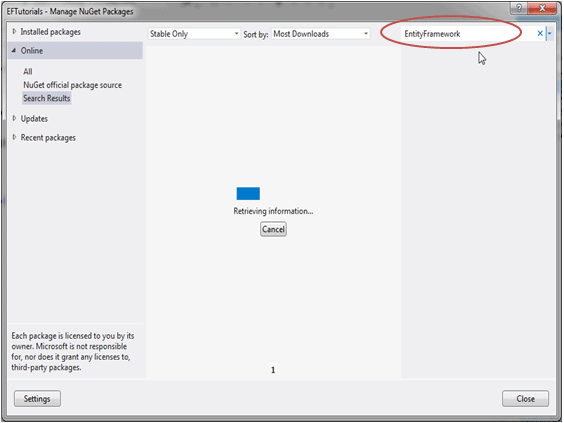
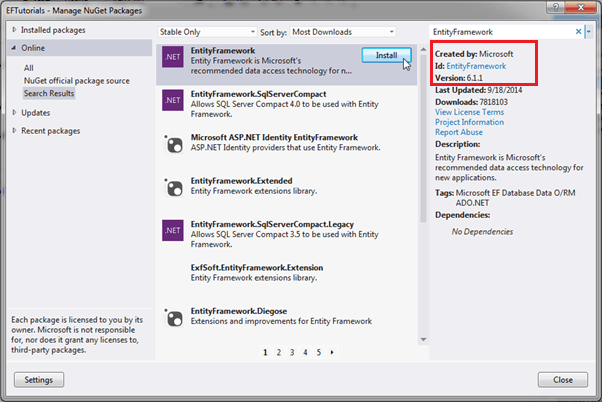
This will search for all the packages related to Entity Framework. Select EntityFramework and click on Install.
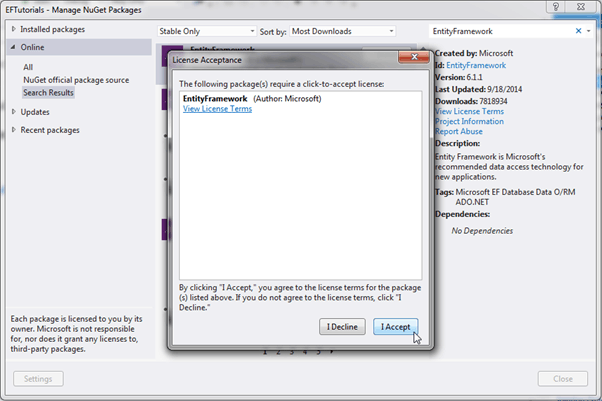
Click on the I Accept button in the License Acceptance dialogue box to start the installation.
After installation, make sure that the appropriate version of EntityFramework.dll is included in the project.
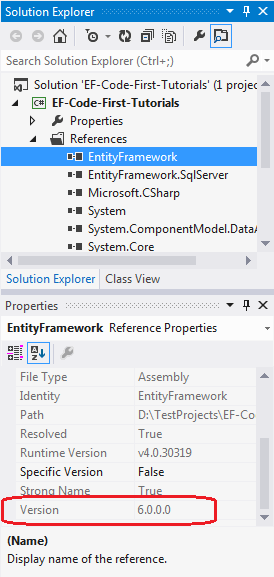
Now, we are ready to use Entity Framework Code-First in our sample console project. Let's start writing our first simple code-first example in the next section.
Entity Framework Code-First(3):Setup Environment的更多相关文章
- Entity Framework Tutorial Basics(4):Setup Entity Framework Environment
Setup Entity Framework Environment: Entity Framework 5.0 API was distributed in two places, in NuGet ...
- Entity Framework Code first(转载)
一.Entity Framework Code first(代码优先)使用过程 1.1Entity Framework 代码优先简介 不得不提Entity Framework Code First这个 ...
- Entity Framework Code First (三)Data Annotations
Entity Framework Code First 利用一种被称为约定(Conventions)优于配置(Configuration)的编程模式允许你使用自己的 domain classes 来表 ...
- Entity Framework Code First (二)Custom Conventions
---------------------------------------------------------------------------------------------------- ...
- Entity Framework Code First (一)Conventions
Entity Framework 简言之就是一个ORM(Object-Relational Mapper)框架. Code First 使得你能够通过C#的类来描述一个模型,模型如何被发现/检测就是通 ...
- Entity Framework Tutorial Basics(11):Code First
Code First development with Entity Framework: Entity Framework supports three different development ...
- Entity Framework Code First (七)空间数据类型 Spatial Data Types
声明:本文针对 EF5+, Visual Studio 2012+ 空间数据类型(Spatial Data Types)是在 EF5 中引入的,空间数据类型表现有两种: Geography (地理学上 ...
- Entity Framework Code First (四)Fluent API - 配置属性/类型
上篇博文说过当我们定义的类不能遵循约定(Conventions)的时候,Code First 提供了两种方式来配置你的类:DataAnnotations 和 Fluent API, 本文将关注 Flu ...
- Entity Framework Code First (八)迁移 Migrations
创建初始模型和数据库 在开始使用迁移(Migrations)之前,我们需要一个 Project 和一个 Code First Model, 对于本文将使用典型的 Blog 和 Post 模型 创建一个 ...
- Entity Framework Code First (六)存储过程
声明:本文只针对 EF6+ 默认情况下,Code First 对实体进行插入.更新.删除操作是直接在表上进行的,从 EF6 开始你可以选择使用存储过程(Stored Procedures) 简单实体映 ...
随机推荐
- 【leetcode刷题笔记】Permutation Sequence
The set [1,2,3,…,n] contains a total of n! unique permutations. By listing and labeling all of the p ...
- hd acm1013
Problem Description(数根) The digital root of a positive integer is found by summing the digits of the ...
- Android 蓝牙实例【转】
本文转自:http://www.yiibai.com/android/android_bluetooth.html 在很多方面,蓝牙是一种能够发送或接受两个不同的设备之间传输的数据. Android平 ...
- Shell中的 >/dev/null 2>&1
默认情况下,总是有三个文件处于打开状态,标准输入(键盘输入).标准输出(输出到屏幕).标准错误(也是输出到屏幕),它们分别对应的文件描述符是0,1,2 .那么我们来看看下面的几种重定向方法的区别: 1 ...
- Hive- 大数据仓库Hive
什么是 Hive? Hive 是由 FaceBook 开源用于解决少量数据结构化日志的数据统计.Hive是基于 Hadoop 的一个数据仓库工具,可以将结构化的数据文件映射成一张表,并提供类SQL查询 ...
- python循环切片
x = [0,99, 'a', 1, 2, 'b',5, 3, 0,'a' ,1, 8, 5,'b',5,9,5] b=[] c=[] d=[] for i in range(len(x)): if ...
- 英语发音规则---Z字母
英语发音规则---Z字母 一.总结 一句话总结:字母Z的名称zed /zed/,美式英语的称zee /zi:/,少数方言(如香港)读izzard /'izəɹd/. 1.字母Z在单词中发[z]? pu ...
- Python3 数据可视化之matplotlib、Pygal、requests
matplotlib的学习和使用 matplotlib的安装 pip3 install matplotlib 简单的折线图 import matplotlib.pyplot as plt #绘制简单的 ...
- Hibernate学习---第十三节:hibernate过滤器和拦截器的实现
一.hibernate 过滤器 1.在持久化映射文件中配置过滤器,代码如下: <?xml version="1.0"?> <!DOCTYPE hibernate- ...
- 【leetcode刷题笔记】Flatten Binary Tree to Linked List
Given a binary tree, flatten it to a linked list in-place. For example,Given 1 / \ 2 5 / \ \ 3 4 6 T ...