
Webstorm下安装ESLint检测JS代码
今天配置下Webstorm下面的Eslint。
1,先看下本地安装的Node,NPM版本,2017-11-23日这个节点最新版本。
>node -v

v8.9.1

>npm -v

5.5.
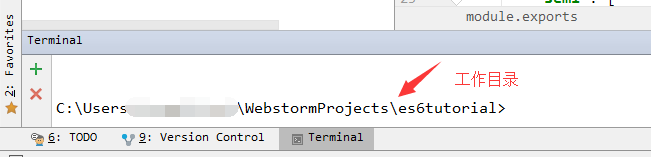
2,使用Webstorm快捷键Alt + F12,进入Terminal窗口,如下图
3,执行全局安装eslint
npm install -g eslint

4,执行 eslint --init
初始化eslint配置文件,每一步根据自己需要选择YES or NO,
C:\Users\XXXXXXX\WebstormProjects\es6tutorial>eslint --init

? How would you like to configure ESLint? Answer questions about your style

? Are you using ECMAScript  features? Yes

? Are you using ES6 modules? Yes

? Where will your code run? Browser

? Do you use CommonJS? No

? Do you use JSX? No

? What style of indentation do you use? Tabs

? What quotes do you use for strings? Single

? What line endings do you use? Unix

? Do you require semicolons? Yes

? What format do you want your config file to be in? JavaScript
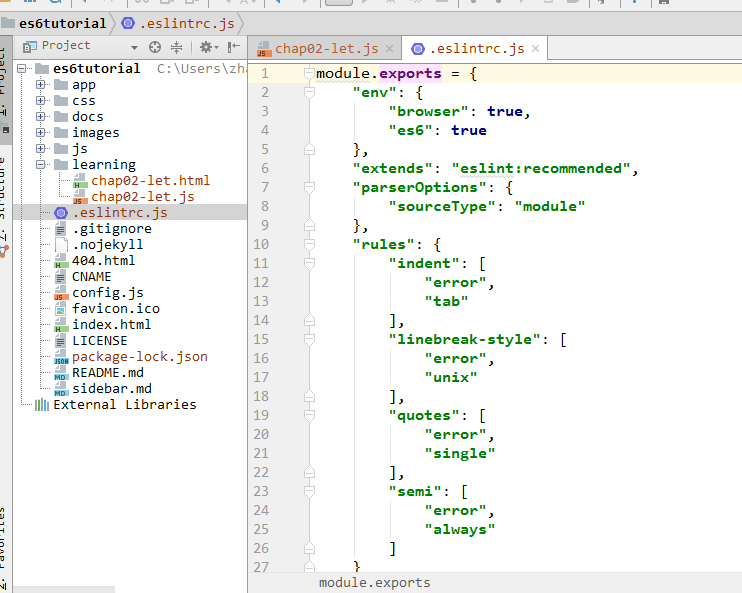
最后将会生成一份.eslintrc.js 文件,
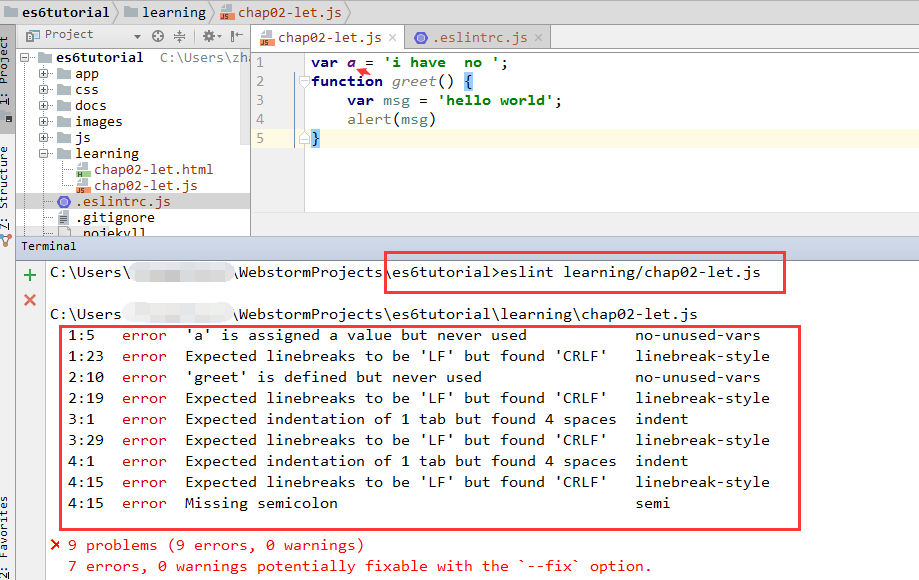
5,在自己项目里,执行 eslint learning/chap02-let.js,
eslint将会根据配置的规则进行JS验证并在控制台打印出提示消息
PS:我在安装测试过程中,发生如下错误,大概意思是:要确保ESLint全局安装。
Oops! Something went wrong! :(

ESLint: 4.11..

ESLint couldn't find the plugin "eslint-plugin-jsx-a11y". This can happen for a couple different reasons:

. If ESLint is installed globally, then make sure eslint-plugin-jsx-a11y is also installed globally. A globally-installed ESLint cannot find a

locally-installed plugin.

. If ESLint is installed locally, then it's likely that the plugin isn't installed correctly. Try reinstalling by running the following:

    npm i eslint-plugin-jsx-a11y@latest --save-dev

If you still can't figure out the problem, please stop by https://gitter.im/eslint/eslint to chat with the team.
Webstorm下安装ESLint检测JS代码的更多相关文章
- vscode安装eslint插件,代码统一自动修复
ESlint:是用来统一JavaScript代码风格的工具,不包含css.html等. 方法和步骤: 通常情况下vue项目都会添加eslint组件,我们可以查看webpack的配置文件package. ...
- ESLint检测JavaScript代码
1.安装 有2中安装方式:全局安装和局部安装. 局部安装方式为: (1)cnpm install -g eslint (2)打开项目目录.配置eslint文件 eslint --init (3)执行e ...
- ubuntu下安装 openssl&&编译运行测试代码
检查是否已安装 openssl: sudo apt-get install openssl 如果已安装执行以下操作:sudo apt-get install libssl-devsudo apt-ge ...
- 检测js代码是否已加载的判断代码
该方法不局限于jQuery的检测,对与任何Javascript变量或函数都是通用的. 当前网页加载jQuery后,jQuery()或$()函数将会被定义,所以检测jQuery是否已经加载存在以下2种方 ...
- Linux系统下安装 rpm 软件和源代码 软件包
RPM 安装方式 RPM是一个包安装管理软件,我们可以使用这个工具安装 .rpm 类型的软件.Linux的rpm包很多都能在光盘的Packages 包中找得到.首先挂载一下光盘,查看Packages中 ...
- CentOS下安装实时检测网络带宽的小工具bmon
首先下载rpmforge-release扩展的rpm包 32位操作系统:wget http://www.sudu.us/Tools/bmon/rpmforge-release-0.3.6-1.el5. ...
- 浏览器检测JS代码(兼容目前各大主流浏览器)
var BrowserMatch = { init: function () { this.browser = this.getBrowser().browser || "An Unknow ...
- Linux环境下安装配置Node.js
1.在官网查看版本,LTS代表长期支持的版本 2.进入服务器 3.输入命令:·wget https://npm.taobao.org/mirrors/node/v8.9.3/node-v8.9.3-l ...
- TODO:Ubuntu下安装Node
TODO:Ubuntu下安装Node Node.js 是一个基于 Chrome V8 引擎的 JavaScript 运行环境.Node.js 使用了一个事件驱动.非阻塞式 I/O 的模型,使其轻量又高 ...
随机推荐
- redis性能调优笔记(can not get Resource from jedis pool和jedis connect time out)
对这段时间redis性能调优做一个记录. 1.单进程单线程 redis是单进程单线程实现的,如果你没有特殊的配置,redis内部默认是FIFO排队,即你对redis的访问都是要在redis进行排队,先 ...
- maven私服 nexus2.x工作目录解读(翻译文档)
安装nexus repository manager oss 或pro版本时,会创建两个目录:一个目录包含运行环境及应用,通常符号链接为nexus:一个目录包含所有的配置和数据,通常为sonatype ...
- Yarn一点小认识
正文 打开官网http://hadoop.apache.org/docs/r2.6.5/hadoop-yarn/hadoop-yarn-site/YARN.html,将图片拿过来. 我用的是2.6.5 ...
- caffe源码 池化层 反向传播
图示池化层(前向传播) 池化层其实和卷积层有点相似,有个类似卷积核的窗口按照固定的步长在移动,每个窗口做一定的操作,按照这个操作的类型可以分为两种池化层: 输入参数如下: 输入: 1 * 3 * 4 ...
- ubuntu tftp-server 服务器安装与配置
第一步:安装tftp服务sudo apt-get install tftpd tftp openbsd-inetd第二步:目录配置vi /etc/inetd.conf修改文件夹为根目录下的tftpbo ...
- Bootstrap 禁用滚动条
Bootstrap中禁用滚动条的方法 逻辑: 当点击弹窗按钮后,js会为body元素添加一个modal-open的类,该类主要内容如下 .modal-open .modal { overflow-x: ...
- Oracle学习笔记之用户自定义函数
自定义函数语法格式: 用户自定义的函数,可以直接在sql语句中直接调用,并且任何一个funciton都必须有返回值,而且该函数声明后,是保存在数据端的,我们随时可以使用:注意:函数只能有一个返回值 ...
- 博客收藏--sailing的博客
http://blog.sina.com.cn/sailingxr free:这个博客主页的内容不错 PC的足迹 arm与x86 浅谈PCIe体系架构 浅谈cache memory
- JAVA NIO 主要概念
NIO有三个主要概念: buffer channel selector channel间通过buffer通信,channel在selector注册后,可以由selector管理,实现非阻塞编程 buf ...
- 如何用VS EF连接 Mysql,以及执行SQL语句 和存储过程?
VS2013, MySQL5.7.18 , MySQL5.7.14 执行SQL语句: ztp_user z = new ztp_user(); object[] obj = new object[] ...