
vscode安装eslint插件,代码统一自动修复
ESlint:是用来统一JavaScript代码风格的工具,不包含css、html等。
方法和步骤:
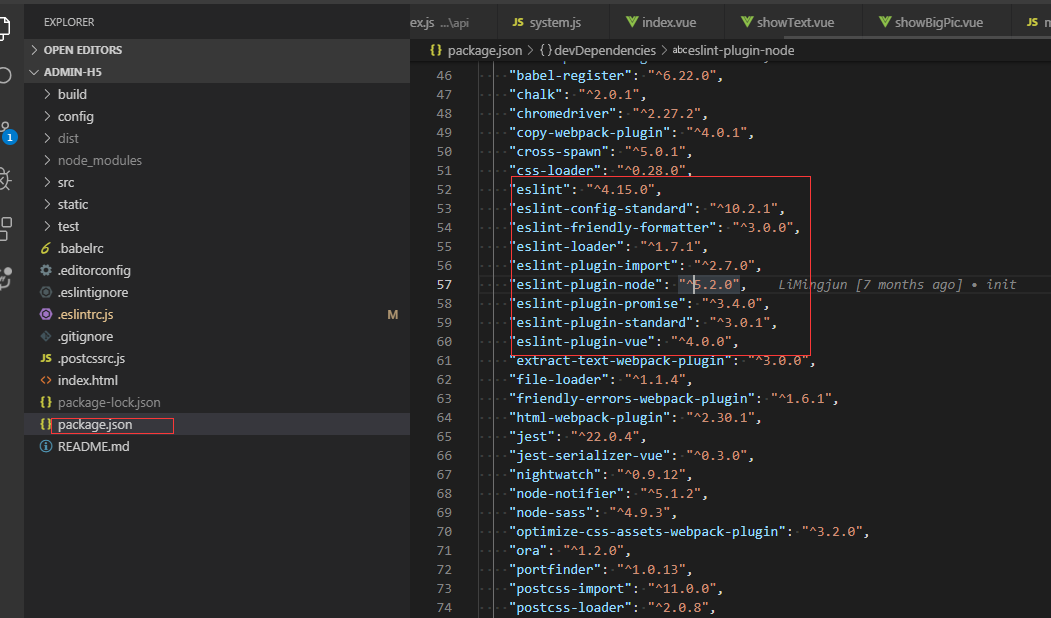
通常情况下vue项目都会添加eslint组件,我们可以查看webpack的配置文件package.json查看,也可以查看工程下是否有.eslintrc.js和.eslintignore查看到eslint是否开启。

当我们编写不符合eslint规范的代码时,启动项目会报错,比如
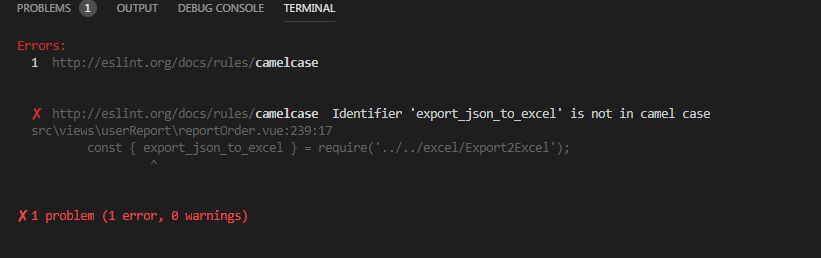
这个时候可以安装vscode eslint插件,就可以自动检测不符合规范的代码。打开vscode左侧扩展面板,搜索eslint,点击安装,重启后生效

安装好之后,还需要在vscode文件中进行设置:
通过 file->preferences->Settings 出现如下界面:

点击红框,则会出现配置文件
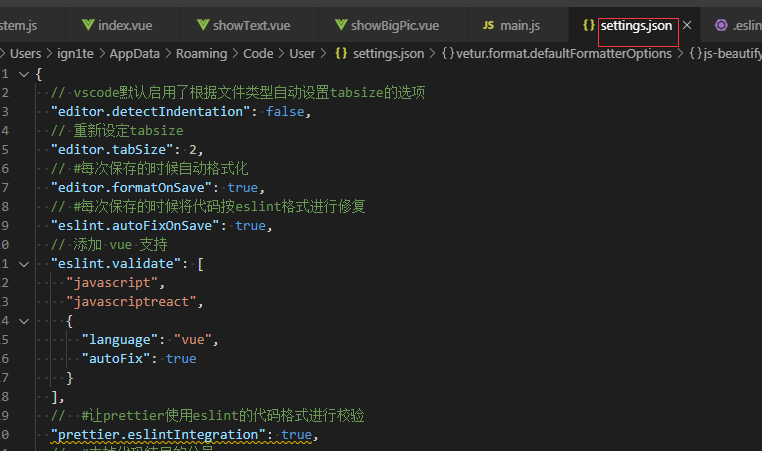
把以下代码复制到这个文件中:
{

  // vscode默认启用了根据文件类型自动设置tabsize的选项

  "editor.detectIndentation": false,

  // 重新设定tabsize

  "editor.tabSize": 2,

  // #每次保存的时候自动格式化

  "editor.formatOnSave": true,

  // #每次保存的时候将代码按eslint格式进行修复

  "eslint.autoFixOnSave": true,

  // 添加 vue 支持

  "eslint.validate": [

    "javascript",

    "javascriptreact",

    {

      "language": "vue",

      "autoFix": true

    }

  ],

  //  #让prettier使用eslint的代码格式进行校验

  "prettier.eslintIntegration": true,

  //  #去掉代码结尾的分号

  "prettier.semi": false,

  //  #使用带引号替代双引号

  "prettier.singleQuote": true,

  //  #让函数(名)和后面的括号之间加个空格

  "javascript.format.insertSpaceBeforeFunctionParenthesis": true,

  // #让vue中的js按编辑器自带的ts格式进行格式化

  "vetur.format.defaultFormatter.js": "vscode-typescript",

  "vetur.format.defaultFormatterOptions": {

    "js-beautify-html": {

      "wrap_attributes": "force-aligned"

      // #vue组件中html代码格式化样式

    }

  },

  "window.zoomLevel": 0,

  "explorer.confirmDelete": false,

  "explorer.confirmDragAndDrop": false,

  "editor.renderControlCharacters": true,

  "editor.renderWhitespace": "all"

}
然后在项目的.eslintrc.js中添加如下代码:
// https://eslint.org/docs/user-guide/configuring

module.exports = {

  root: true,

  parserOptions: {

    parser: 'babel-eslint'

  },

  env: {

    browser: true

  },

  extends: [

    // https://github.com/vuejs/eslint-plugin-vue#priority-a-essential-error-prevention

    // consider switching to `plugin:vue/strongly-recommended` or `plugin:vue/recommended` for stricter rules.

    'plugin:vue/essential',

    // https://github.com/standard/standard/blob/master/docs/RULES-en.md

    'standard'

  ],

  // required to lint *.vue files

  plugins: ['vue'],

  // add your custom rules here

  rules: {

    // allow async-await

    'no-console': 'off',

    indent: ['error', 2, { SwitchCase: 1 }],

    semi: ['error', 'always'],

    'space-before-function-paren': [

      'error',

      { anonymous: 'always', named: 'never' }

    ],

    'generator-star-spacing': 'off',

    // allow debugger during development

    'no-debugger': process.env.NODE_ENV === 'production' ? 'error' : 'off'

  }

}
ctrl + s保存代码后,便会自动修复格式不正确的代码
vscode安装eslint插件,代码统一自动修复的更多相关文章
- vscode如何安装eslint插件 代码自动修复
ESlint:是用来统一JavaScript代码风格的工具,不包含css.html等. 方法和步骤: 通常情况下vue项目都会添加eslint组件,我们可以查看webpack的配置文件package. ...
- VSCode 使用 ESLint + Prettier 来统一 JS 代码
环境: VSCode 1.33.1 Node.js 8.9.1 一.ESLint 1.介绍 ESLint是最流行的JavaScript Linter. Linter 是检查代码风格/错误的小工具.其他 ...
- vscode安装golang插件失败问题
vscode安装golang插件失败问题 dlv go-outline go-symbols gocode-gomod gocode 代码补全 godef 代码跳转 golint gopkgs gor ...
- 踩坑:VScode 集成 eslint 插件
本文以 Vue 官方脚手架 Vue-cli 为例: 1. 创建 Vue 项目 注意:Vue-cli 默认给出了 eslint 配置,一路回车即可.最后在安装模块的时候,选择直接安装!我用淘宝镜像安装时 ...
- vscode安装dlv插件报错:There is no tracking information for the current branch.
vscode安装dlv插件报错:There is no tracking information for the current branch. https://blog.csdn.net/a7859 ...
- VSCode安装jshint插件报错
Mac电脑上使用VSCode安装jshint插件时提示如下错误: Failed to load jshint library. Please install jshint in your worksp ...
- win10中,vscode安装go插件排雷指南
最近学习go,想着使用强大的vscode编写go,在安装go插件过程中,遇到了很多问题.下面记录解决方案. 1)win10环境,安装go,vscode,git 配置GOPATH环境变量,在我的电脑-& ...
- vscode 安装go插件失败后,最简单的方法
vscode 安装go插件 参考: https://github.com/goproxy/goproxy.cn/blob/master/README.zh-CN.md https://goproxy. ...
- ubuntu下vscode安装go插件失败解决办法
go env -w GO111MODULE=on go env -w GOPROXY=https://goproxy.io,direct go env -w GOSUMDB=gosum.io+ce6e ...
随机推荐
- thinkPHP连接数据库报错:PDOException in Connection.php line 295
跑去网上找了N多方法来尝试,重装apache.mysql.安装集成软件都试过了.错误一样. 后来细细分析,PDOException in Connection指的不就是PDO异常吗? 然后去了解了一些 ...
- c# winfrom 界面设计
1.在用DotnetBar的RibbonControl时,界面最大化时,会把电脑桌面的任务栏遮盖住: 解决办法:在load事件中写入: , Screen.PrimaryScreen.WorkingAr ...
- 【js】面向对象学习资料
1.面向对象模式: https://m.jb51.net/article/74549.htm 2.面向对象基础篇 http://www.cnblogs.com/chiangchou/p/js-oop1 ...
- JS ES5
常用 严格模式 use strict 必须使用var声明变量 禁止自定义函数this指向window 'use strict' funcion Person(name){ this.name = na ...
- vue中params-解决换路由不刷新问题
因为依赖路由的params参数获取写在created生命周期里面,因为相同路由二次甚至多次加载的关系 没有达到监听,退出页面再进入另一个文章页面并不会运行created组件生命周期,导致文章数据还是第 ...
- 阿里巴巴开源框架java诊断工具--Arthas
下载:arthas wget https://alibaba.github.io/arthas/arthas-boot.jar java -jar arthas-boot.jar --target-i ...
- ONNX源码安装
ONNX是facebook提出的一个 Open Neural Network Exchange协议,能够让训练好的模型在不同的框架间进行交互. ONNX的安装相对来说不是特别麻烦,麻烦的是其依赖库的安 ...
- 创建LEANGOO项目
转自:https://www.leangoo.com/leangoo_guide/leangoo_guide_create_project.html#toggle-id-3 一个项目包括多个看板和多名 ...
- Dreamweaver CS6 破解安装
安装 双击Dreamweaver.dmg文件,然后Command+N,新建一个Finder,接着将Adobe Dreamweaver CS6拖到新建Finder的应用程序中. 在Finder中应用 ...
- Vue异步请求最佳实践
一.当前存在的问题 目前项目前端请求后台数据的方式是这样的: 页面中method中dispatch到action action调用mutation,请求axios 请求到数据后存储到state中 页面 ...