
[转].net core 通过ViewComponent封装控件 左侧菜单
本文转自:http://www.cnblogs.com/BenDan2002/p/6224816.html
我们在.net core中还使用了ViewComponent方式生成控件。ViewComponent也是asp.net core的新特性,是对页面部分的渲染,以前PartialView的功能,可以使用ViewComponent来实现。
View Component包含2个部分,一个是类(继承于ViewComponent),和它返回的结果Razor视图(和普通的View视图一样)。
我们还是来看一下以侧边菜单控件为例子,怎么创建一个ViewComponent。侧边菜单控件如下图:
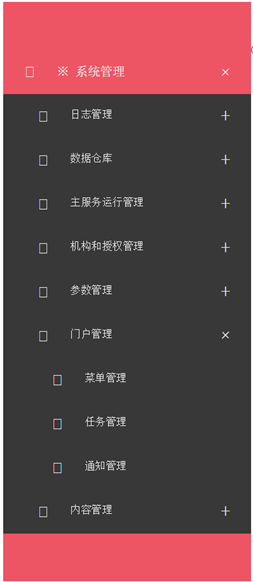
控件的主要逻辑是按照用户和应用程序代码,获取所有已经按照父子结构组织的菜单,传送到页面展示。
上面已经提到,View Component包含2个部分,一个是类,这个类也继承于ViewComponent类。子控件最主要的是重写ViewComponent类的Invoke/InvokeAsync方法:

 1     public class SideMenuViewComponent : ViewComponent

 2     {

 3         private IMenuAppService service;

 4         public SideMenuViewComponent(IMenuAppService service)

 5         {

 6             this.service = service;

 7         }

 8

 9         public IViewComponentResult Invoke(string appCode, UserInfo userInfo)

10         {

11             IEnumerable<MenuDto> menuItems = this.service.GetHierarchy(appCode, userInfo);

12

13             return View("SideMenu", menuItems);

14         }

15     }
再来看ViewComponent的第二部分,就是Razor视图,这里是SideMenu.cshtml:
 1 @using MicroStrutLibrary.Presentation.Web.Controls

 2 @using MicroStrutLibrary.AppService.Portal

 3 @using Microsoft.AspNetCore.Html

 4

 5 @model  IEnumerable<MenuDto>

 6 @{

 7     var controlId = System.Guid.NewGuid().ToString("N");

 8 }

 9

10 @functions

11 {

12     public IHtmlContent RenderChildren(IEnumerable<MenuDto> menuItems)

13     {

14         string result = "<ul class=\"submenu\" style=\"display: none;\">";

15

16         foreach (MenuDto itemInfo in menuItems)

17         {

18             var url = Url.Content(string.IsNullOrWhiteSpace(itemInfo.Url) ? "#" : itemInfo.Url);

19             var icon = string.IsNullOrWhiteSpace(itemInfo.IconClass) ? "fa fa-list-ul" : itemInfo.IconClass;

20             var leaf = (itemInfo.IsLeaf && (itemInfo.Children == null || itemInfo.Children.Count() < 1));

21

22             result += "<li>";

23             result += $"<a href=\"{Html.Raw(url)}\" target=\"{itemInfo.Target}\" title=\"{itemInfo.MenuDesc}\" data-feature=\"{itemInfo.WinFeature}\" data-leaf=\"{leaf.ToString().ToLower()}\"><i class=\"${Html.Raw(icon)}\"></i><span>{itemInfo.MenuName}</span></a>";

24             if (!leaf)

25             {

26                 result += RenderChildren(itemInfo.Children).ToString();

27             }

28         }

29

30         result += "</ul>";

31         return new HtmlString(result);

32     }

33 }

34 <div id="@(controlId)" class="jquery-accordion-menu red">

35     <div class="jquery-accordion-menu-header">

36     </div>

37     <ul>

38         @foreach (MenuDto itemInfo in Model)

39         {

40             var url = Url.Content(string.IsNullOrWhiteSpace(itemInfo.Url) ? "#" : itemInfo.Url);

41             var icon = string.IsNullOrWhiteSpace(itemInfo.IconClass) ? "fa fa-list-ul" : itemInfo.IconClass;

42             var leaf = (itemInfo.IsLeaf && (itemInfo.Children == null || itemInfo.Children.Count() < 1));

43

44             <li>

45                 <a href="@Html.Raw(url)" target="@itemInfo.Target" title="@itemInfo.MenuDesc" data-feature="@itemInfo.WinFeature" data-leaf="@(leaf.ToString().ToLower())">

46                     <i class="@Html.Raw(icon)"></i>

47                     <span>@itemInfo.MenuName</span>

48                 </a>

49                 @if (!leaf)

50                 {

51                     @RenderChildren(itemInfo.Children)

52                 }

53             </li>

54         }

55     </ul>

56     <div class="jquery-accordion-menu-footer">

57     </div>

58 </div>

59 <script>

60     require(['jquery', 'accordionmenu'], function ($) {

61         var $sidebar = $("#@(controlId)");

62

63         $sidebar.jqueryAccordionMenu();

64

65         $("a", $sidebar).click(function (e) {

66             var $this = $(this);

67

68             if (!$this.data("leaf")) {

69                 e.preventDefault();

70             } else {

71                 var feature = $this.data("feature");

72

73                 if (feature) {

74                     e.preventDefault();

75                     window.open($this.attr("href"), $this.attr("target"), feature);

76                 }

77             }

78         });

79         $("li", $sidebar).click(function () {

80             $("li.active", $sidebar).removeClass("active");

81             $(this).addClass("active");

82         });

83     });

84 </script>
Cshtml中,我们用到了@functions的写法,其实就是相当于在cshtml中编写cs的方法,一般这个方法要求返回的是IHtmlContent。
进阶:资源性视图的应用
按照以往的惯例,我们依旧还一个进阶,说明下ViewComponent中的cshtml作为嵌入的资源该如何写。
其实做法和TagHelper是一样的。首先是嵌入式资源方式,需要在project.json中按照如下方式编写:
"buildOptions": {
"embed": [ "Components/**/*.cshtml", "TagHelpers/**/*.cshtml" ]
}
然后再写一个扩展方法,同上个文档的EmbeddedFileServiceCollectionExtensions,最后是在Startup.cs中使用这个扩展方法。
因为我们的ViewComponet和TagHelper都在同一个WebControls项目中,因此进阶部分的代码根本不需要再写了。这里再重复说明的原因是,在没有写过上述代码的情况下,如何将ViewComponent的Cshtml作为嵌入的资源。
[转].net core 通过ViewComponent封装控件 左侧菜单的更多相关文章
- 9.2.4 .net core 通过ViewComponent封装控件
我们在.net core中还使用了ViewComponent方式生成控件.ViewComponent也是asp.net core的新特性,是对页面部分的渲染,以前PartialView的功能,可以使用 ...
- 9.2.3 .net core 通过TagHelper封装控件
.net core 除了继续保留.net framework的HtmlHelper的写法以外,还提供了TagHelper和ViewComponent方式生成控件. 我们本节说的是使用TagHelper ...
- [转]9.2.3 .net core 通过TagHelper封装控件
本文转自:https://www.cnblogs.com/BenDan2002/p/6170624.html .net core 除了继续保留.net framework的HtmlHelper的写法以 ...
- wheelView实现滚动选择 三方开源的封装控件 spannableString autofitTextView、PinnedSectionListView SwipeListView等等
wheelView多用于popupwindow用来滚动选择条目 github上的开源三方控件 spannableString autofitTextView.PinnedSectionLi ...
- 一步一步学Silverlight 2系列(8):使用样式封装控件观感
述 Silverlight 2 Beta 1版本发布了,无论从Runtime还是Tools都给我们带来了很多的惊喜,如支持框架语言Visual Basic, Visual C#, IronRuby, ...
- WPF封装控件时 检测是否在设计模式中
原文:WPF封装控件时 检测是否在设计模式中 版权声明:本文为博主原创文章,未经博主允许不得转载. https://blog.csdn.net/Vblegend_2013/article/detail ...
- MFC小型工具通用界面框架CLIST控件+右键菜单功能
MFC-小型工具通用界面框架 0x1 场景 由于工作需要我会写代码开发工具给客户或者同事用.代码都能实现,但写个黑乎乎的命令行工具给别人用确实显得不够专业,用别人写好的成型工具又担心有后门. 所以掌握 ...
- WPf 带滚动条WrapPanel 自动换行 和控件右键菜单
原文:WPf 带滚动条WrapPanel 自动换行 和控件右键菜单 技能点包括 WPf 样式的引用 数据的验证和绑定 比较适合初学者 前台: <Window.Resources> < ...
- ASP.NET的面包屑导航控件、树形导航控件、菜单控件
原文:http://blog.csdn.net/pan_junbiao/article/details/8579293 ASP.NET的面包屑导航控件.树形导航控件.菜单控件. 1. 面包屑导航控件— ...
随机推荐
- Linux网络相关配置
一.修改网卡相关配置 Linux网络参数是在/etc/sysconfig/network-scripts/ifcfg-eth0中设置,其中ifcfg-eth0表示是第一个网卡,如果还有另外一块网卡,则 ...
- Qt安装配置
Qt Creator: 下载: Qt 5.5.1 for Windows 32-bit(MinGW 4.9.2, 1.0 GB):http://download.qt.io/official_rele ...
- Navisworks Api Quantification
Quantification 国外有的叫定量 我们国内一些施工方叫工程量. 通过TakeOff API的开发者有机会获得更多的数据和数据可通过图形用户界面. 1 添加Navisworks的Api ...
- 使用 SSH上传安装tomcat
开发步骤: 1.在soft文件夹下上传tomcat 2.[root@localhost soft]# tar -zxvf apache-tomcat-7.0.61.tar.gz //解压安装 ...
- 2016 ICPC青岛站---k题 Finding Hotels(K-D树)
题目链接 http://acm.hdu.edu.cn/showproblem.php?pid=5992 Problem Description There are N hotels all over ...
- 面向对象设计模式纵横谈:Abstract Factory 抽象工厂模式(笔记记录)
今天是设计模式的第二讲,抽象工厂的设计模式,我们还是延续老办法,一步一步的.演变的来讲,先来看看一个对象创建的问题. 1.如何创建一个对象 常规的对象创建方法: 这样的创建对象没有任何问题, ...
- WCF服务启用与配置端口共享
在 Windows Communication Foundation (WCF) 应用程序中使用 net.tcp:// 端口共享的最简单方式是使用 NetTcpBinding 公开一个服务. 此绑定提 ...
- linux使用wkhtmltopdf报错error while loading shared libraries:
官网提示 linux需要这些动态库.depends on: zlib, fontconfig, freetype, X11 libs (libX11, libXext, libXrender) 在li ...
- shiro在springmvc里面的集成使用【转】
<dependency> <groupId>commons-collections</groupId> <artifactId>commons-coll ...
- 沙盒解决方案解决SharePoint 2013 以其他身份登陆的问题
众所周知,SharePoint 2013没有像SharePoint 2010那样有一个叫"以其他身份登录"的菜单项. 当然解决方案也很多,比如你可以直接修改Welcome.ascx ...