
9.2.4 .net core 通过ViewComponent封装控件
我们在.net core中还使用了ViewComponent方式生成控件。ViewComponent也是asp.net core的新特性,是对页面部分的渲染,以前PartialView的功能,可以使用ViewComponent来实现。
View Component包含2个部分,一个是类(继承于ViewComponent),和它返回的结果Razor视图(和普通的View视图一样)。
我们还是来看一下以侧边菜单控件为例子,怎么创建一个ViewComponent。侧边菜单控件如下图:
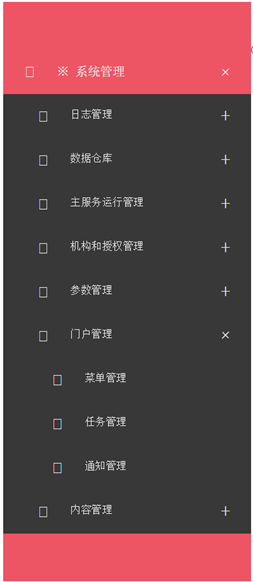
控件的主要逻辑是按照用户和应用程序代码,获取所有已经按照父子结构组织的菜单,传送到页面展示。
上面已经提到,View Component包含2个部分,一个是类,这个类也继承于ViewComponent类。子控件最主要的是重写ViewComponent类的Invoke/InvokeAsync方法:
     public class SideMenuViewComponent : ViewComponent

     {

         private IMenuAppService service;

         public SideMenuViewComponent(IMenuAppService service)

         {

             this.service = service;

         }

         public IViewComponentResult Invoke(string appCode, UserInfo userInfo)

         {

             IEnumerable<MenuDto> menuItems = this.service.GetHierarchy(appCode, userInfo);

             return View("SideMenu", menuItems);

         }

     }
再来看ViewComponent的第二部分,就是Razor视图,这里是SideMenu.cshtml:
 @using MicroStrutLibrary.Presentation.Web.Controls

 @using MicroStrutLibrary.AppService.Portal

 @using Microsoft.AspNetCore.Html

 @model  IEnumerable<MenuDto>

 @{

     var controlId = System.Guid.NewGuid().ToString("N");

 }

 @functions

 {

     public IHtmlContent RenderChildren(IEnumerable<MenuDto> menuItems)

     {

         string result = "<ul class=\"submenu\" style=\"display: none;\">";

         foreach (MenuDto itemInfo in menuItems)

         {

             var url = Url.Content(string.IsNullOrWhiteSpace(itemInfo.Url) ? "#" : itemInfo.Url);

             var icon = string.IsNullOrWhiteSpace(itemInfo.IconClass) ? "fa fa-list-ul" : itemInfo.IconClass;

             var leaf = (itemInfo.IsLeaf && (itemInfo.Children == null || itemInfo.Children.Count() <));

             result += "<li>";

             result += $"<a href=\"{Html.Raw(url)}\" target=\"{itemInfo.Target}\" title=\"{itemInfo.MenuDesc}\" data-feature=\"{itemInfo.WinFeature}\" data-leaf=\"{leaf.ToString().ToLower()}\"><i class=\"${Html.Raw(icon)}\"></i><span>{itemInfo.MenuName}</span></a>";

             if (!leaf)

             {

                 result += RenderChildren(itemInfo.Children).ToString();

             }

         }

         result += "</ul>";

         return new HtmlString(result);

     }

 }

 <div id="@(controlId)" class="jquery-accordion-menu red">

     <div class="jquery-accordion-menu-header">

     </div>

     <ul>

         @foreach (MenuDto itemInfo in Model)

         {

             var url = Url.Content(string.IsNullOrWhiteSpace(itemInfo.Url) ? "#" : itemInfo.Url);

             var icon = string.IsNullOrWhiteSpace(itemInfo.IconClass) ? "fa fa-list-ul" : itemInfo.IconClass;

             var leaf = (itemInfo.IsLeaf && (itemInfo.Children == null || itemInfo.Children.Count() <));

             <li>

                 <a href="@Html.Raw(url)" target="@itemInfo.Target" title="@itemInfo.MenuDesc" data-feature="@itemInfo.WinFeature" data-leaf="@(leaf.ToString().ToLower())">

                     <i class="@Html.Raw(icon)"></i>

                     <span>@itemInfo.MenuName</span>

                 </a>

                 @if (!leaf)

                 {

                     @RenderChildren(itemInfo.Children)

                 }

             </li>

         }

     </ul>

     <div class="jquery-accordion-menu-footer">

     </div>

 </div>

 <script>

     require(['jquery', 'accordionmenu'], function ($) {

         var $sidebar = $("#@(controlId)");

         $sidebar.jqueryAccordionMenu();

         $("a", $sidebar).click(function (e) {

             var $this = $(this);

             if (!$this.data("leaf")) {

                 e.preventDefault();

             } else {

                 var feature = $this.data("feature");

                 if (feature) {

                     e.preventDefault();

                     window.open($this.attr("href"), $this.attr("target"), feature);

                 }

             }

         });

         $("li", $sidebar).click(function () {

             $("li.active", $sidebar).removeClass("active");

             $(this).addClass("active");

         });

     });

 </script>
Cshtml中,我们用到了@functions的写法,其实就是相当于在cshtml中编写cs的方法,一般这个方法要求返回的是IHtmlContent。
进阶:资源性视图的应用
按照以往的惯例,我们依旧还一个进阶,说明下ViewComponent中的cshtml作为嵌入的资源该如何写。
其实做法和TagHelper是一样的。首先是嵌入式资源方式,需要在project.json中按照如下方式编写:
"buildOptions": {
"embed": [ "Components/**/*.cshtml", "TagHelpers/**/*.cshtml" ]
}
然后再写一个扩展方法,同上个文档的EmbeddedFileServiceCollectionExtensions,最后是在Startup.cs中使用这个扩展方法。
因为我们的ViewComponet和TagHelper都在同一个WebControls项目中,因此进阶部分的代码根本不需要再写了。这里再重复说明的原因是,在没有写过上述代码的情况下,如何将ViewComponent的Cshtml作为嵌入的资源。
9.2.4 .net core 通过ViewComponent封装控件的更多相关文章
- [转].net core 通过ViewComponent封装控件 左侧菜单
本文转自:http://www.cnblogs.com/BenDan2002/p/6224816.html 我们在.net core中还使用了ViewComponent方式生成控件.ViewCompo ...
- 9.2.3 .net core 通过TagHelper封装控件
.net core 除了继续保留.net framework的HtmlHelper的写法以外,还提供了TagHelper和ViewComponent方式生成控件. 我们本节说的是使用TagHelper ...
- [转]9.2.3 .net core 通过TagHelper封装控件
本文转自:https://www.cnblogs.com/BenDan2002/p/6170624.html .net core 除了继续保留.net framework的HtmlHelper的写法以 ...
- wheelView实现滚动选择 三方开源的封装控件 spannableString autofitTextView、PinnedSectionListView SwipeListView等等
wheelView多用于popupwindow用来滚动选择条目 github上的开源三方控件 spannableString autofitTextView.PinnedSectionLi ...
- 一步一步学Silverlight 2系列(8):使用样式封装控件观感
述 Silverlight 2 Beta 1版本发布了,无论从Runtime还是Tools都给我们带来了很多的惊喜,如支持框架语言Visual Basic, Visual C#, IronRuby, ...
- WPF封装控件时 检测是否在设计模式中
原文:WPF封装控件时 检测是否在设计模式中 版权声明:本文为博主原创文章,未经博主允许不得转载. https://blog.csdn.net/Vblegend_2013/article/detail ...
- TWinControl的刷新过程(5个非虚函数,4个覆盖函数,1个消息函数,默认没有双缓冲,注意区分是TCustomControl还是Windows原生封装控件,执行流程不一样)
前提条件:要明白在TWinControl有以下四个函数的存在,注意都是虚函数: procedure Invalidate; override;procedure Update; override;pr ...
- mvc 封装控件使用mvcpager
具体使用如下: 前台部分: @RenderPage("~/Views/Controls/_Pagebar.cshtml", new PageBar { pageIndex = Mo ...
- 9.2.2 .net framework下的MVC 控件的封装(下)
控件封装的部分说明 可能有人觉得应该前后端分离,我也承认这是应该的方向,我们也在考虑使用ng2等简化前端.但是,我们封装控件还是因为如下原因综合考虑的: 我们这是个框架,上面支撑了许多个应用,包含几百 ...
随机推荐
- JavaScript基础
JavaScript基础 JavaScript是一门编程语言,浏览器内置了JavaScript语言的解释器,所以在浏览器上按照JavaScript语言的规则编写相应代码之,浏览器可以解释并做出相应的处 ...
- 听H3絮叨:何以让天下没有难用的流程
最近朋友圈.网站新闻铺天盖地是"让天下没有难用的流程",有人就要问了,H3 BPM何德何能,为BPM站台,让天下没有难用的流程? 这是一个关于"办公室空想"的故 ...
- Oracle-BPM安装详解
H3 BPM安装包括两个部分,基础工作包括安装IIS..net Freamwork基础框架.安装完成之后,主要配置安装包括数据库,H3 BPM 程序.下面详细介绍Oracle与H3 BPM对接安装的整 ...
- Android事件分发机制浅谈(一)
---恢复内容开始--- 一.是什么 我们首先要了解什么是事件分发,通俗的讲就是,当一个触摸事件发生的时候,从一个窗口到一个视图,再到一个视图,直至被消费的过程. 二.做什么 在深入学习android ...
- Atitit.研发团队的管理原则---立长不立贤与按资排辈原则
Atitit.研发团队的管理原则---立长不立贤与按资排辈原则 1. 组织任命原则概述1 2. 历史的角度看,大部分组织使用的立长不立贤原则1 3. 论资排辈 立长不立贤原则1 3.1. 资格和辈分是 ...
- 使用apache自带日志分割模块rotatelogs,分割日志
rotatelogs 是 Apache 2.2 中自带的管道日志程序,参数如下(参见:http://lamp.linux.gov.cn/Apache/ApacheMenu/programs/rotat ...
- MyEclipse对Maven的安装
好记性不如烂笔头,记录一下. 操作系统:windows 7 MyEclipse2015 JDK1.7 maven的下载链接,点这里下载apache-maven-3.0.4-bin.tar.gz. 下载 ...
- kvm上的Linux虚拟机使用virtio磁盘
kvm上的Linux虚拟机使用virtio磁盘 系统:centos6.6 64位 网上的文章比较少,怎麽将Linux虚拟机的磁盘改为使用virtio磁盘 因为centos6或以上系统已经包含了vir ...
- iOS开发系列--Swift 3.0
概述 从写第一篇Swift文章的时候到现在Swift已经从1.2发展到了今天的3.0,这期间由于Swift目前还在发展阶段并不能向下兼容,因此第一篇文章中的部分代码在当前的Xcode环境中已经无法运行 ...
- .net的简易多线程处理
这篇文章是对几年前写的<Task及其异常处理的若干事项>的一些狗尾续貂的补充. 更简单的写法 几年前写的那篇文章很详细地描述了.net用Task对线程进行封装的相关技术.开一个新的线程去执 ...