
sharepoint 创建个人网站
One of the SharePoint 2013 puzzle pieces which got some major improvements are My Sites, User Profiles and news feeds. This article describes step-by-step process of setting up the my site infrastructure in the SharePoint Farm.
Prerequisite for setting up My Sites is having user profiles import or sync up and running. You can read more on user profiles sync in my previous article.
When this has been configured, we can start configuring my sites:
The first step us to go create (according to the best practices) own web application for hosting my sites. Go to the central administration, Application management, “Manage web applications”
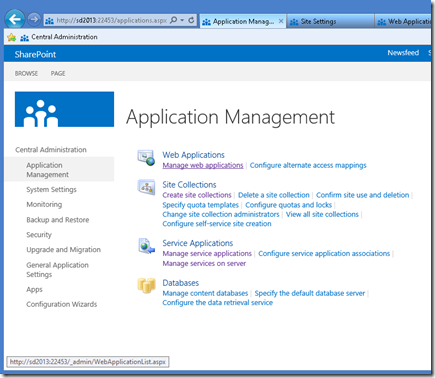
And create a dedicated web application (sd2013:101 in my example here)
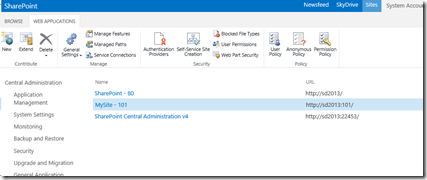
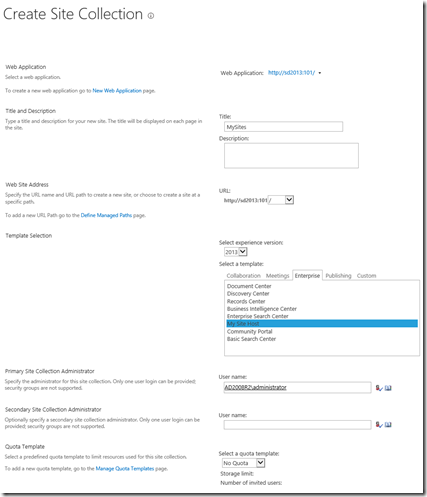
Now, the next step would be to create a site collection in the root of the newly created web application. You can of course create it inside some other managed path other than root, but since we have dedicated Web Application, root seems like an obvious choice.
Site Collection must have “2013” experience and use “My Site Host” template.
After Site Collection has been created, click on the “Managed Paths” in the web application that you created to host My Sites.
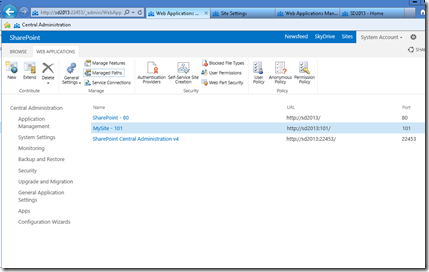
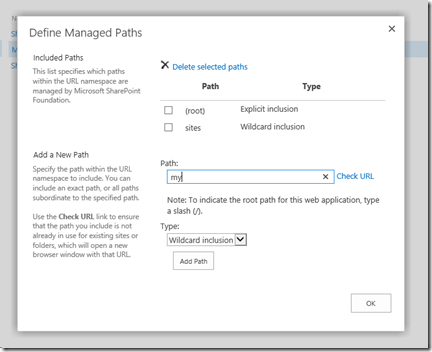
Add a new managed path with wildcard inclusion. I prefer to use “my” as the My Site managed path, but you can of course pick up anything else.
The next thing is to check service connections for the Web Application which will host my sites. Click on the “Service Connections” button to…
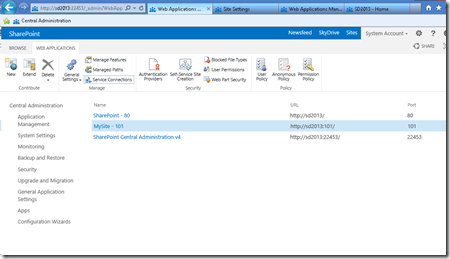
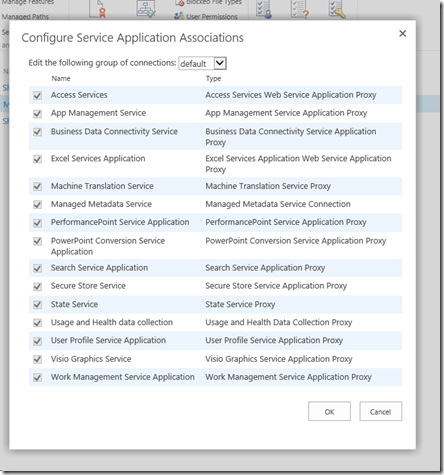
..see if right service applications are set up.
If you choose “Custom” (instead of the “Default”) in the Edit the following group of connections drop down, select any service applications to which you want to connect the web application. The most important ones re User Profile service application, the managed metadata service application, and the Search service application.
In my case, I’ll just proceed with “default”
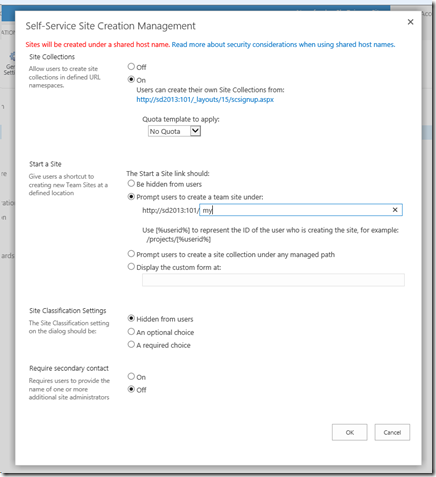
Now it’s time to set up the self service site creation. Go back to the Web application management, chose the application that you created to host My Sites, and click on the “Self Service Site Creation” button.
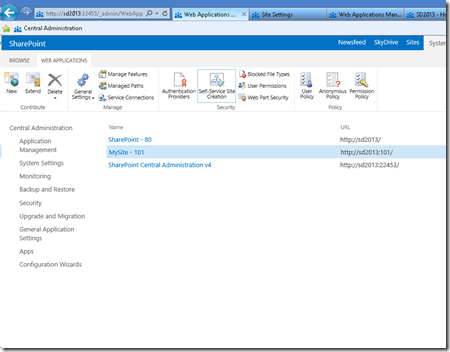
Click “On” in the “Site Collections” radio box, and enter your managed path in the “Start a Site” field (with “Prompt users to create a team site under” chosen)
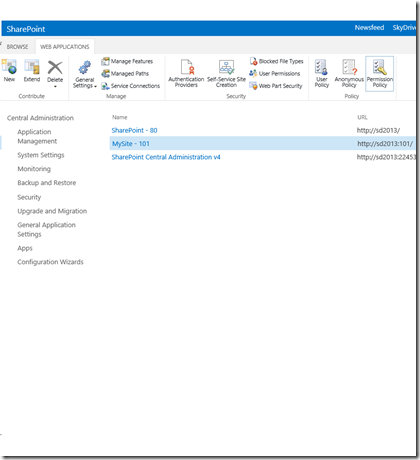
Now, the next step is to grant users permission to create new site collections (for my sites). Click on the “Permission Policy” button in the Web Application management, with the web application which hosts the my sites selected.
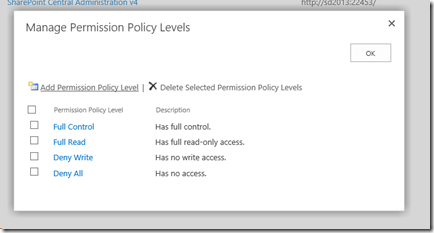
In the”Manage Permission Policy Levels”, click on the “Add Permission Policy Level”
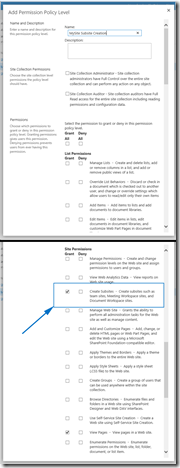
Call it however you want (“MySite Subsite Creation” in my case), and grant the “Create Subsites” permission.
Now, the new permission policy level should appear among other policy levels…
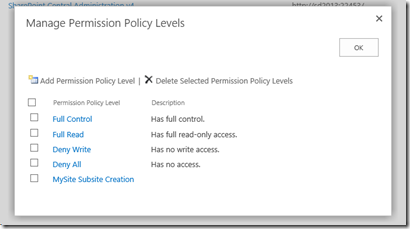
And we need to grant that policy level to the users. Click on the “Users Policy” button in the Web Application management, with the web application that you created to host My Sites selected…
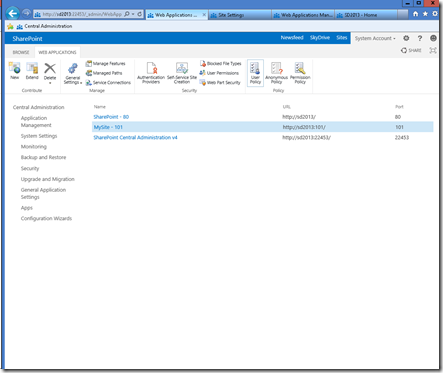
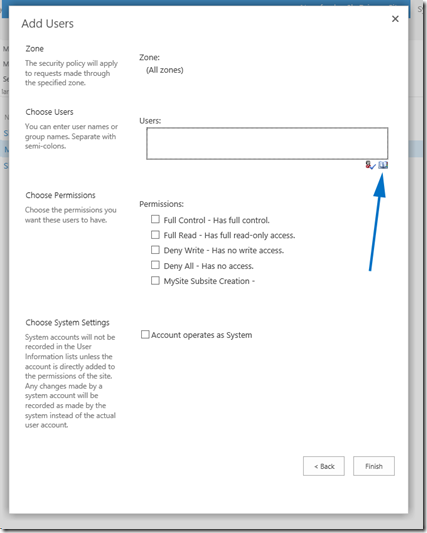
Click on the “Add users” link…
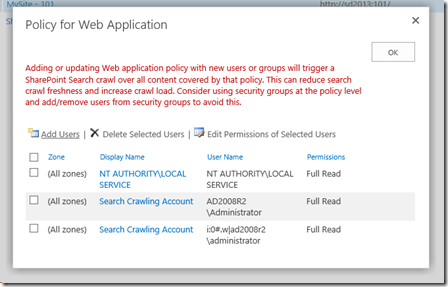
From all zones…
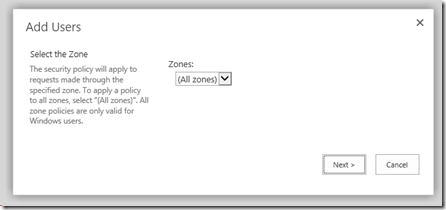
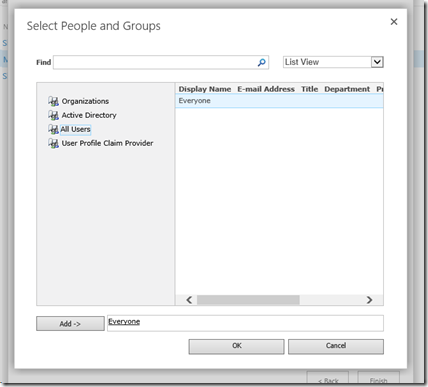
And select the users which you want to have rights to create my sites. On my case, it will be “Everyone”.
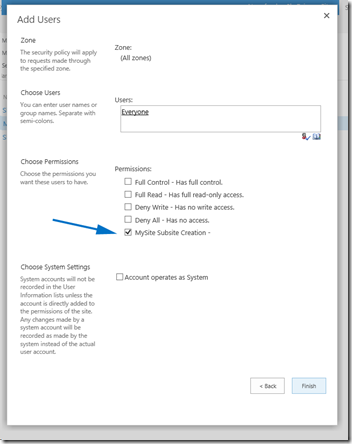
Select your newly created policy level…
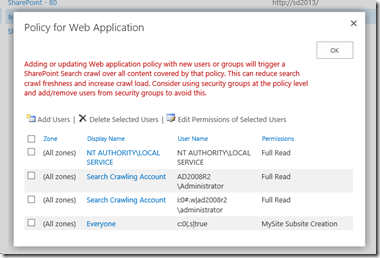
And now you should see “Everyone” with the new policy selected.
OK, everything has been set up and prepared so far. Now, finally, let’s set up the my sites. Go to the Central Administration –> Application Management, and select “Manage service applications”.
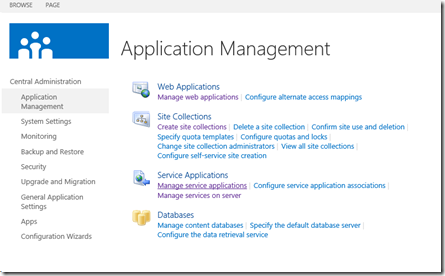
Then select the “User Profile Service Application”

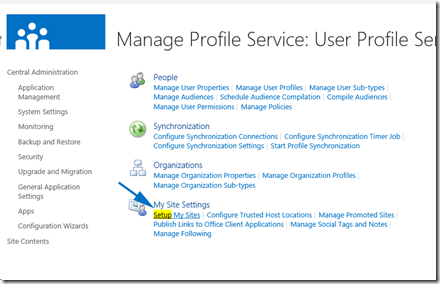
In the “User Profile Service Application”, click on “Setup My Sites”
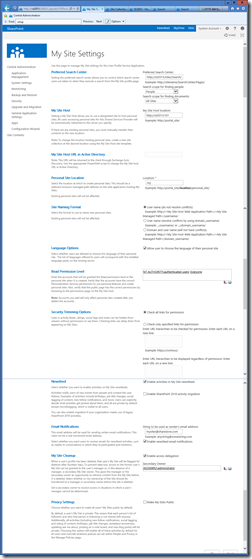
This is where you need to set up the search center, my host location (in my case – root site collection of the Web Application that serves as the host) and personal site location (managed path within the host web application – “my” in my case). Take a look at the screenshot for all the other fields (which I have used in my case):
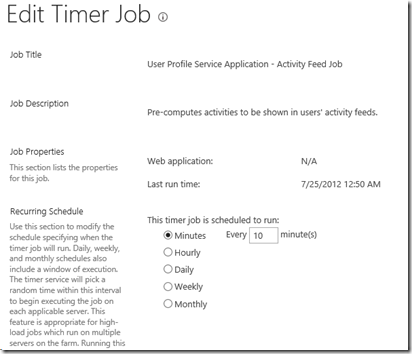
The only remaining thing would be to set up the timer job for activity feed. Go to the Central Administration –> Monitoring –>Timer Job –> Review job definitions
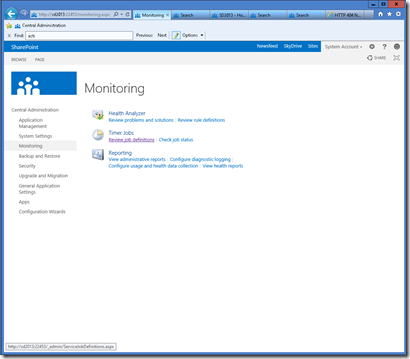
Find the “User Profile Service Application – Activity Feed Job”, and set up the activity feed sync timer according to your needs.

And, that’s it.
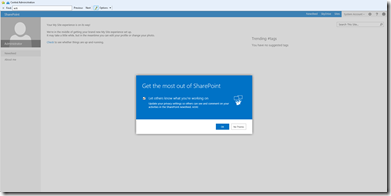
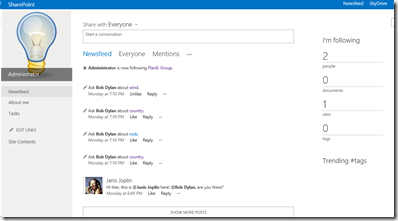
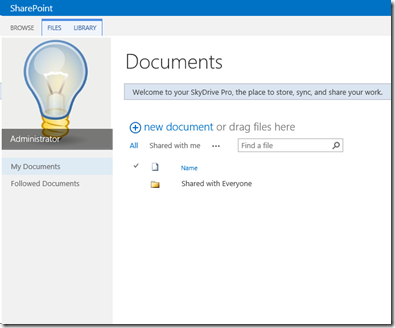
Go to the my site now, and you will be notified of my site creation for your self. Take care of your profile, follow people. Upload you private documents, share documents, follow documents – enjoy being social! 
sharepoint 创建个人网站的更多相关文章
- SharePoint Online 创建门户网站系列之准备篇
前 言 门户是SharePoint自推出以来,就非常适合的一种站点类型,在Server版本中,发布站点的应用非常广泛.这里,我们以一个个简单的例子,然后以一个固定的项目Demo,为大家演示如何一步步在 ...
- 使用SharePoint创建和定义自己的网站页面
使用SharePoint创建和定义自己的网站页面 1. 打开SharePoint Designer 2010. 2. 点击网站页面导航. 3. 在功能区点击Web部件页面,新建Employee.axp ...
- SharePoint 创建网站地图树视图及格式枚举截图
SharePoint 创建网站地图树视图及格式枚举截图 SharePoint首页隐藏掉左側导航以后,假设要以树视图呈现站点地图也非常easy. 仅仅须要复制v4.mas ...
- SharePoint入门——创建一个网站
1.首先安装SP相关环境,可以百度到具体操作步骤: (以下步骤基于本人环境:本人用的Win10自带的Hyper-V虚拟机.Windows Server2012R2.SQL2014以及SharePoin ...
- SharePoint 2013 新建网站集图解
前言:接触SharePoint的人可能是越来越多,但是很多人一接触就很迷茫,在技术群里问如何新建网站集,这样一篇图解,帮助新手学习在搭建好SharePoint环境之后,如何创建一个网站集,做一个基本的 ...
- SharePoint 2013 跨网站集发布功能简介
在SharePoint Server 2013网站实施中,我们经常会遇到跨网站集获取数据,而2013的这一跨网站集发布功能,正好满足我们这样的需求. 使用SharePoint 2013中的跨网站发布, ...
- SharePoint 2013 新建网站集图解(绝对菜鸟篇)
前言:接触SharePoint的人可能是越来越多,但是很多人一接触就很迷茫,在技术群里问如何新建网站集,这样一篇图解,帮助新手学习在搭建好SharePoint环境之后,如何创建一个网站集,做一个基本的 ...
- SharePoint 创建 Lookup 类型的Site Column解决跨站问题
在某些情况下,我们需要去引用其他List中的数据,比如在网站集(Site Collection)上有个List叫Country,在其子网站(WebSite)有个List叫Employee,如果要在子S ...
- SharePoint创建内容类型
SharePoint创建内容类型 内容类型的用途是多种多样的.创建内容类型也非常简单. 1. 点击网站操作--网站设置. 2. 点击网站内容类型,点击创建. 3. 命名Beginning_ShareP ...
随机推荐
- 201521123040《Java程序设计》第2周学习总结
1. 本周学习总结 本周学习目录: <1>回顾(Java程序) <2>掌握各种数据类型的使用 <3>掌握运算符和表达式的使用 <4>枚举类.String ...
- 201521123063 《Java程序设计》 第10周学习总结
1. 本周学习总结 1.1 以你喜欢的方式(思维导图或其他)归纳总结异常与多线程相关内容. 2. 书面作业 本次PTA作业题集异常.多线程 finally 题目4-2 1.1 截图你的提交结果(出现学 ...
- SpringMVC第五篇【方法返回值、数据回显、idea下配置虚拟目录、文件上传】
Controller方法返回值 Controller方法的返回值其实就几种类型,我们来总结一下-. void String ModelAndView redirect重定向 forward转发 数据回 ...
- Exception in thread "main" org.hibernate.TransientObjectException: object references an unsaved tran
今天在使用一对多,多对一保存数据的时候出现了这个错误 Hibernate错误: Exception in thread "main" org.hibernate.Transient ...
- 离线安装 Cloudera Manager 5 和 CDH5.10
关于CDH和Cloudera Manager CDH (Cloudera's Distribution, including Apache Hadoop),是Hadoop众多分支中的一种,由Cloud ...
- 原型那些事 - JavaScript深入浅出(三)
前两次总结了JavaScript中的基本数据类型(值类型<引用类型>,引用类型<复杂值>)以及他们在内存中的存储,对内存空间有了一个简单的了解,以及第二次总结了this深入浅出 ...
- 学习OpenResty的正确姿势
前段时间老罗退出得到专栏事情闹得沸沸扬扬,另一位老罗也给出了合理的会员退费,感觉得到还是蛮贴心的.想想也是,毕竟精力有限,如今老罗也有了十亿的投资,集中精力做好手机才是主业.记得老罗刚开专栏那段时间很 ...
- [js高手之路] es6系列教程 - Set详解与抽奖程序应用实战
我们还是从一些现有的需求和问题出发,为什么会有set,他的存在是为了解决什么问题? 我们看一个这样的例子,为一个对象添加键值对 var obj = Object.create( null ); obj ...
- CentOS 7安装squid代理服务器
Squid,一个高性能的代理缓存服务器,支持FTP.gopher.HTTP协议. Squid,一个缓存Internet 数据的软件,其接收用户的下载申请(作为代理服务器),并自动处理所下载的数据,并返 ...
- C#最基本的小说爬虫
新手学习C#,自己折腾弄了个简单的小说爬虫,实现了把小说内容爬下来写入txt,还只能爬指定网站. 第一次搞爬虫,涉及到了网络协议,正则表达式,弄得手忙脚乱跑起来效率还差劲,慢慢改吧. 爬的目标:htt ...