
Delphi10.2 VCL Forms Application 的构成
Delphi10.2 项目的构成(File Extensions of Files Generated by RAD Studio)
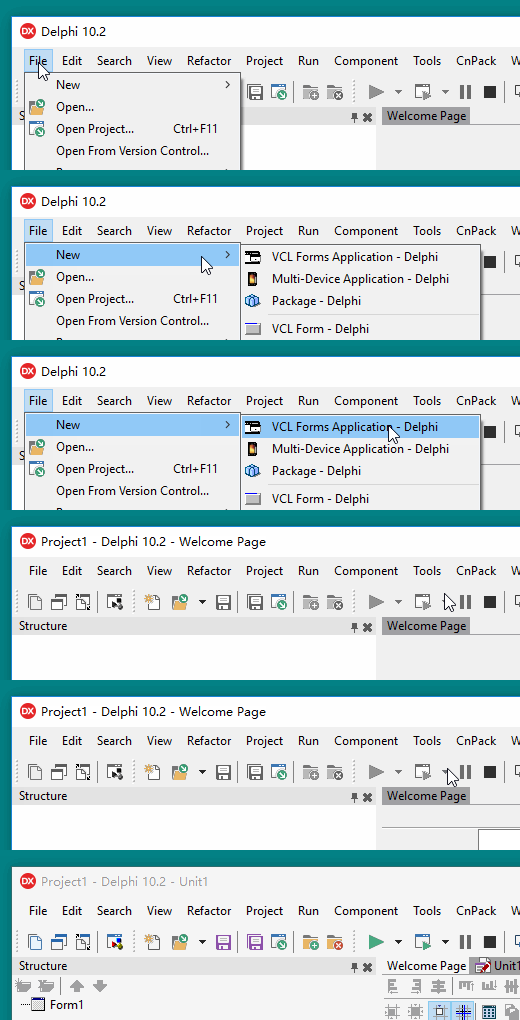
Step1、打开 Delphi10.2,选择【File | New | VCL Forms Application - Delphi】,创建一个 Delphi 应用程序;
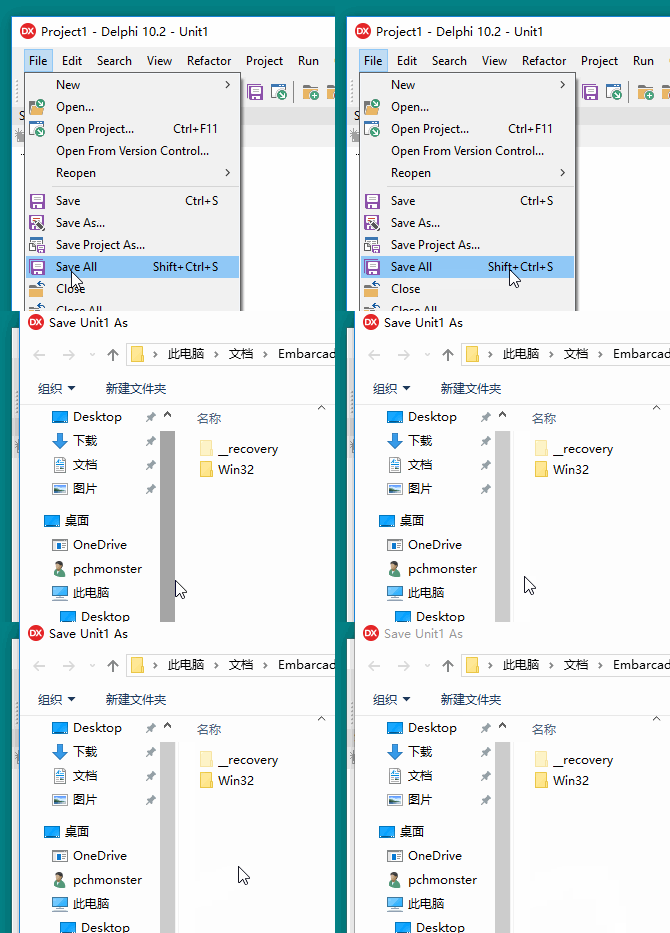
Step2、选择【File | Save All】,将我们的默认Delphi程序保存到一个独立的文件夹(例如 F:\Delphi10.2\First)中;
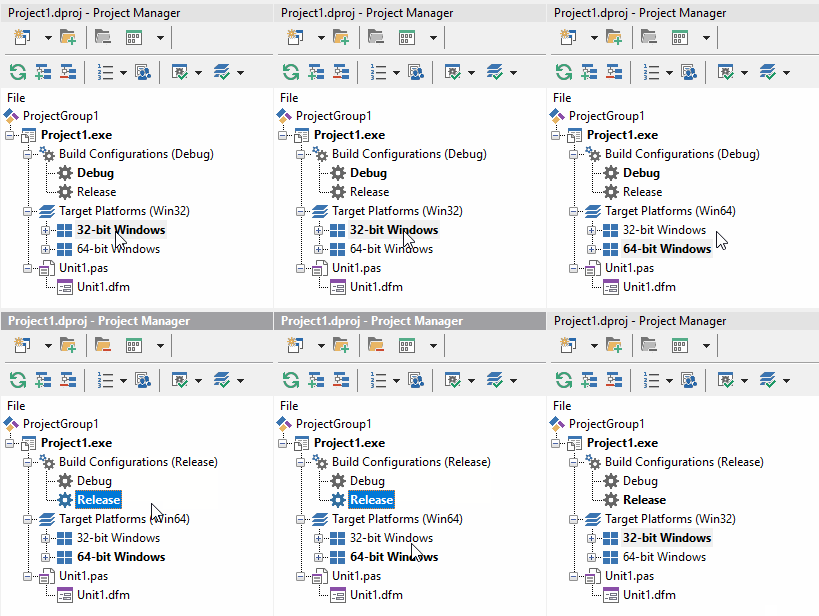
Step3、在 Project Manager 中的 Build Configurations 和 Target Platforms 选项中分别选择 32位 Debug、32 位 Release、64位 Debug和64位 Release组合,并按【F9】运行我们的程序;
Step4、接下来打开Windows资源管理器,打开刚刚保存的文件夹看看,如下图:
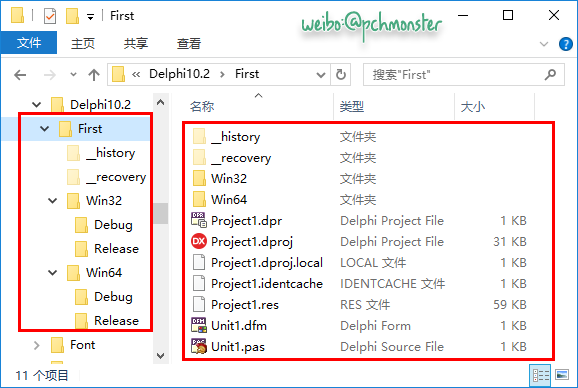
并且 Win32(Win64) 的 Debug(Release) 目录下文件如下:
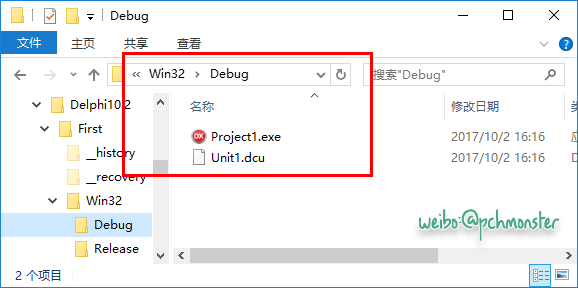
下面结合 Delphi10.2 的帮助文件说明下每个文件的具体意义:
- 【Project1.dpr】Delphi project source; when compiled, produces .exe, .dll, or .ocx file.
- 【Project1.dproj】Delphi project file created by the IDE. Contains the current settings for project options, such as compiler and linker settings, directories, conditional directives, and command-line parameters. Set these options using Project > Options. This file is not used when compiling a project from the command line using the command line compiler.
- 【Project1.dproj.local】User-specific project options.
- 【Project1.identcache】Information used for refactoring.
- 【Project1.res】Compiled and uncompiled resource files.
- 【Unit1.dfm】A Windows VCL form file.
- 【Unit1.pas】Delphi source file.
- 【_history 文件夹】 There are now three versions of the file stored in the current directory in a hidden directory named __history.
- 【_recovery 文件夹】 When Tools > Options > Environment Options > AutoRecover is enabled, RAD Studio saves the recovery files in the hidden folder called
_recovery, in the folder of your project. - 【Win32 文件夹 】Output folder, 32-bit Windows platform
- 【Win64 文件夹】 Output folder, 64-bit Windows platform
- 【Project1.exe】 应用程序
- 【Unit1.dcu】Delphi compiled unit file.
Delphi10.2 VCL Forms Application 的构成的更多相关文章
- create Context Menu in Windows Forms application using C# z
In this article let us see how to create Context Menu in Windows Forms application using C# Introduc ...
- Catch Application Exceptions in a Windows Forms Application
You need to handle the System.Windows.Forms.Application.ThreadException event for Windows Forms. Thi ...
- 【C#遗补】获取应用程序路径之System.IO.Directory.GetCurrentDirectory和System.Windows.Forms.Application.StartupPath的区别
原文:[C#遗补]获取应用程序路径之System.IO.Directory.GetCurrentDirectory和System.Windows.Forms.Application.StartupPa ...
- Windows Forms Application Creation and Initialization
Windows Forms Application Creation and Initialization This topic details the steps performed after a ...
- vcl.Forms等与VCL界面有关的单元不支持跨平台
vcl.Forms等与VCL界面有关的单元不支持跨平台 midaslib也不支持
- System.Windows.Forms.Application.DoEvents();
关于Application.DoEvents()的小研究 在MSDN中的备注是: 当运行 Windows 窗体时,它将创建新窗体,然后该窗体等待处理事件.该窗体在每次处理事件时,均将处理与该事件关联的 ...
- xe6+firedac连接sybase
一.Win7 X64系统安装sybase odbc: 1. 下载对应包至c:\system_odbc(文件夹名自己取,在后面注册表内容需要用到): 2. 将值信息写入到注册表内: Windows ...
- 李维作答 《insideVCL》——李维实在很勤奋,而且勇于突破,从不以旧的内容充数
(编者按)<Inside VCL(VCL核心架构剖析)>一书出版以来,众多热心读者给李维先生.博文视点公司.CSDN写来信件,有更多朋友在各个论坛上发表关于该书的言论.读者们不但盛赞该书, ...
- XE5 搭建DataSnap服务
1 准备工作 1.1 环境准备 XE5或XE7,操作系统Windows7(64位)操作系统. 数据库MSSQL选择SQLServer2008. 如果数据库服务没有在开发电脑上,则需要在开发电脑上安 ...
随机推荐
- ActiveMQ笔记——技术点汇总
目录 · Introduction to ActiveMQ · Installing ActiveMQ · Message-oriented middleware · JMS specificatio ...
- Python 学习系列----第一章:基础知识
1.1 常量-----不能改变它的值 1.2 数 在Python 中数可以分为整数.浮点数和复数. PS:在Python中不用区分'long int'类型.默认的整数类型可以任意长.(译者注:长度应该 ...
- jsp、freemarker、velocity区别详解
详见:http://blog.yemou.net/article/query/info/tytfjhfascvhzxcyt172 在java领域,表现层技术主要有三种:jsp.freemarker.v ...
- mysql varchar和char的根本区别深度详解
详见:http://blog.yemou.net/article/query/info/tytfjhfascvhzxcyt337 VARCHAR 和 CHAR 是两种最主要的字符串类型 .不幸的是,很 ...
- 大型网站的 HTTPS 实践(二)——HTTPS 对性能的影响
详见:http://blog.yemou.net/article/query/info/tytfjhfascvhzxcyt388 HTTPS 在保护用户隐私,防止流量劫持方面发挥着非常关键的作用,但与 ...
- 使用nfs作为根文件系统启动,(3)
通过设置u-boot的bootargs来更改开机自动进入nfs远端服务器,不需要mount指令,实现虚拟机编译程序后直接通过u-boot烧写程序 1 使用nfs作为根文件系统启动 1.1 pr ...
- Jquery 清空input file的值
var file = $(obj).parent().find(".fileData"); $(file).val('');
- Word直接发布新浪博客(以Wo…
原文地址:Word直接发布新浪博客(以Word 2013为例)作者:paulke2011 注意:这篇博客直接由Word 2013发出!这虽然也算是一个教程,但更多的是一个试验品. 老早就知道Word有 ...
- 转:【Java集合源码剖析】Hashtable源码剖析
转载请注明出处:http://blog.csdn.net/ns_code/article/details/36191279 Hashtable简介 Hashtable同样是基于哈希表实现的,同样每个元 ...
- 团队作业8——第二次项目冲刺(Beta阶段)日志集合处
Beta版本冲刺 http://www.cnblogs.com/vviane1/p/6886049.html 第一天(2017.05.22) http://www.cnblogs.com/vviane ...