
Bootstrap入门(四)表格
<table class="table">

  ...

</table>
           <table class="table">

                <thead>

                    <tr>

                        <th>biaoti</th>

                        <th>biaoti</th>

                        <th>biaoti</th>

                    </tr>

                </thead>

                <tbody>

                    <tr>

                        <th>danyuange</th>

                        <th>danyuange</th>

                        <th>danyuange</th>

                    </tr>

                    <tr>

                        <th>danyuange</th>

                        <th>danyuange</th>

                        <th>danyuange</th>

                    </tr>

                    <tr>

                        <th>danyuange</th>

                        <th>danyuange</th>

                        <th>danyuange</th>

                    </tr>

                </tbody>

            </table>
效果:

.png)

.png)

.png)
                <table class="table table-striped table-bordered">

                    <thead>

                        <tr class="active">

                            <th>biaoti</th>

                            <th>biaoti</th>

                            <th>biaoti</th>

                        </tr>

                    </thead>

                    <tbody>

                        <tr class="success">

                            <th>danyuange</th>

                            <th>danyuange</th>

                            <th>danyuange</th>

                        </tr>

                        <tr class="info">

                            <th>danyuange</th>

                            <th>danyuange</th>

                            <th>danyuange</th>

                        </tr>

                        <tr class="warning">

                            <th>danyuange</th>

                            <th>danyuange</th>

                            <th>danyuange</th>

                        </tr>

                        <tr class="danger">

                            <th>danyuange</th>

                            <th>danyuange</th>

                            <th>danyuange</th>

                        </tr>

                    </tbody>

                </table>
效果:

.png)
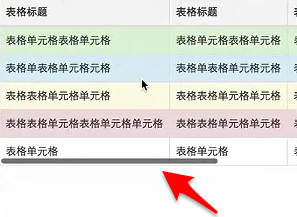
.png)
Bootstrap入门(四)表格的更多相关文章
- Bootstrap入门四:代码
1.内联代码 code: 通过 <code> 标签包裹内联样式的代码片段.灰色背景.灰色边框和红色字体. For example, <code><section>& ...
- Bootstrap入门(2)表格
Bootstrap入门(四)表格 <table>标签 首先,引入bootstrap的css文件,然后表格内容放在一个class为table的<table>标签中(class=& ...
- Bootstrap入门(二十四)data属性
Bootstrap入门(二十四)data属性 你可以仅仅通过 data 属性 API 就能使用所有的 Bootstrap 插件,无需写一行 JavaScript 代码.这是 Bootstrap 中的一 ...
- Bootstrap入门(十四)组件8:媒体对象
Bootstrap入门(十四)组件8:媒体对象 这是一个抽象的样式,用以构建不同类型的组件,这些组件都具有在文本内容的左或右侧对齐的图片(就像博客评论或 Twitter 消息等). 1.基本样式 2. ...
- Bootstrap <基础五>表格
Bootstrap 提供了一个清晰的创建表格的布局.下表列出了 Bootstrap 支持的一些表格元素: 标签 描述 <table> 为表格添加基础样式. <thead> 表格 ...
- Bootstrap<基础四> 代码
Bootstrap 允许您以两种方式显示代码: 第一种是 <code> 标签.如果您想要内联显示代码,那么您应该使用 <code> 标签. 第二种是 <pre> 标 ...
- bootstrap 入门
bootstrap 入门 <!DOCTYPE html> <html> <head lang="en"> <meta charset=&q ...
- Bootstrap入门(二十九)JS插件6:弹出框
Bootstrap入门(二十九)JS插件6:弹出框 加入小覆盖的内容,像在iPad上,用于存放非主要信息 弹出框是依赖于工具提示插件的,那它也和工具提示是一样的,是需要初始化才能够使用的 首先我们引入 ...
- Bootstrap入门(二十八)JS插件5:工具提醒
Bootstrap入门(二十八)JS插件5:工具提醒 工具提示在使用过程中比较常见,但是实现起来有些麻烦,而bootstrap则很好地解决了这个问题. 我们来写一个简单的实例 先引入CSS文件和JS文 ...
随机推荐
- SQL Server 事务及回滚事务的几种方法
第一种: declare @iErrorCount int set@iErrorCount=0 begintran Tran1 insertinto t1(Id, c1) values( ...
- 创建mysql数据库的时候指定编码
CREATE DATABASE xxx DEFAULT CHARACTER SET utf8 COLLATE utf8_general_ci;
- 高橋君とカード / Tak and Cards
高橋君とカード / Tak and Cards Time limit : 2sec / Stack limit : 256MB / Memory limit : 256MB Score : 300 p ...
- VS+VA 开发NDK
工欲善其事,必先利其器. Android NDK开发环境,可选择VIM+插件.Eclipse+CDT等,这里介绍另一种选择:VS+VA 软件准备:Visual studio 2008 // 其他版本也 ...
- 关于val(),text(),html()的用法
直接上demo: <!DOCTYPE HTML PUBLIC "-//W3C//DTD HTML 4.01 Transitional//EN" "http://ww ...
- php中__clone() shallow copy 只是浅复制
什么是浅复制呢? 简单一点,就是说复制一个对象的时候,如果对象$Obj的一个属性的类型是引用类型的,比如 $person这个属性,指向的是一个 叫做 $objPerson的一个引用, 那么复制$Obj ...
- 7 -- Spring的基本用法 -- 11...
7.11 基于XML Schema的简化配置方式 Spring允许使用基于XML Schema的配置方式来简化Spring配置文件. 7.11.1 使用p:命名空间简化配置 p:命名空间不需要特定的S ...
- mousewheel,DOMMouseScroll判断滚轮滚动方向
firefox使用DOMMouseScroll,其他浏览器使用mousewheel 首先绑定一个滚动事件 //firefox使用DOMMouseScroll,其他浏览器使用mousewheel$(do ...
- 更多文章请关注公众号:FullStackPlan 或前往个人主页:www.linbingdong.com
个人主页:www.linbingdong.com 扫一扫关注公众号: FullStackPlan 获取更多干货哦~
- eclipse快速定位java对应的class
当前设置值,只能定位class文件 设置eclipse External Tools Configurations... Program --> new New 创建viewclass.bat文 ...