
Bootstrap入门(2)表格
<table class="table">

  ...

</table>

           <table class="table">

                <thead>

                    <tr>

                        <th>biaoti</th>

                        <th>biaoti</th>

                        <th>biaoti</th>

                    </tr>

                </thead>

                <tbody>

                    <tr>

                        <th>danyuange</th>

                        <th>danyuange</th>

                        <th>danyuange</th>

                    </tr>

                    <tr>

                        <th>danyuange</th>

                        <th>danyuange</th>

                        <th>danyuange</th>

                    </tr>

                    <tr>

                        <th>danyuange</th>

                        <th>danyuange</th>

                        <th>danyuange</th>

                    </tr>

                </tbody>

            </table>
效果:

.png)

.png)

.png)
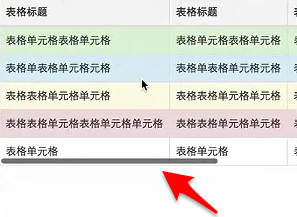
                <table class="table table-striped table-bordered">

                    <thead>

                        <tr class="active">

                            <th>biaoti</th>

                            <th>biaoti</th>

                            <th>biaoti</th>

                        </tr>

                    </thead>

                    <tbody>

                        <tr class="success">

                            <th>danyuange</th>

                            <th>danyuange</th>

                            <th>danyuange</th>

                        </tr>

                        <tr class="info">

                            <th>danyuange</th>

                            <th>danyuange</th>

                            <th>danyuange</th>

                        </tr>

                        <tr class="warning">

                            <th>danyuange</th>

                            <th>danyuange</th>

                            <th>danyuange</th>

                        </tr>

                        <tr class="danger">

                            <th>danyuange</th>

                            <th>danyuange</th>

                            <th>danyuange</th>

                        </tr>

                    </tbody>

                </table>
效果:

.png)
Bootstrap入门(2)表格的更多相关文章
- Bootstrap入门(四)表格
Bootstrap入门(四)表格 <table>标签 首先,引入bootstrap的css文件,然后表格内容放在一个class为table的<table>标签中(class=& ...
- bootstrap 入门
bootstrap 入门 <!DOCTYPE html> <html> <head lang="en"> <meta charset=&q ...
- Bootstrap入门(十五)组件9:面板组件
Bootstrap入门(十五)组件9:面板组件 虽然不总是必须,但是某些时候你可能需要将某些 DOM 内容放到一个盒子里.对于这种情况,可以试试面板组件. 1.基本实例 2.带标题的面板 3.情景效果 ...
- Bootstrap <基础五>表格
Bootstrap 提供了一个清晰的创建表格的布局.下表列出了 Bootstrap 支持的一些表格元素: 标签 描述 <table> 为表格添加基础样式. <thead> 表格 ...
- 01.Bootstrap入门
Bootstrap介绍: Bootstrap,来自 Twitter,是目前很受欢迎的前端框架.Bootstrap 是基于 HTML.CSS.JAVASCRIPT 的,它简洁灵活,使得 Web 开发更加 ...
- Bootstrap入门(二)栅格
Bootstrap入门(二)栅格 Bootstrap入门(二)栅格 全局CSS样式--栅格 先引入本地的CSS文件(根据自己的文件夹,有不同的引入地址,我是放在一个新建的名为css的文件夹中) con ...
- BootStrap入门教程 (一)
BootStrap入门教程 (一) 2011年,twitter的"一小撮"工程师为了提高他们内部的分析和管理能力,用业余时间为他们的产品构建了一套易用.优雅.灵活.可扩展的前端 ...
- Bootstrap入门(三十)JS插件7:警告框
Bootstrap入门(三十)JS插件7:警告框 通过这个插件可以为警告信息添加点击以及消失的功能. 当使用一个.close按钮,它必须是第一个子元素.alert-dismissible,并没有文字内 ...
- Bootstrap入门(二十九)JS插件6:弹出框
Bootstrap入门(二十九)JS插件6:弹出框 加入小覆盖的内容,像在iPad上,用于存放非主要信息 弹出框是依赖于工具提示插件的,那它也和工具提示是一样的,是需要初始化才能够使用的 首先我们引入 ...
随机推荐
- Django 查看原生的sql语句
python manage.py sqlmigrate your_app_name 0001 把your_app_name换成自己的app名字即可看到框架自动生成的创建表sql语句,于是我就这样看到了 ...
- linux学习之编译-链接
在Windows下使用习惯了IDE,导致我们对程序的编译链接没有一个清晰的认识,甚至混淆了编辑器和编译器的概念.在学习Linux时,这些问题就暴露出来了. 实际上,我们应该严格区分一个程序从产生到执行 ...
- HTML连载64-a标签伪类选择器的注意点与练习
一.a标签的伪类选择器注意点 (1)a标签的伪类选择器可以单独出现,也可以一起出现.也就是可以设置多个状态的样式. (2) a标签的伪类选择器如果一起出现,那么有严格的顺序要求,编写的顺序必须要遵守原 ...
- 二分查找 python实现
欢迎回来 [^first blood]. 要求A是升序数组 递归 只能查 数据存不存在,不能返回下标 def binary_find(A, m): if len(A) == 0: return -1 ...
- CSS隐藏元素的五种方法
1.opacity:0 2.visibility:hidden 3.diaplay:none 4.position:absolute display display属性依照词义真正隐藏元素.将disp ...
- MySQL的选则字段+联表+判断+排序(order by)
MySQL的选则字段+联表+判断+排序(order by) 两个表:1.成绩单 2.查询名单 目标: 1.选中全部字段,用于输出. 2.成绩单中有很多人的成绩,第一步是希望通过联表,只查查询名单上的人 ...
- Common Subsequence POJ - 1458 最长公共子序列 线性DP
#include <iostream> #include <algorithm> #include <string> #include <cstring> ...
- unrecognized import path "golang.org/x/*"的解决办法
由于国内网络原因,因此访问https://golang.org/网站会被限制.所以在go get下载其他第三方包的时候,如果这个第三方包又引用了https://golang.org/x/下的包,通常会 ...
- LaTeX技巧009:中国象棋的LaTeX排版
Latex可以排版容易排版中国象棋, 围棋, 国际象棋棋谱和乐谱, 详情请见. http://bbs.chinatex.org/forum.php?mod=viewthread&tid=498 ...
- mybatis-plus热部署mapper.xml插件JRebel MybatisPlus extension,报错:java.lang.NullPointerException
事件 mybatis转mybatis-plus,结果原来的Jrebel for intrllij 不能热部署mapper.xml文件,百度得知得添加新的插件 JRebel MybatisPlus ex ...