
在 Windows Forms 和 WPF 应用中使用 FontAwesome 图标
前言
FontAwesome 大家都不陌生,精美的图标,出现在各式各样的网页中。
最近在做 Windows Forms 应用程序,要求美观,就想能不能把 FontAwesome 图标用上,于是就有了本文。
本人已经将 FontAwesome 进行了封装,并上传到了 GitHub 和 NuGet。
- GitHub:https://github.com/seayxu/FontAwesome
- 码云:http://git.oschina.net/seayxu/FontAwesome
- NuGet:https://www.nuget.org/packages/FontAwesomeNet/
样图

简介
下面是解决方案列表:
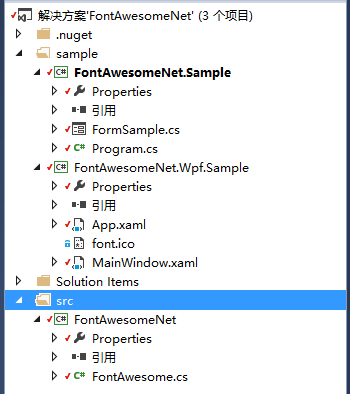
|- .nuget

|- sample

   |--- FontAwesomeNet.Sample        # Windows Forms Samlpe

   |--- FontAwesomeNet.Wpf.Sample    # WPF Samlpe

|- src

   |--- FontAwesomeNet   # FontAwesome for .NET library
使用
可以参考示例源码。
0. 安装字体
安装过请忽略,地址是:fontawesome-webfont-4.7.0.ttf。
1. 安装类库
PM> Install-Package FontAwesomeNet
2. 添加命名空间
using FontAwesomeNet;
3. 生成图片(Image)或图标(Icon)
使用的是 FontAwesome 静态类。
获取字体图标名称:
// get FontAwesome icon class names(type is Dictionary<string, int>)

string[] names = FontAwesome.TypeDict.Select(v => v.Key).ToArray();
获取字体图标名称对应的Unicode码:
// use FontAwesome icon class name get FontAwesome icon Unicode value

int val = FontAwesome.TypeDict["fa-heart"];//0xf004
获取图片和图标:
只有这两个方法。
Bitmap bmp = FontAwesome.GetImage(val);//0xf004

Icon ico = FontAwesome.GetIcon(val);//0xf004
修改默认参数:
直接对静态字段赋值即可。
FontAwesome.IconSize = 128;//change icon size

FontAwesome.ForeColer = Color.Purple;//change icon forecolor

...
如有不好的地方,欢迎大家更正,谢谢。
在 Windows Forms 和 WPF 应用中使用 FontAwesome 图标的更多相关文章
- Oracle 远程访问配置 在 Windows Forms 和 WPF 应用中使用 FontAwesome 图标 C#反序列化XML异常:在 XML文档(0, 0)中有一个错误“缺少根元素” C#[Win32&WinCE&WM]应用程序只能运行一个实例:MutexHelper Decimal类型截取保留N位小数向上取, Decimal类型截取保留N位小数并且不进行四舍五入操作
Oracle 远程访问配置 服务端配置 如果不想自己写,可以通过 Net Manager 来配置. 以下配置文件中的 localhost 改为 ip 地址,否则,远程不能访问. 1.网络监听配置 ...
- Windows Presentation Foundation (WPF) 项目中不支持xxx的解决
一般Windows Presentation Foundation (WPF) 项目中不支持xxx都是由于没引用相应的程序集导致,比如Windows Presentation Foundation ( ...
- Windows Forms和WPF在Net Core 3.0框架下并不会支持跨平台
Windows Forms和WPF在Net Core 3.0框架下并不会支持跨平台 微软将WinForms和WPF带到.NET Core 3.0这一事实,相信大家都有所了解,这是否意味着它在Linux ...
- 在WPF中使用FontAwesome图标字体
原文:在WPF中使用FontAwesome图标字体 版权声明:原创内容转载必须注明出处,否则追究相关责任. https://blog.csdn.net/qq_36663276/article/deta ...
- 直接在 CSS 中引用 FONTAWESOME 图标(附码表)
直接在 CSS 中引用 FONTAWESOME 图标(附码表) 因此我们如果不想用 Fontawesome 提供的类,只想在 css 里面引用图标的话,可以这样子,请自行脑补: .icon:befor ...
- WPF、Windows Forms和Silverlight间的联系和区别(转)
WPF.Windows Forms和Silverlight间的联系和区别http://blog.csdn.net/bitfan/article/details/6128391 .NET Windows ...
- Windows Forms (一)
导读 1.什么是 Windows Forms 2.需要学Windows Forms 么? 3.如何手写一个简单的Windows Forms 程序 4.对上面程序的说明 5.Form 类与Control ...
- 使用XAML在WPF项目中承载ArcGIS Engine地图控件开发
原文 http://blog.csdn.net/flexmapserver/article/details/5868882 用Windows Form进行ArcGIS Engine二次开发时常见的形式 ...
- Windows Forms(二)
导读 1.用VS创建一个Windows Forms程序 2.分析上面的程序 3.Mediator pattern(中介者模式) 4.卡UI怎么办——BackgroundWorker组件 用VS创建一个 ...
随机推荐
- git archive
git archive --format zip --output ../g.zip 3.4.2 git archive --format=tar \ --remote=ssh://remote_se ...
- 计算机学院大学生程序设计竞赛(2015’12) 1009 The Magic Tower
#include<cmath> #include<cstdio> #include<cstring> #include<algorithm> using ...
- JQuery的隐式迭代和each函数和map函数
1.JQuery选择器选择出来的是一个数组对象,可是给这些每一个元素都要设置内容时,就会隐式迭代,JQuery自己实现内部循环给每个元素绑定上设置. 2.如果是获取的话,那就是默认获取第一个元素的值. ...
- nodejs连接mysql实例
1.在工程目录下运行npm install mysql安装用于nodejs的mysql模块: 2.创建db.js模块用于连接mysql,同时定义query查询方法: var mysql = requi ...
- (中等) Hiho 1232 Couple Trees(15年北京网络赛F题),主席树+树链剖分。
"Couple Trees" are two trees, a husband tree and a wife tree. They are named because they ...
- tls session resumption
http://stackoverflow.com/questions/12318325/resume-tls-connection-in-java As long as you use the sam ...
- OSX下编译安装opencv3.1.0与opencv_contrib_master
OSX版本10.11.3 1.安装homebrew,打开终端,写入指令 ruby -e "$(curl -fsSL https://raw.githubusercontent.com/Hom ...
- Spring动态数据源的配置
Spring动态数据源 我们很多项目中业务都需要涉及到多个数据源,就是对不同的方法或者不同的包使用不同的数据源.最简单的做法就是直接在Java代码里面lookup需要的数据源,但是这种做法耦合性太高, ...
- [转]tar 分包压缩与合并
要将目录logs打包压缩并分割成多个1M的文件,可以用下面的命令: tar cjf - logs/ |split -b 1m - logs.tar.bz2. 完成后会产生下列文件: logs.ta ...
- Tsinsen-A1490 osu! 【数学期望】
问题描述 osu!是一个基于<押忍!战斗!应援团><精英节拍特工><太鼓达人>等各种音乐游戏做成的一款独特的PC版音乐游戏.游戏中,玩家需要根据音乐的节奏,通过鼠标 ...