
java poi处理excel多sheet并实现排序
需求:有一个数据字典全量汇总表,其中第一个sheet为目录,包括编号和表名,第二个以后为表的明细。其中sheet名就是表名但无序,sheet内字段序号无序有空行
现在要求将其中101,104,107,111表中的格式列和字段名称以及表名取出,生成批量语句,要求按给的编号有序输出,字段出要有序并排除窄。
输出结果如下:
insert into t_export(export_id,owner,table_name,col_name,format) values(101,'T_A','scott','id','20180308001');
insert into t_export(export_id,owner,table_name,col_name,format) values(101,'T_A','scott','sal','2000');
insert into t_export(export_id,owner,table_name,col_name,format) values(101,'T_A','scott','20','张三');
insert into t_export(export_id,owner,table_name,col_name,format) values(101,'T_A','scott','remark','hello');
insert into t_export(export_id,owner,table_name,col_name,format) values(101,'T_A','scott','birthday','40479');
insert into t_export(export_id,owner,table_name,col_name,format) values(101,'T_A','scott','age','20');
.
.
.
至111
excel如下:
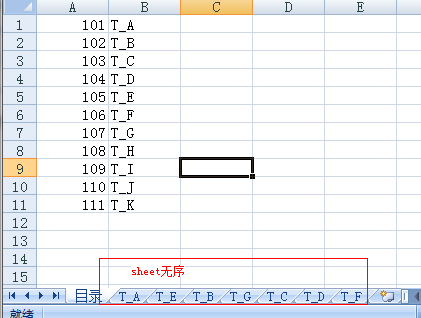

下载poi包poi-3.17.jar并引入eclipse的java工程,仅需要RowInfo.java,ShowExcel.java
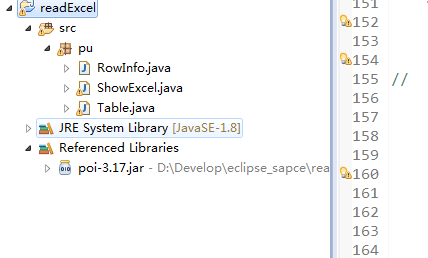
RowInfo.java:
package pu;

public class RowInfo implements Comparable<RowInfo>{//实现字段排序

    private int rownumb;

    private int expId;

    private String tableName;

    private String columnName;

    private String formatInfo;

    public RowInfo(int rownumb,int expId, String tableName, String columnName,String formatInfo) {

        super();

        this.rownumb=rownumb;

        this.expId = expId;

        this.tableName = tableName;

        this.columnName=columnName;

        this.formatInfo = formatInfo;

    }

    @Override

    public String toString(){

        return "insert into t_export(export_id,owner,table_name,col_name,format) values('"

                +this.expId+"','SCOTT','"

                +this.tableName+"','"

                +this.columnName+"','"

                +this.formatInfo+"');";

    }

    @Override

    public int compareTo(RowInfo row) {//重写排序方法

        // TODO Auto-generated method stub

        return this.rownumb - row.rownumb;

    }

    public int getExpId() {

        return expId;

    }

    public void setExpId(int expId) {

        this.expId = expId;

    }

    public String getTableName() {

        return tableName;

    }

    public void setTableName(String tableName) {

        this.tableName = tableName;

    }

    public String getFormatInfo() {

        return formatInfo;

    }

    public void setFormatInfo(String formatInfo) {

        this.formatInfo = formatInfo;

    }

    public int getRownumb() {

        return rownumb;

    }

    public void setRownumb(int rownumb) {

        this.rownumb = rownumb;

    }

    public String getColumnName() {

        return columnName;

    }

    public void setColumnName(String columnName) {

        this.columnName = columnName;

    }

}
ShowExcel.java
package pu;

import java.io.File;

import java.io.FileInputStream;

import java.io.FileOutputStream;

import java.io.PrintStream;

import java.util.ArrayList;

import java.util.Collections;

import java.util.HashMap;

import java.util.Map;

import java.util.TreeMap;

import org.apache.poi.hssf.usermodel.HSSFRow;

import org.apache.poi.hssf.usermodel.HSSFSheet;

import org.apache.poi.hssf.usermodel.HSSFWorkbook;

import org.apache.poi.ss.usermodel.Cell;

import org.apache.poi.ss.usermodel.Row;

public class ShowExcel {

    public static  void showExcelSheet(Map<Integer,ArrayList> map) throws Exception {//处理方法

        HashMap     hashmap     =     new     HashMap();
     //放入需求的表名

        hashmap.put("T_A","101");

        hashmap.put("T_D","104");

        hashmap.put("T_G","107");
        hashmap.put("T_K","111");

        HSSFWorkbook workbook=new HSSFWorkbook(new FileInputStream(new File("E:\\data\\Dictionary.xls")));

        HSSFSheet sheet=null;

        FileOutputStream fs = new FileOutputStream(new File("E:\\output\\temp.txt"),false);//每次都覆盖

        PrintStream p = new PrintStream(fs);

        p.println("sheet amount==="+workbook.getNumberOfSheets());

        for (int i = 0; i < workbook.getNumberOfSheets(); i++) {//获取每个Sheet表

             sheet=workbook.getSheetAt(i);

             ArrayList<RowInfo> list_rows = new ArrayList<>();//每个sheet需new一个list

            if (hashmap.containsKey(sheet.getSheetName()))

             {

                p.println("reading the sheet "+sheet.getSheetName());

             for (int j = 0; j < sheet.getPhysicalNumberOfRows(); j++) {//获取每行

                HSSFRow row=sheet.getRow(j);

                if(row==null){//跳过空行

                    System.out.println("wowowo");

                    continue;

                }

                System.out.print("row amount=="+sheet.getPhysicalNumberOfRows()+" and now row"+j+"\t");

            //    p.print("table_name_"+sheet.getSheetName() +"\t");

                if(j>2 && row.getCell(1)!=null){//此处跳过sheet中的前三行

                    p.print("table_name_"+sheet.getSheetName()+" row=="+j +"==\t");

                    p.print(hashmap.get(sheet.getSheetName()).toString() +"\t");

                    p.print(sheet.getSheetName() +"\t");

                    p.print(row.getCell(1).toString().toUpperCase()+"\t");

                    p.print(row.getCell(5)+"\t");

                    p.println();
            //装载每行的序号,字段名称,格式

                    list_rows.add(new RowInfo((int)row.getCell(0).getNumericCellValue(),Integer.parseInt(hashmap.get(sheet.getSheetName()).toString()),sheet.getSheetName().toString(),row.getCell(1).toString().toUpperCase().trim(),row.getCell(5).toString()));

                }

                for (int k = 0; k < row.getPhysicalNumberOfCells(); k++) {//获取每个单元格

                    if(row.getCell(k)!=null){

                         System.out.print(row.getCell(k)+"\t");

                         //p.print(row.getCell(k)+"\t");

                    }else

                        System.out.print("row.getCell(k) is nullnull"+"\t");

                }

               // p.println(" row over");

                System.out.println("---Sheet表"+i+"处理完毕---");

    }

             p.println("---Sheet表"+i+"处理完毕---");

             // 排序

             Collections.sort(list_rows);


        //读完一张装入一张

             map.put(Integer.parseInt(hashmap.get(sheet.getSheetName()).toString()), list_rows);

    }

 }

        p.close();

        }

public static void main(String[] args) throws Exception{

     FileOutputStream f = new FileOutputStream(new File("E:\\output\\result.txt"),false);

     PrintStream rs = new PrintStream(f);

    try{

        Map<Integer,ArrayList> map=new HashMap<>();

        showExcelSheet(map);

        Map<Integer,ArrayList> treemap=new TreeMap<>();//实现结果表对象按export_id排序

        treemap.putAll(map);

        for(int k:treemap.keySet()){

            System.out.println(k);

        }

        for(ArrayList<RowInfo> tab :treemap.values()){

            for(RowInfo row:tab){

                rs.println(row.toString());

            }

        }

    }catch(Exception e){e.printStackTrace();}

}

}
java poi处理excel多sheet并实现排序的更多相关文章
- 重构:以Java POI 导出EXCEL为例
重构 开头先抛出几个问题吧,这几个问题也是<重构:改善既有代码的设计>这本书第2章的问题. 什么是重构? 为什么要重构? 什么时候要重构? 接下来就从这几个问题出发,通过这几个问题来系统的 ...
- java POI创建Excel示例(xslx和xsl区别 )
Java用来处理office类库有很多,其中POI就是比较出名的一个,它是apache的类库,现在版本到了3.10,也就是2014年2月8号这个版本. 在处理PPT,Excel和Word前,需要导入以 ...
- 在java poi导入Excel通用工具类示例详解
转: 在java poi导入Excel通用工具类示例详解 更新时间:2017年09月10日 14:21:36 作者:daochuwenziyao 我要评论 这篇文章主要给大家介绍了关于在j ...
- JAVA POI替换EXCEL模板中自定义标签(XLSX版本)满足替换多个SHEET中自定义标签
个人说明:为了简单实现导出数据较少的EXCEL(根据自定义书签模板) 一.替换Excel表格标签方法```/** * 替换Excel模板文件内容 * @param map * 需要替换的标签建筑队形式 ...
- java poi出excel换行问题
POI操作excel实现换行问题. package jp.co.misumi.mdm.batch.common.jobrunner; import java.io.FileInputStream; i ...
- Java POI 导出EXCEL经典实现 Java导出Excel
转自http://blog.csdn.net/evangel_z/article/details/7332535 在web开发中,有一个经典的功能,就是数据的导入导出.特别是数据的导出,在生产管理或者 ...
- java poi操作excel 添加 锁定单元格保护
Excel的book保护是很常用的,主要是不想让别人修改Excel的时候用.这样能够避免恶意随便修改数据,提高数据的可信度. 下面介绍JAVA POI来实现设置book保护: 使用HSSFSheet类 ...
- Java POI 导出excel表
1.首先下载poi-3.6-20091214.jar,下载地址如下: http://download.csdn.net/detail/evangel_z/3895051 2.Student.java ...
- Java POI读取Excel数据,将数据写入到Excel表格
1.准备 首先需要导入poi相应的jar包,包括: 下载地址:http://pan.baidu.com/s/1bpoxdz5 所需要的包的所在位置包括: 2.读取Excel数据代码 package S ...
随机推荐
- Java知识之运算符篇
运算符 算术运算符:+.-.*./ 和 %,两个整数相除,结果还是整数. 赋值运算符:=.+=.-=.*=./=.%=.&=.|=.~=.^=.<<=.>>= . &g ...
- db2报错: [DB2/NT] SQL0952N 由于中断,处理被取消 SQLSTATE=57014
DB2被中断,报错: [DB2/NT] SQL0952N 由于中断,处理被取消 SQLSTATE=57014 在DB2的开发过程中,今日运行了一个执行时间较为长的sql语句.使用DB2服务端的控制台 ...
- Hadoop概念学习系列之Hadoop新手学习指导之入门需知(二十)
不多说,直接上干货! 零基础学习hadoop,没有想象的那么困难,也没有想象的那么容易.从一开始什么都不懂,到能够搭建集群,开发.整个过程,只要有Linux基础,虚拟机化和java基础,其实hadoo ...
- PAT 乙级 1048 数字加密(20) C++版
1048. 数字加密(20) 时间限制 400 ms 内存限制 65536 kB 代码长度限制 8000 B 判题程序 Standard 作者 CHEN, Yue 本题要求实现一种数字加密方法.首先固 ...
- Java泛型深入理解(转载)
原文地址 http://blog.csdn.net/sunxianghuang/article/details/51982979 泛型之前 在面向对象编程语言中,多态算是一种泛化机制.例如,你可以将 ...
- python的导包问题
有事会遇到在python代码中导入包错误问题,本文简单对python包的引入做简单介绍 简单说,我认为python导包一共有3种情况,分别是: 要导的包与当前文件在同一层要导的包在当前文件的底层(就是 ...
- Jmeter(四十二)Jmeter工作原理
“千举万变,其道一也.不离于宗,谓之天人” ----<荀子·儒效>和<庄子·天下> 作为接口测试工具 Jmeter只是作为发起请求的客户端(可以理解为前端),Jmeter是作为 ...
- Jmeter(二十七)Jmeter Question 之“集成Ant+Jenkins自动化”
首先介绍一下Ant.Apache Ant,是一个将软件编译.测试.部署等步骤联系在一起加以自动化的一个工具,大多用于Java环境中的软件开发.由Apache软件基金会所提供. 是的.还是Apache家 ...
- androidstudio在创建new project时,窗口太大,看不到下面确定按钮的解决方法
点击File-->setting-->Appearance将里面的Override default fonts by(not recommended)打钩去掉. 这个是目前找到唯一办法.
- jqgrid使用(1)生成表格
1.引入js,css 2,基本配置 function init() { $("#list1").jqGrid({ url: "../Listing.ashx", ...