
Java POI读取Excel数据,将数据写入到Excel表格
1.准备
首先需要导入poi相应的jar包,包括:
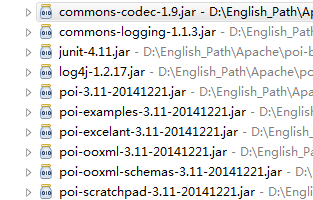
下载地址:http://pan.baidu.com/s/1bpoxdz5
所需要的包的所在位置包括:
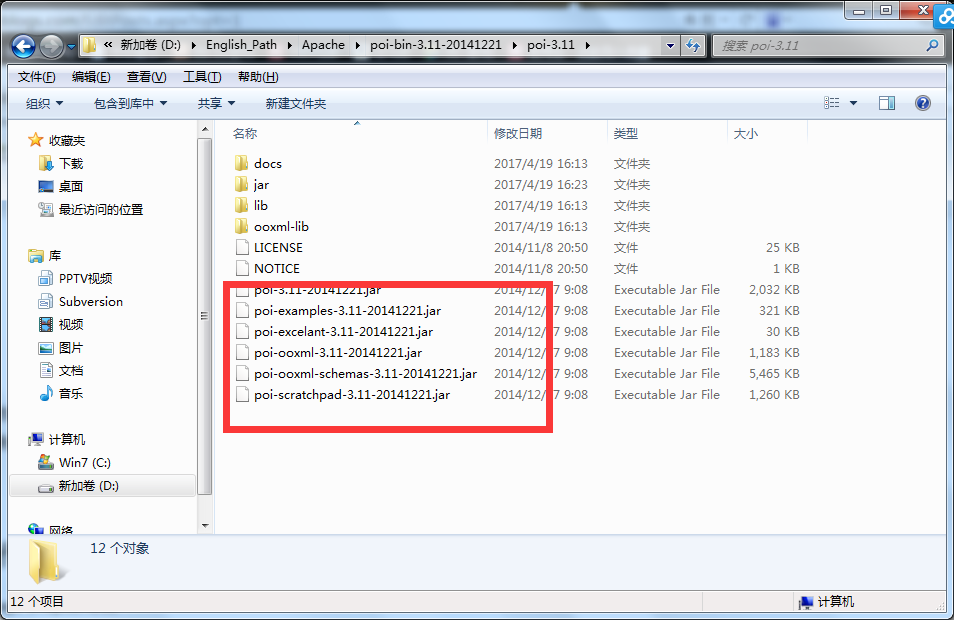

2.读取Excel数据代码
package Shape2MDB;
import java.io.File;
import java.io.FileInputStream;
import java.io.InputStream;
import java.util.ArrayList;
import java.util.List;
import org.apache.poi.hssf.usermodel.HSSFCell;
import org.apache.poi.hssf.usermodel.HSSFRow;
import org.apache.poi.hssf.usermodel.HSSFSheet;
import org.apache.poi.hssf.usermodel.HSSFWorkbook;
import org.apache.poi.xssf.usermodel.XSSFCell;
import org.apache.poi.xssf.usermodel.XSSFRow;
import org.apache.poi.xssf.usermodel.XSSFSheet;
import org.apache.poi.xssf.usermodel.XSSFWorkbook;
import Bean.Student;
public class ReadXMLXData {
public static void main(String[] args) {
String path = "D:\\1work\\XLSX\\Test.xlsx";
if (path.endsWith(".xls")) {
readExcel2003(path);
} else if (path.endsWith(".xlsx")) {
readExcel2007(path);
}
}
private static void readExcel2007(String path) {
File excelFile = null;// Excel文件对象
InputStream is = null;// 输入流对象
String cellStr = null;// 单元格,最终按字符串处理
List<Student> studentList = new ArrayList<Student>();// 返回封装数据的List
Student student = null;// 每一个学生信息对象
try {
excelFile = new File(path);
is = new FileInputStream(excelFile);// 获取文件输入流
XSSFWorkbook workbook2007 = new XSSFWorkbook(is);// 创建Excel2007文件对象
XSSFSheet sheet = workbook2007.getSheetAt(0);// 取出第一个工作表,索引为0
// 这里注意区分getLastRowNum()和getPhysicalNumberOfRows()的区别
System.out.println("sheet.getLastRowNum():" + sheet.getLastRowNum());
System.out.println("sheet.getPhysicalNumberOfRows():" + sheet.getPhysicalNumberOfRows());
// 开始循环遍历行,表头不处理,从1开始
for (int i = 1; i <= sheet.getLastRowNum(); i++) {
student = new Student();// 实例化Student对象
XSSFRow row = sheet.getRow(i);// 获取行对象
if (row == null) {// 如果为空,不处理
continue;
}
// row如果不为空,循环遍历单元格
for (int j = 0; j < row.getLastCellNum(); j++) {
XSSFCell cell = row.getCell(j);// 获取单元格对象
if (cell == null) {// 单元格为空设置cellStr为空串
cellStr = "";
} else if (cell.getCellType() == XSSFCell.CELL_TYPE_BOOLEAN) {// 对布尔值的处理
cellStr = String.valueOf(cell.getBooleanCellValue());
} else if (cell.getCellType() == XSSFCell.CELL_TYPE_NUMERIC) {// 对数字值的处理
cellStr = cell.getNumericCellValue() + "";
} else {// 其余按照字符串处理
cellStr = cell.getStringCellValue();
}
// 下面按照数据出现位置封装到bean中
if (j == 0) {
student.setName(cellStr);
} else if (j == 1) {
student.setGender(cellStr);
} else if (j == 2) {
student.setAge(new Double(cellStr).intValue());
} else if (j == 3) {
student.setSclass(cellStr);
} else {
student.setScore(new Double(cellStr).intValue());
}
}
studentList.add(student);// 数据装入List
}
System.out.println(studentList);
} catch (Exception e) {
e.printStackTrace();
} finally {// 关闭文件流
try {
if (is != null) {
is.close();
}
} catch (Exception e2) {
e2.printStackTrace();
}
}
}
private static void readExcel2003(String path) {
File excelFile = null;// Excel文件对象
InputStream is = null;// 输入流对象
String cellStr = null;// 单元格,最终按字符串处理
List<Student> studentList = new ArrayList<Student>();// 返回封装数据的List
Student student = null;// 每个学生信息对象
try {
excelFile = new File(path);
is = new FileInputStream(excelFile);// 获取文件输入流
HSSFWorkbook workbook2003 = new HSSFWorkbook(is);// 创建Excel2003文件对象
HSSFSheet sheet = workbook2003.getSheetAt(0);// 取出第一个工作表,索引是0
// 这里注意区分getLastRowNum()和getPhysicalNumberOfRows()的区别
System.out.println("sheet.getLastRowNum():" + sheet.getLastRowNum());
System.out.println("sheet.getPhysicalNumberOfRows():" + sheet.getPhysicalNumberOfRows());
// 开始循环遍历行,表头不处理,从1开始
for (int i = 1; i <= sheet.getLastRowNum(); i++) {
student = new Student();// 实例化Student对象
HSSFRow row = sheet.getRow(i);// 获取行对象
if (row == null) {// 如果为空,不处理
continue;
}
// 如果row不为空,循环遍历单元格
System.out.println("row.getLastCellNum:" + row.getLastCellNum());
for (int j = 0; j < row.getLastCellNum(); j++) {
HSSFCell cell = row.getCell(j);// 获取单元格对象
if (cell == null) {// 如果为空,设置cellStr为空串
cellStr = "";
} else if (cell.getCellType() == HSSFCell.CELL_TYPE_BOOLEAN) {// 对布尔值的处理
cellStr = String.valueOf(cell.getBooleanCellValue());
} else if (cell.getCellType() == HSSFCell.CELL_TYPE_NUMERIC) {// 对数字值的处理
cellStr = cell.getNumericCellValue() + "";
} else {// 其余按照字符串处理
cellStr = cell.getStringCellValue();
}
// 下面按照数据出现的位置封装到bena中
if (j == 0) {
student.setName(cellStr);
} else if (j == 1) {
student.setGender(cellStr);
} else if (j == 2) {
student.setAge(new Double(cellStr).intValue());
} else if (j == 3) {
student.setSclass(cellStr);
} else {
student.setScore(new Double(cellStr).intValue());
}
}
studentList.add(student);// 数据装入List
}
System.out.println(studentList);
} catch (Exception e) {
e.printStackTrace();
} finally {// 关闭文件流
if (is != null) {
try {
is.close();
} catch (Exception e2) {
e2.printStackTrace();
}
}
}
}
}
3.将数据写入到Excel表格代码
package Shape2MDB;
import java.io.FileOutputStream;
import java.text.SimpleDateFormat;
import java.util.ArrayList;
import java.util.List;
import org.apache.poi.hssf.usermodel.HSSFCell;
import org.apache.poi.hssf.usermodel.HSSFCellStyle;
import org.apache.poi.hssf.usermodel.HSSFRow;
import org.apache.poi.hssf.usermodel.HSSFSheet;
import org.apache.poi.hssf.usermodel.HSSFWorkbook;
import Bean.Student;
public class OutputXMLSData {
public static void main(String[] args) {
//测试数据
List<Student> list = new ArrayList<Student>();
Student s1 = new Student("1", "1", 1, "1", 1);
list.add(s1);
Student s2 = new Student("1", "1", 1, "1", 1);
list.add(s2);
Student s3 = new Student("1", "1", 1, "1", 1);
list.add(s3);
Student s4 = new Student("1", "1", 1, "1", 1);
list.add(s4);
Student s5 = new Student("1", "1", 1, "1", 1);
list.add(s5);
Student s6 = new Student("1", "1", 1, "1", 1);
list.add(s6);
outPutData(list);
}
private static void outPutData(List<Student> list) {
// 第一步,创建一个webbook,对应一个Excel文件
HSSFWorkbook wb = new HSSFWorkbook();
// 第二步,在webbook中添加一个sheet,对应Excel文件中的sheet
HSSFSheet sheet = wb.createSheet("学生表一");
// 第三步,在sheet中添加表头第0行,注意老版本poi对Excel的行数列数有限制short
HSSFRow row = sheet.createRow((int) 0);
// 第四步,创建单元格,并设置值表头 设置表头居中
HSSFCellStyle style = wb.createCellStyle();
style.setAlignment(HSSFCellStyle.ALIGN_CENTER); // 创建一个居中格式
HSSFCell cell = row.createCell((short) 0);
cell.setCellValue("name");
cell.setCellStyle(style);
cell = row.createCell((short) 1);
cell.setCellValue("gerder");
cell.setCellStyle(style);
cell = row.createCell((short) 2);
cell.setCellValue("age");
cell.setCellStyle(style);
cell = row.createCell((short) 3);
cell.setCellValue("class");
cell.setCellStyle(style);
cell = row.createCell((short) 4);
cell.setCellValue("score");
cell.setCellStyle(style);
// 第五步,写入实体数据 实际应用中这些数据从数据库得到,
for (int i = 0; i < list.size(); i++) {
row = sheet.createRow((int) i + 1);
Student stu = (Student) list.get(i);
// 第四步,创建单元格,并设置值
row.createCell((short) 0).setCellValue(stu.getName());
row.createCell((short) 1).setCellValue(stu.getGender());
row.createCell((short) 2).setCellValue((double) stu.getAge());
row.createCell((short) 3).setCellValue(stu.getSclass());
row.createCell((short) 2).setCellValue((double) stu.getScore());
}
// 第六步,将文件存到指定位置
try {
FileOutputStream fout = new FileOutputStream("C:/students.xls");
wb.write(fout);
fout.close();
} catch (Exception e) {
e.printStackTrace();
}
}
}
4.异常处理
Exception in thread "main" java.lang.NoClassDefFoundError: org/apache/xmlbeans/XmlException
at Shape2MDB.ReadXMLXData.readExcel2007(ReadXMLXData.java:39)
at Shape2MDB.ReadXMLXData.main(ReadXMLXData.java:26)
Caused by: java.lang.ClassNotFoundException: org.apache.xmlbeans.XmlException
at java.net.URLClassLoader$1.run(URLClassLoader.java:202)
at java.security.AccessController.doPrivileged(Native Method)
at java.net.URLClassLoader.findClass(URLClassLoader.java:190)
at java.lang.ClassLoader.loadClass(ClassLoader.java:306)
at sun.misc.Launcher$AppClassLoader.loadClass(Launcher.java:301)
at java.lang.ClassLoader.loadClass(ClassLoader.java:247)
... 2 more
使用POI操作Excel,电脑上面装的office2007,一直报如下错误,第一个是反射有关的,第二个是没找到对应的类,确实在POI的几个包中也没有找到该类,但是我直接引入该类编译器又没报错……最后发现把Excel另存为2003的格式是就正确了。到网上查了下,在操作office2007还要加入一个包
xbean.jar 官网:http://xmlbeans.apache.org
本文也提供网盘下载地址:http://pan.baidu.com/s/1bQI3jK
4.POI报表的一些常用函数
摘自:http://blog.csdn.net/tolcf/article/details/48346697
(1)建立sheet:
1.HSSFSheet sheet = workbook.createSheet("sheet1");//新建sheet页
(2)兴建单元格:
2.HSSFCellStyle cellStyle = wb.createCellStyle(); //新建单元格样式
(3) 设置背景颜色:
- cellStyle.setFillForegroundColor((short) 13);// 设置背景色
- cellStyle.setFillPattern(HSSFCellStyle.SOLID_FOREGROUND);
(4)设置边框:
- cellStyle.setBorderBottom(HSSFCellStyle.BORDER_THIN); //下边框
- cellStyle.setBorderLeft(HSSFCellStyle.BORDER_THIN);//左边框
- cellStyle.setBorderTop(HSSFCellStyle.BORDER_THIN);//上边框
- cellStyle.setBorderRight(HSSFCellStyle.BORDER_THIN);//右边框
(5)设置居中:cellStyle.setAlignment(HSSFCellStyle.ALIGN_CENTER); // 居中
(6)设置字体:
- HSSFFont font2 = wb.createFont();
- font2.setFontName("仿宋_GB2312");
- font2.setBoldweight(HSSFFont.BOLDWEIGHT_BOLD);//粗体显示
- font2.setFontHeightInPoints((short) 12); //字体大小
- cellStyle.setFont(font);//选择需要用到的字体格式
(7)设置列宽
- sheet.setColumnWidth(0, 3766);
- //第一个参数代表列id(从0开始),第2个参数代表宽度值 参考 :"2012-08-10"的宽度为2500
(8)设置自动换行
- cellStyle.setWrapText(true);//设置自动换行
(9)合并单元格
- //参数1:行号 参数2:起始列号 参数3:行号 参数4:终止列号
- Region region1 = new Region(0, (short) 0, 0, (short) 6);//合并第(0,0)单元格到第(0,6)单元格
- sheet.addMergedRegion(region1);
- //此方法在POI3.8中已经被废弃,建议使用下面一个
- //或者用
- CellRangeAddress region1 = new CellRangeAddress(rowNumber, rowNumber, (short) 0, (short) 11); //参数1:起始行 参数2:终止行 参数3:起始列 参数4:终止列
- sheet.addMergedRegion(region1);
- //但应注意两个构造方法的参数不是一样的,具体使用哪个取决于POI的不同版本。
Java POI读取Excel数据,将数据写入到Excel表格的更多相关文章
- 分享非常有用的Java程序(关键代码)(八)---Java InputStream读取网络响应Response数据的方法!(重要)
原文:分享非常有用的Java程序(关键代码)(八)---Java InputStream读取网络响应Response数据的方法!(重要) Java InputStream读取数据问题 ======== ...
- Java poi读取,写入Excel2003
Java poi读取,写入Excel2003 相关阅读:poi读写Excel2007:http://www.cnblogs.com/gavinYang/p/3576741.htmljxl读写excel ...
- Java poi读取,写入Excel2007
Java poi读取,写入Excel2007 相关阅读:poi读写Excel2003:http://www.cnblogs.com/gavinYang/p/3576739.htmljxl读写excel ...
- poi 读取使用 Strict Open XML 保存的 excel 文档
poi 读取使用 Strict Open XML 保存的 excel 文档 某项目有一个功能需要读取 excel 报表内容,使用poi读取时报错: 具体错误为: org.apache.poi.POIX ...
- Java——poi读取Excel文件
1.创建文件流,打开EXCEL文件 FileInputStream excelFile = new FileInputStream(excelPath); XSSFWorkbook workbook ...
- JAVA用POI读取和创建2003和2007版本Excel完美示例
import java.io.File; import java.io.FileInputStream; import java.io.FileNotFoundException; import ja ...
- JAVA用POI读取和创建2003和2007版本Excel
1.添加maven依赖 <dependency> <groupId>org.apache.poi</groupId> <artifactId>poi-o ...
- java POI读取excel 2007/2003
2003版office excel读取 import java.io.FileNotFoundException; import java.io.IOException; import java.io ...
- Java InputStream读取网络响应Response数据的方法
Java InputStream读取数据问题 原理讲解 1. 关于InputStream.read() 在从数据流里读取数据时,为图简单,经常用InputStream.read()方法.这个方 ...
随机推荐
- GStreamer Windows tutorial demo 开发环境配置
GStreamer 示例程序在 Windows 环境配置时坑比较多,好不容易配置成功了,写篇文档分享一下安装的关键步骤 官方文档见:https://gstreamer.freedesktop.org/ ...
- BZOJ 1002: [FJOI2007]轮状病毒【生成树的计数与基尔霍夫矩阵简单讲解+高精度】
1002: [FJOI2007]轮状病毒 Time Limit: 1 Sec Memory Limit: 162 MBSubmit: 5577 Solved: 3031[Submit][Statu ...
- ubuntu配置服务器apache
在配置apache之前我们需要先配置好ubuntu中的网络,如果不太懂的话可以看看这我的这篇文章:配置ubuntu网络,里面详细的介绍了怎么配置ubuntu的网络. 1.安装apache服务器 sud ...
- css3滤镜Filter使用
Filter主要用于图片,SVG等元素上,其默认值是none,有以下10个filter-function值可选: grayscale(灰度)效果类似于PS中的去色或者黑白 blur(模糊)效果类似于P ...
- 【搬运】Tea算法Java实现工具类
最近在做数据加密,目标是实现平台app的数据安全性,所以准备使用AES+Base64进行加密,适逢一个特长的json串AES加密不了,于是在谷歌了各种算法,判断是否合用,参见 各种加密算法比较 一文中 ...
- ES6中export , export default , import模块系统总结
最近在学习使用Webpack3的时候发现,它已经可以在不使用babel的情况下使用ES6的模块加载功能了. 说到ES6的模块加载功能,我们先复习一下CommonJS规范吧: 一 . CommonJS ...
- SQLite 链接大全
http://www.cnblogs.com/stephen-liu74/archive/2012/01/22/2328757.html
- 【开发技术】java异常的捕获与抛出原则
在可能会出现exception的地方,要使用try-catch或者throws或者两者都要.我的判断依据是:如果对可能出现的exception不想被外部(方法的调用者)知道,就在方法内部try-cat ...
- 解决eclipse出现This Android SDK requires Andro...date ADT to the latest version.问题
更新完android SDK之后,eclipse出现了“This Android SDK requires Andro...date ADT to the latest version.”问题,这是因 ...
- maven配置文件详解
settings.xml 本篇文章主要对maven中setting.xml配置文件进行解释 1.声明规范 <settings xmlns="http://maven.apache.or ...