
c++中文件读取
对于C++编译运行文件,我使用过两个编译器,一个是visual studio 2013,另外一个是devcpp,推荐使用devcpp。
vs的特点是界面整洁清晰,但是需要收费,这是微软的,并且在电脑上的运行速度是非常慢的; 而devcpp的特点是界面比较简陋,但是该软件免费下载,运行速度快,软件响应快。
例0.0:
这里介绍cin和cout对象的方法: cin.get()以及cout.put(),前者是将用户的输入获取,返回获取到的一个字符; 后者接受一个参数,返回值就是在控制台输出这个字符。如下所示:
#include <iostream>

using namespace std;

int main()

{

    char c;

    cout << "Input the words: " << endl;

    while ((c= cin.get()) != EOF)

    {

        cout.put(c);

    }

    cout << "That's the end!" << endl;

    return ;

}
这里就是将用户输入的依次获取,并且输出,知道判断为EOF,则停止程序。结果如下: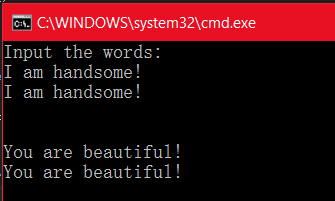
例0.1
这里在介绍getline函数和read函数。
其中 getline函数的作用是从输入流中读取一行字符,其用法和上面将的get函数输入一行字符的功能类似,如cin.getline();
而read函数可以从输入流中读取指定书目的字符并将他们存放在指定的数组当中,格式如下:
cin.read(char *buf, int size);
而eof函数是end of file的缩写,表示文件结束。 如果读取数据到达末尾,eof函数值为真,表示遇到文件结束符;eof函数值为假,表示没有遇到文件结束符。
另外,peek函数的作用是从输入流中返回下一个字符,但他只是观测,指针仍然停留在当前位置,遇到流结束标志时返回EOF。 调用形式为: c= cin.peek();
而cin.putback函数作用是将前面用get或者getline函数从输入流中读取的字符ch返回到输入流,插入到当前指针位置,供后面读取。
例1:
如下所示,首先创建一个文件流对象,接着打开文件,进行输入,最后关闭。 读取文件内容与之相似。
#include <iostream>

#include <fstream>

using namespace std;

int main()

{

    cout << "this is the begining!" << endl;

    int n;

    double d;

    ofstream outfile;

    outfile.open("C:\\Users\\Administrator\\Desktop\\fileTest\\fileTest\\test.txt", ios::out);

    //outfile.open("./test.txt", ios::out);

    outfile <<  << endl;

    outfile << 3.8 << endl;

    outfile.close();

    cout << "successful!" << endl;

    ifstream infile("C:\\Users\\Administrator\\Desktop\\fileTest\\fileTest\\test.txt", ios::in);

    //ifstream infile("./test.txt", ios::in);

    infile >> n >> d;

    cout << n << "," << d << endl;

    infile.close();

    return ;

}
这里绝对路径使用“\\”是转义后的结果,相对路径暂未成功。
程序执行完毕,可发现内容为50 3.8,成功输入。
例2
#include <iostream>

#include <fstream>

using namespace std;

int main()

{

    cout << "this is the beginning!" << endl;

    fstream outfile;

    outfile.open("C:\\Users\\Administrator\\Desktop\\fileTest\\fileTest\\test1.txt", ios::out);

    if (!outfile)

    {

        cout << "open failed!" << endl;

        exit();

    }

    outfile << "Hello world! \n";

    outfile << "github ours github! \n";

    outfile.close();

    return ;

}
如果打开文件失败,outfile返回0,则 exit(1)退出程序。
另外,注意 ios::out 这个实参必填。最后要 close 即可。
且如果没有该文件可打开,则会自动创建文件,并完成后续输入。
例3
#include <fstream>

#include <iostream>

#include <string>

using namespace std;

int main()

{

    fstream outfile;

    outfile.open("C:\\Users\\Administrator\\Desktop\\fileTest\\fileTest\\test2.txt", ios::out);

    if (!outfile)

    {

        cerr << "open out failed !" << endl;

        exit();

    }

    outfile << "Hello world! \n";

    outfile << "github! \n";

    outfile.close();

    char s[];

    fstream infile;

    infile.open("C:\\Users\\Administrator\\Desktop\\fileTest\\fileTest\\test2.txt", ios::in);

    if (!infile)

    {

        cerr << "open failed!" << endl;

        exit();

    }

    while (!infile.eof())

    {

        infile.getline(s, sizeof(s));

        cout << s << endl;

    }

    infile.close();

    return ;

}
如上所示:我们先通过outfile输入内容,然后使用infile读取磁盘内容,infile.eof() 中eof即end of file,即如果不是file的最后一行,就继续读取文件,并且输出。且每次在操作时,无论读取,都需要进行打开文件已经关闭文件的操作。
c++中文件读取的更多相关文章
- Perl中文件读取操作
Perl中文件读取操作 http://blog.csdn.net/yangxuan12580/article/details/51506216
- 详解Js中文件读取机制
前言,文件读取是提高应用体验度的必须接口,应用场景中需求很频繁. Js处理文件读取,由于处于安全方面的考虑,在2000年以前,都是以“<input type="file"&g ...
- Java开发中文件读取方式总结
JAVA开发中,免不了要读文件操作,读取文件,首先就需要获取文件的路径. 路径分为绝对路径和相对路径. 在文件系统中,绝对路径都是以盘符开始的,例如C:\abc\1.txt. 什么是相对路径呢?相对路 ...
- 用python对txt中文件读取,然后按顺序标号存入excel中
读取txt文件,然后存入excel中 import xlwt #从txt文件中读取内容,放到ftext1中 f1=open('/Users/XXX/Documents/pythonwork/tenso ...
- OC中文件读取类(NSFileHandle)介绍和常用使用方法
NSFileHandle 1.NSFileManager类主要对于文件的操作(删除,修改,移动,赋值等等) //判断是否有 tagetPath 文件路径,没有就创建 NSFileManager *fi ...
- [转]关于Unity中文件读取 - 大世界
原文 http://www.cnblogs.com/ThreeThousandBigWorld/p/3199245.html 存储: 在程序发布后文件的存放有两种,第一种是打包到Uniyt的资源包 ...
- 关于Unity中文件读取
存储: 在程序发布后文件的存放有两种,第一种是打包到Uniyt的资源包中(*.unity3D),第二种就是把文件存放在一个特殊的目录如:StreamingAssets,这个目录的东西Unity不会打包 ...
- python文件夹中文件读取踩坑
Q: 进行数据集图片预处理时,初始命名如下图(Fig1左),发现读取文件时,读取的结构并非如所设想的那样顺序读取 Fig 1 A: pyhton读取文件的时候,按照文件名的ascii码中的顺序进行逐位 ...
- java中的文件读取和文件写出:如何从一个文件中获取内容以及如何向一个文件中写入内容
import java.io.BufferedReader; import java.io.BufferedWriter; import java.io.File; import java.io.Fi ...
随机推荐
- 5-具体学习git--分支冲突,merge合并
修改1.py: 然后提交修改: git commit -am "change 4 in master" 之后移到dev分支上: 哎呀,这个乱了. 人家意思是都基于c1分出来两个枝, ...
- Mysql中Left Join Right Join Inner Join where条件的比较
建立一对多的表 company 和 employee company表 id name address 1baidu北京 2huawei深圳 3jingdong北京 4tengxu ...
- querySelectorAll()方法
querySelectorAll()方法 调用的对象包括:Document(文档) DocumentFragment(文档片段) Element(元素) querySelectorAll()方法接收的 ...
- IDEA有用插件总结
IDEA要查看哪些插件起效了可以通过.IntellijIdeaXxx/config/plugins/availables.xml里查看: 一:Lombok插件,里面很多注解都可以省略许多冗余的代码: ...
- SQL常用增删改查
转 http://www.cnblogs.com/daxueshan/p/6687521.html 1增 1.1[插入单行]insert [into] <表名> (列名) values ( ...
- WordPaster-KesionCMS V8整合教程
1.上传WordPaster文件夹 2.上传ckeditor3x插件文件夹 4.修改ckeditor编辑器的config.js文件,启用插件,在工具栏中增加插件按钮 5.在文章页面增加插件初始化代码 ...
- C++二级指针第一种内存模型(指针数组)
二级指针第一种内存模型(指针数组) 指针的输入特性:在主调函数里面分配内存,在被调用函数里面使用指针的输出特性:在被调用函数里面分配内存,主要是把运算结果甩出来 指针数组 在C语言和C++语言中,数组 ...
- python的基础socket知识
对于所有的Web应用,本质上其实就是一个socket服务端,用户的浏览器其实就是一个socket客户端. 代码意思if __name__ == '__main__':是主文件的话就先执行main函数, ...
- java后台技术
本文旨在梳理服务端开发技术栈,希望帮助后端开发同学更全面了解Java服务端主要涉及的知识点 1. 语言相关 1.1 Java 核心知识点 Java的类加载机制 JVM相关:JVM内存模型和结构,GC原 ...
- 13.1.DataGrid的增、删、改、查前台页面
公共js: 前台页面: