
小学四则运算APP 第一阶段冲刺 第二天-补
团队成员:陈淑筠、杨家安、陈曦
团队选题:小学四则运算APP
第一次冲刺阶段时间:11.17~11.27
本次发布已经解决上次问题,问题是写程序逻辑错误,问题已经修改!我们还增加两个模块的面板设置,如下是程序结果:
import java.util.Random;

import android.os.Bundle;

import android.app.Activity;

import android.view.Menu;

import android.view.View;

import android.view.View.OnClickListener;

import android.widget.Button;

import android.widget.EditText;

import android.widget.TextView;

import android.widget.Toast;

public class CalculatorActivity extends Activity {

	private final Random num1=new Random();

	private final Random num2=new Random();

	private final Random r = new Random();

	private char[] ch = {'+','-','*','/'}; //字符数组

	private int index = r.nextInt(ch.length); //随机数,小于数组的长度数, 0~3

	private char a=ch[index];

	private TextView text1,text2,text3;

	private EditText answer;

	private Button surebutton;//确定按钮

	//private String c;

	//private String e;

	//private String b;

	private int i1,i2,i3;

	@Override

	protected void onCreate(Bundle savedInstanceState) {

		super.onCreate(savedInstanceState);

		setContentView(R.layout.activity_calculator);

		text1=(TextView)findViewById(R.id.textView1);//随机数字

		text2=(TextView)findViewById(R.id.textView2);//运算符号

		text3=(TextView)findViewById(R.id.textView3);//随机数字

		answer=(EditText)findViewById(R.id.editText1);//运算结果

		final String c=String.valueOf(num1.nextInt(100));

		i2=Integer.valueOf(c);

		final String d=String.valueOf(a);

		final String e=String.valueOf(num2.nextInt(100));

		i3=Integer.valueOf(e);

		text1.setText(c);//随机数1-100

		text2.setText(d);//随机运算符+,-,*,/

		text3.setText(e);//随机数1-100

		surebutton=(Button)findViewById(R.id.surebutton);//确定按钮

		surebutton.setOnClickListener(new OnClickListener() {

			@Override

			public void onClick(View arg0) {

				// TODO Auto-generated method stub

				final String b=answer.getText().toString();//获取输入的数值

				i1=Integer.valueOf(b);

				switch(index){

				case 0:

				{

					if(i1==(i2+i3))

						Toast.makeText(CalculatorActivity.this, "正确"+b, Toast.LENGTH_SHORT).show();

					else

						Toast.makeText(CalculatorActivity.this, "错误"+b, Toast.LENGTH_SHORT).show();

					break;

				}

				case 1:

				{

					if(i1==(i2-i3))

						Toast.makeText(CalculatorActivity.this, "正确"+b, Toast.LENGTH_SHORT).show();

					else

						Toast.makeText(CalculatorActivity.this, "错误"+b, Toast.LENGTH_SHORT).show();

					break;

				}

				case 2:{

					if(i1==(i2*i3))

						Toast.makeText(CalculatorActivity.this, "正确"+b, Toast.LENGTH_SHORT).show();

					else

						Toast.makeText(CalculatorActivity.this, "错误"+b, Toast.LENGTH_SHORT).show();

					break;

				}

				case 3:

				{

					if(i3!=0){

					if(i1==(i2/i3))

						Toast.makeText(CalculatorActivity.this, "正确"+b, Toast.LENGTH_SHORT).show();

					else

						Toast.makeText(CalculatorActivity.this, "错误"+b, Toast.LENGTH_SHORT).show();

					}

					break;

				}

				}

			}

		});

	}

	@Override

	public boolean onCreateOptionsMenu(Menu menu) {

		// Inflate the menu; this adds items to the action bar if it is present.

		getMenuInflater().inflate(R.menu.calculator, menu);

		return true;

	}

}

新功能选择页面代码:
<?xml version="1.0" encoding="utf-8"?>

<RelativeLayout xmlns:android="http://schemas.android.com/apk/res/android"

    android:id="@+id/RelativeLayout1"

    android:layout_width="match_parent"

    android:layout_height="match_parent"

    android:orientation="vertical" >

    <TextView

        android:id="@+id/textView1"

        android:layout_width="wrap_content"

        android:layout_height="wrap_content"

        android:layout_alignParentTop="true"

        android:layout_centerHorizontal="true"

        android:layout_marginTop="23dp"

        android:text="@string/title_activity_choice"

        android:textSize="20sp" />

    <TextView

        android:id="@+id/title"

        android:layout_width="wrap_content"

        android:layout_height="wrap_content"

        android:layout_below="@+id/textView1"

        android:layout_centerHorizontal="true"

        android:layout_marginTop="33dp"

        android:text="TextView"

        android:textSize="20sp" />

    <RadioGroup

        android:id="@+id/radioGroup1"

        android:layout_width="wrap_content"

        android:layout_height="wrap_content"

        android:layout_below="@+id/title"

        android:layout_centerHorizontal="true"

        android:layout_marginTop="44dp" >

        <RadioButton

            android:id="@+id/R1"

            android:layout_width="wrap_content"

            android:layout_height="wrap_content"

            android:text="TextView"

            android:textSize="20sp" />

        <RadioButton

            android:id="@+id/R2"

            android:layout_width="wrap_content"

            android:layout_height="wrap_content"

            android:text="TextView"

            android:textSize="20sp" />

        <RadioButton

            android:id="@+id/R3"

            android:layout_width="wrap_content"

            android:layout_height="wrap_content"

            android:text="TextView"

            android:textSize="20sp" />

        <RadioButton

            android:id="@+id/R4"

            android:layout_width="wrap_content"

            android:layout_height="wrap_content"

            android:text="TextView"

            android:textSize="20sp" />

    </RadioGroup>

    <Button

        android:id="@+id/button1"

        android:layout_width="wrap_content"

        android:layout_height="wrap_content"

        android:layout_alignParentLeft="true"

        android:layout_alignParentRight="true"

        android:layout_below="@+id/radioGroup1"

        android:layout_marginTop="34dp"

        android:text="下一题" />

</RelativeLayout>
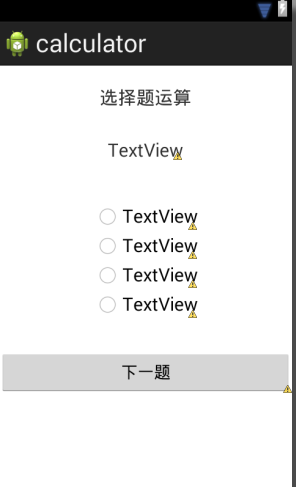
<?xml version="1.0" encoding="utf-8"?>

<RelativeLayout xmlns:android="http://schemas.android.com/apk/res/android"

    android:id="@+id/RelativeLayout1"

    android:layout_width="match_parent"

    android:layout_height="match_parent"

    android:orientation="vertical" >

    <TextView

        android:id="@+id/textView1"

        android:layout_width="wrap_content"

        android:layout_height="wrap_content"

        android:layout_alignParentTop="true"

        android:layout_centerHorizontal="true"

        android:layout_marginTop="35dp"

        android:text="@string/title_activity_set"

        android:textSize="30sp" />

    <EditText

        android:id="@+id/editText1"

        android:layout_width="wrap_content"

        android:layout_height="wrap_content"

        android:layout_alignBottom="@+id/textView2"

        android:layout_alignLeft="@+id/textView1"

        android:ems="10"

        android:inputType="number" />

    <TextView

        android:id="@+id/textView2"

        android:layout_width="wrap_content"

        android:layout_height="wrap_content"

        android:layout_below="@+id/textView1"

        android:layout_marginTop="41dp"

        android:layout_toLeftOf="@+id/editText1"

        android:text="@string/the_number_of_calculator"

        android:textSize="20sp" />

    <RadioButton

        android:id="@+id/radioButton4"

        android:layout_width="wrap_content"

        android:layout_height="wrap_content"

        android:layout_alignBaseline="@+id/radioButton3"

        android:layout_alignBottom="@+id/radioButton3"

        android:layout_marginLeft="25dp"

        android:layout_toRightOf="@+id/textView1"

        android:text="/" />

    <RadioButton

        android:id="@+id/radioButton3"

        android:layout_width="wrap_content"

        android:layout_height="wrap_content"

        android:layout_alignBaseline="@+id/radioButton2"

        android:layout_alignBottom="@+id/radioButton2"

        android:layout_alignRight="@+id/textView1"

        android:layout_marginRight="18dp"

        android:text="*" />

    <RadioButton

        android:id="@+id/radioButton2"

        android:layout_width="wrap_content"

        android:layout_height="wrap_content"

        android:layout_alignBaseline="@+id/radioButton1"

        android:layout_alignBottom="@+id/radioButton1"

        android:layout_toRightOf="@+id/textView2"

        android:text="-" />

    <RadioButton

        android:id="@+id/radioButton1"

        android:layout_width="wrap_content"

        android:layout_height="wrap_content"

        android:layout_alignLeft="@+id/textView2"

        android:layout_below="@+id/textView2"

        android:layout_marginTop="16dp"

        android:text="+" />

    <EditText

        android:id="@+id/editText2"

        android:layout_width="wrap_content"

        android:layout_height="wrap_content"

        android:layout_alignBottom="@+id/textView3"

        android:layout_toLeftOf="@+id/radioButton3"

        android:layout_toRightOf="@+id/textView3"

        android:ems="10"

        android:inputType="number" />

    <TextView

        android:id="@+id/textView4"

        android:layout_width="wrap_content"

        android:layout_height="wrap_content"

        android:layout_alignBaseline="@+id/textView3"

        android:layout_alignBottom="@+id/textView3"

        android:layout_alignLeft="@+id/radioButton3"

        android:text="分"

        android:textSize="20sp" />

    <TextView

        android:id="@+id/textView3"

        android:layout_width="wrap_content"

        android:layout_height="wrap_content"

        android:layout_alignLeft="@+id/radioButton1"

        android:layout_below="@+id/radioButton1"

        android:layout_marginTop="58dp"

        android:text="时间设置:"

        android:textSize="20sp" />

    <EditText

        android:id="@+id/editText3"

        android:layout_width="wrap_content"

        android:layout_height="wrap_content"

        android:layout_alignBottom="@+id/textView4"

        android:layout_alignRight="@+id/radioButton4"

        android:layout_marginLeft="16dp"

        android:layout_toRightOf="@+id/textView4"

        android:ems="10"

        android:inputType="number" >

        <requestFocus />

    </EditText>

    <TextView

        android:id="@+id/textView5"

        android:layout_width="wrap_content"

        android:layout_height="wrap_content"

        android:layout_alignBaseline="@+id/textView4"

        android:layout_alignBottom="@+id/textView4"

        android:layout_alignParentRight="true"

        android:text="秒"

        android:textSize="20sp"/>

    <Button

        android:id="@+id/button1"

        android:layout_width="wrap_content"

        android:layout_height="wrap_content"

        android:layout_alignParentLeft="true"

        android:layout_alignParentRight="true"

        android:layout_below="@+id/editText2"

        android:layout_marginTop="43dp"

        android:text="确定" />

</RelativeLayout>

小学四则运算APP 第一阶段冲刺 第二天-补的更多相关文章
- 小学四则运算APP 第一个冲刺 第二天
团队成员:陈淑筠.杨家安.陈曦 团队选题:小学四则运算APP 第一次冲刺阶段时间:11.17~11.27 本次程序是为了解决上次判断的问题,但是还是出现新的问题页面无法调整,需要进行改进 本次改进代码 ...
- 小学四则运算APP 第一阶段冲刺
需求分析 1.相关系统分析员向用户初步了解需求,然后用word列出要开发的系统的大功能模块,每个大功能模块有哪些小功能模块,对于有些需求比较明确相关的界面时,在这一步里面可以初步定义好少量的界面.[1 ...
- 小学四则运算APP 第一个冲刺阶段 第一天
团队成员:陈淑筠.杨家安.陈曦 团队选题:小学四则运算APP 第一次冲刺阶段时间:11.17~11.27 思考:初步了解小学四则运算数是在100以内的加减乘除,首先先从简单的地方入手,把最基础的算法功 ...
- 小学四则运算APP 第一个冲刺阶段 第六天
团队成员:陈淑筠.杨家安.陈曦 团队选题:小学四则运算APP 第一次冲刺阶段时间:11.17~11.27 本次发布的是重新排列整齐ResultActivity的布局代码activity_result. ...
- 小学四则运算APP 第一个冲刺阶段 第五天
团队成员:陈淑筠.杨家安.陈曦 团队选题:小学四则运算APP 第一次冲刺阶段时间:11.17~11.27 本次发布的是实现练习功能的成功 代码: public class CalculatorActi ...
- 小学四则运算APP 第一个冲刺阶段 第四天
团队成员:陈淑筠.杨家安.陈曦 团队选题:小学四则运算APP 第一次冲刺阶段时间:11.17~11.27 本次发布我们增加了CalculatorsActivity.java.YunsuanActivi ...
- 小学四则运算APP 第一个冲刺阶段 第三天
团队成员:陈淑筠.杨家安.陈曦 团队选题:小学四则运算APP 第一次冲刺阶段时间:11.17~11.27 本次发布是在与团队成员解决了昨天问题的基础上,再增加了几个界面,增加了一些功能,修改与增加的代 ...
- 小学四则运算APP 第一个冲刺 第八天
团队成员:陈淑筠.杨家安.陈曦 团队选题:小学四则运算APP 第一次冲刺阶段时间:11.17~11.27 本次发布的是还未完成的功能二(选择题): ChoiceActivity.java: packa ...
- 小学四则运算APP 第一个冲刺 第七天
团队成员:陈淑筠.杨家安.陈曦 团队选题:小学四则运算APP 第一次冲刺阶段时间:11.17~11.27 本次发布的是完成的功能一: 程序代码: MainActivity代码: import andr ...
随机推荐
- 1.Solr介绍
转载请出自出处:http://www.cnblogs.com/hd3013779515/ Solr是一个基于Lucene的全文搜索引擎,同时对其进行了扩展,提供了比Lucene更为丰富的查询语言,实现 ...
- $.toJSON和eval的区别
1.$.toJSON是jquery的方法.eval是javascript的方法 2.eval兼容的浏览器多,$.toJSON有可能解析不了的json格式的数据,eval可以.
- WorldWind源码剖析系列:绘制参数类DrawArgs
绘制参数类DrawArgs主要对绘制时需要的对象如:设备对象Microsoft.DirectX.Direct3D.Device.Microsoft.DirectX.Direct3D.Font字体对象. ...
- ICC 常用命令
1. 列出当前design 用到的 db 库: list_libs 2. 列出当前design 用到的 reference 库: report_mw_lib -mw_referenc_librar ...
- 多Tomcat多JDK版本的Window服务添加配置方式
本文所讲的配置方式只适合Windows系统,所牵扯的软件2个解压的jdk,2个解压的tomcat. 1.环境初始化 将两个jdk和tomcat解压到我们指定的目录下.修改两个tomcat的端口:必须修 ...
- Leetcode——338. 比特位计数
题目描述:题目链接 对于求解一个十进制数转化为二进制时里面1的个数,可以先看一下概况: 十进制数 二进制数 1的个数 1 1 1 2 10 1 3 11 2 4 100 1 5 101 2 ...
- Java使用线程并发库模拟弹夹装弹以及发射子弹的过程
同样是从网上看到的一个需求,需求描述都在代码中. 不多说了,直接贴代码了.相信大家都能够看得懂的! package cn.yw.bore; import java.util.ArrayList; im ...
- mysql的常用优化知识
索引类型:主键索引,唯一索引,联合索引,普通索引,全文索引 建立索引: create index index_name on table(field_name); 删除索引: drop index i ...
- mysql,int(5)、int(10)啥区别联系
实际没啥区别..这个5和10并不是最大5位,最大10位的意思. 好比选择了int(5),并且当你选择了0填充的话.你的数据假设存了123,那么你的显示会是00123,(有些操作mysql的工具看不出来 ...
- CentOS 6.8 虚拟机安装详解
第一步:安装 VMware 官方网站:www.vmware.com 下载百度云链接:http://pan.baidu.com/s/1bphDOWv 密码:0zix VMware 是一个虚拟 PC 的软 ...