
SQL语句导致性能问题
前阵子,突然收到服务器的报警信息,于是上服务器找问题,我擦,top看到mysql占的%cpu高得把我吓尿了
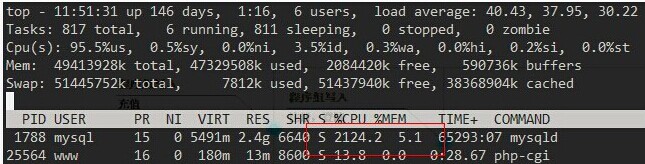
从以上的信息看,相信大家已经可以定位到底是那个程序导致服务器CPU负载过高了,但我们要做的是,找出mysql进程下,是什么动作导致服务器出现性能问题
以下做个实验,相信大家看了后也能猜到当时是什么导致高负载的,废话不多说:
表结构如下:
mysql> desc test1;

+---------+-------------+------+-----+---------+----------------+

| Field   | Type        | Null | Key | Default | Extra          |

+---------+-------------+------+-----+---------+----------------+

| id      | int(11)     | NO   | PRI | NULL    | auto_increment |

| role_id | int(11)     | NO   |     | 0       |                |

| referer | varchar(20) | NO   |     |         |                |

+---------+-------------+------+-----+---------+----------------+

3 rows in set (0.00 sec)

mysql> desc test2;

+--------------+---------+------+-----+---------+----------------+

| Field        | Type    | Null | Key | Default | Extra          |

+--------------+---------+------+-----+---------+----------------+

| id           | int(11) | NO   | PRI | NULL    | auto_increment |

| role_id      | int(11) | NO   | MUL | 0       |                |

| privilege_id | int(11) | NO   |     | 0       |                |

+--------------+---------+------+-----+---------+----------------+

3 rows in set (0.00 sec)
表的索引情况如下:
mysql> show index from test1;

+-------+------------+----------+--------------+-------------+-----------+-------------+----------+--------+------+------------+---------+

| Table | Non_unique | Key_name | Seq_in_index | Column_name | Collation | Cardinality | Sub_part | Packed | Null | Index_type | Comment |

+-------+------------+----------+--------------+-------------+-----------+-------------+----------+--------+------+------------+---------+

| test1 |          0 | PRIMARY  |            1 | id          | A         |         329 |     NULL | NULL   |      | BTREE      |         |

+-------+------------+----------+--------------+-------------+-----------+-------------+----------+--------+------+------------+---------+

1 row in set (0.00 sec)

mysql> show index from test2;

+-------+------------+----------+--------------+-------------+-----------+-------------+----------+--------+------+------------+---------+

| Table | Non_unique | Key_name | Seq_in_index | Column_name | Collation | Cardinality | Sub_part | Packed | Null | Index_type | Comment |

+-------+------------+----------+--------------+-------------+-----------+-------------+----------+--------+------+------------+---------+

| test2 |          0 | PRIMARY  |            1 | id          | A         |       12476 |     NULL | NULL   |      | BTREE      |         |

| test2 |          1 | role_id  |            1 | role_id     | A         |         415 |     NULL | NULL   |      | BTREE      |         |

+-------+------------+----------+--------------+-------------+-----------+-------------+----------+--------+------+------------+---------+

2 rows in set (0.00 sec)
当时执行show full processlist后,发现有好几百个连接在执行同一条SQL语句,看见SQL也还好,不复杂,是子查询
mysql> select privilege_id from t2 where role_id in (select role_id from t1 where id=193);
看着以上的SQL语句,写没什么问题啊,但用explain分析一看,我擦
mysql> explain select privilege_id from test2 where role_id in (select role_id from test1 where id=192);

+----+--------------------+-------+-------+---------------+---------+---------+-------+-------+-------------+

| id | select_type        | table | type  | possible_keys | key     | key_len | ref   | rows  | Extra       |

+----+--------------------+-------+-------+---------------+---------+---------+-------+-------+-------------+


|  1 | PRIMARY            | test2 | ALL   | NULL          | NULL    | NULL    | NULL  | 12476 | Using where |

|  2 | DEPENDENT SUBQUERY | test1 | const | PRIMARY       | PRIMARY | 4       | const |     1 |             |


+----+--------------------+-------+-------+---------------+---------+---------+-------+-------+-------------+

2 rows in set (0.00 sec)
当时MySQL版本是:
mysql> select  version();

+-----------+

| version() |

+-----------+

| 5.1.66    |

+-----------+

1 row in set (0.00 sec)
但把SQL语句的子查询修改为以下的写法,执行效率就就像喝了可乐一样爽^0^:
select a.privilege_id from test2 as a inner join test1 as b on a.role_id = b.role_id and b.id=192;
看效果对比:
mysql> select  version();

+-----------+

| version() |

+-----------+

| 5.1.66    |

+-----------+

1 row in set (0.00 sec)

mysql> explain select privilege_id from test2 where role_id in (select role_id from test1 where id=192);

+----+--------------------+-------+-------+---------------+---------+---------+-------+-------+-------------+

| id | select_type        | table | type  | possible_keys | key     | key_len | ref   | rows  | Extra       |

+----+--------------------+-------+-------+---------------+---------+---------+-------+-------+-------------+

|  1 | PRIMARY            | test2 | ALL   | NULL          | NULL    | NULL    | NULL  | 12476 | Using where |

|  2 | DEPENDENT SUBQUERY | test1 | const | PRIMARY       | PRIMARY | 4       | const |     1 |             |

+----+--------------------+-------+-------+---------------+---------+---------+-------+-------+-------------+

2 rows in set (0.00 sec)

mysql> explain select a.privilege_id from test2 as a inner join test1 as b on a.role_id = b.role_id and b.id=192;

+----+-------------+-------+-------+---------------+---------+---------+-------+------+-------+

| id | select_type | table | type  | possible_keys | key     | key_len | ref   | rows | Extra |

+----+-------------+-------+-------+---------------+---------+---------+-------+------+-------+

|  1 | SIMPLE      | b     | const | PRIMARY       | PRIMARY | 4       | const |    1 |       |

|  1 | SIMPLE      | a     | ref   | role_id       | role_id | 4       | const |   32 |       |

+----+-------------+-------+-------+---------------+---------+---------+-------+------+-------+

2 rows in set (0.00 sec)
相信大家也能看到修改后跟修改前的差别了吧!
以下用版本为5.5的版本测试下:
mysql> select version();

+------------+

| version()  |

+------------+

| 5.5.30-log |

+------------+

1 row in set (0.00 sec)

mysql> explain select privilege_id from test2 where role_id in (select role_id from test1 where id=192);

+----+--------------------+-------+-------+---------------+---------+---------+-------+-------+-------------+

| id | select_type        | table | type  | possible_keys | key     | key_len | ref   | rows  | Extra       |

+----+--------------------+-------+-------+---------------+---------+---------+-------+-------+-------------+

|  1 | PRIMARY            | test2 | ALL   | NULL          | NULL    | NULL    | NULL  | 12195 | Using where |

|  2 | DEPENDENT SUBQUERY | test1 | const | PRIMARY       | PRIMARY | 4       | const |     1 |             |

+----+--------------------+-------+-------+---------------+---------+---------+-------+-------+-------------+

2 rows in set (0.03 sec)

mysql> explain select a.privilege_id from test2 as a inner join test1 as b on a.role_id = b.role_id and b.id=192;

+----+-------------+-------+-------+---------------+---------+---------+-------+------+-------+

| id | select_type | table | type  | possible_keys | key     | key_len | ref   | rows | Extra |

+----+-------------+-------+-------+---------------+---------+---------+-------+------+-------+

|  1 | SIMPLE      | b     | const | PRIMARY       | PRIMARY | 4       | const |    1 |       |

|  1 | SIMPLE      | a     | ref   | role_id       | role_id | 4       | const |   32 |       |

+----+-------------+-------+-------+---------------+---------+---------+-------+------+-------+

2 rows in set (0.01 sec)
MySQL5.5的版本和5.1的情况一样,如果用类似的子查询,可能会存在性能问题
以下用版本为5.6的版本测试下:
mysql> select version();

+------------+

| version()  |

+------------+

| 5.6.10-log |

+------------+

1 row in set (0.00 sec)

mysql> explain select privilege_id from test2 where role_id in (select role_id from test1 where id=192);

+----+-------------+-------+-------+---------------+---------+---------+-------+------+-------+

| id | select_type | table | type  | possible_keys | key     | key_len | ref   | rows | Extra |

+----+-------------+-------+-------+---------------+---------+---------+-------+------+-------+

|  1 | SIMPLE      | test1 | const | PRIMARY       | PRIMARY | 4       | const |    1 | NULL  |

|  1 | SIMPLE      | test2 | ref   | role_id       | role_id | 4       | const |   32 | NULL  |

+----+-------------+-------+-------+---------------+---------+---------+-------+------+-------+

2 rows in set (0.07 sec)

mysql> explain select a.privilege_id from test2 as a inner join test1 as b on a.role_id = b.role_id and b.id=192;

+----+-------------+-------+-------+---------------+---------+---------+-------+------+-------+

| id | select_type | table | type  | possible_keys | key     | key_len | ref   | rows | Extra |

+----+-------------+-------+-------+---------------+---------+---------+-------+------+-------+

|  1 | SIMPLE      | b     | const | PRIMARY       | PRIMARY | 4       | const |    1 | NULL  |

|  1 | SIMPLE      | a     | ref   | role_id       | role_id | 4       | const |   32 | NULL  |

+----+-------------+-------+-------+---------------+---------+---------+-------+------+-------+

2 rows in set (0.04 sec)
看到的两种查询结果是一样高效的,从以上的案例可以看出,写通用且性能高的SQL相当重要,希望大家以后不要踩类似的坑@.@
总结:mysql5.6版本无论在性能还是功能上,已经比之前的版本提升了不少,是一个不错的选择,另外,sql语句写得不适当,会带来很严重的性能问题
|
作者:陆炫志 出处:xuanzhi的博客 http://www.cnblogs.com/xuanzhi201111 您的支持是对博主最大的鼓励,感谢您的认真阅读。本文版权归作者所有,欢迎转载,但请保留该声明。 |
SQL语句导致性能问题的更多相关文章
- 利用pl/sql执行计划评估SQL语句的性能简析
一段SQL代码写好以后,可以通过查看SQL的执行计划,初步预测该SQL在运行时的性能好坏,尤其是在发现某个SQL语句的效率较差时,我们可以通过查看执行计划,分析出该SQL代码的问题所在. 那么,作为 ...
- SQl语句查询性能优化
[摘要]本文从DBMS的查询优化器对SQL查询语句进行性能优化的角度出发,结合数据库理论,从查询表达式及其多种查询条件组合对数据库查询性能优化进行分析,总结出多种提高数据库查询性能优化策略,介绍索引的 ...
- mybatis的sql语句导致索引失效,使得查询超时
mybaitis书写sql需要特别注意where条件中的语句,否则将会导致索引失效,使得查询总是超时.如下语句会出现导致索引失效的情况: with test1 as (select count(C_F ...
- SQL语句导致cpu占用如此高
一般我们可以使用sql server自带的性能分析追踪工具sql profiler分析数据库设计所产生问题的来源,进行有针对性的处理.但我们也可以通过自己写SQL语句来有针对性的进行性能方面的查询.通 ...
- 提高SQL语句的性能
一.FROM子句中的表 FROM子表的安排或次序对性能有很大的影响,把较小的表放在前面,把较大的表放在后面,可以得到更高的效率. 二.WHERE子句中的次序 一般来自基表的字段放在结合操作的右侧,要被 ...
- mysql的sql语句的性能诊断分析
1> explain SQL,类似于Oracle中explain语句 例如:explain select * from nad_aditem; 2> select benchmark(co ...
- SQL 语句与性能之执行顺序
select * , t3.Name from t1 left join t2 on t1.sysno = t2.Asysno left join t3 on t3.sysno = t2.Bsysno ...
- SQL语句执行性能
通过设置STATISTICS我们可以查看执行SQL时的系统情况.选项有PROFILE,IO ,TIME.介绍如下: SET STATISTICS PROFILE ON:显示分析.编译和执行查询所需的时 ...
- SQL 语句与性能之联合查询和联合分类查询
select * from t1 left join t2 on t2.sysno =t1.ASysNo left join t3 on t3.sysno =t2.ASysNo left join t ...
随机推荐
- IntelliJ IDEA之如何提交代码到SVN服务器
一.准备 参照<IntelliJ IDEA教程之如何配置SVN>这篇文章配置SVN插件.提交代码到SVN之前,记得要先创建版本库,请参照<<SVN如何建立版本库>> ...
- Spring Boot整合MyBatis(使用Spring Tool Suite工具)
1. 创建Spring Boot项目 通过Spring Tool Suite的Spring Starter Project对话框,其实是把项目生成的工作委托http://start.spring.io ...
- POJ 2235 Frogger / UVA 534 Frogger /ZOJ 1942 Frogger(图论,最短路径)
POJ 2235 Frogger / UVA 534 Frogger /ZOJ 1942 Frogger(图论,最短路径) Description Freddy Frog is sitting on ...
- hdu3374解题报告
hdu3374 Solution: 最小表示法+KMP 设一个字符串S的最小循环节是T.(如S=“abababab”,则T=“ab”) 在最小循环节T中,只有1个最小字符串和最大字符串.则最小字符串的 ...
- Project facet jst.web.jstl has not been defined.
Project facet jst.web.jstl has not been defined. 博客分类: Eclipse Project facet 原版:http://blog.csdn.ne ...
- Eclipse 报 "The builder launch configuration could not be found" 错误
Eclipse 报 "The builder launch configuration could not be found" 错误的解决办法 标签: eclipseEclipse ...
- Zabbix应用七:Zabbix发送短信报警
Zabbix利用Python脚本调用短信API发送报警信息 一.先贴出python脚本: #!/usr/bin/python # _*_ coding:utf8 _*_ import sys impo ...
- vue父组件调用子组件资源
通过上篇博文提到的方法我们可以触发子组件的某个事件来实现调用子组件的某些资源(例如数据和方法),但是更多的情况下我们会想不通过触发子组件的事件,而直接调用子组件的资源 这个时候我们就需要用到ref了, ...
- Java基础-赋值运算符Assignment Operators与条件运算符Condition Operators
Java基础-赋值运算符Assignment Operators与条件运算符Condition Operators 作者:尹正杰 版权声明:原创作品,谢绝转载!否则将追究法律责任. 一.赋值运算符 表 ...
- 写一个Windows服务
做了两个和Windows服务有关的项目了,最开始的时候没做过,不懂,现在明白了许多.需要注意的是,如果不想登录什么的,最后在添加安装程序的那里选择那个字长的右键属性,把启动方式改为local syst ...