
Android下LayoutInflater的使用
在我们想XML布局文件转换为View对象的时候.我们都会使用LayoutInflate对象.顾名思义咋一眼就能看出来他是布局填充器.那么接下来看看LayoutInfalte的使用
总体分为
- LayoutInfalter的获取方式
- 加载布局过程中LayoutParams的丢失
LayoutInfalter的获取方式
首先我们看看获取LayoutInfalte的加载方式
- getLayoutInflater();
- LayoutInflater.from(context);
- Context.getSystemService(LAYOUT_INFLATER_SERVICE);
关于1方法是在Activity中使用的.那么我们依次看看他们具体的实现流程
    /**

     * Convenience for calling

     * {@link android.view.Window#getLayoutInflater}.

     */

    public LayoutInflater getLayoutInflater() {

        return getWindow().getLayoutInflater();

    }
Activity.class,显然他是调用了Window类中的getLayoutInflate,那么我们接着看Window中是如何实现的
 /**

     * Quick access to the {@link LayoutInflater} instance that this Window

     * retrieved from its Context.

     *

     * @return LayoutInflater The shared LayoutInflater.

     */

    public abstract LayoutInflater getLayoutInflater();
是一个抽象方法.那么我们就要找他的实现类.那么Window的实现类是什么?已知的实现类是PhoneWindow.class.那么我们去看看PhoneWindow是如何实现的
       private LayoutInflater mLayoutInflater;

            public PhoneWindow(Context context) {

              super(context);

              mLayoutInflater = LayoutInflater.from(context);

            }

             /**

             * Return a LayoutInflater instance that can be used to inflate XML view layout

             * resources for use in this Window.

             *

             * @return LayoutInflater The shared LayoutInflater.

             */

            @Override

            public LayoutInflater getLayoutInflater() {

                return mLayoutInflater;

            }
那么显然我们看到的便是PhoneWindow在初始化的时候通过调用LayoutInfalter类中的from(context)初始化布局加载器.那么请挥挥鼠标移到我们刚刚说的三个方法.是不是惊奇的发现了搞了半天是在调方法二.让我们接下来看看LayoutInfalte类
   /**

     * Obtains the LayoutInflater from the given context.

     */

    public static LayoutInflater from(Context context) {

        LayoutInflater LayoutInflater =

                (LayoutInflater) context.getSystemService(Context.LAYOUT_INFLATER_SERVICE);

        if (LayoutInflater == null) {

            throw new AssertionError("LayoutInflater not found.");

        }

        return LayoutInflater;

    }
看完之后是否顿时又发现了什么?没错就是调用方法三.那么搞了半天说白就是根据一个上下文加载布局的过程中.最终的方法调用方法还是直接调用Context.getSystemService(LAYOUT_INFLATER_SERVICE); 获取布局加载器
好了布局加载器的获取方法暂告一段落.个人习惯来说比较建议使用第三种方式.毕竟少走不少流程.
加载布局过程中LayoutParams的丢失
下面直接贴上Demo
XML文件:
布局文件:
<?xml version="1.0" encoding="utf-8"?>

<LinearLayout xmlns:android="http://schemas.android.com/apk/res/android"

    android:layout_width="match_parent"

    android:layout_height="match_parent"

    android:orientation="vertical" >

    <ListView

        android:id="@+id/listView1"

        android:layout_width="match_parent"

        android:layout_height="wrap_content" >

    </ListView>

</LinearLayout>
ListView内容布局,这里我们把每个内容项设置为100dip的高度
<?xml version="1.0" encoding="utf-8"?>

<LinearLayout xmlns:android="http://schemas.android.com/apk/res/android"

    android:layout_width="match_parent"

    android:layout_height="100dip"

    android:orientation="horizontal" >

    <TextView

        android:layout_width="wrap_content"

        android:layout_height="wrap_content"

        android:text="内容一"

        android:textSize="30sp"/>

    <TextView

        android:layout_width="wrap_content"

        android:layout_height="wrap_content"

        android:text="内容二"

        android:textSize="30sp"/>

</LinearLayout>
代码部分:
public class MainActivity extends Activity {

    private ListView         listView;

    private CustomAdapter    adapter;

    @Override

    protected void onCreate(Bundle savedInstanceState) {

        super.onCreate(savedInstanceState);

        setContentView(R.layout.activity_main);

        listView  = (ListView) findViewById(R.id.listView1);

        adapter   = new CustomAdapter(this);

        listView.setAdapter(adapter);

    }

}
CustomAdapter.java
class CustomAdapter extends BaseAdapter {

    private LayoutInflater inflater;

    public CustomAdapter(Context context) {

        this.inflater = (LayoutInflater) context.getSystemService(Context.LAYOUT_INFLATER_SERVICE);

    }

    @Override

    public int getCount() {

        return 10;

    }

    @Override

    public Object getItem(int position) {

        return null;

    }

    @Override

    public long getItemId(int position) {

        return 0;

    }

    @Override

    public View getView(int position, View convertView, ViewGroup parent) {

        if(convertView == null) {

            convertView = inflater.inflate(R.layout.list_item, null);

        }

        return convertView;

    }

}
那么我们现在运行看看效果
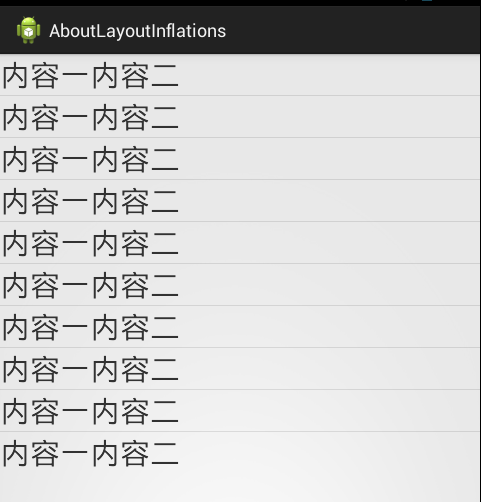
貌似我们并没有看到我们想要的效果.每个内容项并没有30dip的效果.那么问题出在哪里呢?请看CustomAdapter中的代码的以下片段
    @Override

    public View getView(int position, View convertView, ViewGroup parent) {

        if(convertView == null) {

            convertView = inflater.inflate(R.layout.list_item, null);

        }

        return convertView;

    }
在这里inflate(R.layout.list_item, null);我们并没有指定根布局,那么出现的状况如上图.让我们用工具(hierarchyviewer.bat)看看
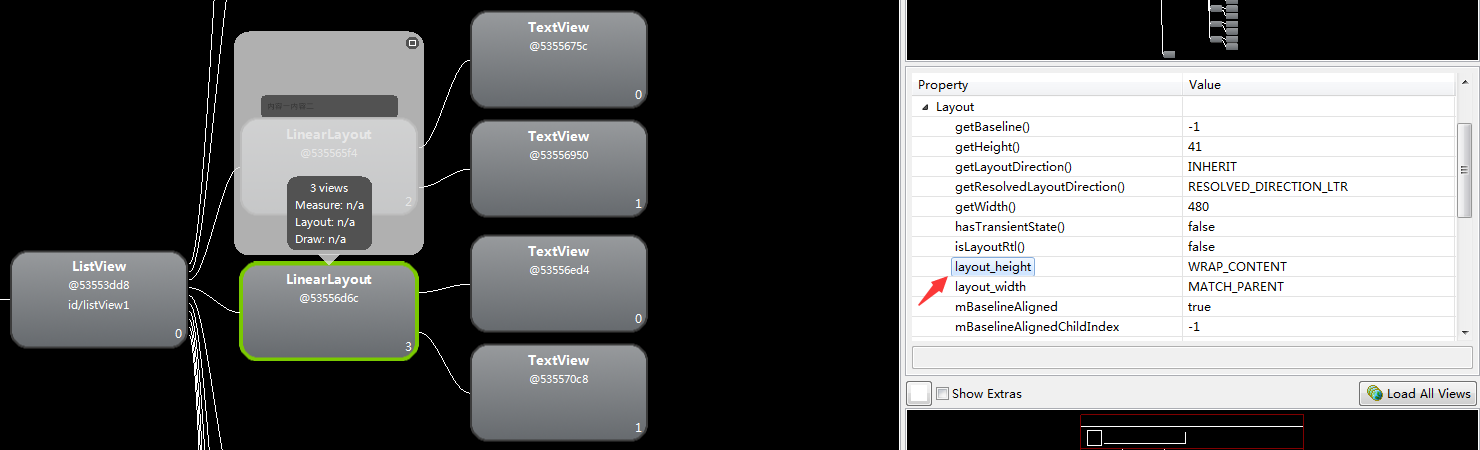
惊奇的发现了.我们原来的XML布局文件中指定的layout_height竟然变成了wrap_content了,那么接下来我们先看看另外一种情况
  @Override

    public View getView(int position, View convertView, ViewGroup parent) {

        if(convertView == null) {

            convertView = inflater.inflate(R.layout.list_item, parent, false);    //修改了这里

        }

        return convertView;

    }
先看看效果图.
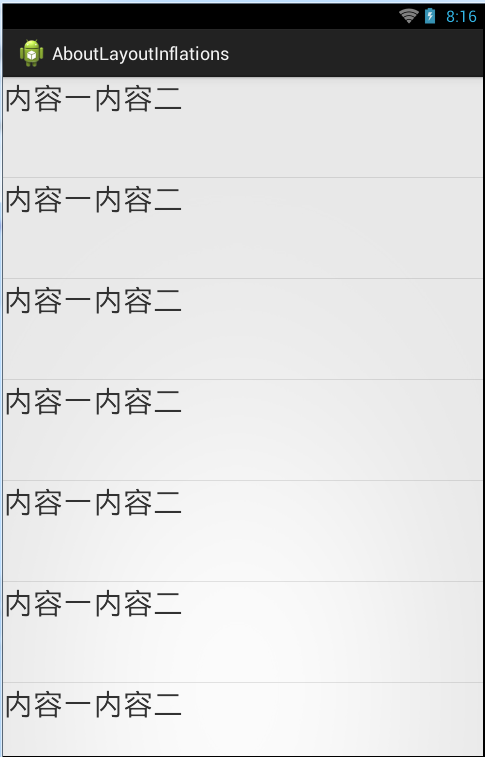
奇怪的是我们想要的效果发生了100dip的高度.那么我们通过工具再看看
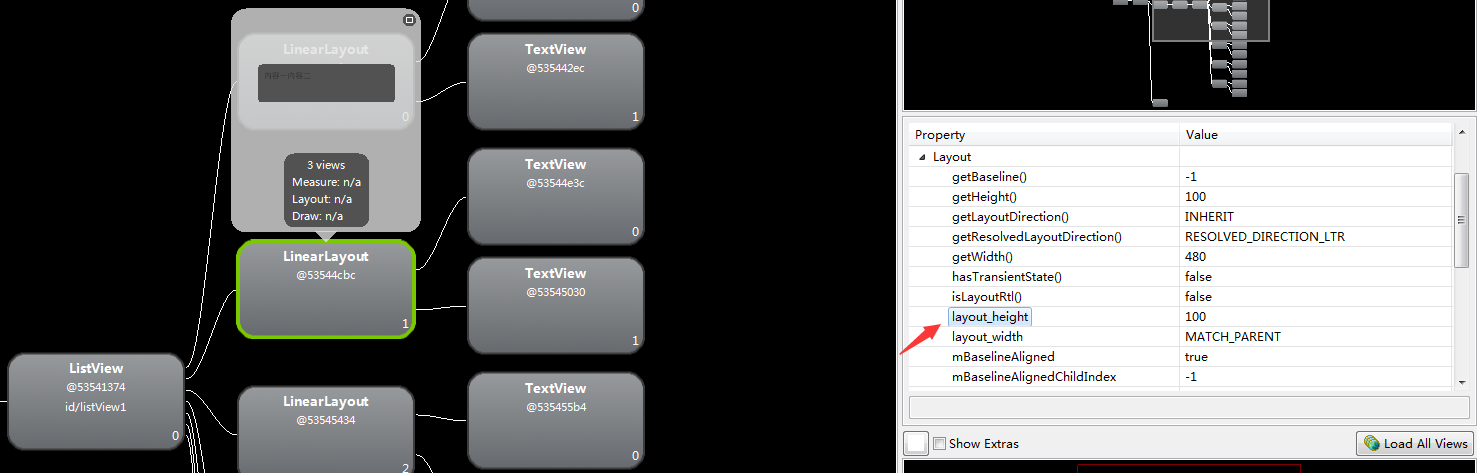
显而易见我们的布局参数没有丢失了.那么原因到底是什么呢?为什么会出现布局参数丢失呢?其实问题就是出现在inflate()方法的参数上
我们来看看源码,inflate()一共有四个重载方法,以下按照依次调用顺序
- inflate(int resource, ViewGroup root); >> inflate(int resource, ViewGroup root, boolean attachToRoot) ; >> inflate(XmlPullParser parser, ViewGroup root, boolean attachToRoot);
- inflate(XmlPullParser parser, ViewGroup root) >> inflate(XmlPullParser parser, ViewGroup root, boolean attachToRoot);
那么我们直接看最后调用的方法
  public View inflate(XmlPullParser parser, ViewGroup root, boolean attachToRoot) {

        synchronized (mConstructorArgs) {

            final AttributeSet attrs = Xml.asAttributeSet(parser);

            Context lastContext = (Context)mConstructorArgs[0];

            mConstructorArgs[0] = mContext;

            View result = root;

            try {

                // Look for the root node.

                int type;

                while ((type = parser.next()) != XmlPullParser.START_TAG &&

                        type != XmlPullParser.END_DOCUMENT) {

                    // Empty

                }

                if (type != XmlPullParser.START_TAG) {

                    throw new InflateException(parser.getPositionDescription()

                            + ": No start tag found!");

                }

                final String name = parser.getName();

                if (DEBUG) {

                    System.out.println("**************************");

                    System.out.println("Creating root view: "

                            + name);

                    System.out.println("**************************");

                }

                if (TAG_MERGE.equals(name)) {

                    if (root == null || !attachToRoot) {

                        throw new InflateException("<merge /> can be used only with a valid "

                                + "ViewGroup root and attachToRoot=true");

                    }

                    rInflate(parser, root, attrs, false);

                } else {

                    // Temp is the root view that was found in the xml

                    View temp;

                    if (TAG_1995.equals(name)) {

                        temp = new BlinkLayout(mContext, attrs);

                    } else {

                        temp = createViewFromTag(root, name, attrs);

                    }

                    ViewGroup.LayoutParams params = null;

                    if (root != null) {

                        if (DEBUG) {

                            System.out.println("Creating params from root: " +

                                    root);

                        }

                        // Create layout params that match root, if supplied

                        params = root.generateLayoutParams(attrs);

                        if (!attachToRoot) {

                            // Set the layout params for temp if we are not

                            // attaching. (If we are, we use addView, below)

                            temp.setLayoutParams(params);

                        }

                    }

                    if (DEBUG) {

                        System.out.println("-----> start inflating children");

                    }

                    // Inflate all children under temp

                    rInflate(parser, temp, attrs, true);

                    if (DEBUG) {

                        System.out.println("-----> done inflating children");

                    }

                    // We are supposed to attach all the views we found (int temp)

                    // to root. Do that now.

                    if (root != null && attachToRoot) {

                        root.addView(temp, params);

                    }

                    // Decide whether to return the root that was passed in or the

                    // top view found in xml.

                    if (root == null || !attachToRoot) {

                        result = temp;

                    }

                }

            } catch (XmlPullParserException e) {

                InflateException ex = new InflateException(e.getMessage());

                ex.initCause(e);

                throw ex;

            } catch (IOException e) {

                InflateException ex = new InflateException(

                        parser.getPositionDescription()

                        + ": " + e.getMessage());

                ex.initCause(e);

                throw ex;

            } finally {

                // Don't retain static reference on context.

                mConstructorArgs[0] = lastContext;

                mConstructorArgs[1] = null;

            }

            return result;

        }

    }
代码显然有点长.我们挑重点看.
if (root != null) {

    if (DEBUG) {

        System.out.println("Creating params from root: " +

                root);

    }

    // Create layout params that match root, if supplied

    params = root.generateLayoutParams(attrs);

    if (!attachToRoot) {

        // Set the layout params for temp if we are not

        // attaching. (If we are, we use addView, below)

        temp.setLayoutParams(params);

    }

}
我们可以看到只要root不为空且attachToRoot取反为true.那么temp就设置布局参数,temp一个临时变量View,继续走
if (root != null && attachToRoot) {

    root.addView(temp, params);

}
当root != null && attachToRoot往所在的父布局添加一个带参数的temp(View).最后
return result 而 result = root;
同理使用两个参数的便能知道并没有添加布局参数上到根布局.从而导致了默认的使用了WRAP_CONTENT.而不是我们指定的布局参数值
到此LayoutInfalte的使用告一段落.有错误的希望大家提出.菜鸟一枚第一次写博客.难免出现各种错误.大家见谅见谅!
Android下LayoutInflater的使用的更多相关文章
- Android下拉刷新效果实现
本文主要包括以下内容 自定义实现pulltorefreshView 使用google官方SwipeRefreshLayout 下拉刷新大致原理 判断当前是否在最上面而且是向下滑的,如果是的话,则加载数 ...
- Android高手进阶教程(五)之----Android 中LayoutInflater的使用!
原创作品,允许转载,转载时请务必以超链接形式标明文章 原始出处 .作者信息和本声明.否则将追究法律责任.http://weizhulin.blog.51cto.com/1556324/311450 大 ...
- Android 下拉刷新上拉载入效果功能
应用场景: 在App开发中,对于信息的获取与演示.不可能所有将其获取与演示,为了在用户使用中,给予用户以友好.方便的用户体验,以滑动.下拉的效果动态载入数据的要求就会出现. 为此.该效果功能就须要应用 ...
- 【原创】窥视懒人的秘密---android下拉刷新开启手势的新纪元
小飒的成长史原创作品:窥视懒人的秘密---android下拉刷新开启手势的新纪元转载请注明出处 **************************************************** ...
- Android 下拉刷新上啦加载SmartRefreshLayout + RecyclerView
在弄android刷新的时候,可算是耗费了一番功夫,最后发觉有现成的控件,并且非常好用,这里记录一下. 原文是 https://blog.csdn.net/huangxin112/article/de ...
- 有关ViewPager的使用及解决Android下ViewPager和PagerAdapter中调用notifyDataSetChanged失效的问题
ViewPager是android-support-v4.jar包中的一个系统控件,继承自ViewGroup,专门用以实现左右滑动切换View的效果,使用时需要首先在Project->prope ...
- Android下/data/data/<package_name>/files读写权限
今天将更新模块拿到android上面测试的时候,发现在创建writablepath.."upd/"目录的时候出现Permission Denied提示BTW:我使用的是lfs来创建 ...
- Android下Cocos2d创建HelloWorld工程
最近在搭建Cocos2d的环境,结果各种问题,两人弄了一天才能搞好一个环境-! -_-!! 避免大家也可能会遇到我这种情况,所以写一个随笔,让大家也了解下如何搭建吧- 1.环境安装准备 下载 tadp ...
- Android下读取logcat的信息
有时我们需要在程序执行进程中遇到一些异常,需要收集一logcat的信息,android下就可以使用以下方法获取: private static String getLogcatInfo(){ Stri ...
随机推荐
- OpenCV安装与配置
本文使用OpenCV2.48在win10平台下操作. 一,关于OpenCV OpenCV是开源C++计算机可视化处理库,它集成了很多计算机图形图像处理的功能.还有机器学习,字符识别,人脸识别,物体检测 ...
- ie11的DOM管理器报错
IE11 Windows7下F12 DOC资源管理器不能用Exception in window.onload: Error: An error has ocurredJSPlugin.3005--- ...
- Java中List循环遍历的时候删除当前对象(自己)
方法一 Java代码 ArrayList<String> list = new ArrayList<String>(); list.add(" ...
- maven: 基本使用
1.项目管理工具:Maven的repository,说白了就是dependency的仓库,它按照一定的规则将dependency存放起来,以作缓存,如果本机的 repository找不到某个depen ...
- weiphp踩坑记录
记录使用weiphp过程中遇到的问题及解决办法: 1.按照网上的教程创建插件怎么没有效果?replyText没有回复信息? 后台清除缓存即可!
- HDU 1233 还是畅通工程(最小生成树)
传送门 还是畅通工程 Time Limit: 4000/2000 MS (Java/Others) Memory Limit: 65536/32768 K (Java/Others)Total ...
- PHP编码规范PSR-1
.note-content { font-family: "Helvetica Neue", Arial, "Hiragino Sans GB", STHeit ...
- mysql 查询制定日期数据
//获取昨天更新数据的条件date_sub(current_date(), interval 1 day) = from_unixtime(senddate, '%Y-%m-%d') 注释:date_ ...
- BZOJ4539: [Hnoi2016]树
复制的树缩点,主席树查k小,毫无技术含量,纯码农题. #include<bits/stdc++.h> #define u first #define v second #define F ...
- APEX初步
APEX是SFDC中用于开发的语言.语法上类似JAVA等面向对象的语言,运行起来类似数据库中的存储过程.可以在SFDC事件中添加业务逻辑,操作相关数据和用在Visual Force页面中. 保存,编译 ...